
 Anamaria
 Hello @ebuka,
Make sure that all theme requirements are set as in our guide -> https://forum.tagdiv.com/requirements-for-newspaper/ in special please make sure this code is set in .htaccess => https://www.screencast.com/t/D3i2ZA7K
Also, if you are using Cloudflare, please make sure that is set as in our guide https://forum.tagdiv.com/cloudflare-cdn/ , you need to disable the Rocket Loader.
Also, if the problem persists please check if you do not have a plugin conflict, please deactivate ALL plugins except tagDiv plugins, also if you are using a child theme or cache plugin, deactivate them, clear all cache and try again.
Let me know the results!
Thank you!
 Bettina
 Hello!
Please make sure you installed the Cloudflare correctly like in our documentation from here: https://forum.tagdiv.com/cloudflare-cdn/
Thank you!
 Anonymous
 Hi, Vlad!
Not trying to be rude or anything, but you do recognize that this CDN is not mine, but from Google, right?
Something (I don’t know if from AMP plugin, or from Mobile Theme) is calling more than once this javascripts…
 Vlad S
 Hello !
You will have to remove your cache after disabling the CDN because as you can see here: https://www.screencast.com/t/qxFLTjl2WlK the elements are still coming from CDN.
Let us know the result !
Thank you !
 ryuugames
there are 2 differences between login or not
when login the background and featured image is shown up
https://cdn.discordapp.com/attachments/751835816225144953/816855022418919424/unknown.png
and when logout / visit the website as a guest the featured image / bg not shown
https://cdn.discordapp.com/attachments/751835816225144953/816855106376826960/unknown.png
Anonymous Hi again, Vlad!
Deactivating the CDN did not resolve the issues, as you can see here:
https://paste.pics/BRGWC
https://paste.pics/BRGWN
Any other idea on what to do?
Thanks!
Anonymous Vlad S Hello !
Since you are using the Mobile theme this issue should not be available. Again, this looks like it is going through your CDN. Can you exclude mobile theme from CDN ? Mobile theme was designed to use as few resources as possible just to make sure that it will offer the fastest user experience.
Thank you !
Vlad S Hello !
From our investigations it looks like your CDN has not been set up properly. As you can see all the issues that you are facing at the moment are CDN related. Please make sure that your CDN is set up properly.
Let us know the result !
Thank you!
 Victor
 And with this one, don’t you need to add the amp script async custom-element=”amp-ad” src=”https://cdn.ampproject.org/v0/amp-ad-0.1.js”this script and then the code in amp ads option? Or just the code in the ads from the mobile plugin?
Bettina Hi @alpeshupadhyay!
Please check our tutorial from here: https://forum.tagdiv.com/cloudflare-cdn/
Hope that helps you!
Thanks!
 alpeshupadhyay
 How to fix cdn ?
 Ali147
 Need to use wp super cash and cdn. In addition, the pictures you use should be in the appropriate size. I cover photos up to 80 85 kb and my other pictures vary between 30 and 50 kb. I have an opening speed of 3.2 seconds.
 Chris-123
I’m having a problem with the sticky header malfunctioning on mobile vertical-view on a mobile site.
Initially it was working fine. I have the sticky header below a hero image (Lifestyle Pro header template).
Then, I made a change to the horizontal view and when I went back to the vertical view, the sticky header was broken. Instead of remaining at the top, when scrolling it would disappear right when it hit the top of the screen, also, at the moment that it vanishes, the elements just below the sticky header flicker & flash.
If I turn off the sticky, everything is fine, except I want the header sticky!
I turned off all other plugins and turned off the Godaddy CDN (no firewall) trying to resolve it, but none of that made any difference.
I then figured maybe there was a glitch with the header itself, so I created a whole new header from scratch (again starting from the Lifestyle Pro mobile template). It was again fine on mobile vertical view after my changes. Then I went and made my changes to mobile horizontal view and, when I finished those, I went back to vertical view and the sticky header malfunction had returned!
I do have the sticky position set to “top” and it’s the row that I’m setting as sticky. I’ve tried it on multiple devices, using both safari and chrome and it does the same thing everywhere — but the problem is only on mobile-vertical view (desktop, etc is fine). I tried changing the z-index for the row to 90 thinking maybe it was in the background, but that didn’t make any difference.
Pls Help!
 celhil
Hi Calin,
on our site we are using NewsMag a couple of years. The problem is, that our score on PageSpeed Insights for mobile is terrible. Now I’m testing the mobile theme in a staging area and the options for the mobile theme are very limited. For example there is no possibility to disable the mobile theme on the startpage, or create an own theme for mobile.
In considering that google will publish the new ranking factors in may 2021, I think it would be recommendable to put more energy into the mobile version. And this is only possible with the Newspaper Theme, right?
If it is so, then I think I must change the Theme from Newsmag to Newspaper.
Can you tell me, how I should proceed to change the theme from Newsmag to Newspaper?
It is possible to migrate everything (Layout/Pages/Settings) from Newsmag to Newspaper?
We are using Cloudflare as CDN and it is absolutely necessary, that we are using the Cloudflare APO before May. Does the Newspaper theme supports the Cloudflare APO for desktop and mobile theme?
Thank you in advanced
Andre
Anamaria Hello,
If you send an email, our team will take a look and will answer you as soon as possible and please let’s continue this thread via email.
Also, if you using the Cloudflare make sure the Rocket Loader is disabled => https://forum.tagdiv.com/cloudflare-cdn/
Thank you!
Anamaria Hello,
This can be hidden only with custom code CSS => https://www.screencast.com/t/yymcDNWV6uC
.td-form-url{

display: none;

}
The code needs to be set in Theme panel -> Custom code -> Custom CSS => https://www.screencast.com/t/fxetQe24ZHf
Hope this helps you!
Thank you!
Anonymous Hi, Vlad!
I took the same piece out of my code (https://paste.pics/BIFMG), but got no results:
– The console warning is triggered (as seen in this screenshot: https://paste.pics/BIFKO)
– and the element is still being loaded in the front-end of the site: https://paste.pics/BIFLN
As always, after editing the code, I flushed all caches: cdn, server, plugins, browser…
Is there any other code/place to edit out?
Anamaria Hello,
Normally, the role should not affect the way it works.
Usually, that problem when you use Rocket Loader from CDN and sometimes when this requirement is not set like this -> https://www.screencast.com/t/uFfzyflRd . Those are the most cases where the problem appears.
Thank you!
 Simion C.
 Hi,
The homepage is excluded from the mobile theme from what I can see, while the rest of the website uses it. I failed to see that it seems.
I also now notice that you used different sizes for the mobile logo on the responsive version and for the logo on the mobile theme
– https://soyunperro.com/wp-content/uploads/2021/01/Logo-SUP-New2.png.webp
– https://soyunperro.com/wp-content/uploads/2021/01/a1a2.png.webp
So this code solution will enlarge the logo to its original size when entered as I mentioned, just for the homepage.
I can make it larger for the mobile theme as well, for a better quality but the original size is too large.
Maybe setting the same logo as the responsive version uses, for the mobile theme as well, would be better if possible. Then it will look consistently and better across the website https://prnt.sc/y48zw5 after the enlargement.
If you switch then logo as I mentioned, enter that previous code where I mentioned, and this one in the mobile theme custom CSS – https://pastebin.com/BUnCDNyP
Normally the logos look better if originally they are of this size https://prnt.sc/y496qi but that is not actually required.
Let me know.
Thank you!
 Calin
Calin Hi,
You can download the Newspaper v10.2 from here -> http://cdn.tagdiv.com/wp-content/uploads/2019/11/Newspaper.zip
Hope this will help you!
Anamaria Hello,
This effect come from Cloudflare. Please make sure that is set as in our guide https://forum.tagdiv.com/cloudflare-cdn/ , and you need to disable the Rocket Loader.
Let me know the results!
Thank you!
 abbozdag
Hello friends,
I made a contact page for my site. Using the tagDiv Composer. But this page looks fine in desktop mode. On mobile, the page does not appear at all or gives the error in the picture. I created a separate page for mobile. It turns out the same again. The theme I use is Newspaper.
I would be glad if you help.
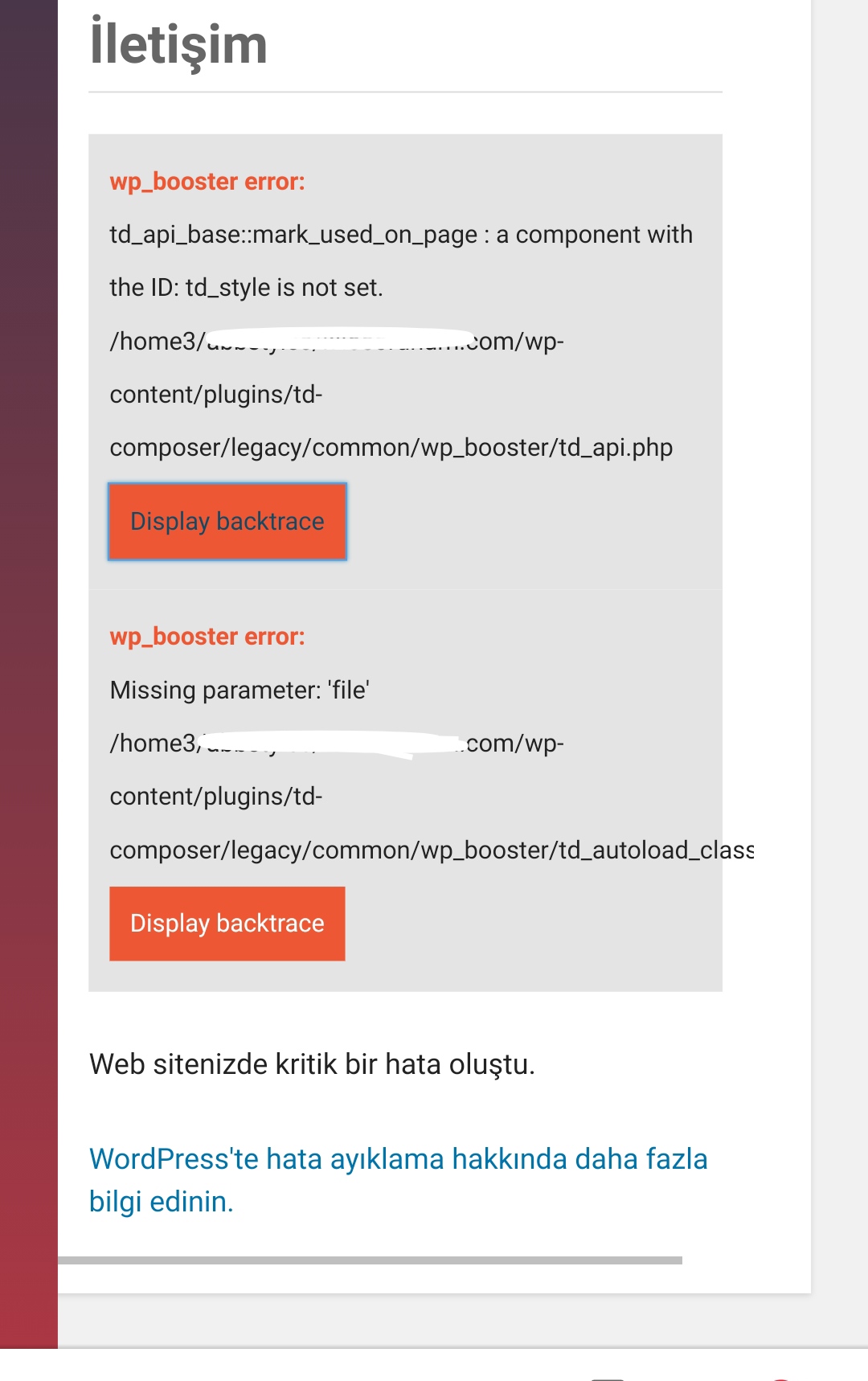
Anamaria Hi,
This problem can appear when is a plugin conflict. Please make sure that you do not have a plugin conflict, please deactivate ALL plugins except tagDiv plugins (theme plugins), also if you are using child theme or cache plugin, deactivate them, clear all cache and try again.
Also, if you are using Cloudflare, please make sure that is set as in our guide https://forum.tagdiv.com/cloudflare-cdn/ , you need to disable the Rocket Loader.
Let me know the results!
Thank you!
 gc_envato
 Hello,
I need to add on the amp template some code to manage infinite loop. Where can I add this:
script async custom-element=”amp-next-page” src=”https://cdn.ampproject.org/v0/amp-next-page-1.0.js”




