
 Anamaria Anamaria
 Hello,
Please follow the steps from this topic https://forum.tagdiv.com/topic/error-at-zones-6models-1dom-the-model-does-not-match-the-content-currene/ if you have a child theme; please use the main theme.
If there is still a problem, you can send us an email at contact@tagdiv.com and provide wp-admin and cPanel login. We will take a look at the problem and we’ll fix it. Include a link to this topic in the email.
Thank you!
Anamaria Hello,
Please let me know what PHP version you have, also, if you use a child theme.
Also, please check this file permission. Our theme to work properly need to have files and folders permissions set as WordPress permissions -> https://wordpress.org/support/article/changing-file-permissions/ -> https://wordpress.org/support/topic/warning-ftp_fget-expects-parameter-1-to-be-resource-null-given-in/
Thank you!
 Calin
Calin Hi,
The Newsmag theme is not so complex, the menu, header and footer template can be removed from the theme panel, or on specific pages using hooks in the child theme. Also, the Newsmag theme has only a boxed version.
The pages can be built using the tagDiv Composer, also theer are some page template – https://forum.tagdiv.com/newsmag-page-templates/
For post templates can use the theme panel templates and you can also assign them as an individual on each post – https://forum.tagdiv.com/newsmag-post-templates/
Thank you!
Anamaria Hello,
Please follow the steps from this topic https://forum.tagdiv.com/topic/error-at-zones-6models-1dom-the-model-does-not-match-the-content-currene/ if you have a child theme; please use the main theme.
If there is still a problem, you can send us an email at contact@tagdiv.com and provide wp-admin and cPanel login. We will take a look at the problem and we’ll fix it. Include a link to this topic in the email.
Thank you!
 signorini
 Thanks Simchris!
The PHP version is 7.4, and I don’t use child themes.
The error is an uptime error. My hosting team is saying that it is generating too many php jobs overloading the whole process.
Is a strange thing that something that was working smoothly some days ago now is a mess. I love the Newsmag theme, I don’t want to delete it!
 simchris
 Support will likely ask you what version of Newsmag you’re using, version of PHP (7.4, 8, 8.1), if using child theme, and what error you’re actually getting when trying to ‘activate’ td-composer plugin.
(I don’t work here; just in middle of updating from 3x to 5x over here for php 8.1 compatiblity)
 Bettina
 Hello!
The child theme is not overwritten by the update. An issue for that could be the compatibility of your child theme with the new version of our theme(if you use some files which were updated). If you’ll have some custom modifications directly in the theme files, then better save the code and replace it after the update.
Please note that the customization(code) will require custom work which is not covered by the support team.
Thank you so much for understanding!
 NDDdude
 Hi, we’re running Newspaper on nbnnews.com.au.
and we’re using Newspaper v9.5.
We’re trying to upgrade to the latest version, but we’ve hit a major stumbling block.
Here’s the problem, when we have a video and enter its file name in a custom the video player appears.
We use custom fields to populate required fields to display a video player and poster frame.
1) Enter a file name
2) Enter a image name
SO basically our journalist enters a video file name and image file name and the video appears.
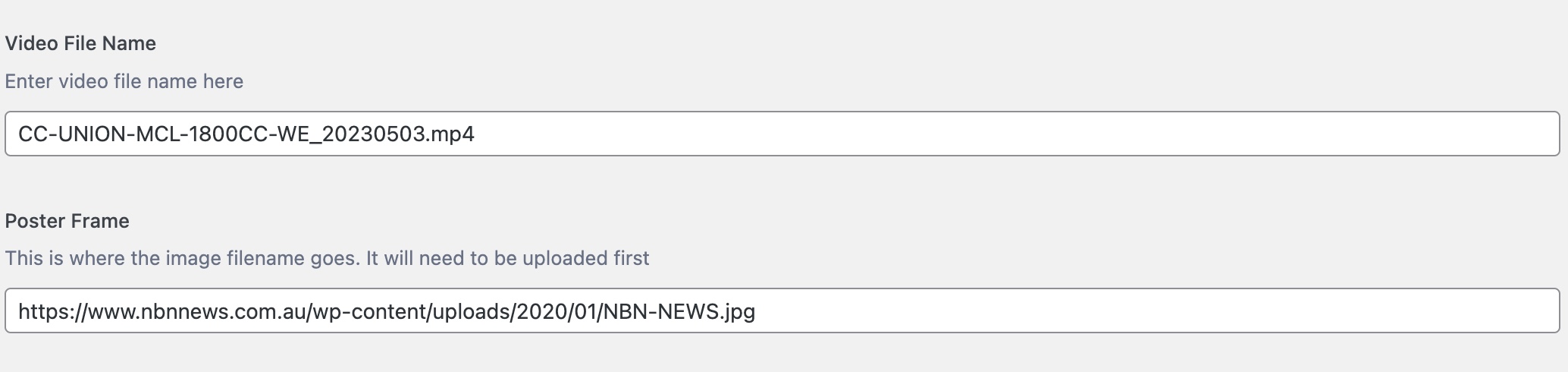
Please see here for reference:-
https://www.nbnnews.com.au/2023/05/03/father-and-son-avoid-jailtime-after-defrauding-mining-company/
Using an if/else php call, we either display a video player or not by using CSS classes.
Once the video file name is entered the “else” bit kicks in and shows the video player.
We’re using the loop-single.php file and sitting the code block just under the
And on version 9.50 this works.
On v12 I can’t get this to work in a child theme or hacking the main theme.
I can’t insert any code (php, html) anywhere and have it render.
I’m not a programmer, but through looking at tutorials and trial and error I got it to work.
And it’s been ok for years.
This has become critical to fix because using v9.5 and updating to php8, it’s throwing up a cross-scripting error.
Here’s the code:-
Any help would be greatly appreciated. I love this theme, but I might have to try other theme to make this work. And I really don’t want to do that.
NDDdudeHi, I can’t seem to post my problem. I get an error when I pose my question.
Anamaria Hello,
Please follow the steps from this topic https://forum.tagdiv.com/topic/error-at-zones-6models-1dom-the-model-does-not-match-the-content-currene/ if you have a child theme; please use the main theme.
If there is still a problem, you can send us an email at contact@tagdiv.com and provide wp-admin and cPanel login. We will take a look at the problem and we’ll fix it. Include a link to this topic in the email.
Thank you!
 Rogerio
Hi,
suddently my website was broked, showing simply a code page. The theme plugins were no longer installed, no theme settings, all was missing. I’ve reisntalled the theme plugins and imported the last theme settings and now it’s back.
Do you have any clue on what might have caused this?
Is this due to the last theme update?
If so, do you have any clue on how to avvoid this, once there is no childtheme?
Now, I’m really worried if this happens when the website becomes public.
https://arktekscience.com
Thanks.
Rogerio
 Sociality
Our website dies immediately when we activate the theme. I download again from themeforest. I downgraded to the previous WP. I closed all plugin (except the ones the theme required). I deactivate the child theme. Nothing.
The moment the theme is activated all the front-end dies with no error log. It kills the php-fcgi-starter and the php as a whole. With all other themes the site works fine.
We need to find a solution as soon as possible.
Thanks
Anamaria Hello,
1. Please follow the steps from this topic https://forum.tagdiv.com/topic/error-at-zones-6models-1dom-the-model-does-not-match-the-content-currene/ if you have a child theme; please use the main theme.
If you added that code, then please try to use a version of the template.
2. You can enable the history of settings from Manager-> Settings -> https://i.imgur.com/PB0rRtK.png
Thank you!
Anamaria Hi,
The problem is not from our theme, is from a plugin, so please disable all extra plugins.
If you have a child theme, you use the main theme.
Thank you!
Anamaria Hi,
If you mean the element from the opt-in builder, then it is here: wp-content\plugins\td-subscription\includes\shortcodes\tds_menu_login.php you can do the changes in this path.
Also, if you want to edit the code depending on the type of header you use, you must edit a certain file.
-> wp-content/plugins/td-composer/legacy/Newspaper/parts/header/td-login-modal.php
-> wp-content/plugins/td-cloud-library/parts/tdb-login-modal.php
Please note that any change you make in the theme files after update will be overwritten and you have to make the changes again. Better save the code somewhere and then apply it again after every update. Or you can set them in child-theme, please take a look in the documentation: https://forum.tagdiv.com/the-child-theme-support-tutorial/
Thank you!
Calin Hi,
This can be done, but you need to edit those breakpoint values in the theme files, and this complicates the situation, the problem is that several files need to be edited and not all of them can be set in the child theme, and in case of an update the changes will be lost.
Thank you!
Calin Hello,
This can only be done by editing the css file in the theme and adding these font families (it should work ok in the child theme as well), or the classic option of adding these fonts manually in custom fonts – https://i.imgur.com/c0eZl8i.png
Thank you!
 namnamir
 Probably you didn’t even read my question carefully as you sent something completely irrelevant.
It seems that this theme is developed by a child with no clue about the basic software design mentality.
 info@itmarketing.ee
 For now, title works with this custom code.
But it would be good to change it in the child theme?
 jahangir khan
 Hello Dear i have created the child theme and also put the code but when i open website on desktop it is still the desktop version, Can you please check and confirm.
https://ibb.co/1f8cCLB
 falcon11
Hi so my tech guy has advised me to ask if the td-multipurpose.ttf file in the following path:
This font has mutliple language fonts etc and is a very large file of 127kb.
I have a theme for desktop and a mobile theme. There’s a child theme used. How do I optimise this font feature? We only use English in our website. Thanks a lot!
 Anshuminesh19
Hi,
I am using a newspaper theme for my website. Also using a Travel Memories child theme. I have connected my personal Instagram account to show the latest posts but its theme is showing one post.
Anamaria Hello,
Please let me know what prebuilt website you have installed.
Also, for error zone please check this topic https://forum.tagdiv.com/topic/error-at-zones-6models-1dom-the-model-does-not-match-the-content-currene/ if you have a child theme; please use the main theme.
Also, those are auto ads?
Thank you!
 dc1
dc1Hi,
Our client is experiencing blurry (not sharp) images on the homepage in a grid. We’ve deactivated all but TagDiv’s plugins, and switched from the child theme to the parent theme, but the issue remains: https://env-qxmagazine-stg.kinsta.cloud/. Note the “Some wellbeing tips for Christmas” thumbnail as an example. The featured image within the post doesn’t have this issue.
How can we resolve this please? We see the image is not bigger than its container so on 4K screens that will not look crisp. Thanks in advance.
Screenshot: https://www.awesomescreenshot.com/image/38956818?key=e89b138645cf66f2f9dc1c7156ddb208


