
- NewsmagRequirements for Newsmag
 Calin
Calin Hi,
Yes, now this is possible, since Newspaper v9.5 our theme have a new option, header builder -> https://www.screencast.com/t/1jwi2J4d -> https://tagdiv.com/whats-new-in-newspaper-theme-9-5-update/
Get a beautiful Overlay Header with Newspaper Theme ->https://tagdiv.com/overlay-header-newspaper-theme/
In order to use the header manager you need to have tagDiv Composer and tagDiv Cloud Library activate.
Thank you!
 Simion C.
 Hi,
Currently in theme version 9.6.1 these would be all the post cloud library templates available (57)
– https://cloud.tagdiv.com/#/load/Single
If you are using the latest theme version you should see them all there. In case you are using the latest theme, we could take a look. Send us an email at contact@tagdiv.com and provide admin login. Include a link to this topic in the email. Let us know.
Thanks
 Catalin
 Hi,
If you want to achieve that section you can easily import it from your Cloud Template Library from here -> https://cloud.tagdiv.com/#/single/page/Blocks/746
Thank you!
Catalin Hi,
If you want to read more details about Custom Post Type, please check here -> https://forum.tagdiv.com/custom-post-type-support/ Also, please notice that the CPT cannot be used with Cloud Library Template, sorry!
Thank you!
 thebassics
Hi!
I have the tagdiv composer and cloud library plugins activated.
I installed the journal demo without content and it worked fine, but when I uninstall it nothing happens, then if I try to install any other demo with content the look of my site does not change, but I can see that all the posts are loaded in my WP back office.
My site is http://www.angiezambrano.com
Thanks!
Calin Hi,
Please not that our demos are build with tagDiv Composer, also some of them like Fast news, iGossip, Gaming need tagDiv Cloud Library , in order to make them to work ( to import them ) you’ll need to have tagDiv Composer activate, also if the demo use cloud templates you need to have tagDiv Cloud library activate too;
-> https://www.screencast.com/t/JSzxWfjT
Installing Demos -> https://tagdiv.com/newspaper-theme-installing-demos/
Thank you for your understanding!
Calin Hi,
In order to change the sidebar for category in Journal demo you need to go in Cloud Template and click on Category Cloud Journal to edit with tagDiv Composer -> https://www.screencast.com/t/XTQNruVI40 -> https://www.screencast.com/t/h0JwZNxYvLXJ also you can set individual templates on each category -> https://www.screencast.com/t/LkmmRvus if you want to have the same template only the sidebar change you can duplicate the template and change in one of theme the sidebar
Please check those tutorials
Block settings tutorial -> https://forum.tagdiv.com/block-settings-tutorial/
What is the Cloud Library and How You Should Use It? -> https://tagdiv.com/what-is-the-cloud-library/
Category Templates: ‘How to’ Tips and Useful Best Practice Examples -> https://tagdiv.com/find-whats-new-category-templates/
How to Import and Edit a Cloud Library Page -> https://tagdiv.com/cloud-library-page-templates-newspaper-theme/
Thank you!
 mjm
mjmHi,
Some of the single post templates from cloud library are not available for importing though I can live preview the same. Not able to use all templates available on the cloud. What can be the reason for same and what can be done so that they are available for importing?
 StefvE
 Hey,
I sorry but I can’t find the explanation of Custom Post Types with the Cloud Library..?
 gains22
Hi – I’m using the “Journal” demo / template to build my site. I watched the youtube video ( https://www.youtube.com/watch?v=masdB3l5qvc ) about how to create smart sidebars for any category / page, but it’s not working for me. The problem seems to be that when i go to “theme panel – categories” the “cloud library template”and every category has “inherit from global settings” selected, so i can’t see the category options shown in the video.
the only way to see those option of “customer sidebar + position” is to select, “theme templates” instead of “inherit from Global Settings.” However, when i do that, the entire rest of the page template and settings are lost.
How can i change the sidebar for a category (while using the “Journal” demo) without losing the design of the rest of the category page?
Simion C. Hi,
The buttons will not appear on mobile, they are not supposed to. The mobile header and menu are different from the desktop version.
You could design the header with the header builder, then you will be able to add the elements you want in the desktop and mobile header
– https://forum.tagdiv.com/tagdiv-cloud-library-plugin/
– https://tagdiv.com/whats-new-in-newspaper-theme-9-5-update/
– https://tagdiv.com/newspaper-theme-customize-the-header-manager/
So you could add buttons in the mobile menu – http://prntscr.com/n5wyyc
Maybe you could consider this a solution. Let me know if you have more questions.
Thanks
Catalin Hi,
Unfortunately, the CPT can’t be edited with TD Composer, sorry! By the way, using the TD Composer, please notice that you can create your own wanted post type using the Cloud Library template. Please check the following useful guide from here -> https://forum.tagdiv.com/tagdiv-cloud-library-plugin/
Thank you!
Calin Hi,
In order to set latest post on homepage you can set the page templates to Page Builder + Latest Articles + Pagination -> https://forum.tagdiv.com/page-templates-2/ or you can use tagDiv Composer with tagDiv Cloud Library and set a post loop in page -> https://www.screencast.com/t/azCGYslFi
Thumbnails – Fix strange looking images on blocks -> https://forum.tagdiv.com/thumbnails-fix-strange-looking-images-on-blocks/
Let me know if you have more questions!
Thank you!
Simion C. Hi,
Most pages and homepages, category templates, post templates etc from demos are available in the cloud library, so you can import and use the ones you want
– https://cloud.tagdiv.com/#/load/All – http://prntscr.com/n5wrfs
– https://forum.tagdiv.com/tagdiv-cloud-library-plugin/
We will try to add more in future updates. If you have more questions let me know.
Thanks
Simion C. Hi,
So you have imported the homepage of the demo with the cloud library, or install the demo? You can edit the respective homepage regardless, with the tagDiv composer. Modify the elements you want as needed, then save it
– https://tagdiv.com/tagdiv-composer-page-builder-basics/
– https://forum.tagdiv.com/block-settings-guide/
Depends on what this design is, what exactly you mean by importing design in the page. Some more details about this would be helpful.
It is true that uninstalling a demo or installing a new one will remove what has been imported by it. A full demo install with content imports demo posts, categories, menus, logo, images, theme panel settings, and in some cases a stylesheet. These will all be removed/reset when uninstalling or installing a new one. Your own created posts, menus, etc will not be affected, just the demo content.
Please let me know if you have more questions.
Thanks
Calin Hi,
Some share buttons like Whatssap are hide on desktop and show only on mobile.
In order to achieve all share buttons in post you can use some single post templates from tagDiv Cloud Library for example single post template 29 -> https://www.screencast.com/t/2nEWawCqLM will show all share buttons in one line ( all share buttons that are for desktop ).
Thank you for your understanding!
 Hugo Chan
 Hello Simion C,
Thank you so much for sending the introductions of the importing the demo. But I met some problems when I imported it.
Actually, I have opened the link of https://forum.tagdiv.com/tagdiv-cloud-library-plugin/. and imported it. However, I found that I am not very satisfied with some contents of the template. For example, I am not very content with some characters of some templates. But I only want to change one part of it and store the remaining part. So are there any ways that I can change one part of the content that I don’t like into something I design by myself? If yes, please send me the introduction. Looking forward to your earliest reply.
By the way, I plan to hire a designer to design my Blog. But I don’t want to limit her imagination because there are a lot of pre-designs on the template, so I am going to ask her to design it on another application such as Photoshop. Therefore, what I want to know is whether she has to design it on this template. If not, are there any ways to help her to import her design into the template? In addition, I think the demo of Newspaper Theme will be upgraded in the future. According to what I know, if one application is upgraded, the CSS or Code might be changed. Consequently, I am worrying that if I upgrade the demo in the future, the fixed contents and designs of my Blog might be changed. Please tell me if there is a way to avoid that problem.
Regards
Hugo
 jamiesharpe
 Sure – so a couple examples from the Pre-designed Templates – tagDiv Cloud Library: Block66 – Home Decor, Block11 – Full1 or Block11 – Full2. In each of these examples, the box containing meta info is overplayed on top of the lower part of the image. That’s what I’m looking to achieve – if that’s not clear I can sign up for screencast and send links?
 amandajholden@me.com
Can you please tell me if there is a default way to change the colour of the small boxes that contain the name of the category (I think its called the category tag). I’ve been able to change it in tagdiv Cloud Library blocks (one block at a time). But I’d like to change it throughout the site AND specifically in the MegaMenu (the category tags are all white text on a black background). Thank you.
 mateusnds
 Hey, Calin.
Thanks for your help.
I trying to do it with Cloud Library.
It works when I set without category: http://prntscr.com/n55coq
But dont work when I set the category: http://prntscr.com/n55dl6
I dont Know what I’m doing wrong. Can you help me?
Example post: https://livecoins.com.br/analista-explica-como-bitcoin-chegara-em-us-55-mil/
 booomcha
Hello, thank you in advance for your time.
My site is: booomcha
Not long ago, I opened a ticket (#283697) because after I made a footer page, I had a duplicate of the JetPack like button appearing before the footer. That was resolved with some CSS snippets and I’m quite happy with it.
This time, however, I installed a single post template from the Cloud Library. Again, I have a duplicate JetPack like button showing up, but this time, it is just below the comments section, above the footer. I was wondering if you could please help me out with more coding to get rid of this duplicate?
Please see photos: This is a pic of the JP Like I want to keep; This is a pic of the duplicate I want to remove
My next question is regarding the Home tab in the main menu in the header. Although my static page is “Home,” I do not see the need to have the Home link in the menu. When I delete it from Appearance>Menus, WordPress automatically seems to generate it regardless. I tried moving the Home tab to the end of the menu, then use CSS to display:none, but No matter where I put the Home tab on the Appearance>Menus, it still appears at the beginning of the menu on the front end. If I leave it there, and use the CSS snippet to hide it, it messes the margin up.
Please see photo: Home Tab
There is just one more question, please. When I use the search in my header and it comes back with “no results,” the page that comes up has a different header. I have a header template set as my global header, so I’m not certain why this is happening. This is the only page I’ve noticed that has this issue. All the others seem fine.
Please see photo: Wrong Header
Thank you again for your time, I appreciate any help you can provide.
Kymber
 Modo
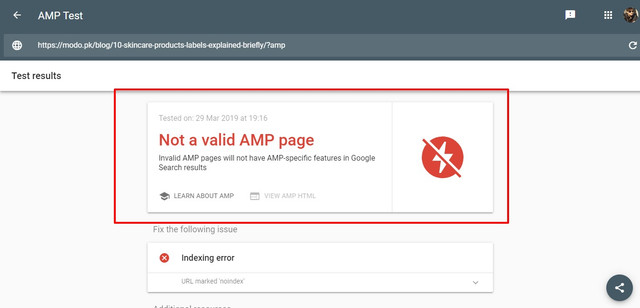
Modo 1. AMP
2. Search Template Default VS Custom
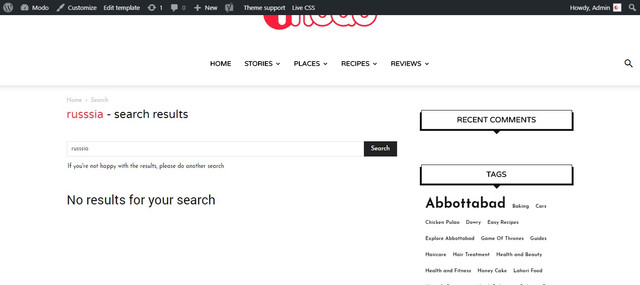
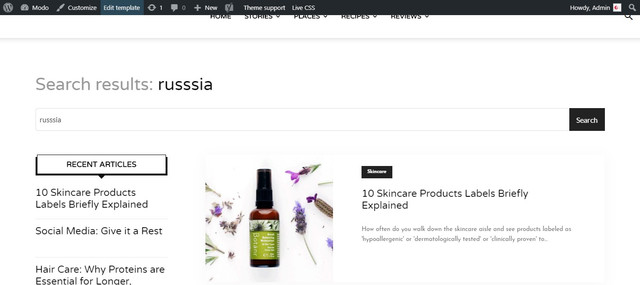
3. Composer layout for search template maybe this is an issue

4. Comments it was an additional feature request A dropdown/actual stars would be a cool addition in order to allow users to rate recipes
I have seen many themes that allow to leave rating with comments.
5. Safari Issue

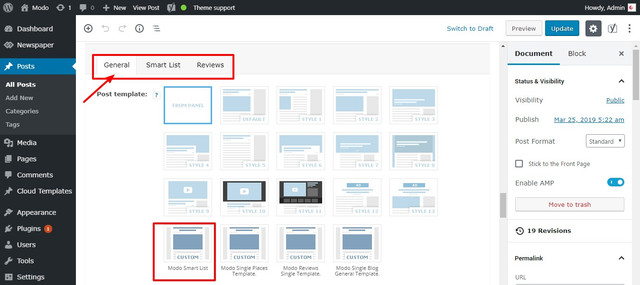
6. Smart List Template
7. Print
Here is how it looks.
https://modo.pk/wp-content/uploads/2019/03/War-of-the-Words-Game-of-Thrones-Best-Dialogues-%E2%80%93-Modo.pdf
Simion C. You can import them with the cloud library plugin, here is a guide for it
– https://forum.tagdiv.com/tagdiv-cloud-library-plugin/
Let me know if you have more questions.
Calin Hi,
So if I’m right you want the width/stretch of row, if so then the simplest way to achieve this will be to create or import a full width templates from the cloud library plugin. There is no one single button push. You have to import a post style and set it as the default post template in the theme panel post settings, then you need to import a category template that is full width and set that one as the default category template. The same for tags, author pages etc:
https://forum.tagdiv.com/tagdiv-cloud-library-plugin/ also for pages (stretch row and content ) https://www.screencast.com/t/i8SQ5eS4 .
Please read similar topics:
-> https://forum.tagdiv.com/topic/force-full-width-on-categories-post-grid/
-> https://forum.tagdiv.com/topic/homepage-full-width-content/
-> https://forum.tagdiv.com/topic/homepage-full-width-content/
Also from what I can see your header and footer is stretch to full width -> https://www.screencast.com/t/8dv4sZzdVu3o -> https://www.screencast.com/t/1nXlJduH7
Thank you for your understanding!
Calin Hi,
Yes you can achieve something like that using tagDiv Composer here is an example -> https://www.screencast.com/t/QWmwYySBv3 or somethink like this -> https://www.screencast.com/t/acAeQ98A
Please check our documentation for How to Create Beautiful Homepages with Newspaper Theme -> https://tagdiv.com/how-to-create-homepages-with-newspaper-theme/
What is the Cloud Library and How You Should Use It? ->https://tagdiv.com/what-is-the-cloud-library/
In order to achieve that homepage you need to have TagDiv Composer and TagDiv Cloud Library activate.
First select no header like this -> https://www.screencast.com/t/11bZOCkhUtdd after that click on row and stretch it and check the divider -> https://www.screencast.com/t/psTxA0yP -> https://www.screencast.com/t/NfNuz8bU78jM -> https://www.screencast.com/t/xHxiMXhuAG add a new row and stretch it and set the layout of it https://www.screencast.com/t/zw8ZXuXQovO set in left column a single image -> https://www.screencast.com/t/6rW1U0DR and set an image for it -> https://www.screencast.com/t/AfrfESbD0WN -> https://www.screencast.com/t/4NZuM85Cqg -> https://www.screencast.com/t/3Ch2H5ZCM8 after that set in the right column the header logo, header menu, social and the header search -> https://www.screencast.com/t/DsJhE4R1t now you need to set each element to be display inline and the search and social align theme to right -> https://www.screencast.com/t/812LUkv5Lai -> https://www.screencast.com/t/tNrmvVkW2
Hope this will help you!
Thanks!
