

1. Mobile theme has a very small number of options in admin panel. Which makes it difficult to control the appearance.
2. AMP is not 100% functional. It would be better to add complete AMP support.
3. Design of my website is messed up in safari. (https://modo.pk)
4. It would be great if you can start rating as an option to individual templates it is a great option for posts like recipes. It needs to be added as an option to comments module.
5. It would be great to have post categories covers/thumbnails.
6. Too Many fonts setting based on this and that which makes it difficult to work with. A website should have similar user interface and type settings across the site. I am not sure if someone else needs these kinds of tons of options to go through every time you change your mind to change the font. Maybe grouping them into headings>post headings>category headings>Then body font that should do it. But if it is the requirement some other individuals it is completely okay to leave things as they are.
7. Search cloud custom template is not working. But the built-in template works fine.
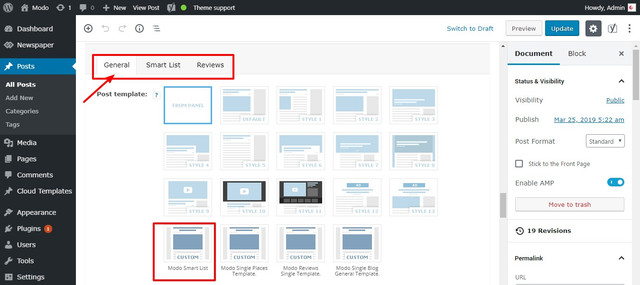
8. A smart list custom template is not working because it places it in general templates which don’t work. Plus there is only module to control the smart list setting which is not sufficient. Maybe you need to do something about it, just not sure yet. I will post once something comes in my head.
9. Tooltips: They look great as well they make the site standout best use of the tooltips could be difficult words meanings, external/internal links, and Acronym/Abbreviations.
10. Last but not least. The print: I tested this on a custom template which prints like an entire page. Including social icons, tags, post images (only placeholder space), related posts, and breadcrumbs which is too much.
Here is how it should work: Title + featured image + content + name of the site/URL in the footer. That should be it.

Hi,
1. That is true, the mobile theme doesn’t have many settings at the moment. There will be more added in the future. However we have to be careful what we add in it, to maintain it’s speed. Not having may settings and using mostly predefined templates is what makes it fast.
2. What exactly is not functional? Currently the solution we provide is not a dedicated AMP plugin, now you can use the official AMP plugin and the mobile theme
– https://tagdiv.com/amp-newspaper-theme/
From what I can see you are using this solution at the moment, seems to be valid
– http://prntscr.com/n4ic9l
3. I checked with a mac using Safari version 12.0.2 (14606.3.4), from what I can see everything looks alright, same as on Chrome for example. Let me know if I should check anywhere specific.
4. The only review system the theme has is like this – https://forum.tagdiv.com/reviews-2/
I am not aware of any plans to add more review or rating capabilities in the theme. Maybe you could use a plugin for this.
5. I don’y quite understand what you mean. The theme uses thumbnails, also category tags. Some more details would be helpful.
6. If there weren’t this many font settings or only for grouped elements, users would request more specific settings. Almost anything has font settings in the theme panel (these are general) and in the tagDiv composer (for specific items).
However something like what you are describing is in development. Not sure how exactly it will be at the moment, but it will be easier to manage the fonts.
7. I made a quick test on my side with a cloud search template, the search works for me same as with the default search template. What exactly is happening in your case?
8. A cloud post smart list template can be used for posts that consist of a smart list. This template will appear anywhere the other post templates appear. If I misunderstand, some more details would be helpful.
9. I can add this on our suggestion list, I don’t believe there were similar request before. There are plugins that could be used for this.
10. How are you testing this? For me the version of this post page
– http://localhost/wp_s2/gadgets/how-to-drive-growth-through-customer-support/
Looks like this – http://prntscr.com/n4isd0
Let me know.
Thanks
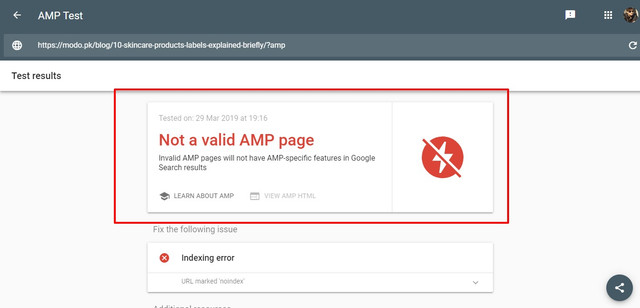
1. AMP
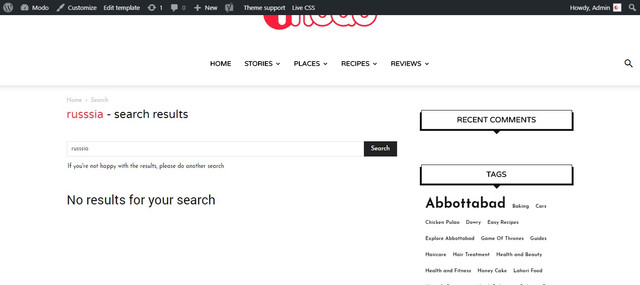
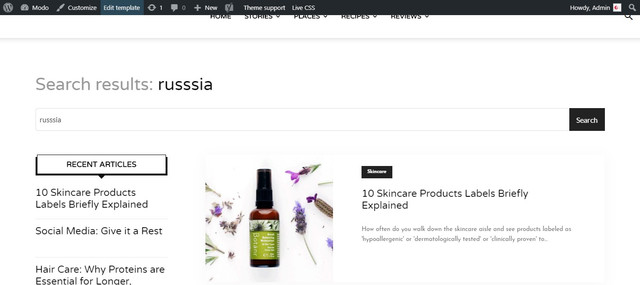
2. Search Template Default VS Custom
3. Composer layout for search template maybe this is an issue

4. Comments it was an additional feature request A dropdown/actual stars would be a cool addition in order to allow users to rate recipes
I have seen many themes that allow to leave rating with comments.
5. Safari Issue

6. Smart List Template
7. Print
Here is how it looks.
https://modo.pk/wp-content/uploads/2019/03/War-of-the-Words-Game-of-Thrones-Best-Dialogues-%E2%80%93-Modo.pdf
1. For me AMP is valid, I tested with both tools
– http://prntscr.com/n5pqd1 – http://prntscr.com/n5pqmp
I can see from your screenshot there is an indexing error, maybe you fixed that.
2. That’s unusual, so the cloud template when used displays a search result which is not displayed when using the default search template. The results should be the same.
I have tested this on my end, seems to work. Are you using a loop element to display the results? – http://prntscr.com/n5pvux
If you want us to take a look, please send us an email at contact@tagdiv.com and provide admin login.
3. I can’t tell from the screenshot if there is a layout problem. What exactly is wrong with the template? If you will send us an email we will check it.
4. You could consider to use plugins for the rating, I could also add this request on the list but I can’t promise anything at the moment. Sorry for the inconvenience.
5. That block looks alright when I check it – http://prntscr.com/n5pxzm
I can only check with the Safari version mentioned above, with this it looks fine.
6. The smart list cloud post template is supposed to appear there, it is a post template after all. By editing it you can choose the smart list style – http://prntscr.com/n5pz1k
Note that these cloud smart lists styles – http://prntscr.com/n5pz7s are not the same as the default smart list styles – http://prntscr.com/n5pzei
7. I see the problem, indeed there are elements that should not be there when printing. I will add this as well on our list to see what can be done about it. Thank you for mentioning this.
Few Additional Issues with cache plugin.
I am using wprocket for caching and it seems like not working, I disabled it for now. But if you want I can create a user account for you with admin rights.
The problem is with mobile theme it acts weird few things don’t display or do not work properly and it loads desktop/AMP theme not builtin mobile theme.
That is usually caused by caching. I have seen cases where the mobile theme was loading on desktop for example, which should not happen.
In almost all those cases the issue was a caching plugin. We recommend to use the WP super cache if possible, with these settings
– https://tagdiv.com/wp-super-cache-plugin-install-and-configure/
There should be no problem with the mobile theme and this caching plugin.
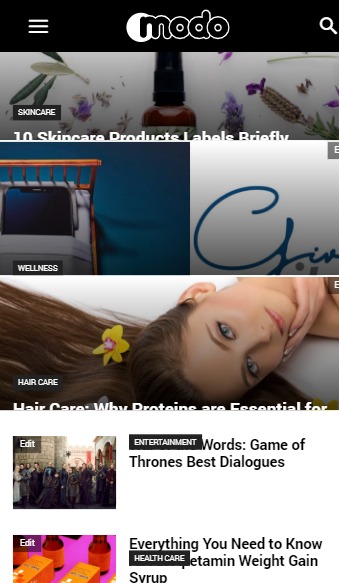
Something is wrong with CSS, please have a look at the attachement and Modo Stories
I see. There is a problem with margins.
.td-module-meta-info {
margin: -50px auto 0 auto;
}
This CSS does not work using composer. It overrides with style.css line number 8550
.td_module_wrap.td-meta-info-hide .td-module-meta-info {
min-height: 1px;
/* margin-top: -4px; */
}
As you can see I commented this out. Can you guys do something about it in next update?
Well, I followed a tutorial. Pasted embed code but when I tried to subscribe.
1) The form had two fields Name and Email. It displayed only 1
2) It redirected to mailchimp website asked for confirmation, this n that.
Seems like a lengthy process no user would subscribe like this. You should make it simplified. Use a static form with two fields/allow user to choose fields in backend and then integrate mailchimp plugin with website through API credentials just like mailchimp official plugin does.
This will build list automatically. I have it runing and working on zoja.ae It works fine with contact. All a blogger need is a list building tool.

Hi,
You can use the tagDiv Newsletter and set the code for Mailchimp in it -> https://www.screencast.com/t/Bpjt4FeL -> https://forum.tagdiv.com/the-newsletter-plugin/
Or you can set the code for Mailchimp in an empty column with tagDiv Composer.
Thank you for your understanding!
https://modo.pk/blog/reviews/laptops/dell-xps-13-review-2019
Something is wrong down here
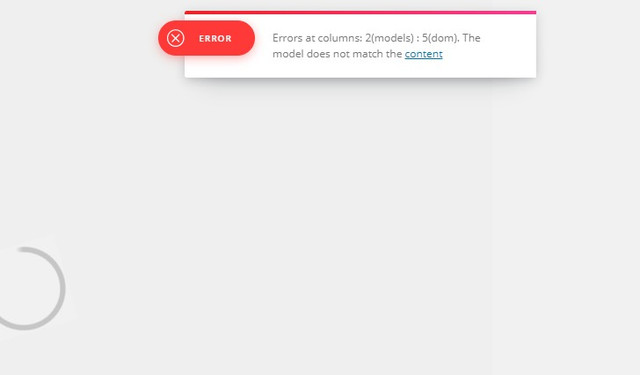
When you edit the template it shows an error msg attached.
Hi,
Please make sure that all the settings are like in our requirements, please follow the guide carefully
– https://forum.tagdiv.com/requirements-for-newspaper/
and please increase all requirements that are lower, and follow all steps.
WP_MEMORY_LIMIT try to increase it at least to 256mb.
Also please check the php version to be 7-7.2
When tagDiv Composer is not working -> https://forum.tagdiv.com/tagdiv-composer-not-working/
Please make sure that you do not have a plugin conflict, please deactivate all non theme plugins, also if you are using child theme or cache plugin, please deactivate them, clear all cache and try again.
If there is still a problem, you can send us an email at contact@tagdiv.com and provide admin login, as well as cPanel or FTP if possible. We will take a look. Include a link to this topic in the email.
Let me know how is works!
Thank you!

I am having the same issue as the post that Modo made at April 4th 2019 at 4:28PM, with the margin-top: -4px. I see this discussion has continued via email, but it has me wondering what the fix is for this / if there will be a fix aside from manually commenting it out…?
Please provide some more details about the problem you have, also provide some screenshots and a link where I can identify the problem you have.
Thank you!
