- NewsmagRequirements for Newsmag
- NewsmagtagDiv Social Counter tutorial
 Bettina
 Hello!
It seems that this page was missed. I just addressed this issue to my colleague and we hope in short time this page will be available in the Cloud Templates.
We are sorry for the inconvenience!
Thank you for understanding!
Bettina Hello!
If a code is displaying in your frontend, then this means some plugins are deactivated.
Make sure you have the TagDiv Composer, tagdiv Cloud Library, Opt-in builder installed and activated.
Thank you!
 Calin
Calin Hi Hindistack,
Indeed, the post itself cannot be created with tagDiv Composer, but its layout can be created / edited, for this you can use a single post template from the cloud. In this example -> https://imgur.com/ZyYBcfV, the progress bar it is set in a single post template.
Thank you!
Calin Hi,
It depends on what you mean by a fully compatible cache plugin. If you are referring to the settings that need to be used to work correctly with the theme, then both of the above plugins can be used, for WP Super cache we have a guide, and for WP Rocket we can give you a guide that works.
Now the problem is that depending on how each website is created, what elements it contains and what resources it still has, some webmasters need help to get a better speed for the mobile version. So our theme besides the responsive version offers me 2 more options.
Mobile page templates, these are mobile templates that can be made for pages and cloud templates with tagDiv Composer -> https://i.imgur.com/Uz85flw.png -> https://i.imgur.com/LR03SYa.png
Mobile theme plugin, is a plugin that uses a simple layout and elements without builders, as a consequence the pages must be rebuilt using mobile editor or you can use the responsive version.
Here is a video for how to use those 2 mobile versions -> https://www.youtube.com/watch?v=SpGkOnJeNZY
Thank you!
Bettina Hello!
The page templates is a new feature. Unfortunately, in this demo, there isn’t a page template built for the contact page.
You can import one existing template for this page from the Cloud Templates -> Page Templates by clicking on “+”, or create a new one from scratch.
Thank you for your feedback!
Calin Hi,
Yes, you can set in any page an cloud template the Newsletter with tagDiv Composer, also you can set any other elements if you have the embed code or the shortcode, you just need to set them in a column text or text with title element.
Thank you!
Calin Hi sdreesen, you can try the suggestion provided by PatWire, or if you have a single post template from cloud, then you can edit it with tagDiv Composer and set the banner in inline ads, like in our guide -> https://forum.tagdiv.com/article-ads/
Thank you!
 viraj24
I m facing issue in theme activation.
when i try to active my theme i got message sucessfully activate and when i refresh page status is still showing not activate.
can you guys please solve this issue asap. i need to import demo. and make it live this website.
 vivreausmic
Hello,
I want to import a tds-switching-plans-wizard by the newspaper center pro demo (https://demo.tagdiv.com/newspaper_center_pro/tds-switching-plans-wizard/)
Tag div Cloud Templates and Opt In Builder are available on my website.
But i don’t find this page on the cloud library. Import all the demo isn’t an option, i need only this page.
Thanks 🙂
 karlinex
https://paste.pics/GRP6P After deleting the single post template for “crypto pro” demo I couldn’t find the template again in tagdiv clouds, I deleted to re-install back hoping to solve a bug I was having but it is not available, instead of seeing it I am seeing templates from other demo which is not what I want as you can see in this screenshot. https://paste.pics/GRP6X
 Herodie
My website suddenly throws me many errors in Search Console about AMP.
When accessing the AMP plugin within the web, it tells me:
“Themes with AMP incompatibility”
“· Newspaperde tagDiv Versión 11.4.3″
“Because of theme issue(s) we’ve found, you’ll want to consider a different template mode below. You may also want to browse alternative AMP compatible themes.”
It asks me to change the template but it doesn’t solve anything.
The other option it tells me is to change the theme. Is there anything we can do?
Raw validation data which you may want to share with the author so they can fix AMP compatibility:
[

    {

        "url": "https://www.staging12.virtualgamer.es/entretenimiento/the-old-man-llegara-pronto-a-disney-espana/",

        "type": "is_singular[post]",

        "label": "Entrada",

        "amp_url": "https://www.staging12.virtualgamer.es/entretenimiento/the-old-man-llegara-pronto-a-disney-espana/?amp=1",

        "validation_errors": [

            {

                "node_name": "script",

                "parent_name": "body",

                "code": "DISALLOWED_TAG",

                "type": "js_error",

                "node_attributes": {

                    "type": "text/javascript",

                    "src": "https://www.staging12.virtualgamer.es/wp-content/themes/Newspaper/includes/js/tagdiv-theme.min.js",

                    "id": "tagdiv-theme-js-js"

                },

                "node_type": 1,

                "sources": [

                    {

                        "type": "theme",

                        "name": "Newspaper",

                        "file": "includes/wp-booster/tagdiv-wp-booster-functions.php",

                        "line": 162,

                        "function": "tagdiv_theme_js",

                        "hook": "wp_enqueue_scripts",

                        "priority": 10,

                        "dependency_type": "script",

                        "handle": "tagdiv-theme-js"

                    }

                ]

            }

        ],

        "validated_url_post": {

            "id": 11517,

            "edit_link": "https://www.staging12.virtualgamer.es/wp-admin/post.php?post=11517&action=edit"

        },

        "stale": true

    }

]
“Plugins with AMP incompatibility”
” ·tagDiv Cloud Library de tagDiv Versión 2.2 | built on 11.04.2022 7:46″
Raw validation data which you may want to share with the author so they can fix AMP compatibility:
[

    {

        "url": "https://www.staging12.virtualgamer.es/entretenimiento/the-old-man-llegara-pronto-a-disney-espana/",

        "type": "is_singular[post]",

        "label": "Entrada",

        "amp_url": "https://www.staging12.virtualgamer.es/entretenimiento/the-old-man-llegara-pronto-a-disney-espana/?amp=1",

        "validation_errors": [

            {

                "node_name": "script",

                "parent_name": "head",

                "code": "DISALLOWED_TAG",

                "type": "js_error",

                "node_attributes": {

                    "type": "text/javascript"

                },

                "text": "var tdbPluginUrl = __DOUBLE_QUOTED_STRING__",

                "node_type": 1,

                "sources": [

                    {

                        "type": "plugin",

                        "name": "td-cloud-library",

                        "file": "td-cloud-library.php",

                        "line": 153,

                        "function": "tdb_on_admin_head1",

                        "hook": "wp_head",

                        "priority": 10

                    }

                ]

            }

        ],

        "validated_url_post": {

            "id": 11517,

            "edit_link": "https://www.staging12.virtualgamer.es/wp-admin/post.php?post=11517&action=edit"

        },

        "stale": true

    }

]
 zenith21
I am using Single Post Parent Pro cloud template. Please could you tell me how can I add text to the featured image.
 demontek
 thanks for the video, but still doesn’t help me do this
heading
image and exceprt (side by side like in this example)
i even checked out all the 500 + Pre-designed Templates – tagDiv Cloud Library
All your demos have
heading
image
excerpt
https://cloud.tagdiv.com/wp-content/uploads/2018/08/bl31-sm-2.jpg
not
heading (on own line)
image and excerpt (side by side).
can u whip up 1 demo like this in your block section
and i won’t bother you again 😉
 Nickolas Combatente
 i dont know what you mean by that: “The mobile page template can be also used on cloud templates”. Im a begginer in doing sites and with newspaper theme.
right, dont have a way to me use only one plugin than can make all the necessary stuff, like show mobile page only on mobile devices and the others cache things. What wanna say is dont have a complete cache plugin compatible with newspaper theme?
 passion-for-ocean
Hi,
I imported a header from the cloud (think it was “hero”). The video works super on all screens, EXCEPT mobiles. What can I do? On all screens, it is added as row background. I have stretched row and content. When I do the same on mobile header – the video just appear as a random still image (from the video). So for now, I have just added a picture for the mobile version. Website: http://www.canarywhistler.com Would love to add the same video to mobiles…
 thecrazybuyersblog
 1) Moreover, I can access cloud library. It shows loading templates…Though theme is registered I can’t see domain under my license tab in theme->panel
Bettina Hello @theatlasnews!
Please check in the file wp-content\plugins\td-cloud-library\shortcodes\single\tdb_single_categories.php
You should find the entire logic of how the primary category is being displayed.
Thank you!
Calin Hi,
The mobile menu can be edited using the options from here -> https://i.imgur.com/hfbUKLP.png
Also, if it is a cloud header, you can edit it using tagDiv Composer -> https://i.imgur.com/FynkKd4.png
Thank you!
Calin Hi,
I think it would help a lot if you assigned the cloud header as a general to see exactly how the site appears.
Then to increase the width of the header, you can select the row in the header and use this option -> https://i.imgur.com/wmJF9dd.png
I hope this will help you!
Calin Hello,
The cloud templates must be public to be assigned, but you can disable them to be indexed by google (you need to use a seo plugin for this, for example Yoast SEO -> https://imgur.com/ApOXLWp)
If you already did that you just need to reindex your website on Google.
Thank you!
Calin The mobile page template can be also used on cloud templates.
Yes you can use the WP Rocket with the WP Super cache, but, you need to clear both caches.
 Media_Ex
Hello,
I have a problem with a very slow image load – Website: wiadomosci.com
My Serwer: Dedicated Instance on Amazon AWS LightSail
32 GB RAM, 8 vCPUs, 640 GB SSD
My database Server: Dedicated Instance on Amazon AWS LightSail
4 GB RAM, 2 vCPUs, 120 GB SSD – MySQL database (8.0.23)
Cache Plugin: W3TotalCache + Cloudflare PRO
Please help
Arthur
 kimstipguide
 Calin
thank you.
You need to create a new mobile menu.
Does the first start start with a blank screen?
(Are you currently working on the mobile screen separately in cloud templates/Header Template 15?)
Please explain the most basic starting point.
————————————————————————————
Yes, I managed to catch it -> https://i.imgur.com/TaHGlxt.png
Normally that auto ad should have been positioned either above or below the mobile header.
What I can recommend is to change the structure of the mobile menu, please try those settings -> https://i.imgur.com/BgkCwwK.png drag the menu, logo and search elements and make sure that those are set inline -> https://i.imgur.com/3tbCnoj.png after that use this option on column -> https://i.imgur.com/tHPav1h.png
————————————————————————————
after that
As above method,
It looks like we should move on.
Thanks for the always great explanation.
Calin Hi,
The problem with the sidebar is caused by a plugin conflict. Most of the time it is about the WPBakery plugin with tagDiv Cloud Library. We recommend to use only one of them.
About the post filter, if you set the post id in this place -> https://i.imgur.com/ukhHAiF.png the problem should be resolved. If this is not working, please try with a different id and in case that the problem persist, try using only tagDiv plugins.
Thank you!
 Archerix
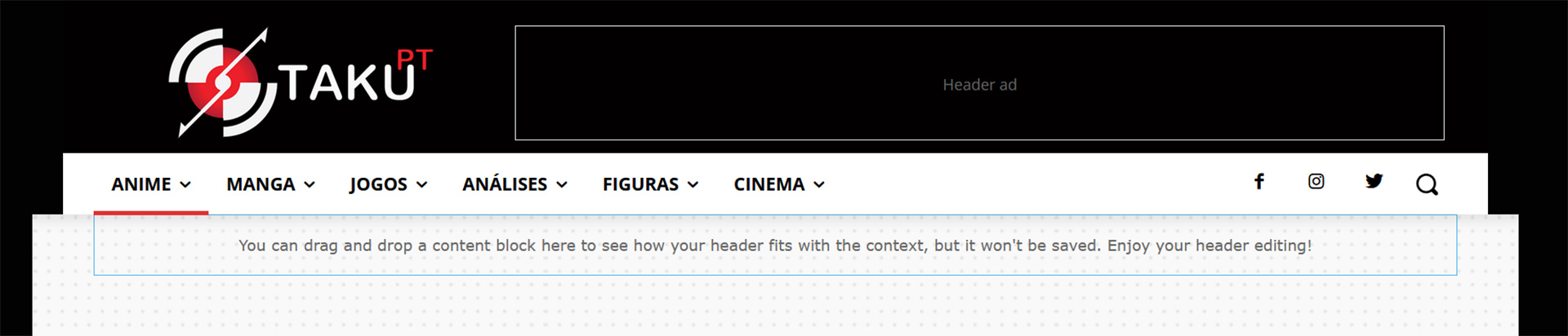
Need some help, there is something that I’m probably missing, I’m trying to move from the standard header to the cloud Header template default pro (trying to control the showing of ads on mobile since the bug), but I can´t get the same look as you can see in the screenshots, I can’t stretch the menu bar to the width of the page, showing tow black spots
How can I edit de Default pro to get the same look?
Live website
https://www.otakupt.com/wp-content/uploads/2022/04/Untitled-8.jpg
Edited Cloud
https://www.otakupt.com/wp-content/uploads/2022/04/Untitled-10.jpg