
- NewsmagRequirements for Newsmag
- NewsmagtagDiv Social Counter tutorial
 CreekWalker7291
Designing and using post templates is pretty straight-forward. What am I missing when trying to use a page template? I imported a premade page template, designed it to my liking, and saved it. It’s in my Cloud Templates library. Now I’d like to use that template for all my pages so I don’t have to go through the design process again for every page on my site…but I’m not finding a way to do that. What am I missing?
 pignetotv
 Let me explain better: i can edit the “single post template” only from the page of the “cloud templates” by clicking on “single post template – default pro” with the right button… then i click on “edit”, then on the page of the “edit template” i click on the permalink… this is the only way to edit the “single post template”, but before i could edit the “single post template” also from any article of my website clicking on the green button “Edit with TagDiv Composer”… is this a problem for the correct working of my website?
Thank you,
Carlo
pignetotv Thank you Calin!
A last question: it’s normal that i can edit the “single post template” only from the page of the “cloud templates”? Before i could edit the “single post template” also from any article of my website…
Please let me know, thank you so much!
Carlo
 rafayhost
I’m using the Newspaper theme with LiteSpeed Cache and Cloudflare, and I have a question regarding the built-in weather block. I’m using the default weather block in the header, However, due to caching (LiteSpeed + Cloudflare), the weather info also gets cached along with the full page. As a result, it does not update in real-time for visitors. How to fix?
 Calin
Calin Hi,
The situation with the header on mobile is related to the margin left and right that has been set on the mobile cloud header on zone https://i.imgur.com/bqA8VEp.png I think it was set to to slightly distance elements from the edges of the screen.
The situation with the page is related to a custom css that have been used – https://i.imgur.com/KU0ElpU.png
 div.td-pb-span8.td-main-content {

                margin-left: 5%!important;

                margin-right: 5%!important;

                width: 55%!important;

            }
Thank you!
pignetotvHello,
on my website https://www.pignetotv.it i can’t edit my “single template(s)” anymore, i receive this message:
“Error at zones: 6(models): 5(dom). The model does not match the content Current state has involved an issue. You cold try an UNDO operation (CTRL+Z/CTRL+SHIFT+Z)”
No problem editing other “cloud templates” as header, footer, category, etc.
I uninstalled and reinstalled the theme but the problem persists.
Could you help me? Thank you very much!
Carlo
Calin Hi,
The child theme can be sued for the templates and code that is coming from tagDiv standard Pack, if is related to td composer, opt-in builder, or cloud, those have no support in the child theme, only if it is custom integrate or an extra plugin is created to overwrite the settings form the plugin.
Related to your customization code, I can take a look over it, but you’ll need a developer, only a developer can let you know if the code is ok or were needs to be improved.
Thank you!
Calin Hi,
It will be need to use tagDiv Composer to edit the cloud header, select the logo and remove the logo text – https://i.imgur.com/VgwDMTg.png and in css tab remove the colors – https://i.imgur.com/PYr0iBU.png do the same on mobile – https://i.imgur.com/4dYHAtx.png
Thank you!
Calin Hi,
You can create a layout like that using an inner row, then set in first inner column a flex 1 with one article https://i.imgur.com/JOxl3ww.png – https://i.imgur.com/pVv8aUF.png – https://i.imgur.com/k1sk8WF.png then in second one set the flex block 1 with image set on the left – https://i.imgur.com/eqpVo4n.png – https://i.imgur.com/fkpsCC7.png. If you want you can import some blocks from the cloud and set them on inner row – https://i.imgur.com/TvX0i0n.png
Calin Hi,
The mentioned prebuilt website use cloud templates for articles, so you’ll need to use tagDiv Composer to add/remove something from the template https://forum.tagdiv.com/sidebars-tutorial/ – https://www.youtube.com/watch?v=fa7GenCHcBU&list=PL6CsDkMaejhoHETIWoxnRB4zefz8L8PYg&index=8
Thank you!
Calin Hi,
Unfortunately, there is currently no way to set a cloud template for pages. I asked our manager about this, and he replied that if a user needs this functionality, it can be customized for them for a fee.
I will try to help you with a php code that can rewrite the pages, but it is possible that it will interfere with the tagDiv Composer and it will no longer be able to be used on the pages. For this you need to use a child theme and edit the php fields related to page templates:
– wp-content/plugins/td-composer/legacy/Newspaper/page.php
– wp-content/plugins/td-composer/legacy/Newspaper/page-pagebuilder-latest.php
– wp-content/plugins/td-composer/legacy/Newspaper/page-pagebuilder-overlay.php
– wp-content/plugins/td-composer/legacy/Newspaper/page-pagebuilder-title.php
You can edit only one or all of them.
I hope this will help you!
Thank you!
 KonstantinosMetaxakis
 Hi again,
Thank you for your previous response. I understand that there is currently no native support for a global Page template similar to how Single Post templates work via Cloud Library.
However, duplicating a designed page manually for each of our pages is unfortunately not a scalable or maintainable solution for our workflow.
Here’s why:
We have over 80 static Pages (not Posts) — such as “Rankings”, “Terms of Use”, “Privacy Policy”, etc.
We need all these pages to have a consistent layout, identical to our Single Post template (header, featured image, date, sidebars, etc.).
Editing and managing 80 separate copies of the same layout breaks maintainability — any design update means repeating changes manually 80 times.
The current Cloud Library approach works great for posts, but we’re specifically trying to apply it to WordPress Pages.
We’ve tried using custom page.php templates in the theme or plugin folders, but TagDiv Cloud Library always overrides the page output.
What we’re asking:
Is there any method — through PHP, a filter, or even a workaround — to assign a single Cloud Template (or custom template) globally to all WordPress Pages and have it pull each page’s content automatically?
We believe this would be extremely useful for many use cases, and perhaps there’s an internal way or workaround that we’re missing.
Thank you again for your support and time — we really hope there’s a way to make this work.
Best regards,
 Archerix
Hello, I’m optimizing my website with the theme to run as efficiently as possible and with ngnix + Redis + MariaDB + database indexes + WPsupercache it’s very fast despite a high number of visitors.
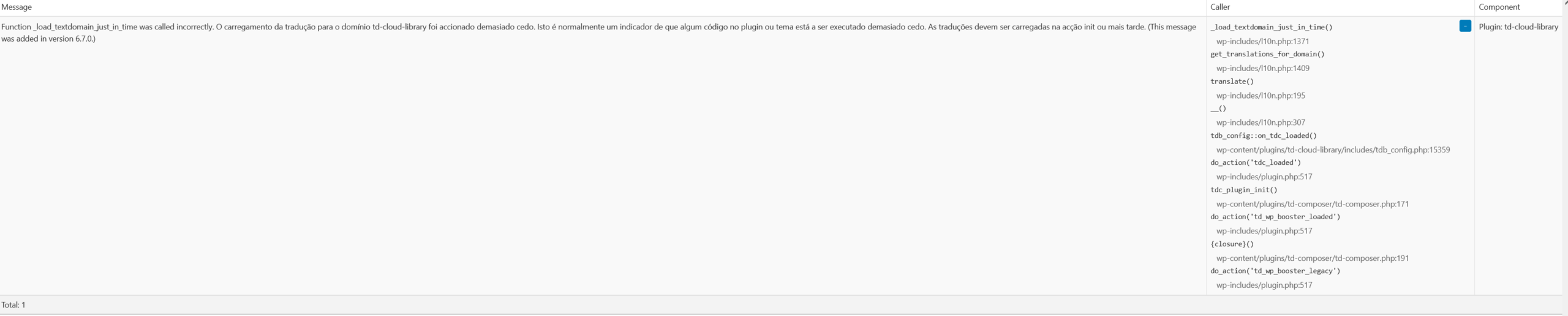
Although it’s not a problem, Query Monitor is giving a warning “Function _load_textdomain_just_in_time was called incorrectly. Loading the translation for the td-cloud-library domain was triggered too early. This is usually an indicator that some code in the plugin or theme is being executed too early. Translations should be loaded in the init action or later. (This message was added in version 6.7.0.)
_load_textdomain_just_in_time()
Plugin: td-cloud-library”
Is there anything I can do about it?
Calin Hi,
When a page comes out of the cloud it is similar to what you would do, but you don’t have to start from 0. As for reducing database queries, this depends a lot on what is set on that page and how big it is. For example, you can use redis and cache on flex block to reduce the number of database requests.
Thank you!
 regio-online
 Aha, I’m sorry I missuderstoof Calin. I thought there was a revisions of the original page (regio Delfzijl, the same as regio Breda), but as I now understand if you import a cloud template there is no going back to the original page it was before that.
I will remove the page of regio Delfzijl, duplicate the page of regio Breda and rebuild it for regio Delfzijl.
Just one other question that was not quiet clear to me: does having a page cloud template reduce the load on the database query’s?
Thank again for your patience and time Calin.
Calin Hi,
Unfortunately, there is no such template for pages, what you can do is import a page you like from the cloud and edit it, or you can create a page according to the structure you want and then duplicate it for the rest of the pages on the site that you need and edit them in part for the content.
Out builder, tagDiv Composer was made to create pages and cloud templates.
Thank you!
Calin Hi,
This is the first time when I hired about the AnWP Football Leagues plugin, but after your details and the screenshot it appears that this is place in the cloud header and also in the content. So this is seeing the header like a page. Just to be sure it’s like this, please set in Newspaper > theme pane > header set it on no template, save the settings, clear the cache and check if the problem is resolved. If is resolved, then you need to fined out how the plugin is working and restrict it to access the cloud header templates.
Thank you!
Calin Hi, the situation is how I explain it above, this is a page imported from the cloud, exact the same elements – https://cloud.tagdiv.com/homepage-fast-news/ so if it was imported there will be no revisions until there are some modifications on that page.
Thank you!
Calin Hi,
If you have the last Newspaper version, 12.7.1 then please replace the td cloud library with this one https://cdn.tagdiv.com/wp-content/uploads/2025/07/td-cloud-library.zip
Thank you!
KonstantinosMetaxakisHello TagDiv Team,
We are using the Newspaper theme and would like to ask for guidance on something quite important for our website workflow.
What we want to achieve:
We would like to design a custom layout for static pages (WordPress Pages, not Posts) using TagDiv Composer or Cloud Library, and then:
Apply this layout to multiple pages — not just one.
Ideally, set it as a default or reusable page template.
Ensure that each page loads its own content from the WordPress editor (Gutenberg or Classic Editor).
Is there a supported method to create a global layout/template for Pages, using TagDiv Composer, that can be reused across multiple pages, showing the content of each page automatically?
We are not referring to blog posts or single post templates — we’re specifically asking about WordPress Pages (e.g. About, Contact, Rankings, etc.).
If there is a recommended approach to achieve this (either through Cloud Templates, PHP page templates, or TagDiv Composer settings), we’d really appreciate your step-by-step guidance.
Thank you very much for your time and support.
Best regards,
Calin Hi,
Most of the time the problem is from a shortcode that is not compatible with our theme or a plugin conflict, therefore after you set it with tagDiv Composer and save the page/cloud template, the next time when you try to edit it, you’ll get that error.
If is only for one page or a cloud template (it can be on the header or footer, you can change them for tests and see if the problem persists), this is from some settings/shortcodes set on it and it can be fixed using the page revision.
If the problem persist, please contact us via email at contact@tagdiv.com and provide temporary wp-admin and FTP or cPanel access. We’ll check it as soon as possible.
I hope this will help you!
Calin Hi,
It looks like you imported a page that was part of a demo, and then deleted it afterward. This action doesn’t affect your actual website pages, so there’s no need for concern.
Please note that these are not page templates like category or article templates. The pages available in the tagDiv Cloud Library are pre-built demo pages created using the tagDiv Composer. When you import them, they are added as standalone pages that can be edited directly with tagDiv Composer, but they are not linked to your theme’s structural templates.
Let me know if you need further clarification.
Thank you!
regio-onlineHi,
We are using cloudtemplate blocks for our site https://regioonline.nl, but not cloud pagetemplates yet. I tried on one page (https://regioonline.nl/delfzijl/). I opened the page in Tagdiv Composer and imported the pagetemplate Fast News. Got a view what this did for that page, but was not satisfied. So I did not save the page, but after refreshing, deleting cache and browser history, login ou and loging in, the mentioned page still show the cloudtemplate for that page. (see https://regioonline.nl/breda/ for original page setup without page cloudtemplate).
If I go to edit page in WordPress editor I don’t see revisions (option missing completely) https://prnt.sc/Zmk-qcNkL7sx, so I can not set it back to an earlier state. In menu Cloud Templates, under page templates there are no cloud pagetemplates mentioned to remove (https://prnt.sc/zbCwOceSRjaA), so that also does not help. Any suggestions on how to undo the cloud page template and get back to previous setup, or is this not possible?
In addition to this question:
My newssite has about 62 regional pages. None of the pages are cloudtemplates, only the blocks. Is it wise to replace every page with a cloud template (all 62 of them have different categories to filter on), or does this not offload the database a lot?
Thanks for taking the time again for my questions. Much appreciated!
Calin Hi,
This situation appears when you are using a single post template from the cloud, if the articles are in draft and you use an extra plugin for seen the article in draft, then the theme will interpret that the post should not be display because is in draft and instead is display the articles templates.
There are a few solution in this situation:
– use de default template for those articles or a post template from tagDiv Standard Pack plugin.
– instead of draft save the article as privet and use share the link article with a password
Thank you!
Calin Hi,
If the project is the same on local and live (same plugins and settings), and there was no change on the page or plugins, then the situation can be related to some settings from the host.
most of the time the problem is from a shortcode that is not compatible with our theme or a plugin conflict, therefore after you set it with tagDiv Composer and save the page/cloud template, the next time when you try to edit it, you’ll get that error.
If is only for one page or a cloud template (it can be on the header or footer, you can change them for tests and see if the problem persists), this is from some settings/shortcodes set on it and it can be fixed using the page revision -https://wordpress.com/support/page-post-revisions/
Thank you!



