
 Vlad S
 Hello!
Please try to remove and re-add the block using tagDiv Composer.
Let us know what the results are !
Thank you!
Vlad S Hello!
In order to use woocommerce products or features with tagDiv Composer you will have to use WooCommerce shortcodes as you can see here: https://docs.woocommerce.com/document/woocommerce-shortcodes/
You can use the column text element in order to render shortcodes or use HTML codes.
Simply copy the shortcode and insert it in the text area of the column text as you can see here: https://www.screencast.com/t/UEMEsVKog
Column text is an element from tagDiv Composer.
Thank you !
 Anamaria
 Hello,
I’m sorry, I don’t understand exactly what ads you mean. Can you give me a screenshot?
If you use a header standard template from the Theme Panel, then you can remove the ad from the header, from Theme Panel -> ADS -> Header ad => https://www.screencast.com/t/GsmrFOmBjDo please delete this code, if you have a header template from Cloud Library, you can delete it edit with tagDiv Composer => https://www.screencast.com/t/nqMn2clY -> https://www.screencast.com/t/VjdUbCMlVX1 and with right-click you can delete it => https://www.screencast.com/t/dIOISaoJd
Thank you!
Anamaria Hello,
The footer template does not have the button to be edited with tagDiv Composer in the backend. Please check this guide:https://forum.tagdiv.com/footer-templates/
If you a Pro Prebuilt Website you can edit with tagDiv Composer the footer template can be edited only from the frontend if it is assigned, edit a page/post template with tagDiv Composer and go down to the footer. => https://www.screencast.com/t/rpfNhfyrF
Thank you!
 huy2612
 i use Cloud Library to create footers. i don’t understand why i can’t edit it in TagDiv Composer. when i click Theme Panel, it shows only template session, no footers setting.
-
This reply was modified 5 years by
huy2612.
 danishmallick
 I use WPBakery Page Builder and not the tagDiv composer, will there be any issue if both the plugins are active at the same time because when I deactivate the tagdiv composer it hides the interface of the theme panel
 Redlemon
 I don’t know why the images are not visible publicly. Please allow me to retry posting them.
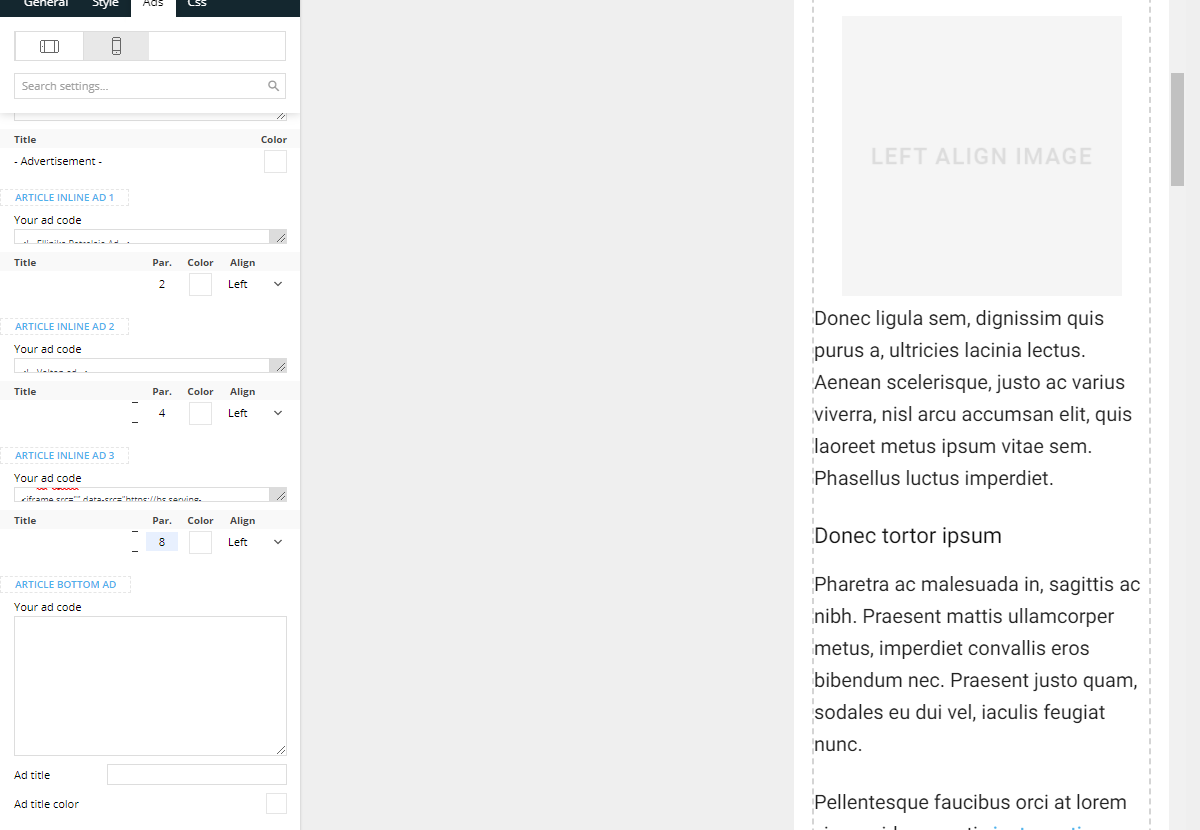
Back end settings for inline ads inside single post
Front end source code of a single post

RedlemonI am having an issue with the inline ads of the single post block. I am inserting an ad inside the Inline Ad 1 container and set it to display left aligned after the second paragraph. That one shows alright and right where I need it to.
Then I insert the appropriate code inside the inline ad 2 container, and set it to display left aligned after the 5th paragraph.
Lastly I insert the appropriate code inside the inline ad 3 container, and set it to display left aligned after the 8th paragraph.
And this is where the problem begins: The first ad is displayed – correctly – after the 2nd paragraph, but then the 2nd and 3rd ads are being prepended before the article, between the post featured image and the actual content of the article. It took me sometime to realize they were the 2nd and 3rd ads. I had to delete the entire single post template page and re-create it, just to make sure it wasn’t template-specific, but unfortunately it happened with the second single post template again. I’ve also tried all different paragraph order combinations, to no avail. Meaning I set the 2nd ad to display after the 3rd, 4th, 5th, 6th, 7th, 8th (you get the point) paragraphs, and similarly with the 3rd inline ad. None of it made any difference whatsoever. Every time I reload the page, the 1st inline ad shows after the 2nd paragraph I’ve ordered it, and the 2nd and 3rd inline ads, they are being injected before the post content (i.e. before the 1st post paragraph).
Please review the screenshots below which show the issue.
Back end settings for inline ads inside single post
Front end source code of a single post
Please advise what it is that I have been doing wrong.
Vlad S Hello !
You can use the column text element in order to render shortcodes or use HTML codes.
Simply copy the shortcode and insert it in the text area of the column text as you can see here: https://www.screencast.com/t/UEMEsVKog
Column text is an element from tagDiv Composer.
Thank you !
Vlad S Hello !
You will have to first start looking for a plugin conflict. please deactivate ALL plugins except tagDiv ones, also if you are using child theme or cache plugin, deactivate them, clear all cache and try again.
Also you can try and remove and re-install the tagDiv Composer plugin and please send us a link to your website in order to take a look.
If the method above does not work, Please contact us via email at contact@tagdiv.com and provide the following:
– admin url and credentials
– A link to this topic in order to identify you
Our team will take a look ! Please note that at the moment the support is a bit crowded. Replying may take up to 24 hours.
Thank you !
Vlad S Hello!
That you can do is after your create your element first, you can save it and now you can find it in tagDiv Composer and simply add it from tagDiv Composer next time: https://www.screencast.com/t/23H4IAewQ
Thank you!
Anamaria Hello,
For mobile theme, you need to comment on this line =>https://www.screencast.com/t/y9VynIMyI from this path wp-content/plugins/td-composer/mobile/header.php
and for AMP this line => https://www.screencast.com/t/98ognUTx from this path => wp-content/plugins/td-composer/mobile/header-amp.php
Hope this helps you!
Thank you!
 sirms
sirms No, it’s just a propper CMS for Newspaper that offer this.
I’m asking if this is something that can be added to Td composer or something. It will make it easier to update content on the page for bissy newspapers. Also it will make better support for multi html titles so you can use proper and stable font size like rem that will dynamically adapt to every screen sizes.
To have something similar you need to use vh and vw for mobile to get a smood font resizing. Unfortunately with those it will not be very smood for everyone.
Vlad S Hello!
That is the text with image element from tagDiv Composer as you can see here: https://www.screencast.com/t/CbPQ4YgxeQ6U this is fully editable using tagDiv Composer.
Thank you!
Vlad S Hello!
You can do that using tagDiv Composer by editing the ROW options: https://www.screencast.com/t/Q0gowVOij7li or similar headers can be imported from the Cloud library and you will be able to edit them with composer: https://www.screencast.com/t/V8fom29fnc79
Thank you!
huy2612Anamaria Hello,
With tagDiv Composer, you can make a cloud template, and a single cloud template applies to all the posts it is assigned to.
Therefore, if you want to put the shortcode before the title and it differs from one post to another, then you need to make a single post template for each post that has a different shortcode.
The best solution would be to put these shortcodes in the content of the post after the title.
Thank you!
Anamaria Hello,
I think you referring to the option the Auto Loading on the Single Post Template you can disable it with tagDiv Composer -> Show site wide settings => https://www.screencast.com/t/4RnV1CnxiuA
Thank you!
 twsillimanian
Here is the site twsillimanian.com
Debug log
[25-May-2021 03:22:13 UTC] PHP Deprecated:  Invalid characters passed for attempted conversion, these have been ignored in /home/wp_99d24c/twsillimanian.com/wp-content/plugins/td-composer/legacy/common/wp_booster/td_util.php on line 1859
[25-May-2021 03:22:13 UTC] PHP Deprecated:  Invalid characters passed for attempted conversion, these have been ignored in /home/wp_99d24c/twsillimanian.com/wp-content/plugins/td-composer/legacy/common/wp_booster/td_util.php on line 1861
[25-May-2021 03:27:32 UTC] PHP Fatal error:  Uncaught Error: Call to a member function the_post() on null in /home/wp_99d24c/twsillimanian.com/wp-includes/query.php:975
Stack trace:
#0 /home/wp_99d24c/twsillimanian.com/wp-content/plugins/td-cloud-library/wp_templates/tdb_view_category.php(17): the_post()
#1 /home/wp_99d24c/twsillimanian.com/wp-includes/template-loader.php(106): include('/home/wp_99d24c...')
#2 /home/wp_99d24c/twsillimanian.com/wp-blog-header.php(19): require_once('/home/wp_99d24c...')
#3 /home/wp_99d24c/twsillimanian.com/index.php(17): require('/home/wp_99d24c...')
#4 {main}
  thrown in /home/wp_99d24c/twsillimanian.com/wp-includes/query.php on line 975
[25-May-2021 03:29:33 UTC] PHP Fatal error:  Uncaught Error: Call to a member function the_post() on null in /home/wp_99d24c/twsillimanian.com/wp-includes/query.php:975
Stack trace:
#0 /home/wp_99d24c/twsillimanian.com/wp-content/plugins/td-cloud-library/wp_templates/tdb_view_category.php(17): the_post()
#1 /home/wp_99d24c/twsillimanian.com/wp-includes/template-loader.php(106): include('/home/wp_99d24c...')
#2 /home/wp_99d24c/twsillimanian.com/wp-blog-header.php(19): require_once('/home/wp_99d24c...')
#3 /home/wp_99d24c/twsillimanian.com/index.php(17): require('/home/wp_99d24c...')
#4 {main}
  thrown in /home/wp_99d24c/twsillimanian.com/wp-includes/query.php on line 975
[25-May-2021 03:29:40 UTC] PHP Fatal error:  Uncaught Error: Call to a member function the_post() on null in /home/wp_99d24c/twsillimanian.com/wp-includes/query.php:975
Stack trace:
#0 /home/wp_99d24c/twsillimanian.com/wp-content/plugins/td-cloud-library/wp_templates/tdb_view_category.php(17): the_post()
#1 /home/wp_99d24c/twsillimanian.com/wp-includes/template-loader.php(106): include('/home/wp_99d24c...')
#2 /home/wp_99d24c/twsillimanian.com/wp-blog-header.php(19): require_once('/home/wp_99d24c...')
#3 /home/wp_99d24c/twsillimanian.com/index.php(17): require('/home/wp_99d24c...')
#4 {main}
  thrown in /home/wp_99d24c/twsillimanian.com/wp-includes/query.php on line 975
[25-May-2021 03:30:07 UTC] PHP Warning:  include(11078): failed to open stream: No such file or directory in /home/wp_99d24c/twsillimanian.com/wp-includes/template-loader.php on line 106
[25-May-2021 03:30:07 UTC] PHP Warning:  include(): Failed opening '11078' for inclusion (include_path='.:') in /home/wp_99d24c/twsillimanian.com/wp-includes/template-loader.php on line 106
[25-May-2021 03:30:14 UTC] PHP Warning:  include(11078): failed to open stream: No such file or directory in /home/wp_99d24c/twsillimanian.com/wp-includes/template-loader.php on line 106
[25-May-2021 03:30:14 UTC] PHP Warning:  include(): Failed opening '11078' for inclusion (include_path='.:') in /home/wp_99d24c/twsillimanian.com/wp-includes/template-loader.php on line 106
[25-May-2021 03:30:20 UTC] PHP Warning:  include(11078): failed to open stream: No such file or directory in /home/wp_99d24c/twsillimanian.com/wp-includes/template-loader.php on line 106
[25-May-2021 03:30:20 UTC] PHP Warning:  include(): Failed opening '11078' for inclusion (include_path='.:') in /home/wp_99d24c/twsillimanian.com/wp-includes/template-loader.php on line 106
[25-May-2021 03:30:30 UTC] PHP Warning:  include(11078): failed to open stream: No such file or directory in /home/wp_99d24c/twsillimanian.com/wp-includes/template-loader.php on line 106
[25-May-2021 03:30:30 UTC] PHP Warning:  include(): Failed opening '11078' for inclusion (include_path='.:') in /home/wp_99d24c/twsillimanian.com/wp-includes/template-loader.php on line 106
[25-May-2021 03:30:42 UTC] PHP Warning:  include(11078): failed to open stream: No such file or directory in /home/wp_99d24c/twsillimanian.com/wp-includes/template-loader.php on line 106
[25-May-2021 03:30:42 UTC] PHP Warning:  include(): Failed opening '11078' for inclusion (include_path='.:') in /home/wp_99d24c/twsillimanian.com/wp-includes/template-loader.php on line 106
[25-May-2021 03:31:02 UTC] PHP Warning:  include(11078): failed to open stream: No such file or directory in /home/wp_99d24c/twsillimanian.com/wp-includes/template-loader.php on line 106
[25-May-2021 03:31:02 UTC] PHP Warning:  include(): Failed opening '11078' for inclusion (include_path='.:') in /home/wp_99d24c/twsillimanian.com/wp-includes/template-loader.php on line 106
[25-May-2021 03:31:29 UTC] PHP Warning:  include(11078): failed to open stream: No such file or directory in /home/wp_99d24c/twsillimanian.com/wp-includes/template-loader.php on line 106
[25-May-2021 03:31:29 UTC] PHP Warning:  include(): Failed opening '11078' for inclusion (include_path='.:') in /home/wp_99d24c/twsillimanian.com/wp-includes/template-loader.php on line 106
[25-May-2021 03:32:20 UTC] PHP Warning:  include(11078): failed to open stream: No such file or directory in /home/wp_99d24c/twsillimanian.com/wp-includes/template-loader.php on line 106
[25-May-2021 03:32:20 UTC] PHP Warning:  include(): Failed opening '11078' for inclusion (include_path='.:') in /home/wp_99d24c/twsillimanian.com/wp-includes/template-loader.php on line 106
[25-May-2021 03:35:34 UTC] PHP Warning:  include(11078): failed to open stream: No such file or directory in /home/wp_99d24c/twsillimanian.com/wp-includes/template-loader.php on line 106
[25-May-2021 03:35:34 UTC] PHP Warning:  include(): Failed opening '11078' for inclusion (include_path='.:') in /home/wp_99d24c/twsillimanian.com/wp-includes/template-loader.php on line 106
include $template; is line 106
$template = apply_filters( 'template_include', $template );
if ( $template ) {
include $template;
} elseif ( current_user_can( 'switch_themes' ) ) {
$theme = wp_get_theme();
if ( $theme->errors() ) {
wp_die( $theme->errors() );
}
}
return; itsevang
I uploaded the Category Section Left – Gadgets PRO template from the tagDiv library and it works fine on desktop but on mobile it keeps giving me trouble. At first it would keep showing the stock photos that were originally used, but then I deleted them and now it won’t show any image at all (even though I’ve uploaded one).
My website is https://www.pbreview.org/
Anyone have any ideas on how to fix it?
 nycinsider
On tagDiv composer, I am able to edit other pages of my website, except the homepage. I keep getting this error
Errors at columns elements: 20(models) : 43(dom). The model does not match the content Current state has involved an issue. You could try an UNDO operation (CTRL+Z / CTRL+SHIFT+Z)
Here is the link to my site’s homepage
https://nycinsiderguidecom.bigscoots-staging.com/
Thanks
huy2612 this is a link to show you disappearance footers in TagDiv Composer https://www.screencast.com/t/oymXTE8iVpV. i need a solution for this. thanks
Anamaria Hello,
In most cases when you get a similar message “ Error at zones: 1(models): 0(dom). The model does not match the content Current state has involved an issue. You could try an UNDO operation (CTRL+Z / CTRL+SHIFT+Z)” then indeed it is a problem, most of the time the problem is from a shortcode that is not compatible with our theme, therefore after you set it with tagDiv Composer and save the page/cloud template, the next time when you try to edit it, you’ll get that error.
For this error, you can check our guide from here at point 5 -> https://forum.tagdiv.com/tagdiv-composer-not-working/ also after trying the steps from our guide you do not get any good results, You can send us an email at contact@tagdiv.com and provide wp-admin login, as well as cPanel and credentials. We will take a look. Include a link to this topic in the email.
Thank you!
Anamaria Hello,
I think you referring to the option the Auto Loading on the Single Post Template you can disable it with tagDiv Composer -> Show site wide settings => https://www.screencast.com/t/4RnV1CnxiuA
Thank you!
Anamaria Hello, @gilean,
Our theme provides a child theme, but the files that can be set in it must be set individually (usually these changes in child theme are made by developers), according to our documentation child theme can be used for files from tagDiv Standard Pack and files from tagDiv Composer => https://forum.tagdiv.com/the-child-theme-support-tutorial/
Thank you!
