
- NewspaperWP Rocket and Newspaper Theme: Optimization Guide
- TutorialsFrom WPBakery to tagDiv Composer
- TutorialsDefault Block Settings Guide
- TutorialsHow to use custom fonts
 Jorge Guevara
 Hi, thanks for the reply, this is what I did.
Insert the code as directed. Save the changes.

Clear the cache through the super cache add-on and also the browser.


But the line still appears on the mobile device


I appreciate your help
 Calin
Calin Hello,
In order to change the background color for the top bar you’ll need to change the background color from Theme panel> Theme colors> Top menu -> http://prntscr.com/pa4nif
Please notice that this option -> http://varna-starost.si/slike-za-zemljevid/image-3.png is only to show the sticky menu in tagDiv Composer.
If you want to remove/hide the sticky menu, you need to edit the header template with tagDiv Composer, click on the sticky menu, click on the css tab -> https://www.screencast.com/t/T3TJ2hvJlD and check the display option, set it on hidden -> https://www.screencast.com/t/D57O79FFainD save the template and clear all cache ( also you need to set this option per each device).
If you are not using a cloud header make sure that these option are set on disable -> http://prntscr.com/p44m35
Thank you!
Calin Hello,
If you want to display the line on all deceive all you need to do is to set this custom css in Theme panel > Custom code> Custom css
.td-social-line{

    display: inline-block;

}
But please notice that the button for share for line is showing only on mobile device because was made only for the mobile deceive, in order to work on desktop your visitor need to have an app install on there desktops.
Thank you!
 Dimitris73
Hello.
There’s a bug on all the posts at http://www.pasteur.gr/nea/. When seen in mobile, there’s a huge gap of over 5000 pixels under the featured image. For example,
http://www.pasteur.gr/%ce%b4%ce%b9%ce%b1%ce%ba%ce%ae%cf%81%cf%85%ce%be%ce%b7-%cf%83%cf%85%ce%bd%ce%bf%cf%80%cf%84%ce%b9%ce%ba%ce%bf%cf%8d-%ce%b4%ce%b9%ce%b1%ce%b3%cf%89%ce%bd%ce%b9%cf%83%ce%bc%ce%bf%cf%8d-17-2019/
You can also check the screenshot:
http://www.dropbox.com/s/newdctpz7dekeuz/Pasteur%20bug.jpg?dl=0
FYI this site is using a child theme and the bug may be due to the code of that developer (which we don’t work with anymore). On the other hand, the problem persisted when I temporarily switched to the parent theme (Newspaper version 9.0.1).
In any case, I’m hoping you can point me to what is causing the problem.
Thank you
Calin Hello,
Please provide me a link to your post where you want to have set the spacing between content and I will provide you the custom css that you need.
Thank you!
Calin Hello,
That is because the single post template from tagDiv Cloud Library is using other class, please provide me a link here I can see the css that you have apply on posts and a link to the posts that have apply the single post template from cloud, in this way I will be able to provide you a custom css for these template too.
Thank you!
Calin Hello,
That is the padding set to have a nice design on smaller device, if you want you can change this padding using some custom css -> http://prntscr.com/p9opei
.tdc-row {

    padding-left: 8px;

    padding-right: 8px;

}
The above custom css need to be set in Theme Panel>Mobile Theme> Custom code> Css
Also, if you want, you can change the number set for px.
Thank you!
Calin Hello,
Unfortunately this style/template can not be edited with tagDiv Composer, but you can change the opacity using some custom css
.td-black .td-post-template-8 .td-post-header {

    background-color: rgba(0, 0, 0, 0.3);

}
-> http://prntscr.com/p9obkt
Thank you!
Calin Hello,
The speed of your website depends on how well your site is optimized, if you follow the steps which are presented in this tutorial here -> https://tagdiv.com/how-to-increase-page-loading-speed/ you’ll be able to increase the speed of your website.
Also you can check this similar topic for more solutions: -> https://forum.tagdiv.com/topic/optimize-script-to-improve-site-speed/
For the second question, unfortunately without css you can use only the option from theme panel https://forum.tagdiv.com/related-articles-2/ , but this will remove the both element ( related articles and more from author )
Thank you for your understanding!
 mni
mniHi,
I would like to add a space in the same size between header h5 and normal post content.
https://www.screencast.com/t/7LhaCNR3
When I click the space bar the space gets much larger.
https://www.screencast.com/t/badbXItd0aG
Maybe some CSS code will solve the problem?
Mario
 aleabuamer
Hi
When I visit my homepage the first time, it loads slowly… then, it depends of what page, is loading slow or not
I download whole the web page and I see a file of 1144 MB (base.js). It’s JavaScript.
How can I do it loading faster?
Thx for all
Another Question:
When I see a post, below there are related posts and another posts from author: Can I hide the second button (posts from author) without using css?
thx
 bdil
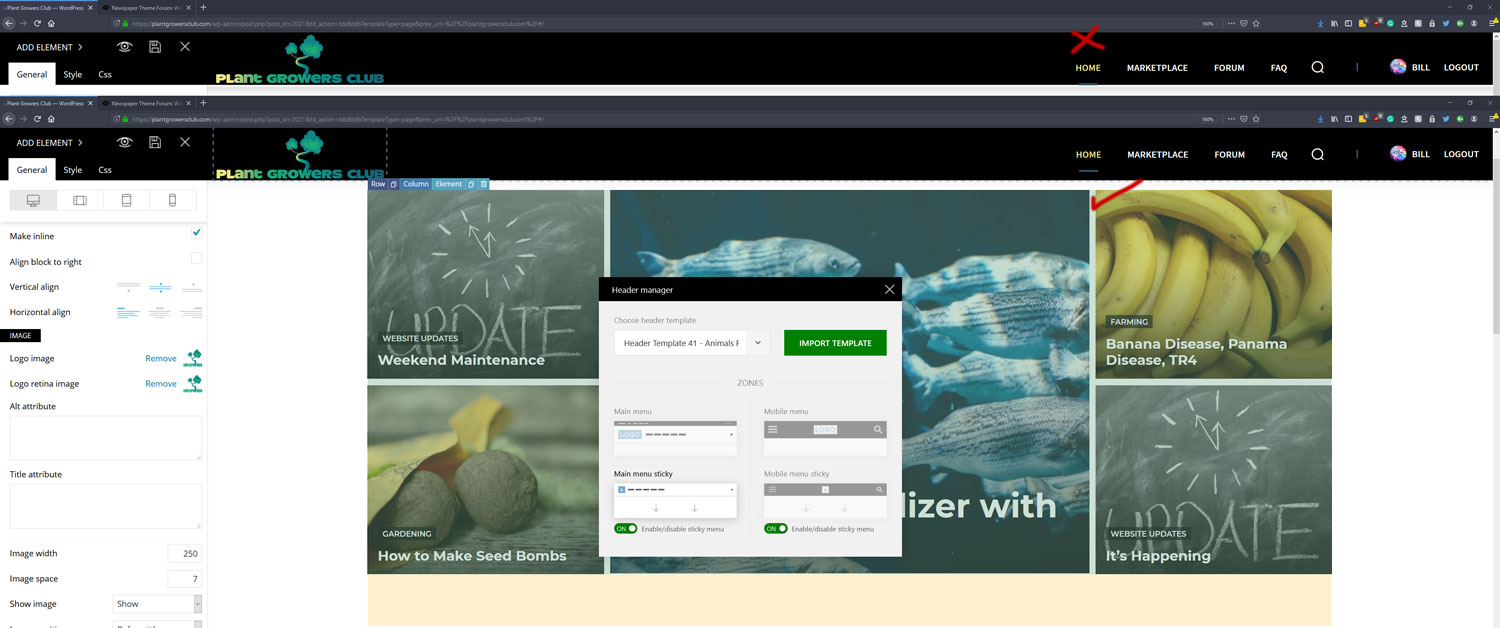
bdilI want my header logo sizing to look good with the rest of the header so I changed the image width from auto to 250 because it was making the header too big. Is this the best way to do this or should I use padding in the CSS options?
How can I make my header content stay centered on both scrolling sticky and when its at the top? Right now it changes the positioning on sticky scroll.
 Kevn1988
I created some custom CSS and added this through Customize>Additional CSS to the site. The CSS is used to make a paragraph with a certain class to have a red background and a white text color. With the basic post templates, there doesn’t seem to be a problem and the changes are noticeable (box with color and changes in text color to white).
I downloaded a cloud template and notice that the CSS that the paragraph is red in background but that the text hasn’t changed and is the color of the “single post content” of the template. Is there a way to correct this?
Calin Hello,
You can trty this custom css to hide the “:”
.tag .td-page-header .td-page-title {

  overflow-x: hidden;

  text-indent: -14px;

}
, also if you want to have more control over the the tag templates, you can use a tag template from tagDiv Cloud Library.
Thank you!
 RobinKiera
 Hi,
Thank you for your reply.
1. Thank you, the code works.
2. Version 9.7.3 and Version 9.8’s child theme file (Function.php and Style.css) are the same, though I replaced it but it didn’t work. I also reuploaded td-composer plugin from downloaded zip but that didn’t work either.
3. I did that too, Deactivate all plugins and active only the newspaper theme and composer plugins, reinstalled wordpress that didn’t work too. I hard refreshed it, change browser and it didn’t work either. here is the error log
1.wp-content/plugins/td-composer/includes/wpeditor.php
Uncaught ReferenceError: ajaxurl is not defined

    at HTMLDocument.<anonymous> (wpeditor.php?wp_path=/home/digit760/public_html/:411)

    at i (jquery.js?ver=1.12.4-wp:2)

    at Object.fireWith [as resolveWith] (jquery.js?ver=1.12.4-wp:2)

    at Function.ready (jquery.js?ver=1.12.4-wp:2)

    at HTMLDocument.J (jquery.js?ver=1.12.4-wp:2)
2. Uncaught TypeError: Cannot read property 'activeEditor' of undefined
at window.loadIframe (wpeditor.php?wp_path=/home/digit760/public_html/:175)
at onload (wpeditor.php?wp_path=/home/digit760/public_html/:278)
window.loadIframe @ wpeditor.php?wp_path=/home/digit760/public_html/:175
onload @ wpeditor.php?wp_path=/home/digit760/public_html/:278
the same file as above.
3. If I use a child theme, the following error will be added to console log.
.....wp-content/themes/Newspaper-child/font-newspaper.css?ver=9.8 net::ERR_ABORTED 404 (Not Found)
RobinKieraSo I updated to new Theme, new child theme and all plugins.
1. This issue came up: https://nimb.ws/XU0N3A on post and page, It works when I deactivate tagdiv composer. The problem lies in post, page. It also works on classic builder and when I install Gutenberg plugin By Gutenberg Team but not in default like it used to.
2. Template is missing. Standalone themes need to have a index.php template file. Child themes need to have a Template header in the style.css stylesheet. I see this error even I have updated all files from the zip I download. I double checked and all file are there. https://nimb.ws/NG8Ted
3. Wp Editor error, https://nimb.ws/rx73wR can’t save nor can I switch. This problem was there before update.
Thanks
 smehr1
 Figured it out. Here is the code I ended up using in the Advanced CSS settings for desktop: .woocommerce ul.products li.product a img{
width: 200px;
}
Here is CSS for both tablet modes: .woocommerce ul.products li.product a img{
width: 75%;
}
If there is a better way to do this, please advise – no expert at css :o)
 Vlad S
 Hello !
You can remove only that paragraph: https://www.screencast.com/t/CrI1CPAAuCE But you will have to do it via HTMl because css will not cover that.
Also please note that this is not a Newspaper Theme Support request and due to our support policy we are not able to offer support :https://forum.tagdiv.com/newspaper-theme-support/
Thank you !
Vlad S Hello !
You will have to go into tagdiv composer, select viewport and edit each file in the CSS tab as you can see here : https://www.screencast.com/t/y9l3tOg89ZE
Thank you !
 smehr
smehrOur shop page is 34northdrones.com/shop. The current layout of this page shows the product images blurry. I tried to change this by adding this CSS but it did not work:
.woocommerce ul.products li.product a img:{width: 50%}
I want to reduce the image size so that the responsive layout doesn’t make the images larger than the original product feature image. Is there a solution that would reduce the product thumbnail image for both the shop page and all the category pages, where we have the same issue? See example https://www.34northdrones.com/product-category/drones/
 Desukiri
 But I know a site that has the social widget in style 7 in the sidebar without any problems. It doesn’t look like this site has rewritten the plugin with CSS, the style looks very similar to the original one. Do you know a way to set this up?
This is the example page:
https://www.anime2you.de/news/322543/die-top-20-meisterwarteten-herbst-serien-2019-in-japan/
Vlad S Hello !
Here are the 2 css codes: .td_block_related_posts .entry-title {
font-size: 15px;
font-family: 'Days One', sans-serif;
}
.td_block_related_posts a {
color:#001f59;
}
The code must be inserted here: https://www.screencast.com/t/g0qQaTrga
I hope you will find this helpfull !
Thank you !
Vlad S Hello !
I couldn’t find any Related articles tab in your page. Please provide a link to a page and I will help with some css in order to edit it.
Unfortunately the thumbnails size cannot be changed but the colour and the font can be edited.
Thank you !
 juanca1612
 Hi Simion C.
The css code does not work, still the same.
 Simion C.
 Hi,
You should enter it in the mobile theme custom CSS section – https://prnt.sc/p7sb84 Should work fine, I can modify the code if needed, let me know.
Thanks


