- NewspaperWP Rocket and Newspaper Theme: Optimization Guide
- TutorialsFrom WPBakery to tagDiv Composer
- TutorialsDefault Block Settings Guide
- TutorialsHow to use custom fonts
 Simion C.
 Hi,
By default there is a margin of 70px there, it could be reduced with a code like this
– https://www.screencast.com/t/YwTJ0FJtURNu
.td-404-sub-sub-title {

margin-bottom: 35px;

}
Modify the code if needed with your own desired value, and enter it in theme panel->Custom CSS section.
Thanks
 Bogdan B.
 Hello,
If you do not show any meta info, then you will have to remove it with css.
Please add this code in your theme panel-> custom code section under custom css:
.td_module_17 .td-module-meta-holder{

background-color:transparent;

}
Thank you!
 Catalin
 Hello ipi_login,
Please notice that the speed of your website depends on how well your site is optimized. Notice that is not a simple task and if you do not have any experience in this regard you will do not bring good results for the theme. Also, notice that we have a speed optimization tutorial but this is addressed only to advanced users. So, if you follow the steps which are presented in this tutorial here -> https://forum.tagdiv.com/how-to-make-the-site-faster/ you can increase the page speed loading and if you are not aware of the steps in this regard, please consider hiring a freelancer/developer to help you because the speed optimization services are not covered by our support policy, as you can read here -> https://forum.tagdiv.com/support-policy-2/ Check our documentation here -> https://forum.tagdiv.com/requirements-for-newspaper/ regarding on dedicated server to fit our requirements.
Unfortunately, our theme does not have such an option to minify the style.css file and we cannot recommend any plugins with this functionality because is not tested with our theme. For minifying this file, we are using CloudFlare for our demo and works fine. If you want to read other views from our users, please check this topic -> https://forum.tagdiv.com/topic/tip-how-to-easily-minify-your-css-without-breaking-your-site/
One of our top members here on the forum wrote his own optimization tutorial here:
https://forum.tagdiv.com/topic/tutorial-chriss-custom-optimizations-for-functions-php-etc/ and here -> https://www.infophilic.com/get-almost-100-pagespeed-newspaper-theme/
Basically, these are the theme requirements
– https://forum.tagdiv.com/requirements-for-newspaper/
Thanks for your understanding!
Simion C. The bold tag corresponds to the font bold value. You could modify it for all of them at once with a code. For example all the b tags in a post content
– https://www.screencast.com/t/f97r0nWh1Xkb
.td-post-content b {

font-weight: 400;

}
This code can be entered in Theme panel->Custom CSS.
Or for all the instances the b or strong tags are used
b, strong {

font-weight: 400;

}
Thanks
Catalin Hello Hannes,
Here is talking about Block Title and please notice that does not have any link to your categories. If you do not want to have block title, you simply edit your block from page builder and remove the name of it or you can use a bit of CSS code to hide them.
You should use the code below and place in Theme panel -> Custom CSS area.
The code is ->
.block-title{

display:none;

}
Thanks.
Simion C. Try a code like this, I believe that is how you want the tags to look
– https://www.screencast.com/t/I2alpldsE7g
– https://www.screencast.com/t/1cZAXNuBuoDN
.td_block_4 .td-module-image .td-post-category {

margin-right: 0;

bottom:auto;

top:0;

left:30%;

right:30%;

display: inline-block;

}

.td_block_4 .td-module-image{

text-align: center;

}
Enter the code in Theme panel->Custom CSS section.
Simion C. Indeed I have not tried to load additional posts. It seems the images are not loaded since they are considered insecure content. If you recently switched to HTTPS make sure you have done it properly
http://www.wpbeginner.com/wp-tutorials/how-to-add-ssl-and-https-in-wordpress/
https://css-tricks.com/moving-to-https-on-wordpress/
https://yoast.com/dev-blog/move-website-https-ssl/
https://forum.tagdiv.com/topic/moving-to-ssl/
 brent
brent Would modifying the style.bbpress.css directly, and keeping an up to date backup which would be restored after a theme update, be the right way to go?
 ocadmin
 This is the URL to the site: http://southbostontod.staging.wpengine.com/
I have tried all of the other menu types but I like this layout the best im sure I just need some custom CSS.
 rafael-l
 Hi there again, i will post this here because is related, so the thing is i just applied the theme on the actual site and i have one last, but VERY SEVERE problem with the ads that happen only on Google Chrome, sometimes in Microsoft Edge, but never on Firefox.
I’m using 1 responsive and 1 native adsense blocks with the plugin quick adsense (i don’t use the native theme tool because the ads become very small than they supposed to be with the automatic function, so for me it dont work good, far from it actually).
The thing is i used this code on theme panel >> custom code >> Advanced CSS >> Desktop
.td-post-content {
padding-left:6%;
padding-right:6%;
}
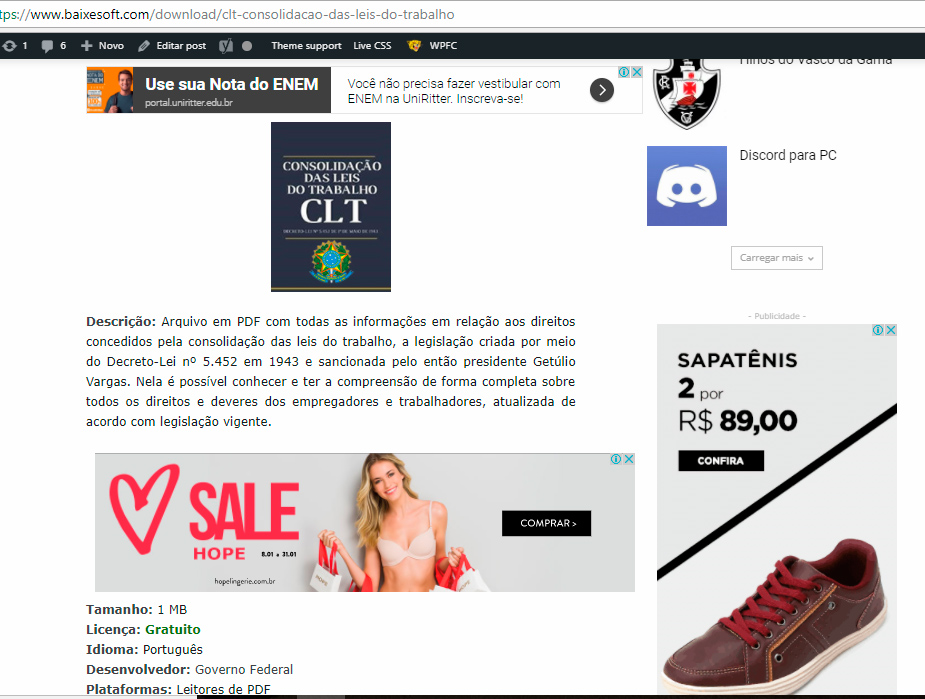
And the ads on chrome become outfited with the content like this: https://www.baixesoft.com/wp-content/uploads/2018/01/Ad-bug-on-chrome-1.jpg
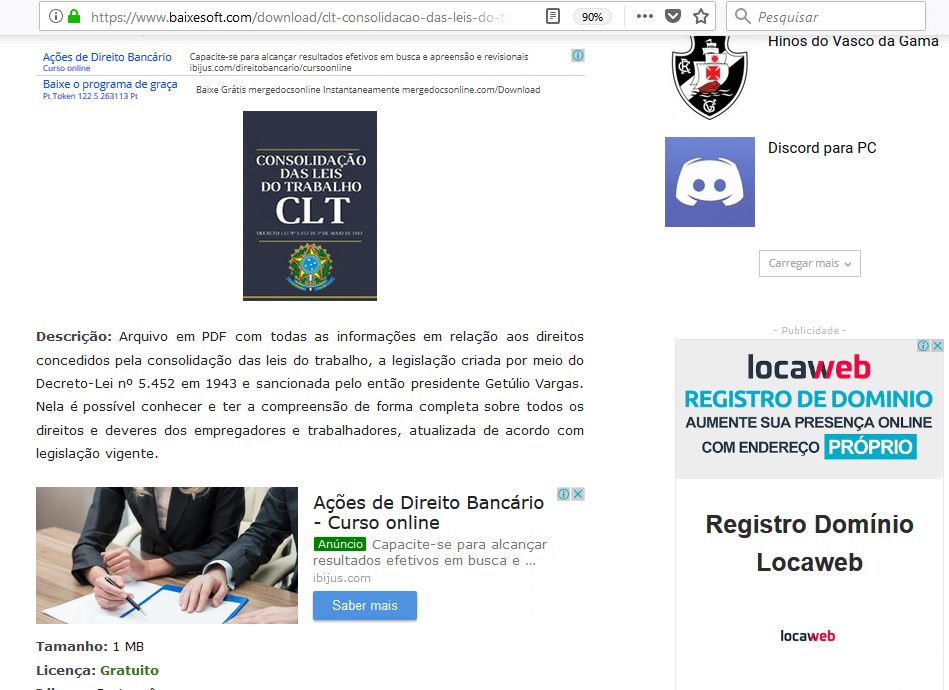
But on firefox it fit’s just nice: https://www.baixesoft.com/wp-content/uploads/2018/01/Ads-on-firefox.jpg
One example link: https://www.baixesoft.com/download/clt-consolidacao-das-leis-do-trabalho
Unfortunately 60 to 70% of my users use chrome, so this is very severe for me, i tried everything, all the others plugins, but nothing, i really don’t know what do do here anymore (tried to fiz this all day), so i’m asking for any ideas, any help, anything at all.
The solution will be to use the native option for blocks in the theme, i already tried but that automatic box for desktops junk this responsive ads real BAD, making them tiny (respectfully saying and meaning no offense)
If needed i can pay for some special service to fix this, because is a VERY SEVERE ISSUE…
-
This reply was modified 8 years by
rafael-l.
brentI’m in the process of modifying bbpress by using style.css within my child theme folder.
My issue is that style-bbpress.css already has values with !important, making my changes in style.css that require !important invalid and not recognised.
I’d rather not edit style.bbpress.css specifically as I don’t like the idea of it being lost when updates rollout.
Any advice would be appreciated on how to go about this.
Thanks
 Eric V
 Here is the link Simion.
So when i add the code to the custom CSS part in the theme panel it will work, also after an update?
Simion C. Hi,
If you choose page builder + title, then the title will be displayed on top of the page. Use the default page template if you don’t want it to show.
The breadcrumbs can be removed in the theme panel if needed for all the website
– https://forum.tagdiv.com/breadcrumbs/
The breadcrumbs will not be displayed on the homepage, there is no need for that. They are generated here in each template
– https://www.screencast.com/t/PXqU9m23sk
Page builder with latest articles will always show the latest articles section in the bottom of the page. This can be removed by choosing a different page template.
The overlay menu page template will display the menu over the page content, like this
– https://www.screencast.com/t/Tiwv4a9NnH
The year could be displayed with this code
– https://www.accessc.com/articles/copyright-year-update.html
– https://www.screencast.com/t/xqlnRb0fM
– https://www.screencast.com/t/yNSvBKIhWdn
Try changing the colors in the theme panel
– https://www.screencast.com/t/s8Cj92MGRv
The demo has custom design, so if at the moment of creating it there was no theme panel option for that color, it was set with CSS
– https://www.screencast.com/t/38DQ0ZhPSEjG
Remove the design from the demo stylesheet and the theme panel option should apply.
Thanks
Catalin Hello agidulyan,
Please notice that the Viber and WhatsApp are available only for mobile devices. Let us know if you want to be visible these social networks for the desktop version. You can enable it from custom CSS code.
Thanks for the message!
 Pradeep Augustine
Hello I have recently started using the tagdiv composer and deleted visual composer. Currently the mobile theme is active. How to hide the featured image displayed at the top of each pages for a particular category. I’m looking for a simple CSS solution. I hear that the official AMP plugin will be released soon. What about the mobile plugin after that. Is it mandatory to use both the plugins or just the AMP. I have another blog that requires AMP support. Can I wait for the official AMP plugin or the official AMP plugin?
Thanks in Advance.
Catalin Hello Jeff,
Do you are referring to these tags from here -> https://www.screencast.com/t/LVBy0rRG You should use a bit of CSS code for hiding these elements. If is not what you mean, please provide more details so I will be able to provide a more accurate response.
Thanks for your understanding!
Simion C. Hi,
1. You could add an empty space element below the events grid
– https://www.screencast.com/t/ZOnyCeL4
This element can have a height set by you in it’s settings. Or even set a margin bottom to the grid, in the CSS tab
– https://www.screencast.com/t/gD4bI1qD6eV
2. That is happening because of a condition in the demo
– https://www.screencast.com/t/rrdvxGghPFO
If you were to remove that condition it would appear like this
– https://www.screencast.com/t/ZRZLXVQf9H
3. Check if the modal image is enabled in the theme panel
– https://forum.tagdiv.com/modal-window/
It should apply to all post content images once enabled in the theme panel, now it seems to be disabled.
Thanks
 Filandor
 Third question – I changed black version color of demo. In what css class is thise black part of megamenu – http://dl4.joxi.net/drive/2018/01/25/0000/0020/4116/16/6d5df222a6.png ?
Simion C. Hi,
It seems the posts have reviews, and they are hidden with CSS code. That will not be necessary, there are options now to choose if you want to display the review stars or author name and date
– https://www.screencast.com/t/615dtmcY
A few versions ago that option was not available, posts with reviews would show the reviews only. The author name and date was not displayed in that case.
Thanks
Bogdan B. Hello,
Please add this custom css code in your theme panel-> custom css box:
.author-2 .author-box-wrap .desc{

margin-left:0;

}
Thank you!
Simion C. Hi,
You could use some CSS to style the scroll button as you wish. The browser inspector is a powerful tool
– https://forum.tagdiv.com/create-custom-code-using-the-browsers-inspector/
For example such a code will do the job, you can make modifications to it
– https://www.screencast.com/t/qSqAV9S1e
.td-scroll-up {

background-color: green;

opacity: .5;

}
This code can be entered in Theme panel->Custom CSS section.
Thanks
Bogdan B. Hello,
You can make this change in the tagdiv composer. Here is an example. If I want to hide a specific block on mobile:
access the block settings under css and then activate the mobile view: https://www.screencast.com/t/A7Rcyl2uk
then simply select hide from the display property: https://www.screencast.com/t/Mk03H6HGXzmL
Thank you!
Eric V Thanks Simion, that worked perfectly on my laptop, but not on mobile. How to get it fixed on mobile too?
Also, i enter a css code after each update to remove a black flash in my menubar. Can i add the code also to the custom css field, so that i wont have to add it every time after each update?
This is the code:
@media (max-width: 767px) {
.td-header-wrap .td-header-menu-wrap-full,
.td-header-wrap .td-header-menu-wrap,
.td-header-wrap .td-header-main-menu {
background-color: #fff !important;
height: 54px !important;
}
.header-search-wrap .td-icon-search {
color: #fff !important;
}
Simion C. Desktop is considered above 1141px – https://www.screencast.com/t/FSH8e92msJLA
So for screen widths higher the that, it will look properly
– https://www.screencast.com/t/dWhszweJS8pD
As the screen size decreases (considered tablet size), a different code would be needed to display properly, like this
– https://www.screencast.com/t/5FcH1pYKYuUl
Enter the previous code as mentioned, in the desktop CSS section. Enter this one in both tablet widths
– https://www.screencast.com/t/9sHPlX8qhn
.td-header-style-8 .td-header-sp-logo {

top: 20px;

}
Thanks
Bogdan B. The scroll to top button has been hidden on mobile devices by default.
If you want to enable it you must use this custom css in the theme panel-> custom css box:
@media (max-width: 767px) {

.td-scroll-up {

display: block;

}}
Thanks.