
- NewspaperWP Rocket and Newspaper Theme: Optimization Guide
- TutorialsFrom WPBakery to tagDiv Composer
- TutorialsDefault Block Settings Guide
- TutorialsHow to use custom fonts
 Anamaria
 Hi,
You can change the style for the button here https://i.imgur.com/7JhaVZy.png or using a custom code css. Please provide the link where you have a button.
Thank you!
Anamaria Hi,
Please use this custom code css .td-image-container{
pointer-events:none;
}
Set the code in Newspaper -> Theme panel -> Custom code -> Custom CSS.
Thank you!
Anamaria Hello,
If you are using the Gutenberg editor, then there will be no sidebar in the editor, this will look like this -> https://i.imgur.com/F6PUBhU.png
If you are using some classic editor plugin, then the sidebar can be removed only from the files, for this, you need to go in -> wp-content/themes/Newspaper/editor-style.css and comment these lines of CSS -> https://imgur.com/EpWJhGZ
Hope this will help you!
Thank you!
 TommyT
Hello — I’m trying to get two sites to have hyperlinks underlined vs. changing color. Do you know of a way to do this when using Newspaper, and if so — what did you do?
two websites: qcmoms.com / crmoms.com
 commandeleven
 We have no child theme, nor any CSS code added. The plugins with 12.6.1 were updated, but threw the whole site out of whack.
We updated and installed all the plugins related to 12.6.1, but when it wrecked our site, I downgraded again and fixed the mistakes caused by the update.
I am willing to give you credentials to login and sort out the problem, otherwise we will be looking for a new theme that doesn’t continuously cause problems for us.
 RKdium
Hey TagDiv Team!
First of all, I am using your theme on 10+ websites, thanks a lot for the great work over the years, happy client since 2014 🙂
I am encountering an issue on my latest website https://arretimprevu.com/:
The google fonts are not laoding correctly. The problem is not permanent. For a few days, the font “Montserrat” is loading correctly (I use on the whole website). Then for a few days, there is a replacement font. Please see screens:
https://arretimprevu.com/wp-content/uploads/2023/10/fonts1.png
https://arretimprevu.com/wp-content/uploads/2023/10/fonts3.png
https://arretimprevu.com/wp-content/uploads/2023/10/fonts2.png
CSS though still shows “Montserrat”, which is weird.
Problem is on all browsers. I am using the demo “News Fast”. On anotherwebsite, I am using the same demo, but no problems with fonts.
Any idea what this can be?
 Pavol Sojka
Hi,
This is the issue: Newspaper Template is missing. Standalone themes need to have a templates/index.html or index.php template file. Child themes need to have a Template header in the style.css stylesheet. Please help
 Bettina
 Hello!
It shouldn’t be like that. Did you have some CSS codes or something custom in a child theme? Make sure that you have all the plugins installed and activated, as well as up-to-date.
Thank you!
Anamaria  brain4web
i
I’m using affiliatable tool (https://affiliatable.io/) to create comparison table.
I’m using a sidebar code but the table doesn’t display properly: https://www.guidaconticorrenti.it/conto-corrente-hello-bank/
Affiliatable support said theme CSS is overwriting the sidebar code, which is why it’s not aligned correctly and I have to contact theme support.
thanks
 datingvergleich
 I have deactivated mobile theme and AMP pages for testing, now.
However, the links to the 404 pages are still there. After investigating the source code for the desktop version of the theme, I have found following section:
</div></div><div class="tdm_block td_block_wrap tdm_block_button tdi_30 tdm-block-button-full tdm-content-horiz-right td-pb-border-top td-press-button td-move-arrow td_block_template_1"  data-td-block-uid="tdi_30"     >

<style>@media (max-width:767px){.tdi_30{text-align:left!important}}</style>

<style>.tdm_block.tdm_block_button{margin-bottom:0}.tdm_block.tdm_block_button .tds-button{line-height:0}.tdm_block.tdm_block_button.tdm-block-button-inline{display:inline-block}.tdm_block.tdm_block_button.tdm-block-button-full,.tdm_block.tdm_block_button.tdm-block-button-full .tdm-btn{display:block}.tdc-row .tdi_30 .tdm-btn{height:auto;padding:15px 25px}@media (min-width:768px) and (max-width:1018px){.tdc-row .tdi_30 .tdm-btn{height:auto;padding:12px 20px}}</style>

<style>.tdc-row .tdi_31{padding:15px 25px;height:auto;line-height:1}.tdc-row .tdi_31 i{font-size:16px}body .tdc-row .tdi_31 .tdm-btn-icon:last-child{margin-left:10px}body .tdc-row .tdi_31{background-color:var(--tt-accent-color)}body .tdc-row .tdi_31:after{background-color:var(--tt-hover)}body .tdc-row .tdi_31 .tdm-btn-text,body .tdc-row .tdi_31 i{color:#ffffff}.tdc-row .tdi_31 svg{fill:#ffffff;fill:#ffffff}.tdc-row .tdi_31 svg *{fill:inherit;fill:inherit}body .tdc-row .tdi_31:hover .tdm-btn-text,body .tdc-row .tdi_31:hover i{color:#ffffff;-webkit-text-fill-color:unset;background:transparent;transition:none}body .tdc-row .tdi_31:hover svg{fill:#ffffff;fill:#ffffff}body .tdc-row .tdi_31:hover svg *{fill:inherit;fill:inherit}body .tdc-row .tdi_31 i{color:#ffffff;-webkit-text-fill-color:unset;background:transparent}body .tdc-row .tdi_31:hover i{color:#ffffff;-webkit-text-fill-color:unset;background:transparent;transition:none}.tdc-row .tdi_31:before{border-width:0px;border-style:solid}.tdc-row .tdi_31{font-size:16px!important;line-height:1.2!important;font-weight:600!important;text-transform:uppercase!important;letter-spacing:0.5px!important;height:auto}@media (min-width:768px) and (max-width:1018px){.tdc-row .tdi_31{padding:12px 20px;height:auto;line-height:1}.tdc-row .tdi_31{font-size:14px!important}}</style><div class="tds-button td-fix-index"><span class="tdm-btn-text">See pricing</span><i class="tdm-btn-icon td-icon-arrow-right-rounded"></i></div></div></div></div><div class="vc_column tdi_33  wpb_column vc_column_container tdc-column td-pb-span4">

<style scoped>.tdi_33{vertical-align:baseline}.tdi_33>.wpb_wrapper,.tdi_33>.wpb_wrapper>.tdc-elements{display:block}.tdi_33>.wpb_wrapper>.tdc-elements{width:100%}.tdi_33>.wpb_wrapper>.vc_row_inner{width:auto}.tdi_33>.wpb_wrapper{width:auto;height:auto}.tdi_33{justify-content:center!important;text-align:center!important}@media (min-width:768px) and (max-width:1018px){.tdi_33{padding-top:30px!important;width:36%!important}}</style><div class="wpb_wrapper" ><div class="tdm_block td_block_wrap tdm_block_socials tdi_34 tdm-content-horiz-left td-pb-border-top td_block_template_1"  data-td-block-uid="tdi_34" >

<style>.tdm_block.tdm_block_socials{margin-bottom:0}.tdm-social-wrapper{*zoom:1}.tdm-social-wrapper:before,.tdm-social-wrapper:after{display:table;content:'';line-height:0}.tdm-social-wrapper:after{clear:both}.tdm-social-item-wrap{display:inline-block}.tdm-social-item{position:relative;display:inline-block;vertical-align:middle;-webkit-transition:all 0.2s;transition:all 0.2s;text-align:center;-webkit-transform:translateZ(0);transform:translateZ(0)}.tdm-social-item i{font-size:14px;color:var(--td_theme_color,#4db2ec);-webkit-transition:all 0.2s;transition:all 0.2s}.tdm-social-text{display:none;margin-top:-1px;vertical-align:middle;font-size:13px;color:var(--td_theme_color,#4db2ec);-webkit-transition:all 0.2s;transition:all 0.2s}.tdm-social-item-wrap:hover i,.tdm-social-item-wrap:hover .tdm-social-text{color:#000}.tdm-social-item-wrap:last-child .tdm-social-text{margin-right:0!important}</style>

<style>.tdi_35 .tdm-social-item i{font-size:14px;vertical-align:middle}.tdi_35 .tdm-social-item i.td-icon-linkedin,.tdi_35 .tdm-social-item i.td-icon-pinterest,.tdi_35 .tdm-social-item i.td-icon-blogger,.tdi_35 .tdm-social-item i.td-icon-vimeo{font-size:11.2px}.tdi_35 .tdm-social-item{width:28px;height:28px;margin:5px 10px 5px 0}.tdi_35 .tdm-social-item i{line-height:28px}.tdi_35 .tdm-social-item-wrap:last-child .tdm-social-item{margin-right:0!important}.tdi_35 .tdm-social-item i,.tds-team-member2 .tdi_35.tds-social1 .tdm-social-item i{color:var(--tt-accent-color)}.tdi_35 .tdm-social-item-wrap:hover i,.tds-team-member2 .tdi_35.tds-social1 .tdm-social-item:hover i{color:var(--tt-hover)}.tdi_35 .tdm-social-text{display:none;margin-left:2px;margin-right:18px}@media (min-width:768px) and (max-width:1018px){.tdi_35 .tdm-social-item i{font-size:12px;vertical-align:middle}.tdi_35 .tdm-social-item i.td-icon-linkedin,.tdi_35 .tdm-social-item i.td-icon-pinterest,.tdi_35 .tdm-social-item i.td-icon-blogger,.tdi_35 .tdm-social-item i.td-icon-vimeo{font-size:9.6px}.tdi_35 .tdm-social-item{width:24px;height:24px}.tdi_35 .tdm-social-item i{line-height:24px}}</style><div class="tdm-social-wrapper tds-social1 tdi_35"><div class="tdm-social-item-wrap"><i class="td-icon-font td-icon-instagram"></i><span style="display: none">Instagram</span></div><div class="tdm-social-item-wrap"><i class="td-icon-font td-icon-linkedin"></i><span style="display: none">Linkedin</span></div><div class="tdm-social-item-wrap"><i class="td-icon-font td-icon-twitter"></i><span style="display: none">Twitter</span></div></div></div><div class="td_block_wrap td_block_raw_css tdi_36 td-pb-border-top td_block_template_1"  data-td-block-uid="tdi_36" ><div id=tdi_36 class="td_block_inner td-fix-index"><style>.td-coaching-mm .td-sd-menu-icon.tdm_block_icon_box {

  cursor: pointer;

}

.td-coaching-mm .td-sd-menu-icon.tdm_block_icon_box .tdm-col-icon {

  transition: padding 0.1s ease-in-out;

}

.td-coaching-mm .td-sd-menu-icon.tdm_block_icon_box:hover .tdm-col-icon {

  padding-right: 10px;

}

</style></div></div></div></div></div></div></div></div>
Here, these problematic links are inserted in the header section. However, the links are not visible (i.e. hidden) on the rendered web pages and I cannot find them in the tagdiv composer templates.
Do you have a clue how to remove them and why/how they are inserted?
Bettina Hello!
Please note that the Opt-in builder plugin is different than Newsletter plugin: https://forum.tagdiv.com/the-newsletter-plugin/ (Copy-paste the URL manually in a new tab)
Try to use the Raw HTML, and style it via CSS.
Thank you!
 amjad
amjadi have the TODAY NEWS PRO demo,
i convert style.css code to rtl and i have create a rtl-style.css and uploaded.
i add code to replace the style.css with the rtl when i change the language, but is not work… its ok!
The important thing is when i replace the style.css code with the new one (copy / paste), nothing change !!!!
and when i edit anything in css custom code, there is nothing changed.
i am try with delete cash, another browser.. etc, still not working.
datingvergleichDear Support Team,
on tools like GTmetrix and Google Page Speed Insights there is an issue with loading fonts and icons of the Newspaper theme (on mobile devices).
This causes problems with First Contentful Paint and Last Contentful Paint metrics.
Please kindly refer to this screenshot:
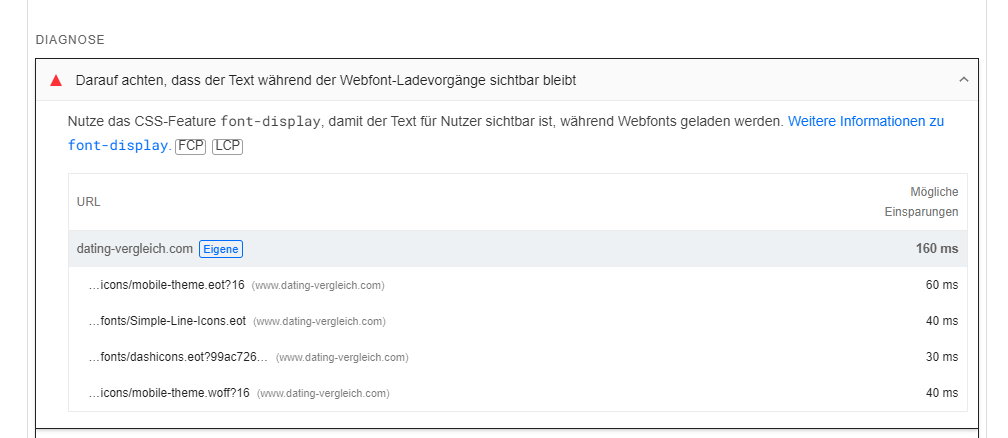
Is there the option to implement the CSS-Feature font-display for these fonts?
Thank you for a brief feedback!
Kind regards
Joachim
 Calin
Calin Hi,
The only way to do this is with a custom css, you can try this one:
.author-box-wrap{ pointer-events: none; cursor: pointer; }
Set the css in the theme panel > custom code> custom css.
Thank you!
Calin Hello,
That underline color is coming from an extra class that is set on body – https://i.imgur.com/yoTzTVk.png
If you only want to change the color you can don it be editing the css –
body.td-newsmag-voice .wpb_wrapper .td_block_template_1 .block-title span:after {

    background-color: #f18506;

}
The css needs to be set in the theme panel > custom code> custom css – https://i.imgur.com/YET1rKr.png
Thank you!
 the-website-builder
Hey there!
I’m going to try to keep my request super simple. I’ve read through about 15 posts in your forum here and none of the suggestions are helping. I’m not a CSS expert, but I definitely tried everything suggested and I’m still struggling.
All I’m trying to so is to make the sidebar/column sticky within the the Crypto News theme/template (I have the full Crypto News Demo site installed), and I’m trying to edit the “Single Template – Global”. I’m also running the latest version of your theme on WordPress 6.3.2. (Brand new install of everything on a new WordPress site this past week).
When I make the “Stay in the Loop” column sticky, the column WILL move up and down the page as a sticky column, however the column doesnt start to move until you are halfway down the contents of the column (the column doesnt “stick” until Ive scrolled down to about the middle of the column”)
I would like to make the “Stay in the Loop” column sticky starting at the top of the column where it says “Stay in the Loop”.
I’ve tried playing with -200 and 200 padding/margins in the CSS for the column (and higher and lower values), this doesnt help with the column becoming sticky when scrolling down, however it does affect the “timing” of when the column scrolls back up again.
I’ve also tried playing with the Sticky offset, which doesn’t seem to do anything at all, which confuses me. If I set sticky offset from 100 to 400 lets say, nothing changes…if I set the offset to 1000 or greater, the sticky column is no longer “sticky” at all even when “Sticky” is checked.
Can you please just install the Crypto News Demo site with all the content, and let me know what settings I need to change to make this work properly? I would appreciate this time-saving help. I’ve spent about 2 hours on this so far.
Thank you in advance for your time and help with this 🙂
 Iqtidar
 I’ve been waiting days to hear an answer to this issue. In my further research, the issue has to do with how the YouTube embed function is working.
The CSS that adjusts the dimensions of the video is loaded later and the page is rendered first, this shows the video Outside the Viewport at first (this is what the Google crawler sees and renders). The video is adjusted perfectly later on. But Google marks it as Outside the Viewport area (see screenshot below).
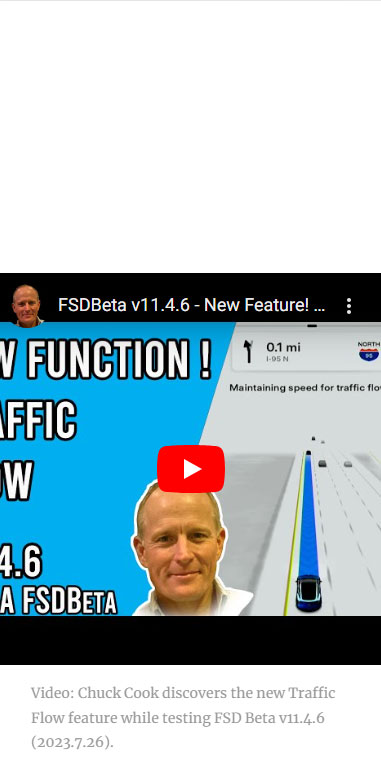
This screenshot was taken from this URL: https://www.teslaoracle.com/2023/08/02/tesla-adds-the-traffic-flow-speed-matching-feature-for-highways-in-fsd-beta-v11-4-6-video/
Calin Hi,
You can try this custom css:
.tdb_header_menu .tdb-menu>li:last-child>a .tdb-menu-item-text {

    text-transform: initial;

}
The code needs to be set in the theme panel – https://i.imgur.com/YxRIZzt.png
If is not apply for you, please provide a link to the website and I will adjust the code.
Thank you!
Anamaria Hi,
Please deactivate, delete and reinstall tagDiv Composer and tagDiv Cloud Library from Newspaper plugins => https://www.screencast.com/t/OrzLvR2j and clear all cache.
Also, please go to the theme panel -> block settings -> inline css and disable the option to minify the css, clear the cache and check after.
Thank you!
 elandroide
 Thank you for the info. I’ve checked the topic but it’s not working on my site. I’ve tried to get the underline by default for all the links inside the posts with this code and it doesn’t make any changes:
.tdb_single_content a {
border-bottom: 1px solid #ed1d25;
}
.tdb_single_content a:hover {
color: ##00a7c9;
}
Also I’ve tried this piece of CSS code recommended in the topic and still can’t get the underlined links:
.wpb_text_column a, .wpb_text_column a:hover, .td_block_text_with_title a, .td_block_text_with_title a:hover{
text-decoration: underline red!important;
}
Can you help me, please? Here’s a post of my website if you want to check: https://misterkernel.com/google-and-universal-music-want-artists-to-get-paid-for-ai-generated-music
Thank you in advance!
 franchisegoal
I’m facing performance and functionality issues with the LiteSpeed Cache plugin on one of my websites. Unlike the main domain, this site experiences slow page loads and non-functional JavaScript elements with the same plugin settings.
Problem Description:
Slow Page Load: The website loads slowly with the LiteSpeed Cache plugin active, impacting the user experience.
JavaScript Issues: Key JavaScript features, like next/previous buttons and drop-down menus, do not work when the plugin is enabled.
Plugin Settings:
Plugin Version: 5.7
CSS Optimization: https://prnt.sc/kjbJakk9N2du
JavaScript Optimization: https://prnt.sc/9OsqnNNIDocv
I’ve tested various configurations but haven’t resolved the issues, suggesting a compatibility problem.
I request your assistance to investigate and resolve these issues to optimize website performance.
Please let me know if you need more information or access for debugging. FYI, I have disabled the plugin on my website as it was impacting the user experience.
Your prompt support is appreciated.
Best regards,
Gaurav
Calin Hi,
This can be done in a few ways, but depends on the current settings you have on menu. If the menu option is set to take the default text format from menu, then the text will be display as it is written, if the text is set in menu to be uppercase, then you need to use an extra class on that menu element and set with custom css that text to be lower-case or camelCase.
Thank you!
 Doan Thanh Nhut
 No, I mean when I hover my mouse over, a bubble with the word Search appears. It is CSS Hover
You can see: https://gatebliss.com/
-
This reply was modified 2 years by
Doan Thanh Nhut.
elandroideHi,
Is there any way to show every link inserted in each post and page to be underlined by default? I know the links get an underline when you move the mouse over the link, but I want it to appear always underlined, so the links are more visible and differentiable from plain text for people with sight problems.
You can differentiate links by the colour, but if I use a bright colour Google Pagespeed Insights says that there’s not enough contrast with the background, and if I use a darker color then it’s more difficult to differentiate links from regular plain text. So, the best solution is to use an underline for every link in the posts. That way Google Pagespeed Insights is happy and the accesibility of my webpage also gets improved. Maybe some CSS code can solve the issue or there’s an option in the Newspaper theme I haven’t seen yet?
Thank you very much for your help.



