
No search results were found in Documentation!
 Alina S
Hello, Community!
We know you all want to make your website faster :), we want that for you, too. Newspaper theme 10 brings you a new way to build a faster WordPress website. For the first time in WordPress, you have the freedom to choose how much code the theme is loading and optimize your website’s performance straight from the beginning.
To give you this functionality, we’ve introduced a new plugin called the Standard Pack (available to you for free.) When you update to Newspaper 10, you must activate this plugin, or your website will display the shortcodes on the frontend. We cannot make the plugin automatically activate for you, so you’ll need to go to WordPress Admin area > Newspaper Theme > Plugins and enable the Standard Pack plugin.
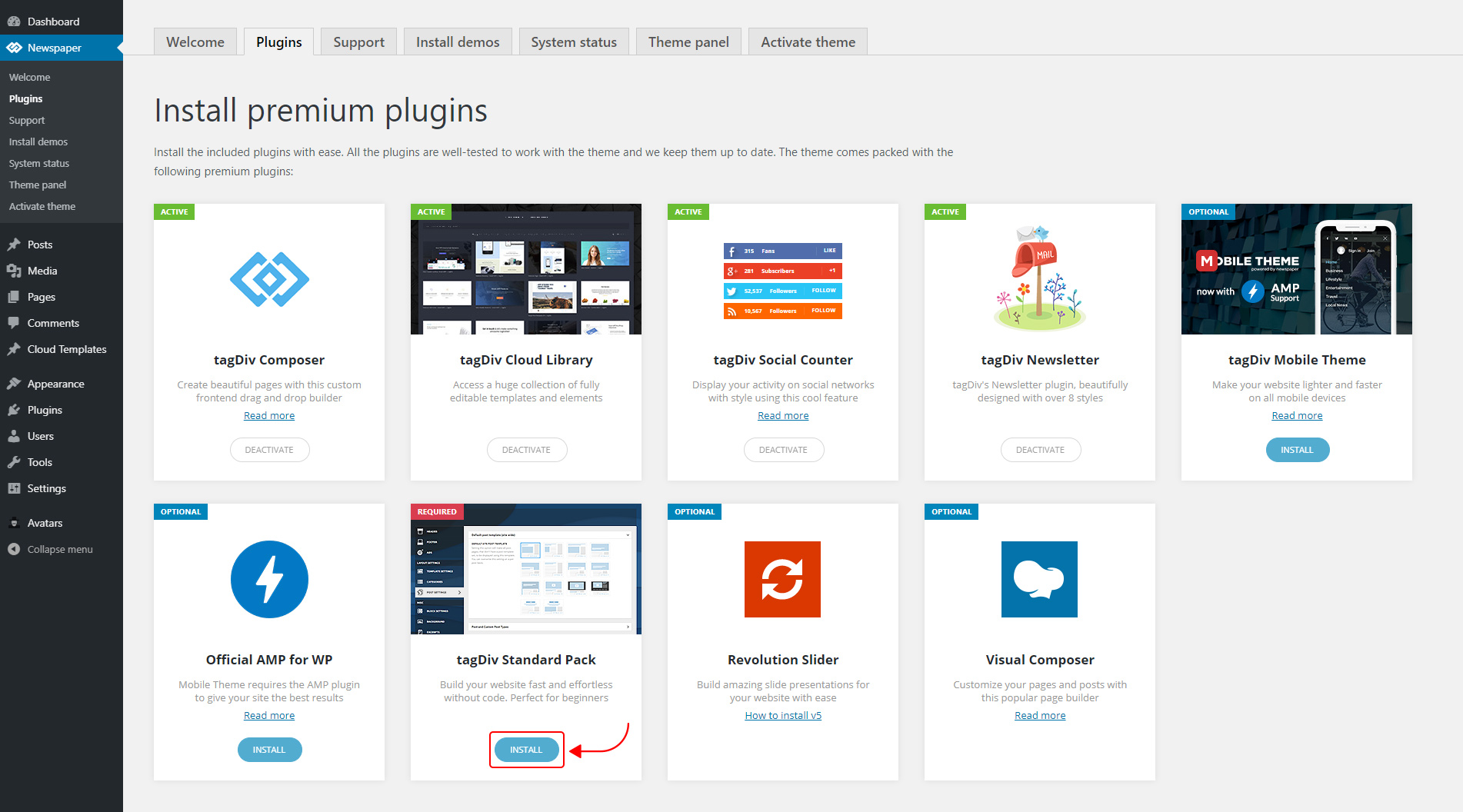
The new Standard Pack Plugin has two functions:
– it brings all the functionality you love in the previous versions
– allows you to separate things when you want to build everything customized and go for website’ performance.
The complete list of templates influenced by the Standard Pack plugin:
In the theme panel:
15 Headers
8 Category templates
10 Big Grids
19 Modules for blocks
14 Single post styles
14 Footer templates
In the tagDiv Composer:
25 Blocks
12 Big Grids
10 Big Grid Full
1 Big Grid Slide
Extra
All the demos that are not marked as PRO Demos.
You can find more details on how to use the Standard Pack Plugin in the dedicated article. When your website has no more dependencies on the Standard Pack plugin, you can deactivate it to increase the page loading time and performance.
If you need the previous version, you can download it from here (Newspaper v9.8).
I hope you’ll enjoy this update!
Thank you!
 infod9
Hi,
I just upadated Newspaper 9 theme to Newspaper X, beacuse like many other users, I was expectiong higher speed. But now I see that speed is not any better. I don’t know if I need to change any settings or I have other problems, that I don’t achive speed of your demo site (https://demo.tagdiv.com/newspaper_pro/) which is on Google PageSpeed Insights more than 90 on Mobile and Desktop. I allready have fallowed all you instructions to get more speed, this inclues installing WP Super Cache, changing setting of it and all other changes that you said I need to change for Newspaper 9. Please help.
 Amit
Amit I am facing this issue only on my one site. I am not using any predesigned demo on the site. (Not imported any demo on the website)
 ariwisnu
 One more question sir.
If i want to install another demo, do i need uninstall the older one first, or is it okay to not uninstall it?
 Vlad S
 Hello !
The PRO is just another demo, different looks but it works the same as the other ones.
I hope this was more helpful !
Thank you !
Vlad S Hello !
The PRO stands only for the name, You can easily switch from one demo to another and if you want to make changes you can make them using the tagDiv Composer.
Thank you !
ariwisnuI have my website installed with Default newspaper demo. Recently I updated my theme to Ver.10 via Envato Market Plugin.
Now I really want to use the new Default Newspaper pro.
1. How to change my current Default Newspaper to the Default Newspaper Pro?
2. Do I need to uninstall this one http://prntscr.com/pt6pxd (the demo I installed earlier)?
3. If I install the Default Newspaper Pro, how to make it not change all of my content that I’ve make with the old Default Newspaper?
 Calin
Calin Hi,
Please check our documentation for how to install and import the revolution sliders on demos:
How to install Revolution Slider v5 -> https://forum.tagdiv.com/how-to-install-revolution-slider-v5/
Import Revolution Sliders on demos -> https://forum.tagdiv.com/import-revolution-sliders-on-demos/
Hope this will help you!
Thank you.
Calin Hi,
Please notice that the Influencer PRO is made only with tagDiv Composer and cloud templates, so the settings from the theme panel will not affect the pro demos.
In order to change the logo you need to edit the header template with tagDiv Composer -> http://prntscr.com/pt32m2 -> http://prntscr.com/pt331k
Hope this will help you!
Thank you!
 awards-webmaster
Hi,
I have imported the LifeNews demo and made some tweaks to it via fonts, colors, etc..
HOWEVER, my advertisements do NOT show up any longer on the homepage. The header ad is through the theme panel and doesn’t show. In the blocks, I’ve inserted a few, and they also do not show.
In addition, if I try to update the page in order to put SEO for the page, featured images, etc.., it redirects to the posts and nothing holds.
Can you please assist?
 Thomas
 I just paste the code like on your capture but it breaks another time the site! 🙁
/**

 * tdStyleCustomizer.js is required

 */

if (TD_DEBUG_LIVE_THEME_STYLE) {

    add_action('wp_footer', 'td_theme_style_footer');

		// new live theme demos

	    function td_theme_style_footer() {

		    ?>

            DEMOS

            BUY

		    <?php

	    }
}
add_action( 'after_setup_theme', 'yourtheme_setup' );
function yourtheme_setup() {
add_theme_support( 'wc-product-gallery-zoom' );
add_theme_support( 'wc-product-gallery-lightbox' );
add_theme_support( 'wc-product-gallery-slider' );
}
//td_demo_state::update_state("podcasts", 'full');
 Luan Morais
Hello! I installed a demo and used her home. But every time I create a page to customize, it always comes with the contents of the main page. When I try to edit this message appears “the current content was not created by TagDiv Composer!
 Artemide
Hello
I integrated in my page, as from the template demo that we installed, the instagram block. But unluckely we have an issue as you can see from our web page (http://braintechdev.it), that is pictures are not displayed
can you help us?
 Thomas Dominikowski
I have selected the “black version” demo as a basis for my website, and now I would like to slightly customize some templates, for instance the “single post” template, in the tagdiv editor. How is that possible?
I understand that I can import cloud templates from the library, and there I can find several templates for single posts from other demos. But there is no template for the “black version”.
Is there a way to edit the predefined templates in the tagdiv editor?
 vichung2018
 You can check my demo :
http://yp4.36a.myftpupload.com/category/xxx/
https://imgur.com/a/BvaRNoT
vichung2018 Please follow this link
https://demo.tagdiv.com/newsmag_video/category/tagdiv-festivals/
I will disable top grid. But i want grid 4 cols on desktop and grid 2 cols on mobile for list content BELOW Top post.
https://prnt.sc/pr81x3
 Anthony1978
See here: https://demo.tagdiv.com/newspaper_travel/
Hello if i want to change the header background image from Newspaper – Travel Guides the camel!
I get this message: Invalid data Current state has involved an issue. You could try an UNDO operation (CTRL+Z / CTRL+SHIFT+Z) What to do ?
Also how can i change the text for EDITOR PICKS and POPULAR POSTS and where can i find the POPULAR CATEGORY ?
And where can i change the footer text : ABOUT US and Follow us ?
Regards,
Anthony
 jaydeedaley1
Dear Support
I would like to change my header to the living demo header if possible but when I import the living theme header it’s blank. https://snipboard.io/sF2pi1.jpg
I notice that during the installation of the living demo no header is present. It seems as though the header is just within the theme panel header section? https://snipboard.io/JcRMPQ.jpg
But when I add an image for the background, the image is not replaced. I get the impression that the background image is changable in another location.
I look forward to hearing from you.
Thanks
JD
When I changed the header background in the dashboard
Calin Hi,
In order to do that you need to use the revolution Slider, here you can find some documentation for this -> https://www.themepunch.com/revslider-doc/add-wp-standard-gallery/#default
Here is an example -> https://www.screencast.com/t/gz5L6Gjo -> https://www.screencast.com/t/lULmo9IPF -> https://www.screencast.com/t/OP0KGwRZp -> https://www.screencast.com/t/8xzRSWT50p -> https://www.screencast.com/t/nAgnPJdY -> https://www.screencast.com/t/aQvuPQicrF
How to install Revolution Slider v5 -> https://forum.tagdiv.com/how-to-install-revolution-slider-v5/
Import Revolution Sliders on demos -> https://forum.tagdiv.com/import-revolution-sliders-on-demos/
Hope this will help you!
Thank you.
 Klinik Mata Utama
Apakah import demo memang tidak bisa di edit, saya import demo dentis tapi saya edit tidak bisa
 Snixer
I have encountered a slight problem when i was trying to replicate the single post template of the Cryptocurrency demo i am currently using.
I have no idea how to merge the 3 Blocks like you guys have in the demo content, i could use a couple of tips on how to do that.
I added a couple of images to explain visually what i am trying to do.
Thanks!
 steven777
The footer menu also is displaying in the main menu. I have spent 2 hours trying to get this right.
I started with the Animal News Demo and started modifying it.
How do I display the header on some pages and hide it on others?
 Prateek
Hi, team tagDiv.
In one of the demos “Fitness Pro”, there’s a module in which the meta info, i.e., title, category, date, author are aligned over the article image. But the module support this for one row only and in the next row it changes the lay out but I want it consistent throughout all the posts.
I want to display 9 articles 3 in each row and I want them to be sorted from latest to older. How can I do that?
In this screenshot there are only 3 articles. How can I display 9 articles but in three rows. Not in three tagdiv rows. I am talking about general rows. Like the 4th 5th and 6th articles should be displayed in next line(row) and so on. Hope you understand.
 Simion C.
 Hi,
That website doesn’t use the Newspaper theme, but something similar could be done with the composer.
At the top from what I can see there is simple text and an image. The composer has text and image elements you can use.
Then there are those figures. Try using the image info box element from the composer
– https://demo.tagdiv.com/newspaper_crypto/image-info-box/
You can use an image in it, add a description, also it has a button.
The title over image is similar, but doesn’t have a button, the whole element can have a custom link set however
– https://demo.tagdiv.com/newspaper_crypto/title-over-image/
Thanks
Simion C. Hi,
That looks like a gallery. Is it provided by a plugin? Is it in the post content? Also how is it integrated with the post template or post?
Would it be possible to provide a link to the staging website so I can take a look?
The theme has a gallery that you can use in posts and pages as well
– https://demo.tagdiv.com/newspaper/td-post-aston-villa-beat-liverpool-to-join-arsenal-in-the-fa-cup-final/
– https://forum.tagdiv.com/gallery-2/
The theme package does indeed contain the Revolution slider. No need to activate it, simply ignore the activation messages. It is a bundled plugin, you can use it fully without the need of a activation key
– https://help.market.envato.com/hc/en-us/articles/213762463-Bundled-Plugins
Thanks


