
No search results were found in Documentation!
 NoFrag
 Hi,
We haven’t taken the time to add an answer this topic for a while but we still have a problem.
Images still don’t load correctly since we have updated the theme last June. The problem is that we have to choose “media file” when we upload an image so that the lightbox works properly. It could be a solution, if we didn’t have thousands of old posts that don’t work correctly since the update, because uploaded images are not set with the “media file” property, but “Attachment page”. With this option, the image doesn’t show correctly, as you can see on this example : https://nofrag.com/2019/06/18/138137/
The image is visible, as you’ve written in your first reply, but if you click on the image, you’ll see the lightbox embed with your theme failing to show the image in fullscreen, displaying a message “The image could not be loaded”. As a workaround, we use another lightbox plugin (simple lightbox), which shows correctly the image (in “media file” or “attachment page” mode) but as I’ve written, it’s just a workaround: your lightbox is still called by the user click and he will see the error message before the image.
I’ve seen that click on an image calls a JS script which use “magnific popup” script (https://github.com/dimsemenov/Magnific-Popup) in your td composer plugin, and I’ve found no option to disable this script. We have already installed the last release of this plugin but it doesn’t fix our problem.
We would like to use your lightbox instead of using a third party plugin, or completely disable your lightbox if you’re not planning to fix it. Could you help us ?
 Duvelix
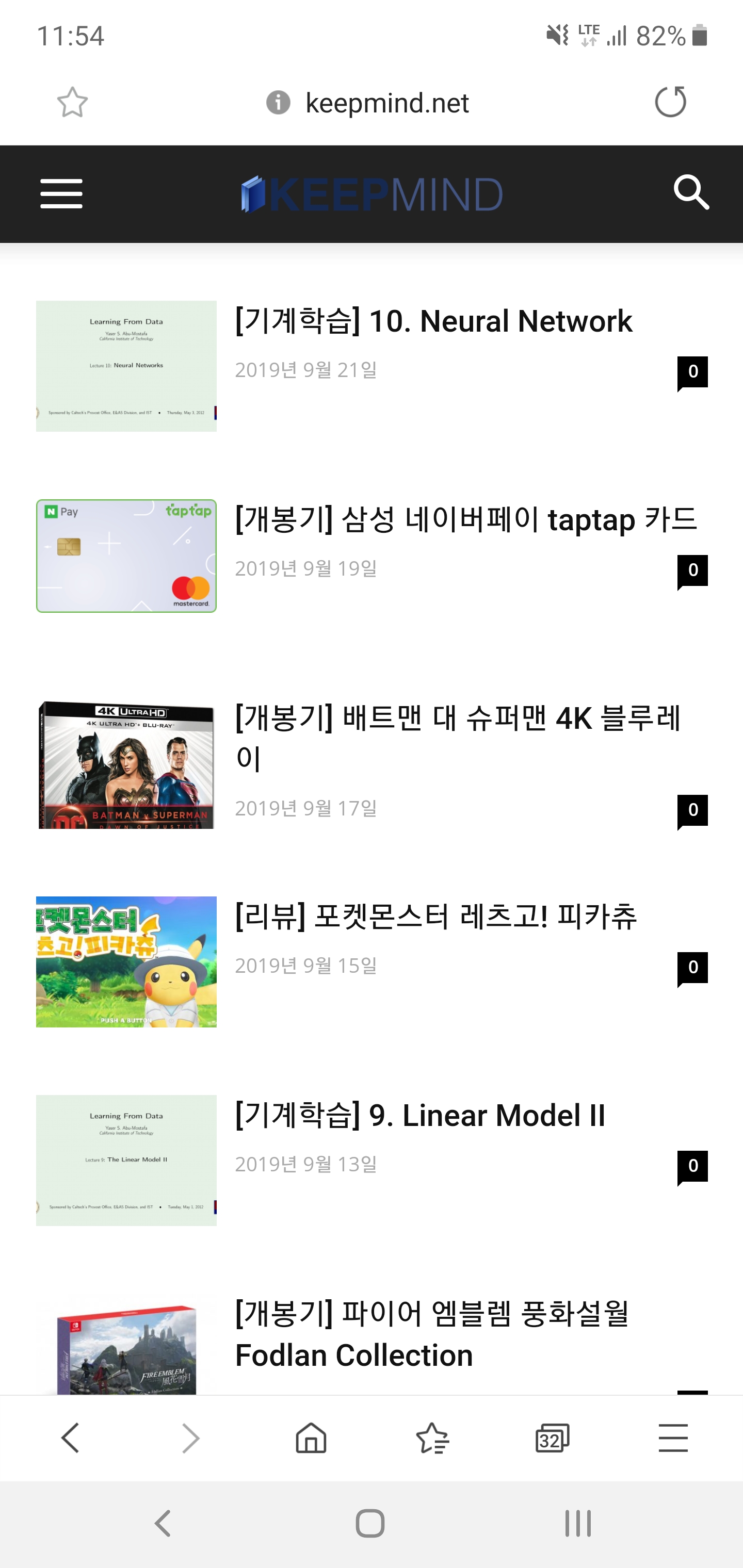

Hello, I have a problem with my blog’s logo, so I post in the forum.
I’m currently using a Journal skin in a Newspaper theme.
As you can see in the screenshot above, the background color is different on PC and mobile screens. So I have created both a regular and a dark version of my blog’s logo so that it looks good on both screens.
But there was one problem. When I click on the post on the mobile screen, the dark version of the logo appears properly. However, the general version of the logo is printed on the main page.
I want to print a dark version of the logo on the main page of the mobile screen. Can you tell me how to do it?
I’m not good at English so I hope my inquiry has been received properly.
 Edward
 With your permission I will add a small comment.
SVG (Scalable Vector Graphics) is an XML-based vector image format, so it’s better to create your logo in a vector editor (I recommend Adobe Illustrator for example). After re-saving your logo to SVG format, optimize it via this service: https://jakearchibald.github.io/svgomg/ which guarantees the correct rendering in all modern browsers.
Duvelix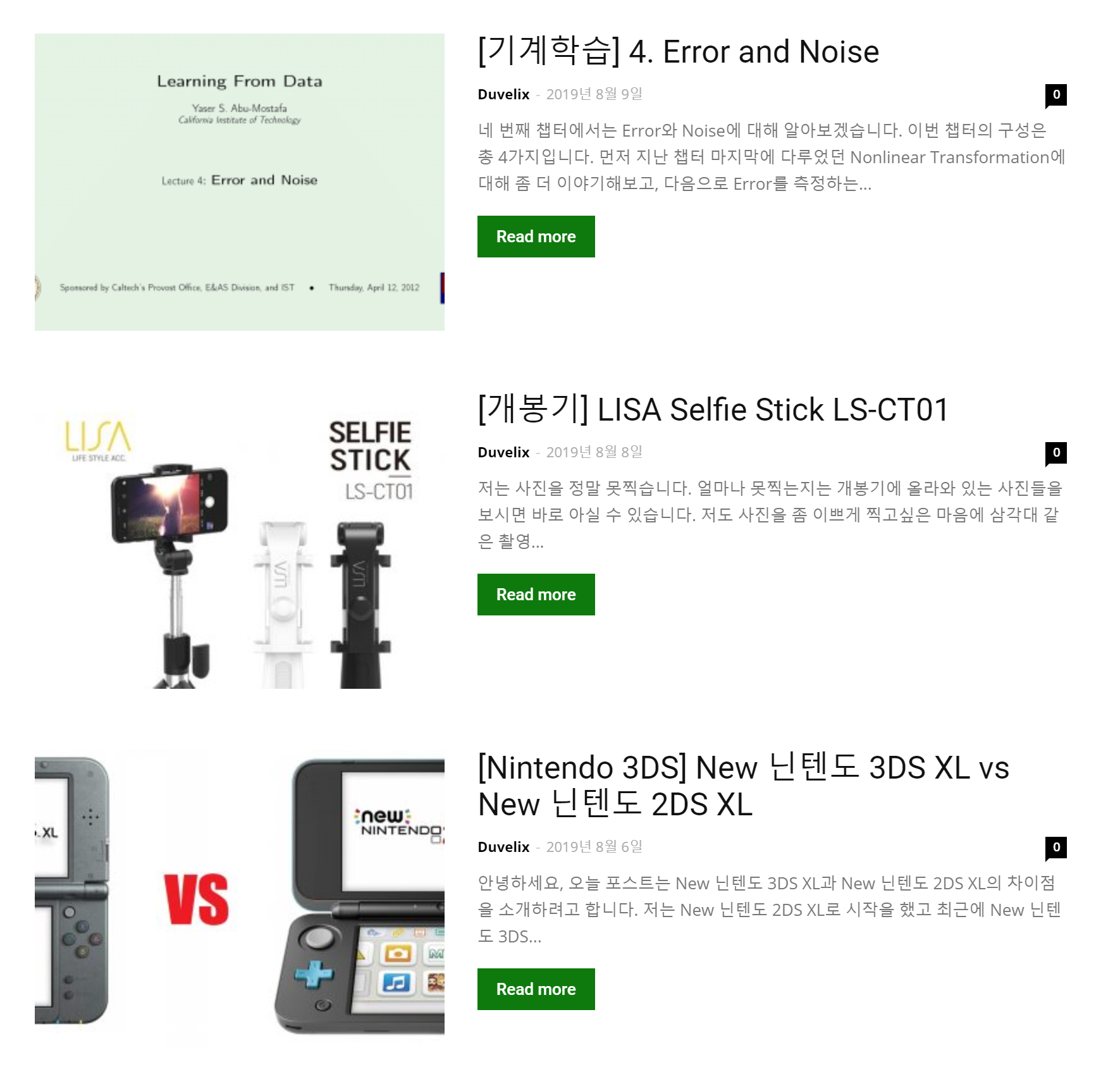
Hello, I am using Block 12 of the Newspaper Theme.
As you can see in the picture, there is a problem that the picture looks strange because the current thumbnail size does not fit.
I’m curious about the size and ratio of thumbnail images recommended by the Newspaper Theme.
It would be nice if you could tell me what size looks good on both PC and mobile environments.
Duvelix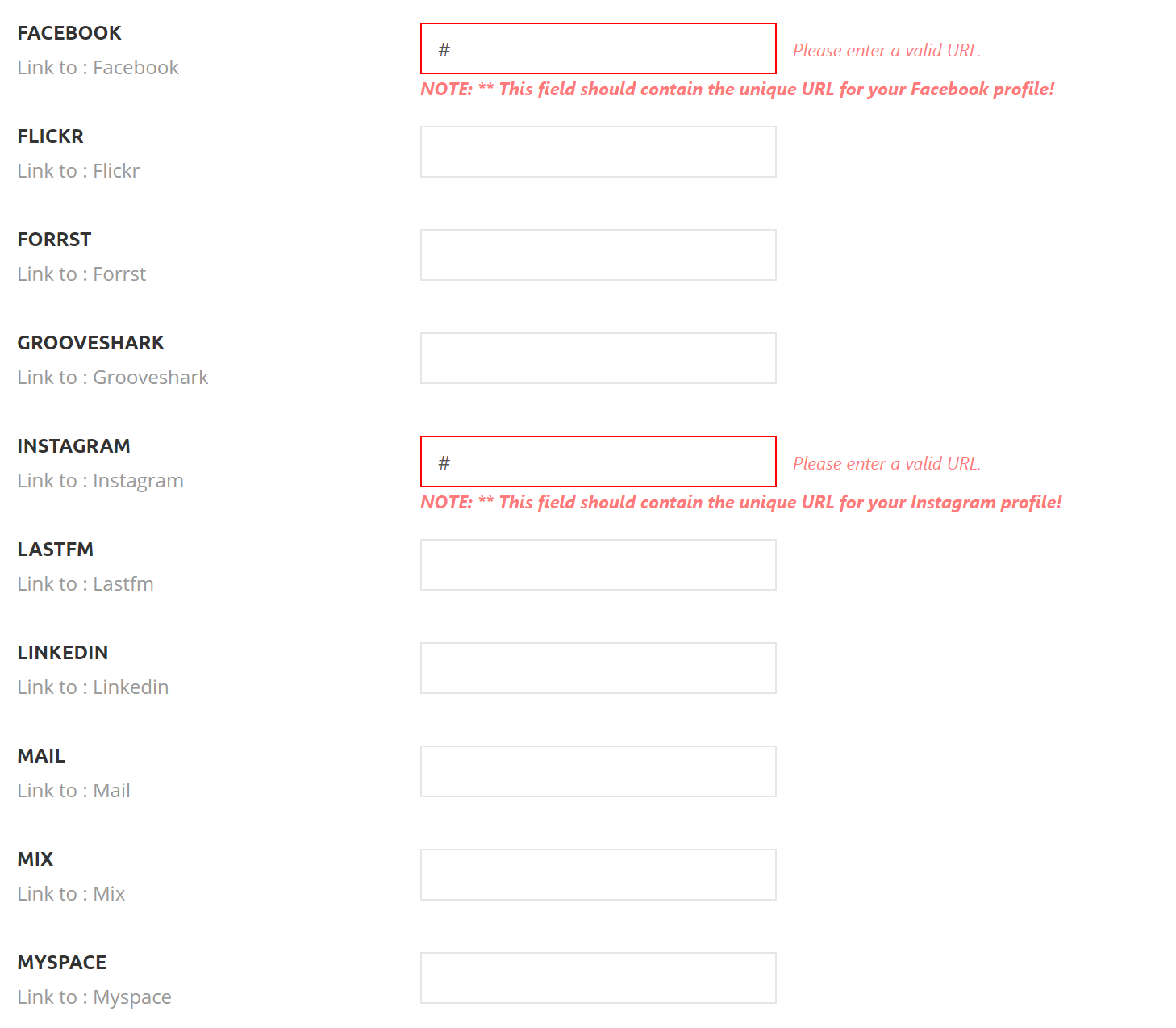
Hello, I want to add a GitHub icon in my newspaper blog.
but unfortunately, there is no option for GitHub in newspaper’s social network tab.
Can I use GitHub instead of other social networks that I don’t use? I think it just need to change the icon image.
 cantoute
 Hi Calin,
I was very busy with migrating that 140k pages site, so I didn’t take the time to look into this until now.
So I just prettified the script_for_front.js and had a quick look and the fix seams real easy.
somewhere around line 350 I see this
        a.jqueryObj.find(".tdb-head-search-form-input").keydown(function (b)

        {

          if (b.which && 39 === b.which || b.keyCode && 39 === b.keyCode || b.which && 37 === b.which || b.keyCode && 37 === b.keyCode) tdbSearch.set_input_focus(a);

          else

          {

            if (b.which && 13 === b.which || b.keyCode && 13 === b.keyCode) return b =

              a.jqueryObj.find(".tdb-aj-cur-element"), 0 < b.length ? window.location = b.find(".entry-title a").attr("href") : jQuery(this).parent().parent().submit(), !1;

            if (b.which && 40 === b.which || b.keyCode && 40 === b.keyCode) return tdbSearch.move_prompt_down(a), !1;

            if (b.which && 38 === b.which || b.keyCode && 38 === b.keyCode) return tdbSearch.move_prompt_up(a), !1;

            (b.which && 8 === b.which || b.keyCode && 8 === b.keyCode) && 1 === jQuery(this).val().length && a.jqueryObj.find(".tdb-aj-search").empty();

            tdbSearch.set_input_focus(a);

            setTimeout(function ()

              {

                tdbSearch.do_ajax_call(a)

              },

              100);

            return !0

          }

        });
looking just on the last few lines
replacing this
setTimeout(function ()

  {

    tdbSearch.do_ajax_call(a)

  },

  100);
by that
  debounce(

    setTimeout(function () {

        tdbSearch.do_ajax_call(a)

      }, 0),

    250

  );
first you would need this https://davidwalsh.name/javascript-debounce-function
actually coming from an old version of underscore (it works!)
function debounce(func, wait, immediate) {

	var timeout;

	return function() {

		var context = this, args = arguments;

		var later = function() {

			timeout = null;

			if (!immediate) func.apply(context, args);

		};

		var callNow = immediate && !timeout;

		clearTimeout(timeout);

		timeout = setTimeout(later, wait);

		if (callNow) func.apply(context, args);

	};

};
this is the actual up to date function on https://github.com/jashkenas/underscore/blob/master/underscore.js
but perhaps underscore can be useful to have in such a project
I see here that _.debounce requires _.delay who needs restArguments
this could be the “light” way that does the trick too
_ = _ || {};
_.debounce = function(func, wait, immediate) {
var timeout, result;
var later = function(context, args) {
timeout = null;
if (args) result = func.apply(context, args);
};
var debounced = restArguments(function(args) {
if (timeout) clearTimeout(timeout);
if (immediate) {
var callNow = !timeout;
timeout = setTimeout(later, wait);
if (callNow) result = func.apply(this, args);
} else {
timeout = _.delay(later, wait, this, args);
}
return result;
});
debounced.cancel = function() {
clearTimeout(timeout);
timeout = null;
};
return debounced;
};
_.delay = restArguments(function(func, wait, args) {
return setTimeout(function() {
return func.apply(null, args);
}, wait);
});
// Some functions take a variable number of arguments, or a few expected
// arguments at the beginning and then a variable number of values to operate
// on. This helper accumulates all remaining arguments past the function’s
// argument length (or an explicit startIndex), into an array that becomes
// the last argument. Similar to ES6’s "rest parameter".
var restArguments = function(func, startIndex) {
startIndex = startIndex == null ? func.length - 1 : +startIndex;
return function() {
var length = Math.max(arguments.length - startIndex, 0),
rest = Array(length),
index = 0;
for (; index < length; index++) {
rest[index] = arguments[index + startIndex];
}
switch (startIndex) {
case 0: return func.call(this, rest);
case 1: return func.call(this, arguments[0], rest);
case 2: return func.call(this, arguments[0], arguments[1], rest);
}
var args = Array(startIndex + 1);
for (index = 0; index < startIndex; index++) {
args[index] = arguments[index];
}
args[startIndex] = rest;
return func.apply(this, args);
};
};
Perhaps you all ready have underscore? but didn’t spot it in that js
… it’s got nice goodies and comes handy 🙂 (17.6 KB not so bad ?)
hope this comes helpful, have a nice day.
oups editing code here is dangerous ö

 larsjgl1
 Appears this issue relates to Chrome version 77.x and not Newsmag itself:
 mparlevliet
 Looks like it was an issue with a recent update of the AMP plugin:
https://github.com/ampproject/amp-wp/releases
Fixes: “Prevent empty srcset for images in galleries.”
 Vlad S
 Hello !
What exactly would you want to achieve with this. Please provide more details about what you want to achieve.
I’ve found something similar about what I think you want here: https://gist.github.com/vidluther/2941787
THank you !
 Simion C.
 Hi,
Thank you for the appreciation. Where is that caching setting exactly? All I can find about it is this topic – https://github.com/ampproject/amp-wp/wiki/Post-Processor-Cache
I really can’t say what it does and if you should activate it or not, if you have this option.
We currently provide a mobile theme + AMP solution – https://tagdiv.com/amp-newspaper-theme/ which is all there is to it, install both plugins and activate them, then configure them.
Let me know if you have more questions.
Thanks
 maurolopes
Hi. I am trying to use TD Composer to edit my homepage, but the content area for text block is not loading.
Console says:
JQMIGRATE: Migrate is installed, version 1.4.1

leadin.js?ver=1:17 Uncaught ReferenceError: Raven is not defined

    at configureRaven (leadin.js?ver=1:17)

    at leadin.js?ver=1:396

    at leadin.js?ver=1:398

js_files_vue_modals.min.js?ver=d158fac1e2f85794ec26781eb2a38fd9:204 Download the Vue Devtools extension for a better development experience:

https://github.com/vuejs/vue-devtools

You are running Vue in development mode.

Make sure to turn on production mode when deploying for production.
jquery-migrate.min.js?ver=1.4.1:2 JQMIGRATE: Migrate is installed, version 1.4.1
js_files_for_wp_admin.min.js?ver=61179afdbbd6a8d8c8a7f82ae3fcd87d:26 Array(5)
js_files_for_wp_admin.min.js?ver=61179afdbbd6a8d8c8a7f82ae3fcd87d:28 tdcJobManager.addJob
js_files_for_wp_admin.min.js?ver=61179afdbbd6a8d8c8a7f82ae3fcd87d:26 N.d
js_files_for_wp_admin.min.js?ver=61179afdbbd6a8d8c8a7f82ae3fcd87d:26 Object
js_files_for_wp_admin.min.js?ver=61179afdbbd6a8d8c8a7f82ae3fcd87d:26 customRender - Rendering our model
js_files_for_wrapper.min.js?ver=61179afdbbd6a8d8c8a7f82ae3fcd87d:561 Object
font-newspaper.css:1 Failed to load resource: the server responded with a status of 404 ()
 MG Dev
 The link to the code throws a 404:
Here is my own version: https://github.com/renduples/tagDiv-Newspaper-CoAuthors-Plus
Simion C. Hi,
I see there are 2 article schema’s detected – http://prntscr.com/nzwvxd
One is coming from the theme, the other seems to be coming from Yoast
– http://prntscr.com/nzwwm8
Could be related to the schema Yoast uses, which cannot be disabled it seems
– https://github.com/Yoast/wordpress-seo/issues/12752
It could be disabled with a code in the functions file
– https://developer.yoast.com/schema-documentation/api/
You could try to disable it and check again to see if this is really the cause. Should work.
Thanks
 GiacomoLaw
 Hi, thank you! The banner image takes you to the home page.
Just checked the homepage and the 6 – 10 images aren’t linking as I haven’t set them to link. Setting them to link in the media settings has fixed the issue.
I’m using this: https://github.com/GiacomoLaw/tagdiv-cdn-modal/blob/master/tagdiv-cdn-modal.php as I have a CDN, so I need to use that to fix it as Tagdiv haven’t allowed CDNs to be used with the modal.
 Ken0929
 Thank you for your reply.
What if I want to use something like slick slider, which has multiple module with touchable to scroll in a row for mobile view?
https://kenwheeler.github.io/slick/
I considered to use normal slider that you are providing us, but I only see one module in a row on the slider.
Speaking of slider, will not be able to set “%” for image hight? I want to set 16:9 aspect ratio, so I tried “56%”. But it doesn’t work.
Sorry for my bad explanation.
-
This reply was modified 7 years by
Ken0929.
 Catalin
 Hi,
I have checked your website and I saw that you are using some Analitycs which are not correctly configured and that’s why you bring bad results. https://www.screencast.com/t/MvSkhGQmfU3
Please follow the next steps and useful guide for a properly set up of these!
Try adding it in the AMP analytics section – http://prntscr.com/njvluz
– https://amp.dev/documentation/guides-and-tutorials/optimize-measure/configure-analytics/analytics-vendors
Can’t find any precise information or documentation about it, here are some more topics
– https://stackoverflow.com/questions/45455167/how-to-add-facebooks-pixel-into-googles-amp
– https://amp.dev/documentation/examples/components/amp-pixel/
– https://github.com/ampproject/amphtml/issues/20297
Thanks
Simion C. Hi,
I haven’t seen that error before. I checked the with the AMP validation tools, seems AMP is valid at the moment – http://prntscr.com/nvwi07 – http://prntscr.com/nvwi40
But when I test with the structured data tool there is an issue
– http://prntscr.com/nvwo63
Could be related to the schema Yoast adds, which cannot be disabled it seems
– https://github.com/Yoast/wordpress-seo/issues/12752
It could be disabled with a code in the functions file
– https://developer.yoast.com/schema-documentation/api/
You could try to disable it temporarily and check again to see if this is really the cause.
Thanks
 GGiugliano
Hi, with the new version of the theme and with the new AMP plugin I have this problem:
“An invalid layout is specified in the attributes of the HTML AMP tag.”
https://github.com/ampproject/amphtml/blob/master/spec/amp-html-format.md
How to solve?
Simion C. I did some testing and it seems it doesn’t work that way currently, I was wrong. Even if a cloud template and the modified date elements is used, the theme will still output both the datepublished and the datemodified metas. Google will pick either one in most cases, from what I can find online it is random. I believe this is supposed to happen, because it is better to have them both
– https://support.google.com/webmasters/answer/9253249?hl=en
Even Yoast loads both metas by default, and they could only be removed with code and not by a setting in the plugin
– https://github.com/Yoast/wordpress-seo/issues/12707
If you want to remove the datepublished and see what happens, the only option is to remove it from the theme code, for default templates in the location mentioned in the screenshot (still possible through a child theme at the moment, might change in future updates). If you also use Yoast, try the code from the topic provided above.
However note that this might result is errors with the structured data
– https://support.google.com/webmasters/forum/AAAA2Jdx3sUYLyTQhbwrSo/
– https://stackoverflow.com/questions/31549422/getting-headline-and-datepublished-required-and-missing-errror-in-blogger
– https://www.bloggerspice.com/2015/12/how-to-fix-post-update-error-from-your-Blogger-template.html
 nervusvagus
I need to use Geo Mashup plugin with the theme so I’m trying to place the following code into single page template:
<?php echo GeoMashup::map( 'map_content=single&auto_info_open=false&static=true&map_type=G_NORMAL_MAP&width=690&height=260&zoom=18&add_map_type_control=true&add_overview_control=true&open_object_id=' .
get_the_ID() ); ?>
https://github.com/cyberhobo/wordpress-geo-mashup/wiki/Tag-Reference
I imported a cloud template. Edited and renamed it to My Template. Using TagDiv Composer tried adding the code via “Raw HTML” box. Then went to Newspaper > Theme Panel > Post Settings > Default Post Template (site wide) and activated My Template there, but naturally the php code for raw html box didn’t work.
Any way I can edit my single-post template to include this GeoMashup code?
 Rikk
Rikk I’m looking to update from version 9.5 to the latest. Can i do that directly or do i need up update the last one first?
I installed the Evato plugin from github and it does not detect that the newspaper theme is installed. It detects that I have purchased the themes but not installed.
-
This reply was modified 7 years by
Rikk.
Catalin Hi Aboda,
I have checked your website again and I saw that you are using the Facebook Pixel. Please notice that major of your problem for AMP happen due to this, sorry!
Try adding it in the AMP analytics section – http://prntscr.com/njvluz
– https://amp.dev/documentation/guides-and-tutorials/optimize-measure/configure-analytics/analytics-vendors
Can’t find any precise information or documentation about it, here are some more topics
– https://stackoverflow.com/questions/45455167/how-to-add-facebooks-pixel-into-googles-amp
– https://amp.dev/documentation/examples/components/amp-pixel/
– https://github.com/ampproject/amphtml/issues/20297
Thanks
Simion C. Hi,
I see that only one ad seems to appear, the one in the footer. There is another one at the top below the header but it has no size – http://prntscr.com/nlg9rz
I remember when we tested the AMP auto ads that they worked fine, all there is to it is to enter the ad code in the theme panel dedicated section – http://prntscr.com/nlgaq2 and they should appear. After refreshing the page a couple of times the top ad appeared as well – http://prntscr.com/nlgfko
On Firefox I get quite a lot of ads – http://prntscr.com/nlgh56
– http://prntscr.com/nlgh9q – http://prntscr.com/nlghib (usually 3 ads)
While on Chrome I get 1 or two ads.
I did find some similar topics with the same issues, but no actual solution
– https://github.com/ampproject/amphtml/issues/19952 – http://prntscr.com/nlgi5i
– https://stackoverflow.com/questions/55426552/how-to-fix-amp-auto-ads-on-wordpress-with-with-error-cannot-resize-element-and
I don’t quite know what one could do in such cases.
Simion C. Hi,
Try adding it in the AMP analytics section – http://prntscr.com/njvluz
– https://amp.dev/documentation/guides-and-tutorials/optimize-measure/configure-analytics/analytics-vendors
Can’t find any precise information or documentation about it, here are some more topics
– https://stackoverflow.com/questions/45455167/how-to-add-facebooks-pixel-into-googles-amp
– https://amp.dev/documentation/examples/components/amp-pixel/
– https://github.com/ampproject/amphtml/issues/20297
Thanks
 zekavr