
- TutorialsDefault Block Settings Guide
 tangshaojiecanada@gmail.com
Hi, I am trying to customize some settings towards my footer, the footer is imported from prebuild template, then I go to cloud template, but other template such as headers has the option to edit with tagdiv composer, but footer does not. what should I do.
 Stanford Nix
 I dont know how to find the folder. Just saying it is wp-content/plugins/td-composer/legacy/Newspaper/parts/header doesn’t tell me where I can find the folders. I tried inputting that after my domain and it didn’t go anywhere. I don’t know how to find the ‘sign in/join’ to edit.
 Calin
Calin Hi,
Please replace the above css with this one
 .td-mega-menu-page a:hover {

color: #4db2ec;

}
This should work.
About the menu align only if you chose a different header style -> https://i.imgur.com/E06AoMs.png or with some custom css.
Than you!
Calin Hi Stanford Nix,
The folder is header and the path to it is wp-content/plugins/td-composer/legacy/Newspaper/parts/header there is a file td-login-modal.php where is the code for sign in / join.
The code for menu is this one wp-content/plugins/td-composer/legacy/Newspaper/parts/login.php – logged.php
Now if you are using the mobile theme plugin the files are on this path -> wp-content/plugins/td-composer/mobile/parts
Thank you!
 Anamaria
 Hello Célestine,
Please make sure you have set the same menu in the header -> https://i.imgur.com/SIhLgjT.png
Also, please provide some screenshots with your settings and the link to your website.
Thank you!
 On train
Hi !
I created a menu based on tags (meaning each item of my menu is a tag). I included this menu into one of my headers, and everything is working… Except for tag pages.
For example, i have 2 tags “Data” & “AI”. I created a header including a WP menu with these 2 tags. It’s working everywhere on the website. But on the “Data” tag page (website.com/tag/data), it doesn’t work, it’s replaced by the main menu instead (the one without the tags i use for the hp). But i checked on the template manager, i selected the right Header (the one with the tags).
Do you have any explanation/solution?
Thanks a lot !
Célestine
 marketingart2
 Hi,
This does not work for me because i cannot translate cloud templates. I cannot even edit them with composer – https://prnt.sc/26cqeo1
Also, the header is not a cloud template. I am using the Style 3 – Multipurpose and i use different menu’s for every language.
I cannot find a solution for my situation. The last thing i want to do is to copy-paste the footer i created on every page.
Waiting for your reply soon,
Thank you.
Calin Hi,
The text can be translated using the theme panel > translations -> https://forum.tagdiv.com/loading-translations/
Or in case that you want to edit it, then it can be done only in the theme files and those can be find in this folder wp-content/plugins/td-composer/legacy/Newspaper/parts/header
Thank you!
Calin Hi,
Indeed, I just made a few test and indeed only one footer page will be display.
But, if you can translate the cloud header, then you can simple make a cloud footer and translate it.
Thank you!
 Bruno Riggs
Hello,
I want to change the colors of the categories in the header (mega menu) and in the content.
I’ve already changed the color in Theme Options, but it hasn’t changed in those places.
It’s only green on the category page, on the others it’s either purple or blue.
Can you help me with this?
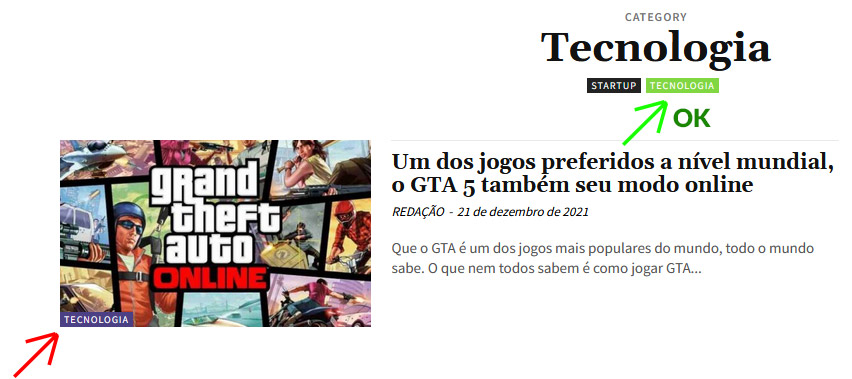

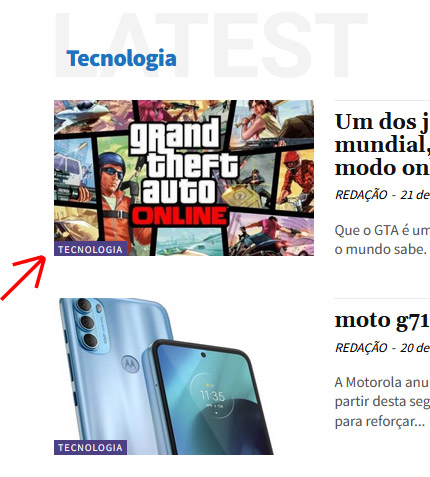
Tnx.
 figdivco
I am using the DEFAULT PRO demo and when I made any changes in the content part and go to view not make any change in theme and not give me the third success msg just give me the footer and header success msg like this photo ( https://drive.google.com/file/d/1TQvPc4Sy1B0W0fhjCjpZYf7W-X6jEIMl/view?usp=sharing ) pls reply fast cus its urgent issue
 carlmarcus
Hello, if I change the style in the header in the Newspaper – Theme panel (V 11.4) and press save, the change is not saved.
I have sometimes had this problem in other areas. After a change it is changed and saved, but I cannot change the style back and save again.
I can’t try out the different styles like this.
What is the problem?
Anamaria Hello,
“reCAPTCHA v3 returns a score for each request without user friction. The score is based on interactions with your site and enables you to take appropriate action for your site.” -> https://developers.google.com/recaptcha/docs/v3
You can set the score in Theme Panel -> header -> Sign in -> https://i.imgur.com/nlSrIpP.png
Thank you!
Calin Hi,
Yes, you can use a css like this one -> https://i.imgur.com/5e57GGE.png
.td-header-sp-logo {

    height: 80px;

}
Set the code in the theme panel > custom code> custom css.
I hope this will help!
 WalnutHillDesign
 Solved. Actually this same thing happened to us before and I was able to find my notes on that in the forum. Someone had accidentally edited/deleted the header and it saved a corrupt version of it with incomplete code. This jammed up any page using it.
Solution: Open the header template, view revisions, restore previous version.
A way to lock the headers would be very valuable. They are way to easy to accidentally edit while editing another page.
WalnutHillDesignSomething happened today while editing pages. There are not a handful of pages where the header disappeared and cannot be edited with the tagdiv composer. Trying to Edit with tagdiv composer just opens the TDC but it never fully loads. It just spins forever.
Strangely some pages on the site do work, so it’s like there are a bunch of corrupt pages.
Everything is up to date on the latest version.
Calin Hi,
So, this is a php code that need to be set in a special place, then I do not think that will work setting it with tagDiv Composer, for the moment there are no elements to support php code, some of theme support html, css and a some JavaScript.
Now, if will be to set the code in the theme header.php file, I think that will be triger this file wp-content/plugins/td-composer/legacy/Newspaper/header.php (our theme has 3 header.php files, but if the tagDiv Standard Pack is not installed and you use a cloud header, the above one will be use). Just copy the file from there in child theme (Newspaper-child/header.php) and set the code in that file, it should work properly.
I hope this will help!
Thank you!
Calin Hi arqsanchezmota, unfortunately, we do not have in our theme an option to just set the code in it and to be display link in your screen, but, this can be achieved with some work. A solution is the one provided by Anamaria, to make a background image that have the website width + the left and right banners.
Now another solution is to set a cloud header and in it to set a row with columns like this -> https://i.imgur.com/j0RbOpk.png then adjust the columns and set an extra class on ad box, the results will be something like this -> https://i.imgur.com/tH240it.jpg
Now, the first solution is most easier to achieved then the second one, or maybe you can use a plugin -> https://wordpress.org/plugins/search/left+right+ads/
Thank you!
Anamaria Hello,
We have an element called My account for Opt-In builder, which needs to be set on an individual page and set page in Opt-In Builder -> Subscriptions – Pages -> https://i.imgur.com/qscFZf6.png -> https://i.imgur.com/5OdW5l4.png and a shortcode which can be set the header for login “Menu login” https://i.imgur.com/OEe5n7c.png -> https://forum.tagdiv.com/shortcodes/
Thank you!
Calin Hi joit,
Unfortunately, the amp is not entirely translated, but I just made some changes and if you replace the code from this file wp-content/plugins/td-composer/mobile/header-amp.php with the code from here the problems should be solved.
Let me know the results.
Thank you!
Anamaria Hello Ian,
Yes, is possible if you use a header/footer template and after you can set on No Header and No Footer => https://i.imgur.com/yzFsQdv.png
Thank you!
Thank you!
Anamaria Hello,
I verified your page and I don’t see the Sign In element -> https://i.imgur.com/WBoU5Dn.jpg
Also, to remove the sign-in/join from the header you can do it with tagDiv Composer => https://www.screencast.com/t/Y5j6ArY8Ug , select the element and with right-click, you can delete it => https://www.screencast.com/t/GshM3Q3nwDv
Thank you!
 kfranck
I am starting to create a new website for my high school students. The site is called LifeAtStart.Com. At this point, I just want the header to say LifeAtStart.com. How can I accommodate with just adding text? At some point, I will upload a (272 x 90px) logo. In the interim, I want to know how to add type.
The URL for the site is lifeatstart.com
 stephenetta
 hi thanks for your response but it ignores my original question and notes.
“Google Analytics and JavaScript Codes” section in theme panel does not parse PHP within the WordPress loop. in addition, i need to have the code called AFTER the doctype is declared. i already have a child theme, but even when adding code to header.php it calls BEFORE doctype.
so, my question is it possible to add via cloud template? or is there a trick to inject code in child header to render after the doctype is defined
 knthdgd
Hi.
Is there any way to disable lazyload on a single image that I am using as a css background-image in a div in my header?



