
- Apitd_api_header_style::delete
- Apitd_api_header_style::update_key
- Apitd_api_header_style::update
- Apitd_api_header_style::add
- ApiAPI – Header style – Introduction
- Apitd_api_top_bar_template::update_key
- Apitd_api_top_bar_template::update
- Apitd_api_top_bar_template::add
- ApiAPI – Top Bar Template – Introduction
- Apitd_api_single_template::update_key
- Apitd_api_single_template::update
- Apitd_api_single_template::add
- ApiAPI – Single Template – Introduction
- Apitd_api_footer_template::update_key
- Apitd_api_footer_template::update
- Apitd_api_footer_template::add
- ApiAPI – Footer Template – Introduction
- Apitd_api_smart_list::update_key
- Apitd_api_smart_list::update
- Apitd_api_smart_list::add
 shpetimH
Hi all,
I have a WP 5.8 and Newspaper 11.2 version (https://observeri.com/).
Everything is working perfectly fine but I have a complex scenario and I ran into some issues which I will try to explain.
– I have few categories, each of them have different headers and footer (body almost the same to all)
– For all categories I also have different mobile versions (those are working as they should)
– Every Single Posts under certain category have also different layout (those are working fine as well)
– When I try to create mobile templates for Single Posts for different Categories, those are getting overwritten 🙁
For example:
– Category X desktop / mobile is fine
– Single Post under Category X uses header and footer as Category X and both desktop / mobile templates are fine
– When I try to design Single Post Mobile Templates for Category Y, all other Single Posts templates are getting overwritten.
Everything is set to use specific templates to “Theme Panel > Categories” and Desktop version is working perfectly, this is happening only on Mobile Templates.
PS: Every mobile template I create from Template itself using “Create Mobile Template”, and on “Cloud Templates” they seem to be correctly linked for example 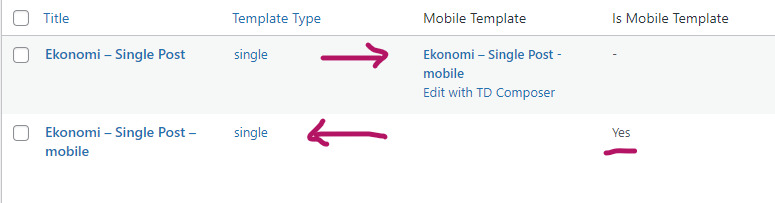
Everytime I create a new single post mobile templates all single posts will start using the latest one!
I would really appreciate any help.
Thanks and regards.
 ismailel
Hi,
I have just purchased the Newspaper theme but there seems to exist some problems that I have encountered at my first attempt to configure it.
Here are some of those aforementioned issues:
1) The single post photos are not shown/illustrated on GUI.
2) The category titles are not clicked on (it does not give any response, not hovered, not clicked on) when you are on a single post page.
3) The sidebar is not activated eventhough it is configured under theme settings in wordpress.
I have sent mail with screenshots attached to the mail (sent mail to “contact@tagdiv.com”) about those issues.
Could you please respond it?
Thanks & Best Regards,
ismail
 maquinero
 Hello Vlad,
But why the single post template changes the header of my website? that shoudnt be happening right? i had to take it out because of that and i really liked the template. Is there something i can do?
 mirko
mirko yes, it is the correct size but it looks like smaller than the “header ad” one.
they both same size…
 louispretorius
I used “racing mag” demo for last few months and no issues with header. Header was simple menu bar, black background with white text and logo on the left.
Now I checked the site and the entire background is white, with black text, logo disappeared and on top of the menu is a massive white block with the page title and tagline.
How can I just get remove the massive page title and get my old menu back?
 Newsminions
 Hello,
Thanks for the reply, Also according to your suggestions above I have already set it to Amp for mobile theme. Also, I have placed adsense amp code on the header of the site using the insert header and footer plugin. But now also ads are not getting displayed. Help me to resolve the issue at the earliest. I have attached the screenshots of various setting of my site as per your request.
Mobile Theme setting – https://prnt.sc/1jocolv
Insert Header And Footer – https://prnt.sc/1jofbk4
AMP version of my site – https://prnt.sc/1jodqnj
Thanks,
-
This reply was modified 5 years by
Newsminions.
 iamkevalkaria
I am facing an issue in mobile layout (probably media query issue in my H2 / H3 tag)
The H3 tag heading is breaking in mobile version.
Kindly refer the 8th & 5th point of following
article
I am not sure what the issue here is. Please let me know what is the issue and how can I fix it.
maquineroHello,
Site is: https://pre.muchacalidad.com
I have downloaded and customized a simple post template from the cloud library. Then i had to create a mobile template so it shows up on mobiles.
The thing is, when i go to site wide post seting and aply the template, on mobile it shows a direfent header from the original.
My header is a global header both desktop and mobile an int works great but when i apply the single post emplate the header on the post in diferent.
Whant is happening?
Thanks!
 HMMedia
 Hello,
I disabled all cache plugins, but now the mobile version of the page not working. Only the header and footer are shown. Is there a way to get rid of this mobile template thing and just display the desktop site with its own responsive style?
Andras
 mcsnadeem
Dear Team
how can i remove tagdiv logo and want to use custom logo. I want to remove header menu from
Pulses PRO demo.
 Anamaria
 Hello,
The header and footer are taken from the standard ones. All you have to do is edit the mobile page, and in Manager (Website Manager) you need to import or the easy way is to convert the existent header/footer like this => https://www.screencast.com/t/HrjOBNayd -> https://www.youtube.com/watch?v=SpGkOnJeNZY (03:11 – Mobile Templates & Pages)
Thank you!
 dkleidonaris
Hello,
I just created a mobile page through the TagDiv composer and copied my home page content in it.
The problem is that the header and the footer don’t seem to be copied into the mobile page and I can’t customise them either.
Does anyone have a solution?
 marcorroma
 Hi, that’s not what I want.
Can you try setting a mobile menu in the desktop version, in the header, and a different mobile menu in the footer, in the desktop version?
You will not be able to create two mobile menus with different menus on the same page.
Here’s a video of what I mean:
Anamaria Hello,
Please let me know how you set the tagline.
If you use a standard template, you can set the font size from Theme Panel -> Theme Fonts -> Header => https://i.imgur.com/2y5vGQo.png if you have a cloud template, you need to edit with tagDiv Composer, select the logo and set the font size like this => https://i.imgur.com/bEKETfK.png
Thank you!
 jsupple05
 Thanks that has fixed one problem, they were both selected. Is there also a way to reduce the height of the sticky header so there is less space underneath the elements?
Anamaria Hello,
Please let me know how you set the sticky. Please don’t use the sticky row and sticky header => https://i.imgur.com/vxG0qlc.png
Thank you!
 Writerat
Hi,
I have been seeing error notifications for two days. I’m not sure, but I think it happened after I tried to change the look of the page header in tagdiv composer, but I reverted the changes immediately. What can I do about this problem?
“Invalid argument supplied for foreach() in”
“Cannot modify header information – headers already sent by”
My website is writerat.pl
Thank you in advance for your help!
 srampia
There are some problems with single posts in mobile version. (Mobile theme is not activated, in desktop version everything is fine)
1. Sharing icons are not shown in mobile posts. Sometimes they are shown after a single post is open for a long time.
2. Not able to remove the divider design under the Header.
3. Change the menu icon to the left.
marcorroma Hi, I would like to set up a floating menu in the header, and a different floating menu for the footer. Only visible for the desktop version.
On mobile I would like there to be another menu, only in the header.
It’s possible?
jsupple05Hi, I am trying to use a custom header with a main menu and a main menu sticky that is less high, but the sticky menu shows at the same height as the main menu from the top of the page. There seems to be an error as the main menu is visible behind the sticky menu. I am using a widget area in the headers to try to use google custom search but have deleted these and it still has the same error. Any idea how I can fix this?
Website is http://solidarity.asn.au/
 madder
How do I change just the colour of the block header? The rectangle that contains the ‘custom title’.
Thanks.
Anamaria Hello,
Please send some screenshots with your steps.
Also, if you have a standard Prebuilt Website you need to add the logo in Theme Panel -> Header -> Logo and Favicon (you need to have the tagDiv Standard Pack plugin activate ), but if you have a Pro Prebuilt Website then you need to add the logo with tagDiv Composer like in this video https://www.youtube.com/watch?v=HXQQygkCCJo
Thank you!
 admin143
 please understand the problem.
only when I use the cloud header template then page loads in 30 seconds.
if I use no template then it load faster.
please assist asap
 fattain_naime
Hi there,
The header logo size is 272 x 90px. This is well working but what is the size for mobile?
When I visit my site with mobile, the top of the logo is cut a bit.
https://ibb.co/kxKT13b
work well on computer.
https://ibb.co/7tMJFmp
Please have a look.
 priyadarshana1989
Dear Team,
I just newly installed newspaper prebuilt website ( default pro theme)theme,
I just trying to use article inline ad, i have created “in- article ” ads unit in adsesnse , and added the code snippet to the theme panel >article in line add box, but no any ads showing in line article,
Kindly advise
**Please note , other adsensense ad units ( created separate ad units for each box)added to theme panel header box,side bar box,article top box working smoothly **,



