- Apitd_api_header_style::delete
- Apitd_api_header_style::update_key
- Apitd_api_header_style::update
- Apitd_api_header_style::add
- ApiAPI – Header style – Introduction
- Apitd_api_top_bar_template::update_key
- Apitd_api_top_bar_template::update
- Apitd_api_top_bar_template::add
- ApiAPI – Top Bar Template – Introduction
- Apitd_api_single_template::update_key
- Apitd_api_single_template::update
- Apitd_api_single_template::add
- ApiAPI – Single Template – Introduction
- Apitd_api_footer_template::update_key
- Apitd_api_footer_template::update
- Apitd_api_footer_template::add
- ApiAPI – Footer Template – Introduction
- Apitd_api_smart_list::update_key
- Apitd_api_smart_list::update
- Apitd_api_smart_list::add
 Bettina
 Hello!
You can change the whole template for your posts and have different headers and footers as well. It works the same as any other template. You should have one global header and another header for your unique posts. More helpful info here: https://forum.tagdiv.com/tagdiv-composer-website-manager/
Thank you!
 depatech
 Hi Bettina
Could you add an option at later versions to have different header/menu at the posts of one or more specified categories?
Thanks
 Good Target
 Good for you, but which browser did you test?
I’ve done the test on 5 friends’ phones, and all of them have a display that doesn’t work properly, via safari.
So I don’t understand, because even in private browsing, even if you delete the cache, the problem is still there. And the header and css don’t load.
I don’t know how to get out of this situation. Do you have a technician who could connect to my back office to look at this and fix it, please?
Good Target Not at all, the problem is still there.
You only need to look at mobile, Safari and Chrome. It’s on mobile that it doesn’t display properly.
On desktop it’s OK.
check : https://postimg.cc/k6nDF4FF
the header is missing, and the css isn’t loading correctly.
Bettina Hello!
You should edit the homepage with the tagdiv Composer, click on the logo and remove those text and image: https://app.screencast.com/GzlhC6XKWygKT
You can also delete the element and add another header logo. There is a recycle bin basket for every element: https://www.screencast.com/t/wFYdqgpo6pT
I recommend you uninstall the Mobile theme and AMP plugin.
Thank you!
 stringbenderb5
 Hi Anamaria,
The ad codes are set in the Dashboard > Theme Options > Ads > In several different ad positions including the header.
 cleatz
I have not even begun to use the theme, and it is throwing tons of errors:
2025/03/11 18:23:39 [error] 10863#10863: *46760 FastCGI sent in stderr: “PHP message: PHP Warning: file_exists(): open_basedir restriction in effect. File(/www/antlersarch_920/wp-config-sample.php) is not within the allowed path(s): (/www/antlersarch_920/public:/www/antlersarch_920/mysqleditor:/www/antlersarch_920/web:/www/antlersarch_920/deploy:/www/antlersarch_920/deployment:/www/antlersarch_920/deployments:/usr/share:/tmp:/dev/urandom) in /www/antlersarch_920/public/wp-admin/setup-config.php on line 46” while reading response header from upstream, client: 2a06:98c0:3600::103, server: antlersarch.com, request: “GET /wp-admin/setup-config.php HTTP/1.1”, upstream: “fastcgi://unix:/var/run/php8.2-fpm-antlersarch.sock:”, host: “antlersarch.com:59596”
2025/03/11 18:21:07 [error] 10863#10863: *46756 FastCGI sent in stderr: “PHP message: PHP Warning: file_exists(): open_basedir restriction in effect. File(/www/antlersarch_920/wp-config-sample.php) is not within the allowed path(s): (/www/antlersarch_920/public:/www/antlersarch_920/mysqleditor:/www/antlersarch_920/web:/www/antlersarch_920/deploy:/www/antlersarch_920/deployment:/www/antlersarch_920/deployments:/usr/share:/tmp:/dev/urandom) in /www/antlersarch_920/public/wp-admin/setup-config.php on line 46” while reading response header from upstream, client: 2a06:98c0:3600::103, server: antlersarch.com, request: “GET /wp-admin/setup-config.php HTTP/2.0”, upstream: “fastcgi://unix:/var/run/php8.2-fpm-antlersarch.sock:”, host: “antlersarch.com:15611”
2025/03/11 17:58:18 [error] 10863#10863: *46743 FastCGI sent in stderr: “PHP message: PHP Warning: file_exists(): open_basedir restriction in effect. File(/www/antlersarch_920/wp-config-sample.php) is not within the allowed path(s): (/www/antlersarch_920/public:/www/antlersarch_920/mysqleditor:/www/antlersarch_920/web:/www/antlersarch_920/deploy:/www/antlersarch_920/deployment:/www/antlersarch_920/deployments:/usr/share:/tmp:/dev/urandom) in /www/antlersarch_920/public/wp-admin/setup-config.php on line 46” while reading response header from upstream, client: 2a06:98c0:3600::103, server: antlersarch.com, request: “GET /wp-admin/setup-config.php HTTP/1.1”, upstream: “fastcgi://unix:/var/run/php8.2-fpm-antlersarch.sock:”, host: “antlersarch.com:59596”
Good Target the homepage on mobile displays fine (Safari and Chrome), but if you open an article (https://saintmalowithlove.com/marche-de-noel-saint-malo/), the CSS is no longer supported and the article is all broken.
the header and footer are not displayed. the page layout is broken.
 richbilt2
Hi, i’m using a cloud category theme – Urban Observer – across my site. It’s set to NOT be global in the theme panel so hopefully this means any change i make to each category page will be only to that category (also set to NOT be global in each category area).
So in one cateogory – called ‘automotive’ i’ve added a menu in the header – also called ‘automotive’ and added it on the top of the page. I’ve then created another menu called ‘tech and gadgets’ and added it only to the ‘tech and gadgets’ category page. both menus contain different entries. But when i add the automotive menu onto only the automotive category page, it appears globally on all category pages. I then add the ‘tech and gadgets’ menu onto the ‘tech and gadets’ category page and all category pages display that menu.
As I say, in the theme panel, both categories have the ‘inherit from global settings’ set to off – so just the name of the category template is showing.
Am I doing something wrong or is the category theme broken?
cheers
 Tony
TonyI am continuing to have issues getting my logo to replace the template default on mobile devices despite changing the logo under ‘phone viewpoint’. Under HEADING LOGO element, I have changed both the LOGO IMAGE and the LOGO RETINA IMAGE to my logo (sized 272×90). But it will NOT change from the default. See images below…
The image below is the logo I am attempting to put in.

FIRST IMAGE: What the site looks like on a mobile phone

SECOND IMAGE: The settings I have changed…

THIRD IMAGE: The logo header under PHONE VIEWPOINT in the Cloud editor.

Two things I can think of that may be preventing this from displaying properly? First of all, I am in the wrong place, maybe it’s under a different setting elsewhere in template settings?
Or… I have to use a specific image size for that particular logo, to which it is forcing the original logo to display instead?
Any help would be appreciated!
 BlackandWhiteTradingLtd
 Thank you. The code suggested on the depreciated page allowed you to wrap ad images and control which one appears in pc, tablet or phone. The settings on the Ad Block and on the Ad page in the back end don’t appear to allow for this – you can turn on/off pc/phone dispaly for one header ad, but as far as I can see you cannot control three. I am using the Google Ad Manager to serve three seperate creatives with these tag types:
<div class=”td-visible-tablet-landscape td-visible-tablet-portrait”>
<div class=”td-visible-phone”>
Which seems to partially work – but as the page is depreciated I thought you might have replace this div class wrapper with a new format?
 Kerminator1
 I use ads in the header of the site. I did not put any code within the site
 Anamaria
 Hello,
Please check with the tagDiv Composer and disable the H1. For example, H1 from logo(header, footer, mobile, sticky) : https://forum.tagdiv.com/topic/6-h1-tags-on-front-page-bing-have-deindexed-my-site/
Thank you!
BlackandWhiteTradingLtdI am trying to display three different ad sizes depending on whether the screen is a PC, Tablet or Phone. I found this link but it’s depreciated
https://forum.tagdiv.com/header-ads-adsense/
I tried changing the view in the editor and pasting different code in the Ad Bock for each view, but it appears to simply show only the last code added and not retain seperate code for each block.
I also tried the Ad Header block – but the settings there don’t allow seperate code for each screen size – just turning off for mobile.
So how can I achieve this please?
 Børnenes Aarhus
Hi tagDiv Support Team,
I’m having an issue where the <h1> tag around the logo isn’t being removed, even after enabling “Disable H1 on logo” in both the frontend (tagDiv Composer) and backend (Theme Panel). I’m running Newspaper version 12, updated from version 8, and working in a test environment to redesign my site. My goal is to fix a “Multiple H1” issue flagged by Screaming Frog, where the logo has an empty <h1> alongside the page title’s <h1>.
Here’s what I’ve tried:
In tagDiv Composer (Frontend):
I imported a new header from Cloud Library.
Edited the “Header Logo” block, found “Disable H1 on logo” (a checkbox), checked it (enabled it), and saved the template.
Assigned the new header to the homepage in Theme Panel > Header > Main Menu.
In Theme Panel (Backend):
Went to Theme Panel > Header > Logo.
Found “Disable H1 on logo” (another checkbox), checked it (enabled it), and saved settings.
Cache Clearing:
Cleared W3 Total Cache (“Empty All Caches”).
Cleared Chrome browser cache and tested in incognito mode.
Despite these steps, the <h1> tag remains in the source code. Here’s an example of what I see when inspecting the page in Chrome:
html
<h1><span class=”tdb-logo-img-wrap”> </span></h1>
This empty <h1> causes a “Multiple H1” issue, as my page titles (e.g., from “Single Post Title”) also use <h1>.
What could be overriding the “Disable H1 on logo” setting? Is this a known issue after updating from version 8 to 12? Could old templates or settings from version 8 be interfering? Any help would be appreciated!
 bratuhas
Hi. I accidentally placed something behind my header and cant delete it now. The header is sticky and i imported it from the cloud. image Is there something like a legend that i can select this row in the editor and delete it. selecting it and pressing “delete” doesn’t work only on this one. Is there any way to go around it and delete it? What do you think created that problem? Thank you
 obit8
obit8When I try to modify the image in the header of the Blockchain Pro template’s home page, all the original image formatting breaks and the image appears on the line below without the possibility of modifying it like the original!
Even modifying the image settings through the TagDiv composer becomes super complicated and I can’t fix this part!
The site is currently only visible if you are logged in as an administrator, but I’ll leave you a screenshot
 Caprold
I tried to deactivate opt-in Builder because I don’t want to serve premium or subscription-dependent content, and it messed up my site, displayed code everywhere on the pages. So I re-enabled it, and have been using the “locking” selection box on all articles to ensure nothing is premium or “exclusive,” so I’m not sure this is still the issue, but articles are not loading all the time. The headers and footers, menus etc load no problem, but the story and featured images are missing sometimes or on some browsers.
I’ve checked this on multiple browsers, had friends check it on their devices and they’ve also reported that they can’t see the articles.
I’m not sure what’s going on or how to fix this
edit: the site is https://604news.com
 GusV
GusVHello Support Team,
I am trying to to upload my custom logo onto the Header Template – Magazine PRO which is visable in the Tagdive page editor however when I save it the header does not show on the live browser please see images:
http://greatincomes.com/wp-content/uploads/2025/03/1.jpg
http://greatincomes.com/wp-content/uploads/2025/03/2.jpg
Thanks
Gus
 accursi
 You are great!
You ran everything.
JUST ONE THING…
The logo in video resolutions from 768 to 1024 is huge across the header.
What CSS solution should I make?
Thank you Thank you Thank you
 Simion C.
 Checking now.
1. There was some padding there and that caused the menu items to appear not centered vertically. I removed that padding and it looks fine now https://prnt.sc/1doWFdOfs8jq
2. The logo on mobile was already looking fine by the time I checked https://prnt.sc/jYinsehWY0dz I see you corrected the problem in the meantime.
3. The logo is first loaded in full size and then resized by the CSS code. To remove that effect or at least reduce it, the CSS code could be loaded faster, in this panel here https://prnt.sc/RAk9j2_ZLHB8 I moved parts of the code there, and now the header doesn’t even jump on refresh/load. It loads much better. Please check it as well.
Thank you!
accursi Two problems remain.
1) I can’t remove the zoom effect of the loading header SVG logo.
2) One concerns the topbar: the menu items are no longer centered in the gray bar.
We need help!
Thank you!
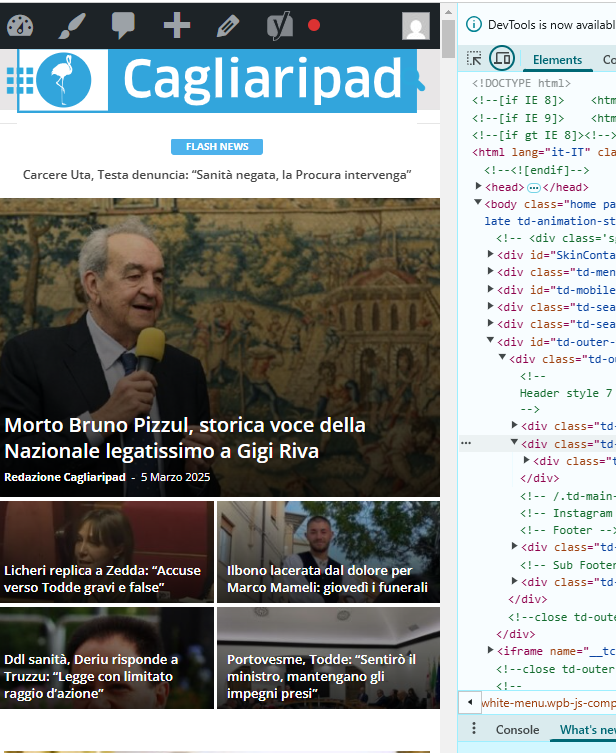
accursi I moved the custom css-desktop to the top of the style.css file. This is to avoid the full-page zoom effect of the header SVG logo.
Two problems remain.
1) One concerns the topbar: the menu items are no longer centered in the gray bar.
2) The logo performs in mobile resolutions.
Example:
https://assets.cagliaripad.it/wp-content/uploads/2025/03/05085711/SCREEN_0503.png
Many Thanks!
 medvid
Hello. I purchased the newspaper plugin. I install and all runs fine. Now, for example I install the demo NEWSWEEK and all is loaded and without error but if I click the NEWSWEEK header orange letters it gives me:
Server Error
403
Forbidden
You do not have permission to access this document.
That’s what you can do
With just click nothing else. To make enable again the wordpress that crash hard. I need to remove caches and login again but the error is there. There is som3thing wrong as the last time before this minimal example I just changed in general settings of wordpress the permalinks and that caused the error and impossible to click again on anything due the same error 403. Now is the same using just that NEWSWEEK Demo and with just clicking the orange NEWSEEK letters crash. How can i override this?
 MzMaffei
 Hi,
I have a full licence of Duplicator Pro plugin and i have checke you suggestion but i do not find any option to move theme settings.
Even if I could proceed in steps, moving the Cloud Templates for Header and Posts that I have downloaded an customised for my purposes in Website 1, I do not find any option to move these customised template to the second platform.
Could you be more specific ?