
- TutorialsDefault Block Settings Guide
 tinyyoppy23
 Hi Simion,
Thank you for your advice. I have changed it to the Page Buiilder + Overlay Menu but still to no avail. I built the page with Tagdiv composer. The header background is still not transparent.
Jian
 Simion C.
 Hi,
On the reference website you mention the current page is also highlighted
– http://prntscr.com/njxd7n
The home menu item is not active when on home, because it leads to a different URL it seems – http://prntscr.com/njxdok and that URL is then redirected to the homepage
– http://prntscr.com/njxe6g
So it is not detected as the current menu item because of this.
For the other website I can give you code to make the current menu item not highlighted
– http://prntscr.com/njxfkv
Enter it in the Theme panel custom CSS section
.td-header-wrap .black-menu .sf-menu > .current-menu-item > a {

background-color: #222222;

}
 daler96
 Hey Catalin,
Thanks for the advice, indeed using Header Cloud Template gives more control over header.
 Vlad S
 Hello !
In order to have a global header that can be customized you have to import one from our cloud library and then set it up in the theme panel. After you do that you will have a fully customizable header all around your website. Please take a look at this documentation regarding how to use cloud library and also i’ve posted a picture to show you how to activate the header.
https://tagdiv.com/what-is-the-cloud-library/ ;https://www.screencast.com/t/vgYmI0ICAvgD
Thank you !
 Calin
Calin Hi,
Using mobile+amp you’ll have the same layout for mobile posts/pages and amp, but you’ll need to make a new content in mobile editor for pages and amp.
Using Amp you’ll have the same layout on mobile like on desktop, but the speed will be lower, and you’ll still need to make content for pages in mobile editor, if you want to have amp on pages.
Please check our documentation for mobile theme -> https://tagdiv.com/mobile-theme-get-mobile-ready-with-newsmag-theme/ and How to Make an AMP Ready Website with Newspaper Theme -> https://tagdiv.com/amp-newspaper-theme/
Yes, you can set a logo for mobile, you need to go in Theme panel>Header > Logo for Mobile -> https://www.screencast.com/t/WLhKBBUENy
Logo & Favicon in Newspaper Theme ->https://forum.tagdiv.com/logo-favicon/
Thank you for your understanding!
Simion C. Hi,
@cosmacelf Seems it does – https://helpx.adobe.com/fonts/using/embed-codes.html
You could add that code in the theme panel analytics section – http://prntscr.com/njubu8
It will be loaded in the theme header. Or if you use a child theme, enter it in the theme header file – http://prntscr.com/njucy2
Either of these methods should work.
Thanks
 keithohara
Hi folks,
My sites header on Safair mobile is appearing skewed (screenshot below).
It’s as it the browser isn’t recognising that it’s a mobile, as it’s not showing the mobile version of the site.
Any recommendations on how this can be remedied?
Thanks,
Keith
Simion C. Hi,
There is a problem currently with that header style, we will fix it in the next theme update. If you want to use it, there is a fix I can provide you. It will require that you make a modification to that header style.
The file is in the tagDiv composer plugin here – http://prntscr.com/njtggo
Add this code instead of the default code found there ads.php
After the modification it should be like this – http://prntscr.com/njth37 and it should work properly when selected.
Sorry for this inconvenience, please let me know if you have more questions.
Thanks
Simion C. So when you edit that header with the composer there are errors. What if you import the header again from the cloud library and try to edit it?
If the same happens, we could take a look at it. Send us an email at contact@tagdiv.com and provide admin login. Include a link to this topic in the email. Let us know.
Calin Hi,
Them mega menu can be set in this way only, with sub-categories and without subcategories, there is no option of a subcategory to subcategory, sorry!
If you want to have more control over menu you can use the header manager
Mega menu -> https://forum.tagdiv.com/mega-menu/
Main menu -> https://forum.tagdiv.com/main-menu/
Page Menu -> https://forum.tagdiv.com/page-menu/
Thank you for your understanding!
 mimicreature
Hey,
Need the CSS code to make the header full width. Please see the snapshot.
https://prnt.sc/njryao
Please visit my website https://riansclub.com and see that the header is not having full width. But if you see another website(Another theme) https://geekybyte.in it has a full-width header. I need to have a style like geekybyte. Also how to make the menu centre align.
Thanks
 PERFORLAB
 My Google Search Console dashboard (AMP Section)

My NewsMag Theme Panel –> AMP Settings

This is the code snippet of my Ads Unit:
<script async src=”//pagead2.googlesyndication.com/pagead/js/adsbygoogle.js”></script>
<!– AMP_Header-Footer –>
<ins class=”adsbygoogle”
style=”display:block”
data-ad-client=”ca-pub-6149XXXXXXXXXX”
data-ad-slot=”3058XXXXXXXX”
data-ad-format=”auto”
data-full-width-responsive=”true”></ins>
<script>
(adsbygoogle = window.adsbygoogle || []).push({});
</script>
Please not I didn’t add ehe snippet anywhere in the theme, i just added data-ad-client and data-ad-slot in the AMP section for header and footer
What I’m doing wrong? Please help me!!
Thank you
-
This reply was modified 7 years by
PERFORLAB.
 chakiss
Hi, I wanted to know how to create a global header that can be used all across the WordPress website with the tagDiv Composer.
I need to create a customized header.
Thank you!
 berg
bergWhen I click the main image of a WooCommerce product, the theme header appears on top the lightbox and image. See here:
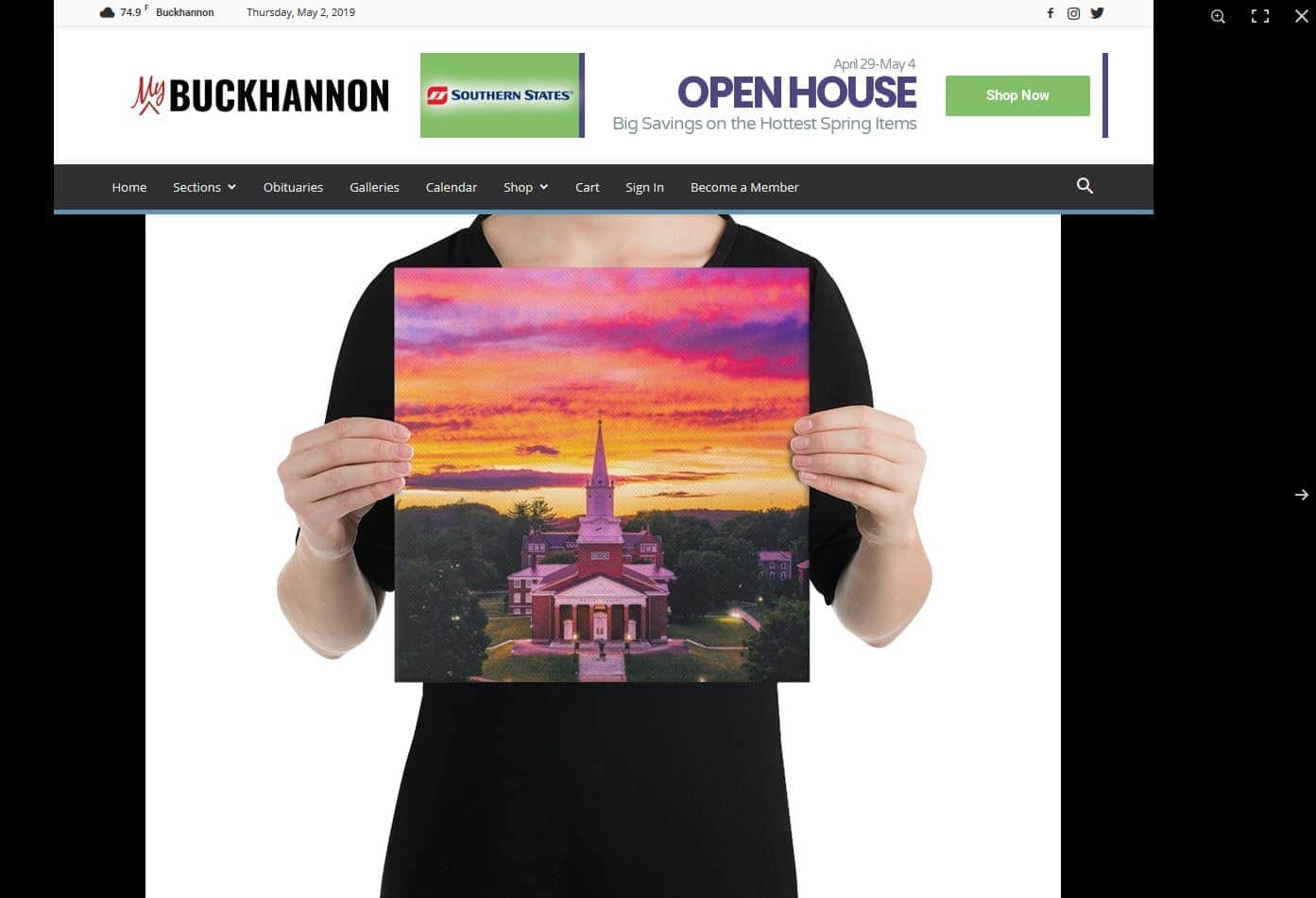
https://www.mybuckhannon.com/store/art-store/pictsburgh/hurricane-clouds-over-wesleyan-canvas/
How can I reverse the order so the lightbox is on top?
 novelapl
 Hi Catalin,
Thank you for answering my question. Yes, I do. Actually, I’ve solved that problem by switching off the plugin from my previous theme.
However, I have another question related to Live CSS Editor. Is it possible to apply the changes only to one page and not to the whole website? I would like to customize the themes of pages (change the header type, add some space between the header and the body, add a background image, etc.). What do you suggest that I should do?
 Catalin
 Hi,
1)
You can try using the code below and place it in Theme panel -> Custom CSS area if you want to remvoe that boder.
.td-header-border:before{

background-color: black;

}
Check here -> https://www.screencast.com/t/e9haWVeD
2)You can use the background image if you want, set up from here -> https://www.screencast.com/t/sKyKwZZ2 or set up the color from here -> https://www.screencast.com/t/zbI2vAQSq
Thank you!
Calin Hi,
If you made the header with menu header please check these settings -> https://www.screencast.com/t/1uTMZjwf
If there is still a problem, please provide me a link were I can inspect this problem.
Thank you!
Calin Hi,
The logo that is set in Newspaper theme panel>Header > Logo for mobile will be show in footer section on mobile theme -> https://forum.tagdiv.com/logo-favicon/ -> https://www.screencast.com/t/GfJ74elj
Thank you!
Vlad S Hello !
In order to change the header logo on the fast news demo you have to go into: Theme panel – Header – Logo & Favicon and change the logo like here: https://www.screencast.com/t/CAaywuK7jqtl
Thank you !
Calin Hi,
You can use the header manager and make a menu for both versions ( desktop and mobile ), most of users that have this problem use the mobile menu for both versions.
Thank you!
Simion C. Hi,
That should be possible with some CSS, please post a link to the website so I can try and create a code for it. It will be more accurate if you can provide a link, or maybe specify the header template used. Let me know.
Thanks
Simion C. Hi,
I could do that, depends how exactly you want it to be. Something like this maybe?
– http://prntscr.com/njgev6
.td-magazine.td-boxed-layout .td-header-menu-wrap-full.td-container-wrap {

border-bottom: 1px solid black;

}
I can modify it if needed, let me know.
Thanks
Simion C. Hi,
That should be loaded in the header I believe, between the head tags
– http://prntscr.com/njeuqa – https://support.google.com/webmasters/answer/9008080?hl=en
So if you enter the meta tag there it should be then loaded.
Try entering it again (you can use a child theme if you have one)
– http://prntscr.com/njevow
Then check in the page source (Ctrl+U) and it should be there – http://prntscr.com/njew6k
They don’t specify how long this will take, so you could wait for a while.
Thanks
tinyyoppy23Hi! I’d like my main slider image to go behind the main menu header (with the header being transparent). May I know how can I achieve this effect?
Thanks.
Regards,
Jian
Simion C. Hi,
Are you sure it has to be entered like that? From what I can see it has to be entered in the theme header (between the head tags)
– https://mailchimp.com/help/add-a-pop-up-signup-form-to-your-website/
That means it can be entered in the analytics section of the theme panel
– http://prntscr.com/njei1e
If I misunderstand something let me know.
Thanks
