- Apitd_api_header_style::delete
- Apitd_api_header_style::update_key
- Apitd_api_header_style::update
- Apitd_api_header_style::add
- ApiAPI – Header style – Introduction
- Apitd_api_top_bar_template::update_key
- Apitd_api_top_bar_template::update
- Apitd_api_top_bar_template::add
- ApiAPI – Top Bar Template – Introduction
- Apitd_api_single_template::update_key
- Apitd_api_single_template::update
- Apitd_api_single_template::add
- ApiAPI – Single Template – Introduction
- Apitd_api_footer_template::update_key
- Apitd_api_footer_template::update
- Apitd_api_footer_template::add
- ApiAPI – Footer Template – Introduction
- Apitd_api_smart_list::update_key
- Apitd_api_smart_list::update
- Apitd_api_smart_list::add
 arvileverson
Hello
after each update of the theme, the built-in plugins are not funkionabel because they are not automatically renewed with. This still has to do manually which ultimately represents a no go. The old plugins of the theme are disabled but so that the website does not work normally. If you are not active for several hours or days, the entire theme is switched off until the plugins are renewed manually. After the current update of the theme
v9.7.2 and the manual renewal of the plugins, only the header with navigation bar can be seen from my homepage – startsite. The rest of the homepage has now disappeared. several times cache emptied, but this has not led to a success. So, where is the mistake now?
 javid
javidHELLO
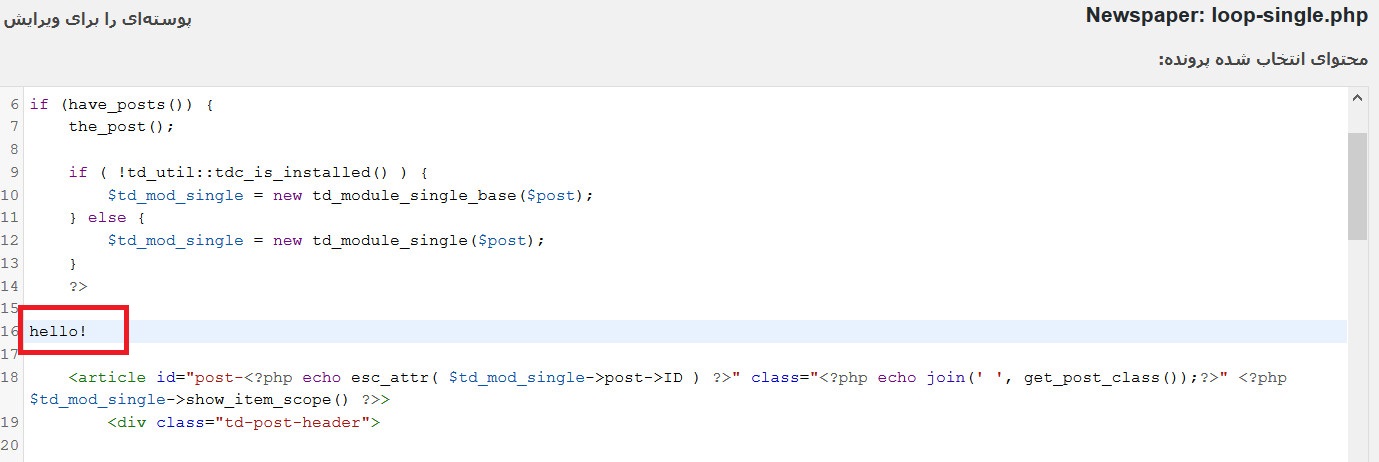
i wnat to change this file loop-single.php
but i can not see any change
i added “hello” here
http://www.coca.ir/wp-content/uploads/2019/04/1.jpg
hello!
<article id=”post-<?php echo esc_attr( $td_mod_single->post->ID ) ?>” class=”<?php echo join(‘ ‘, get_post_class());?>” <?php $td_mod_single->show_item_scope() ?>>
<div class=”td-post-header”>
but i can see them in my single posts
http://www.coca.ir/wp-content/uploads/2019/04/2019-04-27_132154.jpg
 natz1919
Hi,
I tried to insert Google Adsense code in the header portion in the theme panel but as I saved it it just keeps on showing the loading timer and nothing happens.

It’s like this for both my Firefox and Chrome.
 lpa_admin
 Can we assume that the legacy code in header-style-10 will not be updated each time td-composer plugin is updated? Previously, we used mods to that code in a child theme to select an appropriate header for a page. Clearly, that doesn’t work anymore. We will investigate the use of cloud header templates but it is sad to see such a useful capability disappear.
 openmind
Hi,
I added an adsense ad (style=”display:inline-block;width:320px;height:100px”) to header ad in mobile theme, but the add that appears in mobile version is bigger.
With the smartphone in horizontal the ad shows at right size, when i turn the phone to vertical the ad shows bigger.
I need the ad with the right size.
It is possible? Or the theme is resizing the ad?
 GiacomoLaw
In amp, my header image is tiny: https://www.google.co.uk/amp/s/www.thenerdystudent.com/2018/11/putio/%3famp
However when it’s served off my server: https://www.thenerdystudent.com/2018/11/putio/?amp
Normal sized. I’m serving the header image off the Jetpack cdn, photon.
Is there any way I can only customise the AMP CSS to make it normal sized? Where can I find the AMP only style sheet?
Thanks
 topmarouan
Hi,
Am having a problem with the theme, I just bought it and installed it last Sunday via WordPress, but when I uploaded the file “Newspaper.zip” it told me “installation failed…” then I retried and got the same message, after that I went to Appearance > Themes and I found it installed, I activated it and when I go to Dashboard the page did not load and shows a blank page with the menu on the left.
When I contacted my hosting provider they told me that the problem is from your theme and the error log is “Cannot modify header information of theme”.
 jucebo
Hello
I need your help.
I am using newspaper theme .
since the last update, When I try to enter the admin I get this error:
Warning : Cannot modify header information – headers already sent by (output started at /home/benlinea/public_html/wp-content/themes/Newspaper/includes/wp_booster/td_util.php:1311) in /home/benlinea/public_html/wp-includes/pluggable.php on line 1219
 dragoerny
 Hi Calin (or other)
I thought that the problem was now solved but I can see that it sometimes happens.
On front page – Everything ok
On a page – Everything ok
On a post – OK, in desktop mode, but fails in mobile mode.
If you look at : http://dragoernyheder.dk/2019/04/26/usaedvanlig-varme-kan-give-os-aarets-foerste-sommerdag/ and try to refresh the page the header suddenly disappears.
Can you perform you magic again. I have tried to debug the CSS and from my chair it looks okay.
 barelliluca
 Other couple quick fixes for post header image not working properly with different screen sizes
body .td-backstretch {

    max-width:100%!important;

}

@media (min-width: 320px) and (max-width: 374px) {

    body .td-backstretch {

        max-width:190%!important;

    }

}

@media (min-width: 375px) and (max-width: 410px) {

    body .td-backstretch {

        max-width:180%!important;

    }

}

@media (min-width: 411px) and (max-width: 500px) {

    body .td-backstretch {

        max-width:150%!important;

    }

}

.td-boxed-layout .td-container-wrap {

    width:100%;

}
barelliluca So now the full list of css mods is
.td-big-grid-post .td-module-thumb img {

    max-width:100%!important;

}

.td_module_mx1 .td-module-thumb .entry-thumb {

    max-width:100%!important;

}

img {

    width:auto!important;

}
@media (min-width: 1019px) and (max-width: 1140px) {
.td-header-style-8 .td-header-sp-logo img {
width:80%!important;
}
}
@media (max-width: 767px) {
.td_block_image_box .td-image-box-row {
margin:0!important;
}
}
 FrankGeppert
hi
I am unable to log into the wp-admin page. I updated as soon as the new version was release, and it seem to work just find. but suddenly I am faced with the error below when I try to log into wp-admin … please
advice
br
Warning: Cannot modify header information – headers already sent by (output started at /var/www/farsgryde.dk/public_html/wp-content/themes/Newspaper/includes/wp_booster/td_util.php:1311) in /var/www/farsgryde.dk/public_html/wp-includes/pluggable.php on line 1251
Warning: Cannot modify header information – headers already sent by (output started at /var/www/farsgryde.dk/public_html/wp-content/themes/Newspaper/includes/wp_booster/td_util.php:1311) in /var/www/farsgryde.dk/public_html/wp-includes/pluggable.php on line 1254
 sathana
 I dont understand
“You can set a general template that contains an ad, while in the homepage use one with no ad in it.”
Can you show me how to do it? I just want header ad to disappear on my homepage thanks.
 wspeed
Hi Team,
I’d like to setup a header for all my posts, categories, search pages.
I created a sample on the main blog page.
How can I accomplish that?
Here is the model I’m following:
https://www.screencast.com/t/WlR743drph
Here is how my main blog page looks like:
https://www.screencast.com/t/5HRo8ZUQx
I’d like that top header to be on all my post pages:
https://www.screencast.com/t/5HRo8ZUQx (that’s template 10 for now)
Please advise.
Thanks and regards
topmarouanHi,
Am having a problem with the theme, I just bought it and installed it last Sunday via WordPress, but when I uploaded the file “Newspaper.zip” it told me “installation failed…” then I retried and got the same message, after that I went to Appearance > Themes and I found it installed, I activated it and when I go to Dashboard the page did not load and shows a blank page with the menu on the left.
When I contacted my hosting provider they told me that the problem is from your theme and the error log is “Cannot modify header information of theme”.
 mikevic80
Good afternoon,
We just updated our theme to the latest version, and we went to re-add our codes from google ad manager (formerly Double Click) the mobile header file as we have in the past but we can no longer locate the folder/files. It says the plugin is activated, curious, did the location of files change?
The code we are trying to add is needed to display ads on mobile.
Thank you!
 Daniel Iceman
Luckily I’m trying it on Wamp and not in my site, because the new update (9.7.2) is not working for me. First I tried to keep my child-theme (my site has multiple essential customizations), the same error happened. So I activated the main theme, disabled all plugins except for tagDiv Cloud and Composer. Same thing.
The errors are:
Warning: require_once(header/ads.php): failed to open stream: No such file or directory in C:\wamp32\www\mysite\wp-content\plugins\td-composer\legacy\Newspaper\parts\header\header-style-4.php on line 27
and
Fatal error: require_once(): Failed opening required ‘header/ads.php’ (include_path=’.;C:\php\pear’) in C:\wamp32\www\mysite\wp-content\plugins\td-composer\legacy\Newspaper\parts\header\header-style-4.php on line 27
Any help is appreciated, thank you.
 khadley
 #1 can you address the following question from above?
I’m really confused now, you walked me through a process above to get a different header on a category. The theme has the ability to format category pages in the admin. So are you saying that i can create a header for the category page, but that does not extend to the posts in that category?
#2 I’m trying to get a different logo for mobile, not the site wide logo. If i am in the admin for the Laval header settings, it seems like you can adjust the various views. So here’s my desktop view: http://www.westislandblog.com/wp-content/uploads/2019/04/desktop-view.jpg
and here’s the mobile view http://www.westislandblog.com/wp-content/uploads/2019/04/mobile-view.jpg, you can see i’ve changed the menu to be the mobile one, gotten rid of the ad zone, and it’s the laval logo, all shows in the admin view. It all looks like that on the phone view in terms of layout, but the logo doesn’t show as laval, it shows site wide.
#3: I also have an issue with ipad in the layout. As it loads, it’s great, once it is loaded it is not.
 amandajholden@me.com
 Sadly that didn’t make a difference. I cleared cache at wordpress and browser and then reset the global header to the new one and the problem is the same.
 HPVwordpress
 Hi Again,
We do meet the requirements you have mentioned. As other templates are editable, only header template is not allowing that. I am attaching the screenshot.Thanks.
 VZ
VZ Thanks Calem,
I followed your instructions and works perfectly. How do I get it to justify to the far right? Even when clicking the ad element (and clicking align) it doesn’t look as if it’s aligning to the right, or will it change one it is populated with an ad?
example of banner ad in header
Thanks
 Calin
Calin Hi,
Take the Tour to Explore the New Header Manager -> https://tagdiv.com/newspaper-theme-customize-the-header-manager/
Please make sure that all the settings are like in our requirements, please follow the guide carefully
– https://forum.tagdiv.com/requirements-for-newspaper/
and please increase all requirements that are lower, and follow all steps.
WP_MEMORY_LIMIT try to increase it at least to 256mb.
Also please check the php version to be 7-7.2
Please make sure that you do not have a plugin conflict, please deactivate all non theme plugins, also if you are using child theme or cache plugin, please deactivate them, clear all cache and try again.
Please provide some more details and some screenshots with this problem.
Thank you!
 Catalin
 Hi,
There is a quick fix you can try before this is fixed by us in a theme update, it is mentioned in this topic – https://forum.tagdiv.com/topic/newspaper-backend-issue-cannot-modify-header-information-headers-already-sent/ Please update the theme again via FTP way and check the results.
Let us know if the problem is fixed after trying it.
Thanks.
 Simion C.
 Hi,
Indeed they are larger for some reason. I believe it has something to do with the cloud header template used – https://cloud.tagdiv.com/header-template-24-craft-ideas/?
I could give you a code to make them smaller – http://prntscr.com/ngo9j6
Enter it in Theme panel custom CSS section
.td-ht-craft-menu .tdb-menu > li > a .tdb-menu-item-text i {

font-size: 16px!important;

}
I will also add this for more investigation, sorry for the inconvenience. Please let me know if you have more questions.
Thanks
 mrsky28
 Same problem, white screen no content and only header showing. Really bummed with these subsequent small updates. You guys should have tested updates intensively before releasing them.