- Apitd_api_header_style::delete
- Apitd_api_header_style::update_key
- Apitd_api_header_style::update
- Apitd_api_header_style::add
- ApiAPI – Header style – Introduction
- Apitd_api_top_bar_template::update_key
- Apitd_api_top_bar_template::update
- Apitd_api_top_bar_template::add
- ApiAPI – Top Bar Template – Introduction
- Apitd_api_single_template::update_key
- Apitd_api_single_template::update
- Apitd_api_single_template::add
- ApiAPI – Single Template – Introduction
- Apitd_api_footer_template::update_key
- Apitd_api_footer_template::update
- Apitd_api_footer_template::add
- ApiAPI – Footer Template – Introduction
- Apitd_api_smart_list::update_key
- Apitd_api_smart_list::update
- Apitd_api_smart_list::add
 Catalin
 Hello d85,
Please check our useful documentation here -> https://forum.tagdiv.com/newsmag-header-ads/ and also, make sure that you are not using the Ad Blocker to your browser.
Thanks for the messager!
 Bogdan B.
 Hello,
You can use any demo at all with header style 4. But header style 4 is not a full width header though. It will look like so: https://www.screencast.com/t/yQF5a0kdg
You can use header style which is similar in style though and full width.
Thank you!
 Ryansmccain
 Oh I see. I read this incorrectly:
“The other header styles use only images for logos.”
I read that like it meant the others use ONLY images and this one uses images AND text.
thanks.
 d85Catalin
 Hello JessieT,
Our theme has a big list of header styles which uses the logo in different dimensions, according to our documentation here -> https://forum.tagdiv.com/header-styles/ If you want to use the Logo in full-width you should use the header style 10 for example because this kind of header uses the logo in full-width.
Thanks for your understanding!
 Simion C.
 Hi,
The theme overall width cannot be changed, there is no setting for this. It is not recommended to modify the theme width, as this will most likely cause issues for all the elements. You can achieve full width layouts on pages, using the composer. A similar topic here
– https://forum.tagdiv.com/topic/full-width-11/
There are options to stretch the rows on pages, there are Full big grids
– https://demo.tagdiv.com/newspaper/full-big-grid-1/
There are options to stretch the header and footer sections
– https://www.screencast.com/t/YLVbxpAsRQ
But a general theme width setting is not available.
Thanks
 pstgibson
I will like to use the new church demo in Newspaper 8 with header style 4. Is this possible?
Alternately, a need page with full width using header style 4.
Catalin Hello KrawlZone,
Unfortunately, our theme does not have any such an option that allows you to use more than one header style for your entire theme, sorry! Notice that just a single header style can be used for your theme, sorry! If you want to have this option available, you should implement it yourself through the code and if you are not aware of the steps which are needed to take in this case, please consider hiring a freelancer/developer to help you because we cannot provide custom services at the moment, sorry!
Thanks for your understanding!
Simion C. Hi,
The retina logo has to be twice the size of the normal logo image, it will be used on retina displays. Create it and upload it in the theme panel.
A background color can be set for the header, in the theme colors section
– https://www.screencast.com/t/KxBAh012
The background color will be displayed in the available space, behind the logo image.
Thanks
 boka003
 Hi,
Thank You for reply.
Only think that i add is this in global java
// Anonymous "self-invoking" function

(function() {

    // Load the script

    var script = document.createElement("SCRIPT");

    script.src = 'https://ajax.googleapis.com/ajax/libs/jquery/1.7.1/jquery.min.js';

    script.type = 'text/javascript';

    document.getElementsByTagName("head")[0].appendChild(script);
// Poll for jQuery to come into existance
var checkReady = function(callback) {
if (window.jQuery) {
callback(jQuery);
}
else {
window.setTimeout(function() { checkReady(callback); }, 100);
}
};
// Start polling...
checkReady(function($) {
// Use $ here...
});
})();
jQuery(document).ready(function()
{var imavidea=false;
var imafacebookvidea=false;
//Ovdje ide facebook embed code
var facebookembedlink='<iframe src="https://www.facebook.com/plugins/video.php?href=https%3A%2F%2Fwww.facebook.com%2FVideoCraftStudioProduction%2Fvideos%2F825894130902546%2F&show_text=0&width=560" width="560" height="315" style="border:none;overflow:hidden" scrolling="no" frameborder="0" allowTransparency="true" allowFullScreen="true"></iframe>';
//Ovdje ide youtube video link
var videolink="https://www.youtube.com/embed/tsPGxI4J4FI";
if(imavidea)
{
jQuery(".td-big-grid-post-4").html(jQuery(".td-big-grid-post-3").html());
jQuery(".td-big-grid-post-3").html(jQuery(".td-big-grid-post-2").html());
jQuery(".td-big-grid-post-2").html(jQuery(".td-big-grid-post-1").html());
jQuery(".td-big-grid-post-1").html(jQuery(".td-big-grid-post-0").html());
jQuery(".td-big-grid-post-1 img").css({"height":"100%", "width":"100%"});
if(!imafacebookvidea){
jQuery(".td-big-thumb").append('<iframe width="100%" height="100%" src="'+videolink+'?autoplay=1" frameborder="0" style="position:absolute; top:0;left:0; right:0; bottom:0; z-index:10" allowfullscreen></iframe>');}
else
{
var facebookispravljen=facebookembedlink.split('"400"').join('"100%"');
facebookispravljen=facebookispravljen.replace('overflow:hidden"','overflow:hidden;position:absolute; top:0;left:0; right:0; bottom:0; z-index:10; "');
jQuery(".td-big-thumb").append(facebookispravljen);
}
}
// jQuery("li.comment section.content").each(function(){jQuery(this).html(jQuery(this).html().replace(/<br/g, '<br/><br'))});
jQuery("body.single article header").first().append('<div class="sharedaddy sd-sharing-enabled">'+jQuery("div.sharedaddy").html()+'</div>');
setTimeout(function(){jQuery("#gk-content-top").css({"max-height":"500px","margin-bottom":"0"});},1);
setTimeout(function(){jQuery("#gk-banner-top").css({"transition":"all 1s","-webkit-transition":"all 1s","-ms-transition":"all 1s","-o-transition":"all 1s"}).css("margin-top","0");},1);
jQuery("#gk-mainbody-top #widget_gk_nsp-24 .gk-nsp-arts img").each(function(){var sors= jQuery(this).attr("src"); sors="wp-content/uploads/"+sors;jQuery(this).attr("src",sors);})
}
);
jQuery("#gk-inset").before('<div id="youtube_responsive-4" class="box widget_youtube_responsive">'+jQuery("#execphp-6").html()+'</div>');jQuery("#execphp-6").hide();
/* jQuery(document).ready(function(){
var a=jQuery("#execphp-6").html();
jQuery("#execphp-6").html("");
jQuery("#youtube_responsive-4").html(a);
})*/
Here is my system status: http://prntscr.com/h3orse
I have updated theme, and this is happend before update, i think update is not problem.
RyansmccainI have my header style set to 10 and I don’t see my site text and tagline. I’ve also tried header styles 9 and 11, per the documentation.
See this video: https://www.youtube.com/watch?v=UHuXl7b07Zw&feature=youtu.be&hd=1
Thanks
 KrawlZone
I’d like to use a different Header/Header image for some different pages and posts. In other themes the header image is defined in the Header.php file, so it is just a matter of duplicating that file and creating some logic to call which ever header you want. But it looks like you’re defining the logo and header images a different way, so this isn’t working for me. Do you have a solution that I could implement?
 ibrandmg
 Sorry, for the confusion. I use visual composer regularly on on my website build outs. Unfortunately when I apply the stretch content and row (no padding) feature, the content does not stretch to full width it remains within a box layout.
I am wanting the post content right below the header to be full width, as well as other sections of the page to be full width. For example a parallax feature, similar to how you have the demo the grid full 9. No matter what I choose for specs it remains in the box layout.
Ryansmccain Can I use a header logo for desktop/laptop viewers but not for mobile phone viewers?
RyansmccainI’m trying to add my logo to the header and it’s not displaying. See the video I made:
d85Hi, sidebar or widget are not fixed as in your demo example…
whether I need to add something or how to adjust it?
I also can not add any ads to the header – I’ve followed these instructions and do not work.
Thank you – greetings
 saranoa
I received the following error in Newspaper.
1º [26-Oct-2017 15:46:25 Europe/Berlin] PHP Fatal error: Call to undefined function get_header() in /home/pulirfar/public_html/japonpedia.com/wp-content/themes/Newspaper/index.php on line 6
It is important? How can I solve that? Could you do it? I do not have programming skills. Please help.
 pranavmadhu
My Website header and footer are stretched to full screen but the template columns are not stretching!
 Frydenborg
Unauthorized. No header.
I have tried to upload via FTP. Also tried to change permissions settings, as seen in picture below
Still no luck.
What other options are there to try? Thanks in advance.
http://www.screencast.com/t/lWNXhC8bwQcF
saranoaI received the following error in Newspaper.
1º [26-Oct-2017 15:46:25 Europe/Berlin] PHP Fatal error: Call to undefined function get_header() in /home/pulirfar/public_html/japonpedia.com/wp-content/themes/Newspaper/index.php on line 6
It is important? How can I solve that? Could you do it? I do not have programming skills. Please help.
 kelticband
 Is this a bug with the Theme?
You rock man. Thank you. The header has the issue also. It appeared correct because the demo image ad was there also (duplicate banners ads on top of each other).
This was the actual header ad code.
<div class="td-all-devices">
<div data-mantis-zone="header"></div>
</div>
If I add the image, the mantis ad displays proper size.
Went ahead and added:
.td-a-rec-id-header .td-all-devices {

display: block;

}
That fixed the issue as well. Appreciate your help. Just wonder if this is a bug that should be reported somehow?
Thank you and Appreciate the great support.
Simion C. Hi,
Sorry, I did not realize you are using the Newsmag theme. This is the solution for that
– https://www.screencast.com/t/IS6ypx5hZf
.page-id-553 .td-header-menu-wrap {

display: none;

}
There are differences between the Newspaper and Newsmag themes, to avoid confusion please create topics according to theme used
– https://forum.tagdiv.com/forum/newspaper/
– https://forum.tagdiv.com/forum/newsmag/
Thanks
Simion C. Hi,
If I understand correctly the image was displayed vertically in the post page. I have not heard about this issue before, could not say what is causing it. I believe the image is originally like that, from what I can see this is the original image used
– https://i1.wp.com/jazko.com/wp-content/uploads/2017/10/DSC_0322.jpg
WordPress has an option to rotate the images after uploading them in the media library
– https://www.screencast.com/t/WbasznpouK5
Or you can process the images before you upload them, in a photo editing program for example.
Images should not change orientation once uploaded the intended way. I have not heard of this issue before, but every day is something new.
As I understand there are multiple options to implement that verification code. The easiest way would be to add the code as mentioned, in the theme header file. That will be sufficient. The file is located in the main theme folder, on the server you are using. They can be accessed by FTP
– https://premium.wpmudev.org/blog/wordpress-theme-files/
– http://www.wpbeginner.com/beginners-guide/beginners-guide-to-wordpress-file-and-directory-structure/
Or you could simply use the default WordPress editor, like this
– https://www.screencast.com/t/ET50xtubPbKo
Regarding the page issue, from what I can see it is not displaying correctly at the moment. Edit the page with the tagDiv composer and make sure all the elements are placed corrector. You could simply remove the block with issues and add it again.
The easiest way to implement additional sharing would be to use sharing plugins. The alternative is by code modification only and manual implementation. I could not say if or when more sharing options will be added in the theme by default.
Thanks
 Rafael Fernandez
 Hello,
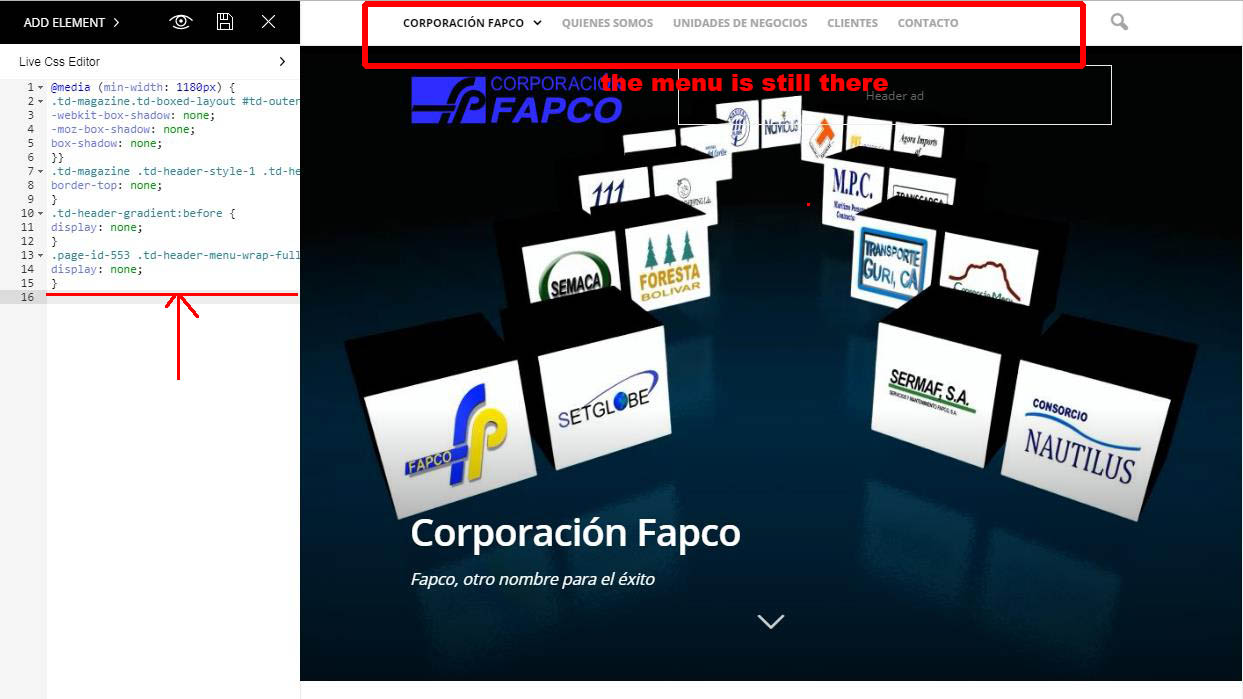
I include the code, but it does not work, I have noticed that I have a code already included before,
if I put it in the end it does not work either.
This is the code that already appears in the css:
@media (min-width: 1180px) {
.td-magazine.td-boxed-layout #td-outer-wrap {
-webkit-box-shadow: none;
-moz-box-shadow: none;
box-shadow: none;
}}
.td-magazine .td-header-style-1 .td-header-top-menu-full {
border-top: none;
}
.td-header-gradient:before {
display: none;
}
.page-id-553 .td-header-menu-wrap-full {
display: none;
}
http://corporacionfapco.com/wp-content/uploads/2017/10/Clip0004-1.jpg
although I put the new code alone does not work either,
thanks for your help
regards
Simion C. Hi,
Please enter this code in Theme panel->Custom CSS section, it will fix the issue with the article bottom ad
– https://www.screencast.com/t/67sPOYzd4p7t
.td-a-rec-id-content_bottom .td-all-devices {

display: block;

}
The header ad seems to be displaying properly from what I can see
– https://www.screencast.com/t/sapEeWxu
Thanks