Hi,
The Yoast SEO plugin generates multiple sitemaps, more information about how to proceed further in this tutorial
– http://www.wpbeginner.com/beginners-guide/what-is-a-wordpress-sitemap-how-to-create-a-sitemap-in-wordpress/
– https://www.screencast.com/t/6daaK2Ixf
You can search online if you want to find more in this matter. There is plenty of information that you can read.
The theme has basic markup for posts, here you can find more information about structured data
– https://developers.google.com/search/docs/guides/intro-structured-data
– https://moz.com/learn/seo/schema-structured-data
– https://yoast.com/seo-basics-what-is-structured-data/
There are plugins that you can use, that would be the easiest way if you require additional options.
As I have mentioned before the <head> section is located in the header.php file. This file is found in the main theme folder
– https://www.screencast.com/t/3ORNutEVslq
Enter the provided code there between the head tags, that is what option 2 suggests.
Thanks

Hello,
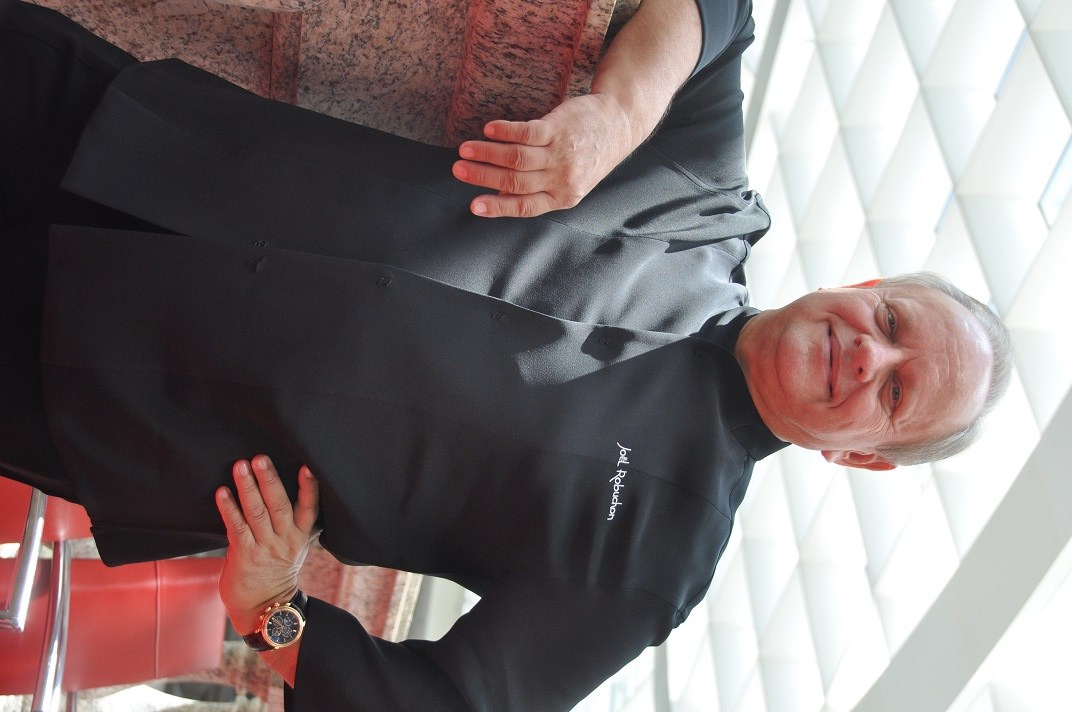
I run into a big problem. When I insert this photo, it was shown vertically. However, after it’s populated and updated, then the photo went horizontally.
Can you please point out what went wrong? There is some other article didn’t have this issue. I checked many times, not sure what happened.
This is wrong: http://jazko.com/featured/joel-robuchon-interview/
This is right: http://jazko.com/food/fine-dining/vrijmoed-belgium/
Please help.
Hello,
I know you mentioned this a couple of times. However, I just want to confirm something before that.
As I have mentioned before the <head> section is located in the header.php file. This file is found in the main theme folder
– https://www.screencast.com/t/3ORNutEVslq
Enter the provided code there between the head tags, that is what option 2 suggests.
1) If I add Bing’s meta tracking HTML there…does it mean I don’t have space to add google’s? and others? or I can do this for both search engines…even if there are 3 search engines ask me to place the meta tags/codes , then i just add them there one next to each other?
2) It also mentioned on Option 1 to upload the file on web server. http://jazko.com/BingSiteAuth.xml Same question applies. Where exactly should I go do to that? I bought this from hostgator (C panel) and using wordpress with Newspaper theme. Where exactly are they referring to? Also, if other search engines ask the same thing. Wound’t it be a conflict if I upload many XML to the same spots? or they work just fine as long as I put it on the right spot.
I tried to look it up online, but on one is explain this logic. If you know how things work here, can you please help to explain me a bit?
Thank you!
Hello,
One more major issue just popped up. It seems that the front page is unstable that sometime the position would get shifted and looks bizzaare.
I did not do anything on changing format or setting or themes today. All I did was to upload a few articles with no selection of whatsoever. Text and images and updated.
Now, the front page looks weird again. it looks weird on google chrome on PC. Could you please let me know what might be the reason for that? How can I show them to you ?
This is the 2nd time already. Last time I think it has something to do with me changing the setting on excempts, not this time though.
Thank you.
Hello,
I have more questions.
1) as for social media sharing on Facebook/Instagram, there are icons for them. How about Chinese social media icons such as WeChat/Line/Weibo? Do you have them available? If not, is there anyway I can have them added next to facebook…etc?
2) The problem I said I was having with vertical pictures going horizontally, I see more of that today. Once again, didn’t change any setting for the last 24 hours and it was perfectly fine yesterday. My question is, is this because of the server? (hosgator) or more of newspaper or wordpress? Could you please help me to look into these few articles, you will be able to spot what I meant pictures suppose to go vertically going horizontally. For instance, a person who should be standing, now looks like floating sideways.
Examples:
http://jazko.com/featured/joel-robuchon-interview/ ( look for pic in the middle of the article )
http://jazko.com/food/fine-dining/taipei-bellavita-beatate/ ( look for cheese and wine , 2pics)
Being said that, my front page is still very wrong with its display for the fashion section. Please try to look at the front page, and click next…all the way til 5 ( still same category) , looks like setting is wrong but I am positive we did not change anything. I am the only one who is building this website, no one else is.
Thank you.
Hello,
I just realized that I don’t know where to find this file.
https://www.screencast.com/t/3ORNutEVslq
It shows where exactly to put them, but as newspaper is uploaded to the cloud, not this laptop i am using. Can you please confirm if I should look it up on Hosgator? or WordPress? or Newspaper Theme ? I am not sure what to do. On that pictures you attached, it shows D: , does it mean this file is somewhere on my laptop?
Thank you!
Hi,
If I understand correctly the image was displayed vertically in the post page. I have not heard about this issue before, could not say what is causing it. I believe the image is originally like that, from what I can see this is the original image used
– https://i1.wp.com/jazko.com/wp-content/uploads/2017/10/DSC_0322.jpg
WordPress has an option to rotate the images after uploading them in the media library
– https://www.screencast.com/t/WbasznpouK5
Or you can process the images before you upload them, in a photo editing program for example.
Images should not change orientation once uploaded the intended way. I have not heard of this issue before, but every day is something new.
As I understand there are multiple options to implement that verification code. The easiest way would be to add the code as mentioned, in the theme header file. That will be sufficient. The file is located in the main theme folder, on the server you are using. They can be accessed by FTP
– https://premium.wpmudev.org/blog/wordpress-theme-files/
– http://www.wpbeginner.com/beginners-guide/beginners-guide-to-wordpress-file-and-directory-structure/
Or you could simply use the default WordPress editor, like this
– https://www.screencast.com/t/ET50xtubPbKo
Regarding the page issue, from what I can see it is not displaying correctly at the moment. Edit the page with the tagDiv composer and make sure all the elements are placed corrector. You could simply remove the block with issues and add it again.
The easiest way to implement additional sharing would be to use sharing plugins. The alternative is by code modification only and manual implementation. I could not say if or when more sharing options will be added in the theme by default.
Thanks
Hello,
I found there is a bug with your newspaper theme. For the page issue, it did not solve the problem when I delete and re add it as the way I want it. however, under the fashion category, if I choose to place order as random , or A to Z, then this issue is gone.
If I choose to show latest, then something goes wrong and the format would go wrong like what you see. As for now, since this website is online already, so I must fix the display and choose ” popular at all times ” for this section. however, I need your help and investigation on why it only happened to fashion (style+frame) are the subsideray pages under fashion categories.
Is there any possibilities that this can be a bug and something to do with coding?
As for the other picture issue, I am certain those images were uploaded correctly. however, I took your advice to turn it 90 degree, then it looks odd just like how it shows up previously, but when i changed it back 90 degree to the original photo…now it is showing correctly. Not sure if this is a bug, but it appears more than once.
Could you please kindly discuss this with your team and advise? This is pretty urgent for us.
Thank you for your help!
Hello,
To give you more clues and info, under category fashion i have style and frame. If I choose to display only the contents in frame, it’s perfectly fine. If i choose style , same thing happens. however, that block is supposed to run all articles combining the two …and show be showing from latest as i am trying to build a news media website.
it would be odd if i cannot show them from latest.
thank you.
Hello,
Even if I did that modification by not choosing “latest” , something is still weird at this page.
http://jazko.com/category/fashion/
I’ve deleted or removed some articles around and could not find out the reason.
That is all I know for now. Thanks for your help.
hello ,
something is wrong with my fashion category only. fashion or style…please play around with it by go to page 1 , 2 , 3 ..til last…not many there for now.
tried all the combination is out there, and still don’t understand what is driving this display abnormal.
Could you please help me out this first thing in the morning? This is very important to our team. Thank you.
Hello,
One more question. Where can I go to change the contents of this in the footer page?
Disclaimer Privacy Advertisement Contact Us (want to state some privacy and agreement to the page)
Also, some readers would like to share them through IG(instagram) , but the icon is not available with this theme? How can I add them there?
Thanks!
Hello,
This page has issue too. I won’t make any changes, so you can verify the problem easier.
http://jazko.com/category/travel/page/4/
However, the other pages do not have any issue.
http://jazko.com/category/travel/page/5/
http://jazko.com/category/travel/page/2/
http://jazko.com/category/travel/page/3/
Please review and advise. Thanks.
Hello,
They are both with problem. Not sure if this is one error, or many errors.
http://jazko.com/category/fashion/style/
http://jazko.com/category/fashion/page/2/
Thanks for your help.
Hello Simion and your team,
I understand you may be away sometime, but this is urgent for us. Could anyone please help to take a look on the earliest possible?
Thank you for your help.
Hi,
Please note that if you keep replying in your own topic, this will refresh the topic date. The result is that the topic will be placed in the newer topics, and we answer from older to newest.
So the problem is on that category page, the modules are not displayed properly. The problem seems to be only on the 4th page of the category however. Other pages do not have the problem.
Please send us an email at contact@tagdiv.com and provide admin login information. We will take a look. Hopefully we can identify what is causing the issue. Paste a link to this topic in your email.
Thanks
Hello,
Understood. Already set up the account and password and sent it to that email address.
Please help to take a look and let me know if I should leave your account on after the problem is solved. Thank you.
Hello,
I found two more issues on top of the previous one. Already emailed, could you please write me an email when this is looked?
http://jazko.com/category/fashion/page/3/
http://jazko.com/category/fashion/style/page/2/
However, I realized there are another 2 problems. When you click on any of the article, and scroll down to related articles, there are usually 3 …they are there without images only the texts and links , which is incorrect from my setting.
Another problem is people are able to share via Facebook. However, when they click like several times (same person did it on purpose), it will be 1 off 1 off…black…then the number shows 2…then …based on the article is brand new and was at 0. Can you please double check if something is wrong with that option? Not saying I’d like to do that on purpose…but a colleague of mine did that and discovered this “issue”.
We are not sure if we can keep on updating articles, so it’d be better to know when this investigation and issue is being taken care of.
Thank you.
Hi,
We will take a look at the category page issues and reply by email. I have inspected the related articles that are coming from the theme, the images are displayed properly
– https://www.screencast.com/t/0N0i4xzU6ao8
But there is a different related section, I believe coming from the Jetpack plugin. You can disable that related section from the plugins settings
– https://jetpack.com/support/related-posts/
There would be no need to have 2 related articles in the post page.
Regarding the sharing please provide more details about the issue so we can understand better what it is happening. The Facebook share functionality is handled by the Yoast SEO plugin
– https://forum.tagdiv.com/facebook-share/
Thanks
Hello,
I don’t know how to take a screen shot and post it here, so I took one and sent it via email. The images of related articles shows up normally on tab or mobile, not on PC(laptop). I tried it with Chrome and Firefox, and they were empty.
I am not quite sure why the result is different , but I took a screen shot and sent you the email already.
Please ignore that FB issue as I did not see it myself, so will ask again when it happens the 2nd time.
Thanks for working on that category page issue, and look forward to hear the result on that.
Hello,
I believe that category issue is not long gong. Please take a look at my cover page/front page. The fashion category part, something is wrong with its layout. You may jump in and do the necessary action.
However, this is more of a trouble than before as it is on cover page. Thanks for your timely help.
BR,
Alex
Hello,
I wonder where can I go to update my footer, I updated the link for Facebook, not the rest as those were not registered yet. However, the link is not straight to facebook.
https://www.facebook.com/JAZKO-292276277929754
Another question is, where can I go to edit the very bottom of the website ? where has a few bars called Disclaimer / Privacy / Advertisement / Contact Us
By the way, it appears the setting for mobile is slightly off for the letters. Please check out my frontpage, and the name JAZKO runs okay and on the same size, but when it comes to mobile, j would fall down a bit and overlaping the word underneath. Is there anyway we can get rid of this problem? I am using Samsung phone with Android system.
Thank you.
Hi,
It seems to direct to Facebook at the moment
– https://www.screencast.com/t/wS1wIn07D5o
– https://www.screencast.com/t/ZelG2uU5dGq
If the link to the account is entered properly in the theme panel social networks field, there should be no problems.
That is the footer menu, you can create your own menu and set it in the theme panel
– https://www.screencast.com/t/yQxwFSww4
I could give you a code to increase the top padding on the logo tagline, for mobile. Try entering this code in Theme panel->Custom code->Advanced CSS in the phones section
.td-logo-text-container .td-tagline-text {

padding-top: 10px;

padding-bottom: 2px;

}
Thanks
Hello,
I don’t want to touch code as much as possible. However, in this case, I don’t think it is adding the line, but the size of J is not lining up with all the other characters.
Same thing happened to tablet as well. The only place where it works normal is on PC and laptop.
Is this something you can fix from your end? Anyone using the letter “J” would be having the same situation too I think?
As for footer menu, can you please point out the direction where should I go to create one for myself? https://www.screencast.com/t/yQxwFSww4
I know that is the place to choose, but not to create a new one. Can you point them out for me?
Thank you.
Hello,
For Disclamer, if I want to write a whole page, how should I do that? Should I create another post and put the URL in the Apperances->Menu section?
Please walk me through in details if possible Thank you.