- TutorialsFrom WPBakery to tagDiv Composer
 wesquibel2
Is there a way to use a static page as the homepage for mobile? Instead of the latest posts that it defaults to.
 dennisjpitocco
Added Header Live Search Element to our Cloud Header and the when attempting a Search – always comes back as “404 Error/Page Does Not Exist” (https://www.bizcatalyst360.com/500.shtml/)
Our Site address: https://www.bizcatalyst360.com/homepage-bc360/
 will@county10.com
https://county10.com
The header and footer cannot be edited or saved.
We have followed the instructions from other threads regarding opening the homepage Page then using the edit in tagDiv Composer button, then going to Manager, clicking on the name of the template under “Choose header template” which then displays the template and allows editing it but not saving it. This goes for the header and footer.
We get the “This type of header is not editable with tagDiv composer. Please use a cloud template!” message when we simply hover over the header or footer. When viewing the Cloud Template library, the footer does not display the option to edit in tagDiv Composer directly.
We can arrange access to the site via Temporary Login if this helps your team diagnose and fix the issue.
All plug-ins and WordPress are up to date. All elements on the system status page are green boxes.
Thank you for your help in this matter.
PT from HP
 Bettina
 Hello @trademodo!
If you have a cloud/PRO template, but you can’t edit the footer, then edit your homepage with the TagDiv Composer, scroll till footer, click on footer zone and you can edit/delete the elements there.
Select the row from footer and in the CSS tab you’ll find the background: https://i.imgur.com/Yq06HV5.png
Thank you!
Bettina Hello!
It does not matter because if the page is made with the TagDiv Composer or you have imported a cloud homepage template, then you can add a flex block there.
Let me know the results!
Thank you!
 c386
c386 Hi Bettina,
Thank you for getting back to me. I think I understand what you mean. Our homepage template is currently set to “Pagebuilder + latest articles + pagination.”
In this configuration I don’t think there’s an option to add additional blocks below the latest articles. My understanding is that I would have to change to the standard template, i.e. pagebuilder only, and then configure my own blocks for the latest articles and sidebar.
Will have a play with it and see what I can do.
Bettina Hello!
A workaround there could be to add a flex block with infinite loading in your homepage like this: https://www.screencast.com/t/bumAjCwVi3c7
Hope that helps you!
Thank you!
Bettina Hello!
Please edit the homepage with TagDiv Composer, scroll the page when you edit it with Composer, and you can edit the sticky header and the logo too.
Or check this video to understand where exactly you can find the sticky header and how you can modify it: https://www.screencast.com/t/vA8nj6T90x57
Let me know the results!
Thank you!
c386Hi,
Is there an option for infinite loading on the homepage of the newspaper theme?
I can make it work for categories – there’s a setting for PAGINATION STYLE with the option for infinite loading, plus infinite loading and load more – but does such an option exist for the homepage?
At present, my homepage shows regular tabbed page numbers at the bottom, as illustrated here: https://imgur.com/k8qpuVL
The page number could end up getting huge and I’d much rather have infinite loading here if at all possible.
 mauta
mauta Thanks for your patience and suggestions. I think I have discovered the reason for the problem: this author uses very often to put footnotes in the first lines of posts, which then appear in homepage in the excerpt, with the WP-Footnotes plugin that puts the text of the footnote between two brackets ((text)) in the body of the post. I don’t know why but it’s these two brackets that mess everything up.
https://www.nazioneindiana.com/wp-content/2021/11/footnote.png
I found 80 of his posts with footnotes in the first lines and I think the only solution is to modify them or prevent the use of (()) in the excerpt.
Best regards
Orsola
 brianfearless
Hi, we recently updated our newspaper theme to the recent release, but one thing we noticed is that our homepage background video isn’t playing anymore. It’s stuck on the Thumbnail. It will randomly work for a few minutes and then stops auto-playing. Nothing was changed other than updating the theme, wondering if there’s something we missed.
What’s weird is that part of the team in Asia isn’t experiencing this issue but everyone in the US is seeing the same issue. We’ve cleared the cache and spoken to the Server company but nothing seems to help. Decided to check here since this only started once we updated the theme.
Also is there a different way to add background videos other than using YouTube?
Here is our site – https://www.creditiq.org/
Thanks
Bettina Hello Alessandro!
Ok, got it. So, the second page of the pagination is empty. There could be a setting hide on pagination and when you uncheck that option from a row, then it will load perfectly. Please check if you have this option on other rows from homepage and uncheck them if you want the rows to be displayed on the second page of the pagination. Please check this video to understand better: https://www.screencast.com/t/QJ0WrN6G
Thank you!
Bettina Hello!
If you have a cloud/PRO template, but you can’t edit the footer, then edit your homepage with the TagDiv Composer, scroll till footer, click on footer zone and you can edit/delete the elements there. Please check this video: https://www.screencast.com/t/fGV2uwNO2I
Thank you!
 ChandlerBing1985
 Hi Bettina, thanks for your reply. We have both mobile theme and AMP (transitional) active. The homepage is the one created with mobile theme, while the posts are in AMP. When I want to switch to the mobile version of the posts, there is a problem. As you can see from the video, the header has GOSSIP written on it which I can’t change in any option present within wordpress. I would like to change the mobile version of the posts. Where can I find the settings?
In the video you can see the homepage, the article in AMP version and then the one in mobile version (the last one you see is the one I would like to modify, specifically the header).
mautaHy, this is our homepage
https://www.nazioneindiana.com/
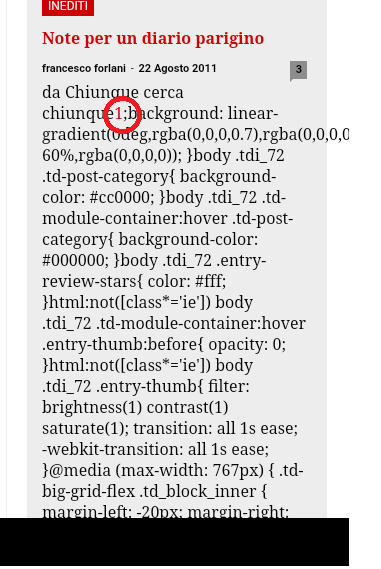
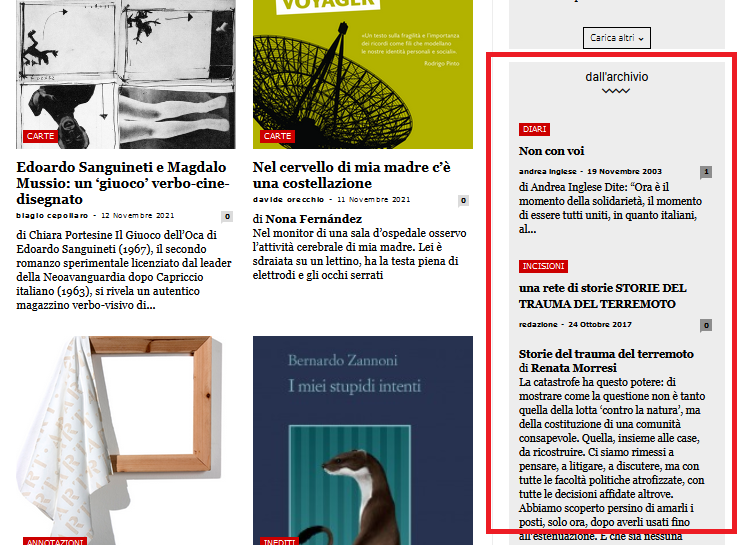
Sometimes when some old posts, not all, are displayed random in archive column on the right in “dall’archivio”
https://www.nazioneindiana.com/wp-content/2021/11/archive-posts.png
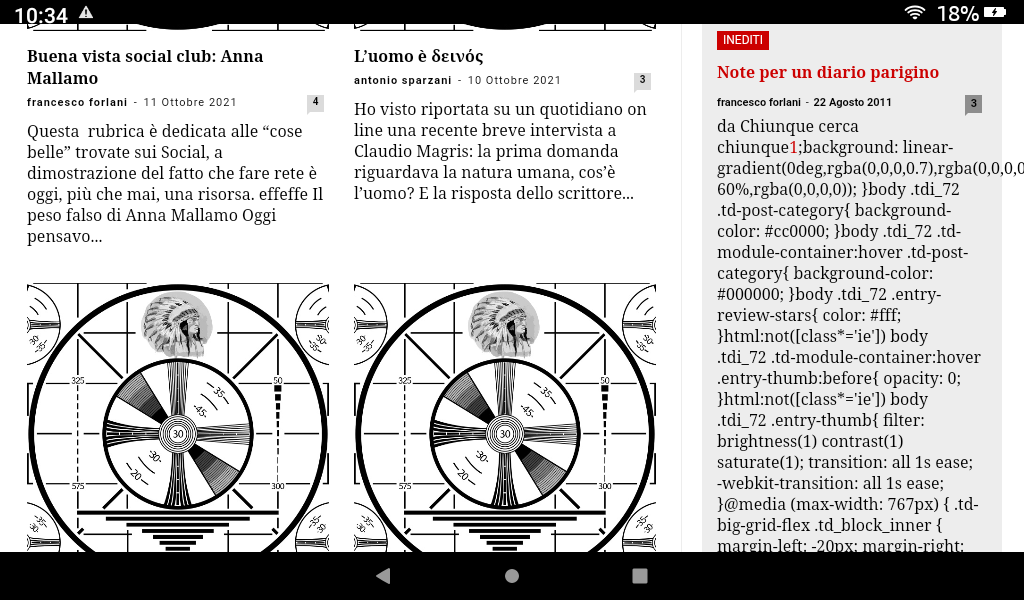
a strange phenomenon happens: parts of code appear in the post, I think of the css, instead the code of the post in “text mode” is normal
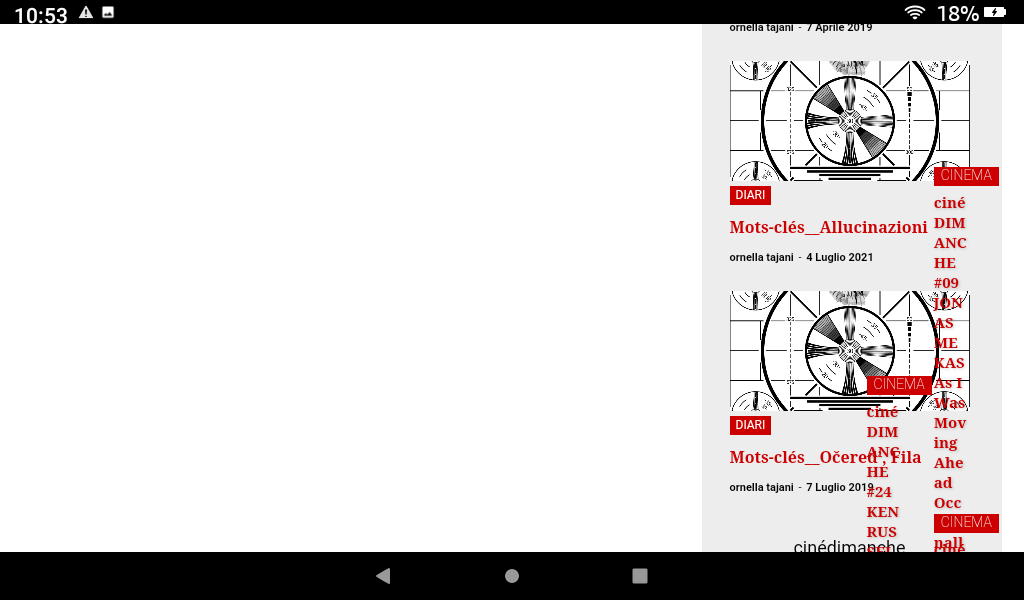
and from this post down the rest of the homepage turns white and appears on the right side and completely messy, without images.
Also it is impossible to access tagDiv Composer.
Everything goes back to normal by updating the page.
Why does this happen?
Thanks
Orsola
 siobhan110
Hi,
Today, I noticed that all my Flex blocks were no longer working (e.g. on my homepage http://www.thevillage.be), but I managed to redo them all. Then, later, I noticed that in fact, NONE of the posts on my site are loading (e.g. https://www.thevillage.be/the-first-village-baby-eamons-birth/) and that I no longer have a choice of post templates via the theme panel, nor font settings for posts, which I’m sure I used to have.
Have I missed some huge updates to all this? Or is it possible that I’ve done something to mess up everything to do with posts on my site? Thanks for any help.
 viaggindia
 Konichiwa @munemoto !
1. Open your homepage and edit it with tagdiv composer.
2. Left side on top click on Manager, it will open your header/footer manager in center of the screen, then Select Mobile menu.
3. Now click Pulses PRO, and past 東瀛仙人掌.
Hope you can do it as it’s very easy.
-
This reply was modified 4 years by
viaggindia.
dennisjpitoccoCloud Footer appears fine on Desktop but extra/blank Footers appear above on Mobile devices. Site is https://www.bizcatalyst360.com/homepage-bc360/
 vasite
 hi, i made a video, you can see here youtube.com/watch?v=l7YNtrX2LEo
you can see the 2nd menu ΣΥΝΤΑΓΕΣ on my site on this link is not working here icookgreek.gr/tags/kids-friendly but for example in homepage is working
Bettina Hello!
You’re right. If you have a cloud/PRO template, but you can’t edit the footer, then edit your homepage with the TagDiv Composer, scroll till footer, click on footer zone and you can edit/delete the elements there. Please check this video: https://www.screencast.com/t/fGV2uwNO2I
Thank you!
Bettina Hello!
You’re right. If you have a cloud/PRO template, but you can’t edit the footer, then edit your homepage with the TagDiv Composer, scroll till footer, click on footer zone and you can edit/delete the elements there.
Thank you!
 webfoleo
Hi there, I have just transferred this site for a friend.. https://blueplanetsociety.org and I don’t know if it was there before but there’s a big gap on the homepage. Does anybody know how to remove this please?
Thank you very much
Roger
Bettina Hello!
You’re right. If you have a cloud/PRO template, but you can’t edit the footer, then edit your homepage with the TagDiv Composer, scroll till footer, click on footer zone and you can edit/delete the elements there.
Thank you!
 SP1
SP1Hi,
The latest in the world of news websites is this trick.
For example, a reader comes to the website from Google News or Google Search. He/she reads the article but now clicks on the back button to go back to the Google News page or Google Search page.
However, when clicking on the back button the user is taken to the websites home page, and then by again clicking the back button they go back to the Google News or Search page.
Does Newspaper have that functionality? OR any plugin recommendation?
websites like http://www.NDTV.com do that regularly.
 goodanduseful
Hello, How do I control the copy and images shown in the link previews? For example when pasting into Linked In one of the posts are selected and the title is ‘Home’. I would like to manually set a description for the homepage.
Homepage: https://sustainable-business.guide/
Preview appears as: https://www.dropbox.com/s/ad004umzfnoj4h3/Screenshot%202021-11-15%20at%2021.19.15.png?dl=0