- TutorialsFrom WPBakery to tagDiv Composer
 Alin [tagDiv]
 Hi,
The posts which appear on that slider are the ones present in the featured category. You can remove “featured” from sort(so you will have latest articles order) and add 'category_ids' => '', in the page-homepage-slider.php file like this: http://screencast.com/t/4tnVLnmdIodG and add categories ID there or if you want to exclude use -
Thanks!
Alin [tagDiv] Hi,
Please try this custom css in Theme Panel > Custom Css – http://screencast.com/t/jAXZVpuwryc
.header-logo-wrap {

float: right;

margin-left: 0px;

margin-right: 30px;

}
You can change to a template without articles like Homepage Blank and add blocks via Visual Composer – http://screencast.com/t/rrHDX6TuIT so it will be displayed only blocks that you add to your page.
Please also consider that unfortunately the version 5 of the theme will not include rtl support. You can still use the theme as it is but unfortunately you cannot updated it as you will lose the rtl support or you can update it and make yourself the necessary adjustments needed. If you can’t use the theme we can offer a full refund, just send an email at contact@tagdiv.com and we will explain the procedure.
Sorry for the inconvenience!
Thanks!
 cfpsts
today, i updated my theme newspaper. then the header logo in main page is not displayed properly.
first the logo is displayed properly. but finally logo is not displayed properly.
my homepage url is http://www.indeconsulting.com, the header logo is the left of ad under main menu.
how can i fix this?
 Brain916
 Hello Alin,
For method one, I removed the <?php echo $this->get_date();?> from every module, but still shows.
When I add the code you shared:
.page .td_module_wrap .meta-info {

display: none;

}
Not only does it remove the post titles on block 14 (we are using it as a slider), but you can see it load then disappear.
To fill you in, I am using a child theme, based off the main theme. You can see it live here:
http://www.sneakerfiles.com/oncourt/
Also the URL is a demo site we will eventually move to the homepage (sneakerfiles.com) so if that helps anything…
 simchris
 Wow…. You know … That is really clever.
Tagdiv could almost make a new homepage version which is basically, a new category page, and add options in the theme panel … Just like managing, say any category is done now, but with all the latest posts.
I am going to try doing what you did here, as vc kills our system a s of 1.7, while 1.6 can spike a little bit on high traffic site with php going to yellow from green over and over.
Going to give this method a whirl…!
-
This reply was modified 11 years by
simchris.
 apesteli
Hi,
I want my homepage to be 3 column and the 3. column to be sticky
as you can see the link below, I did the necessary css input, but it is still not sticky.
http://www.awesomescreenshot.com/image/172900/b157553dad68e11651a1ab6b506b32c7
 yajones
 False alarm.
A change in the category structure affected the filters used for the blocks on the homepage.
Fixed now. Thanks.
yajonesHi guys,
This just occured after I was playing with the top bar the comes with the GetResponse plugin. My homepage went blank – no posts are showing up in the main content area. However the sidebar is fine and posts are showing there (recent posts, popular posts, etc.)
I deactivated the plugin but the problem persists, so I’m assuming that’s not the issue.
Any help available?
Here’s a screen shot.
Brain916Hello,
I wanted the author, date and comment box to not show up on the homepage, but only on single pages. How can I go about doing this?
 MrOrsh
I have previously used the regular Big Slide post in which I could exclude posts with just putting in the category name with a “-” in front of the ones I didn´t want showing.
I am now using the template instead (the one named Homepage-bg-noarticle) which looks a lot better since I want the background-picture option. However I can´t seem to find any settings at all for that Big Slide other then Slide Limit, Slide Background and Background Color.
How do I decide which categories I want to show and not show?
Page is: http://www.enkelteknik.se
 europerashion
Hi,
i get here after latest update massive Problems with images in Category Preview.
If i use videos or Pics in preview they will be go small
i identify the Problem in this line =
<code><img width="326" height="406" alt="" src="http://europefashion.de/wp-content/uploads/2015/02/DSC09037neu-326x406.jpg" />where the width is now 326 and height 406. But i dont know why ??
Where can i change this Values to Values i need, because this here make my Preview Pics much smaller and i found no Place to setup this to my Values i need.
How to do this ?
Because it will not show right –
Example you can see in europefashion.de the homepage, there i use category display for slideshows and this will changed here ??
Regards
Kasi
 sfeaton
I am using “homepage post” at the top and the banner covers part of the image.
 alexandru292
 Still don’t works with Homepage-BG with articles list or Homepage with articles list, but I edit the index.php on the 70 line and it works. http://i.gyazo.com/a011256d4c679caac259296af22ca864.png
I have another problem, if you can help me.
How I can remove “Blog” (BREADCRUMBS) text from Home? http://i.gyazo.com/25e1db28e24c22ed7fb84e01f787954d.png
Thanks,
Alex
Alin [tagDiv] Hi,
For you homepage you have to edit the template that you use “Homepage-BG with articles list” or “Homepage with articles list”: http://screencast.com/t/O3URcn7p So if you say that it doesn’t work it means that you use “Homepage-BG with articles list” page template.
For category page please use the code like this after pagination – http://screencast.com/t/ytKnDWbedfgL and it should solve the issue (above I provided wrong position for category page – sorry ).
Thanks!
 Emil G
 Hi,
I’ve tested your site on multiple devices and on mac(safari) and the issue didn’t appear. Try to create a new homepage identical with the one you have now, build it again from scratch, don’t copy the content from the main one and do some tests, see if the issue is still there.
Also try to clear the browser cache (ctrl+shift+r on chrome).
If it’s still there please provide more details, like what version of safari did you used when you tested the site and other details, we need to replicate it on our side.
Thank you, Emil G.
Emil G Hi,
1. We have it on our list, we’re looking for a fix, it will be fixed in one of the next updates.
2. If you don’t set a custom homepage wordpress automatically displays the blog page, the breadcrumbs appear because of that. If you want to remove the “Blog” breadcrumbs delete the following code – http://screencast.com/t/X2fFbbpEyjb4
Thank you, Emil G.
-
This reply was modified 11 years by Emil G.
 82jachar
Hello!
When i share an article on facebook, no thumbnail shows up. I would like to have the featured image as the thumbnail. Is there a solution to this issue?
the homepage i am speaking of is http://www.bahro.nu
 wagner
 How do I get the sections in the homepage template to use only specific categories and their children?
I used the ‘Reveal Ids’ to get the category id’s for both my ‘releases’ category and my ‘previews’ category and based on looking through all the templates’ code it looks like using the category_id attribute might be what I want. However after trying it, both sections display my current one post which is in the previews category (not a subset of releases). How I can I get each section to display only the appropriate articles?
Code:
[td_block1 limit=”6″ category_id=”13″ header_color=”#f65261″ custom_title=”RELEASES” ajax_pagination=”next_prev”][td_ad_box spot_id=”custom_ad_1″][td_block2 limit=”6″ category_id=”11″ custom_title=”PREVIEWS” ajax_pagination=”next_prev” header_color=”#82b440″]
I’ve also tried show_child_cat with no luck as well. Is there something like an MSDN page that lists all possible attributes and a description of each? Also what is the difference between td_block1 and td_block2?
Alin [tagDiv] Hi,
We know about this issue that appears when you use site background and also homepage background. We will fix this in future updates, please use this custom css in Theme Panel > Custom Css to fix it: http://screencast.com/t/WhBYq3QxAQM
@media (max-width: 767px) {

.td-boxed-layout .td-big-slide-background {

width: 100%;

}

}
Thanks!
Alin [tagDiv] Hi,
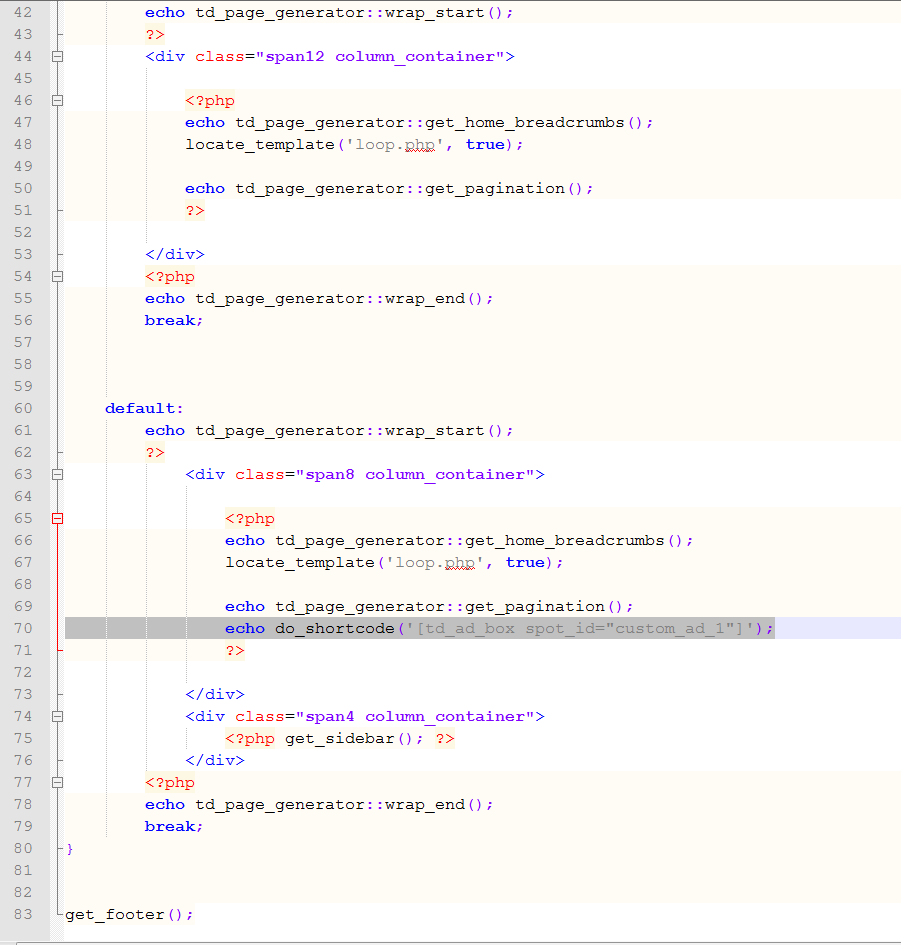
Yes, you can use do_shortcode function and add a custom ad bellow pagination in template that you want:
Homepage with articles list – http://screencast.com/t/d9HPJK5j0 – http://screencast.com/t/vnljqeHfD
Category page – http://screencast.com/t/Sx5IWqWbdy – http://screencast.com/t/IWlGaGdH
Tag page – http://screencast.com/t/oyUmCoCcDmw
echo do_shortcode('[td_ad_box spot_id="custom_ad_1"]');
Thanks!
-
This reply was modified 11 years by Alin [tagDiv].
 Lucian
 Hi,
1. Could you please provide more specific details about the grids your refer to as I’ve checked your homepage but could not find anything wrong.
2. Please also try this without any plugins active, leave just theme’s Visual Composer and test again. Also check browser’s console for errors or notifications and let us know of what you find and please also remove the script which disable selection, right click on page so I can make a few tests.
Thanks
Alin [tagDiv] Hi,
That code appear when you disable Visual Composer plugin because you used Visual Composer to add Big Grid on your homepage.
If you want to disable Visual Composer plugin please follow this topic and try to create something similar – https://forum.tagdiv.com/topic/category-top-posts-style-in-main-blog-index/
Thanks!
Alin [tagDiv] Hi,
td-post-sidebar class is used on posts so if your post’s sidebar is hidden on mobile then adding this class in your page template will also hide the latest articles sidebar. So feel free to use it like that, it is a good solution.
I also checked you site again and I see that you have added this class in page template homepagesidebar, this also can be used if you want this. Just paste this custom css in Theme Panel > Custom css:
@media (max-width: 767px) {

.homepagesidebar {

display: none !important;

}

}
Thanks!
Alin [tagDiv] Hi,
Unfortunately this issue can happen because of content-excerpt(in some cases title excerpt). Even the excerpt length is the same, some articles may contain long words like in your case and start another row – http://screencast.com/t/jQgfFkQcbwKW – http://screencast.com/t/g3B0Ctvbyr2D
This issue cannot be solved from excerpts, but you could try this css if you want to fix this issue at least on your homepage: http://screencast.com/t/aYrMjuA3 – http://screencast.com/t/D9htbcO5
@media (min-width: 768px){

.home .td_block_2 .td_module_4 .td-excerpt {

min-height: 100px;

}

.home .td_block_2 .td_module_4 .entry-title {

min-height: 63px;

}

}
Hope this helps!
 jb
jbI have a very simple homepage where I use the visual composer. I have to use version 4.3.5, because every higher version will use to much memory (+100 mb) and slow down the site.
Is it possible to use another page builder with less functions or anything else?
I just need such a design:
slider -> ad -> posts -> load more button
and a sidebar