- TutorialsDefault Block Settings Guide
- TutorialsOffset Feature
 nearview
 You’re right, Simion … it only affects people using infinite load for posts. I do appreciate you all taking another look at this, however. If you’d like, I have two VERY strong WP developers that I work with that have been taking an in-depth look at this. I would be glad to connect you with them when you’re ready to look at this. Perhaps they can provide some info that would be helpful. Just ping me direct via my forum registered email address. Cheers!
 Simion C.
 Not everyone. That issue happens only when using infinite load for posts. But we’ll see what we can do about in the next theme update, it’s a priority issue. We are very sorry for the situation.
Simion C. Hi,
Infinite loads for posts loads one post at a time once the previous post ends. The new posts are loaded with ajax in an iframe. And they are loaded entirely, the head content is loaded as well, meaning that this could indeed happen since the analytics code is loaded in the head.
However, I have so solution for this issue unfortunately. The infinite load feature was built a long time ago, and for now there aren’t any plans to rework it. I’ll mark it for further testing, maybe something could be done about it in a future update. Hopefully a solution can be found.
Thank you!
nearviewHi TagDiv team. I just discovered a HUGE issue that is going to impact all of my media clients. We have been using infinite load for single posts to great success … so we thought.
However, I just discovered that when infinite scroll triggers, it loads three (or more?) additional articles … each of which trigger a GA4 pageview event. That’s a big problem because it is drastically over-inflating my clients’ GA4 pageview data and loading ad impressions that no one ever sees, lowering my clients’ ad click through rate (CTR).
Here is a Claude-assisted analysis I did looking at network-level events on one of my client sites. It might help you.
The solution would be to only load ONE new post at the bottom of a post, then load another new post at the bottom of the second post, and so one. The problem is when we preload MULTIPLE posts at the end of the first post.
Please let me know if I can be of any assistance. Most of my client site are geo-blocked to just the US and Canada, so we can open one up to you if you’d like.
Simion C. Thank you.
If you want to reduce the admin ajax requests, my suggestion is to change the pagination type for this block in the post page -> https://prnt.sc/Wvqv_ogWmLeq The infinite load pagination used on that block makes 2 requests each time a post page loads, I suggest using next/prev pagination or Load more button. This way the block won’t automatically make requests on page load and scroll, and visitors can load more posts if they want.
The live search also makes requests while typing in the search box -> https://prnt.sc/6wn31CiDh_WA This can be disabled -> https://prnt.sc/A5bIijIb-1k7
But I suggest starting with the changing the pagination of that block in the post page, then check if the situation improves. If not, disable the live search as well.
Let me know.
Thank you!
Simion C. I’m checking the posts on mobile, and from what I see the widget sidebar is actually after the featured image and the post content -> https://prnt.sc/72J2qFN98ASg It’s certainly not positioned as in your screenshot -> https://prnt.sc/hBh_5lIjRovc It can’t be there.
In order for the widget sidebar to be after the comments, it means that you were viewing the desktop post template on mobile. Maybe it was a caching issue or the mobile template was not yet set.
I see you disabled the infinite loading for posts. Infinite loading is a feature from the theme -> https://forum.tagdiv.com/infinite-loading-single-posts/
Basically most of the theme users already updated to wordpress 7. There are no major issues. All we plan to do is fix a few minor issues, and add a bit of compatibility with the new wordpress features if possible. You could update wordpress and it should work fine.
Thank you!
 mundoplus
Hello,
We are experiencing an issue on our WordPress website using the Newspaper theme together with Cloudflare.
Every time we publish a news article, Cloudflare shows a CAPTCHA challenge before the publishing process can be completed. If we do not complete the CAPTCHA, the article is not published. The same thing also happens quite often when saving a draft.
The main problem is that we are currently unable to upload images properly. It looks like Cloudflare is blocking the upload process, but in this case no CAPTCHA is shown, so we have no way to complete the challenge. The only workaround we have found is to save a draft of any article, wait for the Cloudflare CAPTCHA to appear, complete it, and then our computer seems to be temporarily “authorized”. After that, we can publish articles, upload images and make other important changes for a while.
This issue also affects some Newspaper theme features. For example, the infinite scroll option, which loads more articles when scrolling, does not work unless the Cloudflare CAPTCHA has already been completed. The same happens with some news modules that load more posts or paginate results using AJAX.
This is especially important because the infinite scroll and AJAX loading issue affects 100% of our users. Visitors never see the Cloudflare CAPTCHA challenge, so they cannot complete it. As a result, they are unable to load more articles in any of the Newspaper theme “flex” modules that rely on AJAX loading or pagination. The module simply keeps loading forever, showing the spinning icon, but no additional content is loaded.
So the issue seems to be that Cloudflare is challenging or blocking some WordPress/Newspaper AJAX requests or admin actions, but in some cases the CAPTCHA is not displayed to the user, which makes the action impossible to complete.
Could you please help us identify which Newspaper theme AJAX requests, endpoints, scripts or WordPress actions should be excluded or whitelisted in Cloudflare so that features such as infinite scroll, AJAX pagination, image uploads, post publishing and the “flex” modules work correctly?
We would also appreciate any recommended Cloudflare configuration for the Newspaper theme, especially regarding:
* WordPress admin actions
* Media uploads
* admin-ajax.php requests
* Newspaper infinite scroll
* Newspaper AJAX pagination and post loading modules
* Newspaper “flex” modules that load more posts through AJAX
* Any theme-specific AJAX endpoints that should not be challenged by Cloudflare
Thank you.
 Calin
Calin Hello,
Those requests are generated by the theme and are usually related to pagination. If your website uses AJAX pagination, infinite scroll, or a “Load More” button, each time new posts are loaded a request like the one mentioned above is sent to the database.
To reduce the number of requests to /wp-admin/admin-ajax.php?td_theme_name=Newspaper?v=12.7.5, you can lower the number of pagination-triggered requests from your blocks—especially on the homepage. The homepage is typically the most accessed page and often contains the highest number of blocks with pagination enabled.
Thank you.
Calin Hi,
Please change the user and password, and no longer share them on the forum, only in private.
1. This depending o the translation method/plugin you are using. We tested teh theme with the WPML plugin and this can be set as mentioned in our guide https://forum.tagdiv.com/using-theme-translations-together-wpml/. Using a different plugin it should bee need to check the plugin documentation:
https://polylang.pro/documentation/support/getting-started/setup-wizard/ https://polylang.pro/documentation/support/getting-started/create-menus/
2. The option of Infinite Loading for Single Posts can be enabled/disabled by using tagDiv Composer on the post template, edit it and select the right icon as mentioned in this guide https://forum.tagdiv.com/infinite-loading-single-posts/
Thank you!
Calin Hi,
The option you are refering is the Infinite Loading for Single Posts. This can be enabled/disabled using this guide https://forum.tagdiv.com/infinite-loading-single-posts/
The situation with the different styles on articles is related o the fact that different templates are used – https://i.imgur.com/gGkKwLc.png https://i.imgur.com/qDlwnCJ.png
Calin Hi,
You’re referring to the sticky sidebar used with infinite loading on single posts: https://forum.tagdiv.com/infinite-loading-single-posts/ Unfortunately, the sticky column only works for the first post and does not apply to the subsequent articles that are loaded. Sorry for the inconvenience!
Calin Hi ishaque001, if you are referring to the infinite Loading for Single Posts the guide – https://forum.tagdiv.com/infinite-loading-single-posts/ will help you. You’ll see the option on the single post template, click on the right icon as is displayed in the guide.
In case if you want to have a block with the infinite Loading option, you can use tgaDiv Composer and in the filter tab set the pagination on infinite load – https://i.imgur.com/g5zfD5O.png
Calin Hi,
Unfortunately, I’m not sure that I understand the option you are referring to, maybe you are referring to the option from blocks https://forum.tagdiv.com/flex-block-settings-guide/ https://i.imgur.com/DrGChxe.png or maybe you are referring to the article options Infinite Loading for Single Posts.
Thank you!
Calin Hi,
Unfortunately, the Newsmag theme does not have this option for single posts, sorry!
Only the Newsapper theme has the option.
Thank you!
 Koder
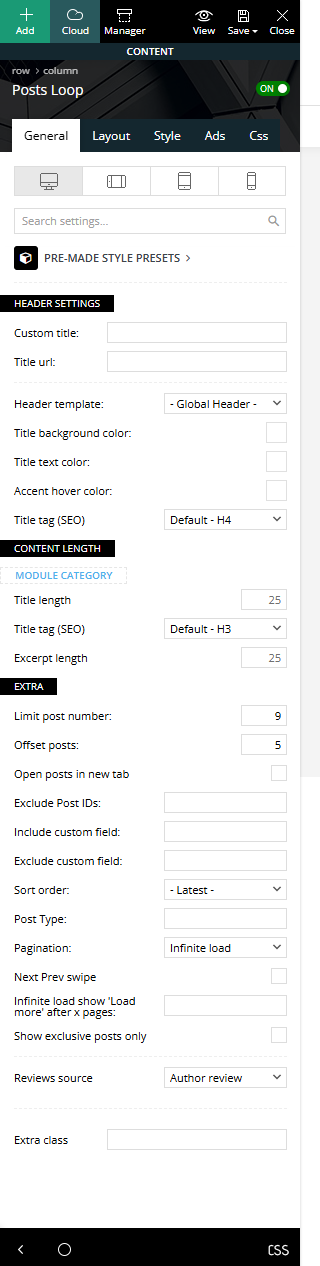
KoderI have a “Posts Loop” block, it has the Pagination “Infinite load” function, as well as skipping 5 posts. Only 9 posts are displayed in the block, and when loading the following posts, the 9th post is duplicated, that is, the 9th and 10th posts are the same (You can see on the screenshot:https://i.ibb.co/HfJVbhc6/Screenshot-2.png). What could be the problem? screenshot of the block settings:https://i.ibb.co/GfjZCxjm/Screenshot-3.png
Calin Hi,
This situation appears when the infinite loading option is used on posts, to resolve it you need to disable the option – https://forum.tagdiv.com/infinite-loading-single-posts/
I hope this will help you!
Calin Hi,
I think that you want to have the option for Infinite Loading for Single Posts https://forum.tagdiv.com/infinite-loading-single-posts/
Thank you!
 gm-2
gm-2Hi everyone,
I’m fairly new to the Newspaper theme and I’ve run into an issue I can’t seem to solve.
In the tagDiv Flex Blocks, I don’t see any option to use numbered pagination. It only offers Infinite Load, Load More, or Previous/Next.
On the other hand, the Post Loop module does support numbered pagination, but it doesn’t include category filtering (there’s no Filter tab like in Flex Blocks).
My goal is to build a movie/TV blog, and for example on my “Movie News” page, I want to show only posts from the Movie category with numbered pagination at the bottom.
Right now I can’t find any module that supports both category filtering + numbered pagination in one place.
Am I missing something? Would appreciate any guidance.
Thank you!
Calin Hello,
I think that you are referring to the auto-loading next article, this option can be enabled/disabled using this guide https://forum.tagdiv.com/infinite-loading-single-posts/
Thank you!
 chaywood0896
My site is served through CloudFlare. For several months, the “Load More” (or, alternatively, infinite load–any function that is designed to load additional posts) on the main page has been broken. You get a spinning wheel. However, if you turn off CloudFlare (or put it into Developer Mode), the problem immediately goes away. Is there a way to avoid this problem? Thanks.
 Padzup
Hi there,
I’m currently using your theme with the Infinite Loading option enabled for articles. It works technically, but I’ve noticed that the next article only loads when the user reaches the very bottom of the page, just below the footer.
From a UX and engagement perspective, this is a bit problematic:
Most users don’t scroll that far — especially when there are additional elements after the article (author box, related posts, comments, etc.). As a result, the infinite loading rarely triggers, and the feature is almost never used.
What I would like instead is for the next article to load as soon as the current article ends, or at least before the footer becomes visible — basically, when the user finishes reading, not when they’re done scrolling everything.
My questions:
Is there any built-in way to adjust the scroll trigger threshold for the infinite loading feature?
If not, is there a way to disable the built-in AE infinite loading and instead add a custom script to trigger the next article loading earlier (for example, when a specific element like .post-content ends)?
Could you point me in the right direction on how to do that safely within your theme structure?
I’d be happy to integrate a small custom JavaScript snippet below the article if needed, but I’d love to have your advice on the cleanest and safest approach.
Thanks in advance for your help!
Best regards,
Arthur
Calin Hi,
1. I checked the homepage and the next prev seems to be working on all blocks except the first one were all the time is bringing the same article. What I can suggest is to try with a filter applied this should resolved the situation.
2. Please check in the theme panel if you have any social share enabled to be display. If there are only a few socials, you can use this quite to add the rest of them – https://forum.tagdiv.com/topic/missing-social-share-options/
3. Where are “td-gadgets-loop” and “td-gadgets-flex” defined? – those classes are coming with the demo install, the css is implemented directly in the demo so you’ll need to overwrite it by adding an extra css that will apply on those classes.
4. This needs to be done per each block where you want to adjust the text, use tagDiv Composer, edit the page/template, select the block and in Layout tab look for button text – https://i.imgur.com/1bvkgVK.png
5. This can be done by editing the single post template with tagDiv Composer and enabling the infinite loading option. You can use this guide – https://forum.tagdiv.com/infinite-loading-single-posts/
Thank you!
 David
DavidHi,
I switched to the Gadget Pro theme today and encountered several issues that I’d appreciate your help with:
1. Prev/Next not working on homepage First (Main) Flexslider
On the homepage – https://www.haustier.net/ – the prev/next arrows on the first FlexSlider 2 block aren’t working. The block has no category filter. The second slider with the exact same settings works fine. (I now have set a filter there but it would also work fine. (Unique ads is not enabled on the page)
2. Social sharing buttons not visible on single posts
Example: https://www.haustier.net/die-richtige-ernaehrung-fuer-verschiedene-tierarten/
Nothing shows on the post pages when I add it in the page builder. It feels like sharing is somehow disabled or being blocked by the theme.
3. Where are “td-gadgets-loop” and “td-gadgets-flex” defined?
These classes appear to be specific to the demo content. I’d like to know where these are defined (CSS or template) so I can review or override them as needed.
4. Translating the “READ” button
How can I translate the “READ” button that shows up in blocks like “More from author” and certain homepage grids? I couldn’t find this string in the theme’s translation panel.
5. How to enable infinite scroll like in the demo?
I’d like to activate infinite scroll on post single, just like in the Gadget Pro demo. Is there a specific setting or block type that enables this?
Thanks in advance for your support — let me know if you need more details.
Calin Hi,
I think that you are referring to Infinite Loading option for Single Posts, this can be enabled/disable by editing the single post template with tagDiv Composer. Please check this guide that provides all steps – https://forum.tagdiv.com/infinite-loading-single-posts/
Thank you!
 mostwonder
 Hi Anamaria,
Thank you for your quick response and for sharing the related files.
I understand that additional functionalities like offset support need to be added through code, but I truly believe that having a built-in offset feature for the infinite scroll system—especially in modes like “Same Category Previous”—would be incredibly valuable for many users.
This feature would allow us to skip a specific number of posts before loading the next ones automatically, which can be useful in various editorial and design scenarios.
I kindly request that you consider adding native support for this feature in a future update. I’m sure it would enhance the flexibility of the theme and be appreciated by a lot of developers using Newspaper.
Thanks again for your time and great work!
Best regards,
mostwonder