Anamaria
 Hello,
Please do a test using only tagDiv plugins, please try to reinstall the WordPress and the theme and check after.
If the problem persists, then please contact us via email at contact@tagdiv.com and provide the wp-admin and cPanel access to investigate it. Also, please do a full backup of all files and databases.
Thank you!
 ThrustMedia
 Hi there. They have been in touch and things are working well now. It was a plugin that I installed that was causing the issue. Thank you!
Anamaria Hello,
Have you checked if don’t have a plugin conflict? Did you update a plugin or the theme recently?
Also, you can try to reinstall Cloud Library and the tagDiv Composer plugins. Delete them and reinstall from Newspaper -> plugins
Thank you!
Anamaria Hi @0728979139,
I answered here https://forum.tagdiv.com/topic/installation-plugin-issues/#post-479714
Do you have the requirements set like in our guide -> https://forum.tagdiv.com/requirements-for-newspaper/?
Thank you!
Anamaria Hi,
I answered here https://forum.tagdiv.com/topic/installation-plugin-issues/#post-479714
Thank you!
Anamaria Hi,
I answered here https://forum.tagdiv.com/topic/installation-plugin-issues/#post-479714
Thank you!
Anamaria Hello,
Please do not create more topics in the future or reply to other topics for the same problem.
What I can suggest, is to install the theme and plugins via FTP/cPanel –> https://i.imgur.com/QWuAITM.png, but only after you have made a full backup. In case the problem persists, please disable all non-theme plugins and try again.
Also, please let me know what PHP version you have.
Thank you!
Anamaria Hello,
Do have code added in Theme Panel -> Analyctics/ Js Code? Please try to reinstall the theme and plugins.
Also, disable and delete the object cache file and check this guide https://yoast.com/help/xml-sitemap-error/
Thank you!
 ajsakal
 hi sir,
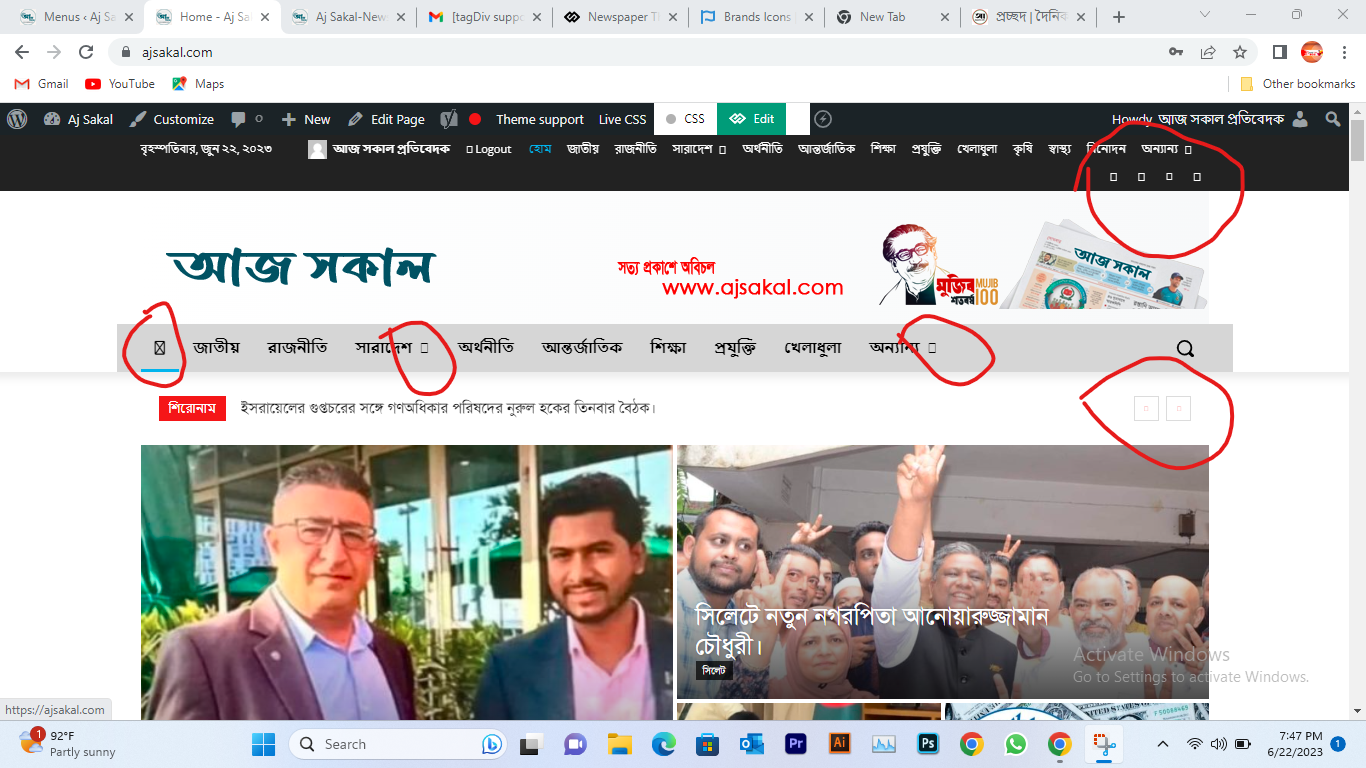
I installed the Font Awesome plugin and followed your instructions but when upload the icon than its not showing. its showing cross box. i attached screenshot for your reference.
best regards
Shariful Islam.
https://ajsakal.com/wp-content/uploads/2023/06/Icon-Missing-Screensoot.png
 drbear
Here is the image of the problem: 
So I install this prebuit template and get this problem. In the Tagdiv composer the blog shows up fine in the grid layout with 7 images for 7 posts. When I load it on regular web browser there’s no image show up, just lines of titles and meta info only. Could you tell me what should I do to fix this problem? Thank you very much!
 lawoman23
Hi,
I installed the Center Pro theme for my homepage and use the Center Pro single posts, as well. During the last week, my website broke and continues to break and fix itself 2-3 times a day. My mobile goes down with the same code as well. When that happens, I get a strange code I’ve never seen. I checked with Bluehost and they didn’t see anything on their end that causes it to break and are unfamiliar with the broken code. I have WP Super Cache and Jetpack and neither seem to help. Can you help me figure out if it’s anything wrong with the theme or plugins? Thank you!
ThrustMedia We are also not able to edit Posts in tagDiv. The icon is missing on the post pages to enter tagdiv composer. I hope someone can help me with this. I don’t want to try to reinstall yet again and lose all the work that I’ve already done.
 0728979139
 Did exactly that but when I try to activate the plugin I am directed to this error ” There has been a critical error on this website. Please check your site admin email inbox for instructions.”
Note: Have not installed any other plugin on the site.
0728979139I am unable to install the theme since the required plugin are not installing . I am always receiving an error with the tagDiv Composer plugin.
This plugin failed to load properly and is paused during recovery mode.
An error of type E_PARSE was caused in line 34899 of the file /home/allsureb/new.allsurebets.com/wp-content/plugins/td-composer/legacy/Newspaper/includes/td_config.php. Error message: syntax error, unexpected ‘?’
0728979139Installation plugin issues
After I installed the theme , tagdiv composer failing to instal with syntax error. Any help?
This plugin failed to load properly and is paused during recovery mode.
An error of type E_PARSE was caused in line 34899 of the file /home/allsureb/new.allsurebets.com/wp-content/plugins/td-composer/legacy/Newspaper/includes/td_config.php. Error message: syntax error, unexpected ‘?’
ajsakal hi sir,
I installed the Font Awesome plugin and followed your instructions but when upload the icon than its not showing. it showing cross box. i attached screenshot for your reference.
best regards
Shariful Islam.

 Bettina
 Hello Paul!
A code in your frontend is appearing only when you have a plugin uninstalled when it should be installed, so instead of the code, it will display the element from that plugin.
Check in the Newspaper -> Plugins.
Thank you!
 Zorg23
Hi, im new to wordpress/tagdiv, i wanted to know how to make the page changes occur in every article, i made some changes in the home page but these don’t occur in the other articles, i thought it was a problem with the theme so i installed a new one and tried again, for exemple here ( tgreal24.com) i removed most of the widgets on the right sidebar and added a picture of a mail envelope but here ( https://tgreal24.com/kate-gosselin-to-star-in-new-reality-show-kate-plus-date/ ) those changes don’t occur, only the changes in the header and footer occur in every article of the site.
thanks for your time.
Bettina Hello Christian!
Our theme was tested only with Yoast SEO plugin. If you use any plugin for schema, then make sure it is compatible with the PHP version you’re using. Or try to uninstall it.
Thank you!
ThrustMedia It is 4am here. I’ve spent the past several hours trying to get this to work and installing and reinstalling it. There is clearly something wrong with my zip files (I’ve downloaded three different ones trying to get this to work and I’m getting the same result). Not only does the layout not match the demo, I am only able to access category pages through breadcrumbs and every layout is exactly the same. What other suggestions for remedying this do you have? Building this site from scratch is not my goal.
I will check for a reply in the morning. Thank you.
ThrustMediaHello,
I have installed the Newspaper theme Default Pro and am having issues with the whole template not installing. I’m not receiving any errors, but when I view the template after installation the header menu category pages are non-existent and have the # in the url – so when I click on the pages, nothing. I have uninstalled and reinstalled the template twice now along with all plugins (deleted site files and started from scratch) and I’m receiving the same issue each time. I’m using the Default Pro template. Any suggestions on how to remedy this? I’m new to WordPress so I really want the full content with the template to learn my way through it.
Thank you!
 smilelondon
 Hi Bettina, thanks for getting back
See screen video here
https://app.screencast.com/HZ3BwSswedfC2
All permissions are set correctly
However, we could never update the Newspaper Theme directly here but had to do this from the multisite network site. Then come back to here and go through the normal plugin activation process afterwards. This works because Tag Div Composer and Cloud Library are already there and only need to be updated.
However for all our other plugins, installation is usually happening on network level. Then we can activate the plugin for each site or network wide.
Please advise on next steps or perhaps you can provide the download links to the Mobile Theme and AMP plugin
Thanks
Sven
Anamaria Hello,
Usually, this happens with cache plugins. If the cache plugin does not have mobile support then the mobile theme version can be delivered instead.
The solution would be to use the recommended WP Super Cache plugin instead and activate these settings (especially the mobile device support): https://forum.tagdiv.com/cache-plugin-install-and-configure/
I hope this helps.
Thank you!
 sohumraut
 No new plugins installed. But yes I updated all the plugins on the site today before discovering the problem on the page I wanted to edit.
I’ve read that page and I’ll be honest, it’s a bit beyond me to try and fix. Is this something one of you guys will be able to fix?
 Explorion
 I am seeing the following message. However, I have checked & all the theme requirements do meet.
tagDiv Importer detects that your server is not properly configured.
Don’t worry, the importer will continue to install the demo after you
click the OK button.
Steps to verify:
– Please go to the SYSTEM STATUS tab and check if all parameters are
green- Verify the permissions on your upload folder
~ Contact our support via email contact@tagdiv.com (please provide
your product license key)