
No search results were found in Documentation!
 miejan
The mobile menu is only showing a quarter of the links that are actually set up under menus for the mobile menu. Six links show up, while I have 15 links set up online for the mobile menu. Please advise.
 Gul Klud
Hi there.
For some reason my whole mobile look has changed and I can’t get the old look back.
Before it looked like a regular mobile site with menus, articles, ads and more.
Bu today it changed so that I only have articles and the hamburger menu is deactivated (and says Click here to use the WP menu builder).
How to fix?
Thanks
Claus
 Calin
Calin Hi,
The menu on mobile should by uncollapsed by default-> https://i.imgur.com/Iqbw85W.png only on amp version this is collapsed -> https://i.imgur.com/0NksT5y.png
Thank you!
 Aleksandra
 I know how to change logo on desktop and mobile, but there is another sticky menu, and I don’t know how to change logo on mobile sticky menu or delete sticky menu. How to disable sticky menu?
 Wolfgang2018
I am using AMP for my mobile experience. I have the strange behavior that the Hamburger Menu on my iPhone X briefly opens and immediately closes again on all pages/posts except on the home page where it works just fine.
The search icon button works fine on all pages.
It seems like a page refresh is being triggered every time I click on the Hamburger Menu and therefor the menu closes again. Where could this issue come from? Thanks!
 mrsky28
I have submenus on my navigation menu items for mobile. Is there a way for it to be uncollapsed by default?
 Vlad S
 Hello !
That is the mobile hamburger menu and that is how this works. You can add multiple header menus and you will be able set multiple menus as you can see here: https://www.screencast.com/t/w39MW3hciMFp
I hope this was helpful !
Thank you !
 LegendforLife
My menus show up on desktop just fine. But when I tried them on mobile it was basically a blank page with the name of the menu. Can you please help me to make sure my website is working correctly on mobile?
Aleksandra Ok, I changed this, but there is still sticky menu with LifeNews logo on mobile. How to change this or delete sticky menu on mobile and desktop?
 Josan
Josan Thanks for reply. I mean add another menu like mobile theme’s menu.
For example a menu like this on right side:
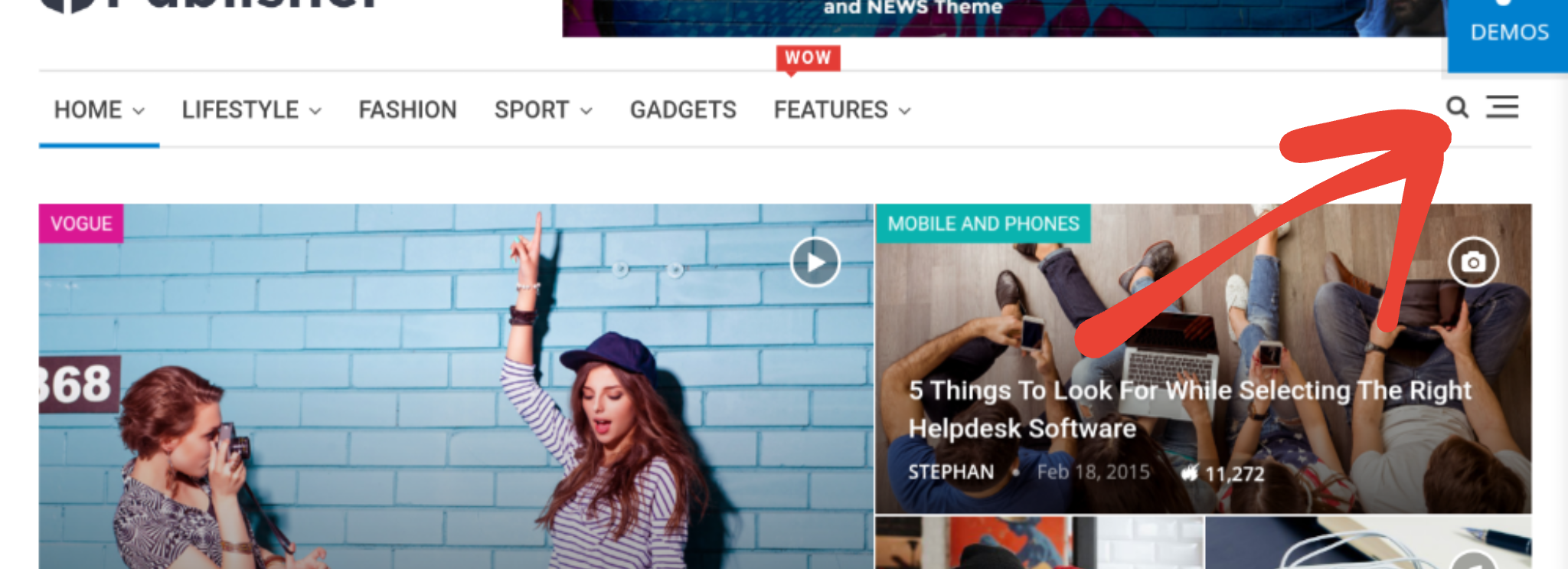
Which when clicked open a menu like mobile theme:
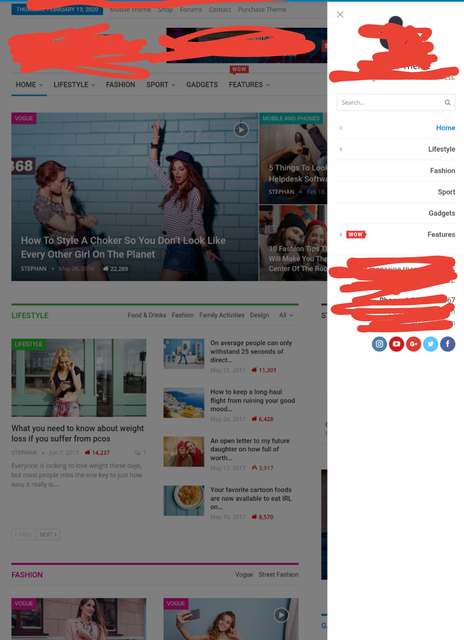
Thanks
-
This reply was modified 6 years by
Josan.
 Simion C.
 Hi,
The top menu won’t be displayed on mobile, for the predefined header templates. I could provide a code to make it visible if that is what you want, it will look like this – https://prnt.sc/r3iszd
Here is the code – https://pastebin.com/bzD7vxpP it can be entered in the custom CSS section of the theme panel.
Or you can use a cloud header template, and design it as you want for mobile
– https://forum.tagdiv.com/header-styles/
– https://tagdiv.com/newspaper-theme-customize-the-header-manager/
Thanks
Vlad S Hello !
On mobile sticky menu you would be able to insert an ad box and have your ads rendered there: https://www.screencast.com/t/MiUXR9hnAhT6
I hope this was helpful !
Thank you !
 robertn
Hi, when I use the mobile version of the default theme I see the login page and a message saying Click here- to use the wp menu builder I already create a menu and i can see it in the web version. I appreciate your support.
What should I modify?
 medbsb
In the chrome mobile views look like this
http://prnt.sc/r2p4p7
in the Iphone view
http://prnt.sc/r2p5af
Header manager settings fail
http://prnt.sc/r2p5oh
also no matter what I have changed in the header manager, it still looks like this
 Viachaslau1974
 Good afternoon! Sorry for my bad English! You made a mistake!
Yes, this menu that you showed works.
The menu displayed at the top of the page does not work in the mobile version.
See the screenshots:
1) this menu works in the mobile version: http://joxi.ru/823KMQoTD3GKl2
2) this menu does not work in the mobile version: http://joxi.ru/brRpybZUY6dVl2
Tell me how to fix it??
Calin Hi,
I just checked your website and I think that you solved the problem with the mobile menu -> https://i.imgur.com/M8vRiBA.png -> https://i.imgur.com/iaicJzp.png
Thank you!
 dimitrisv
 Also note that if you sroll down and make use of the “sticky” menu, there are options appearing that are actually hidden in megamenu. e.g. I have menu choices that only show on desktop and others that only show on mobile (with the bigger names). Your integration appears to ignore these attributes in megamenu or there is a setting that I have missed.
It may be a matter of minutes for you to fix. I can provide you with the credentials if you like, instead of spending us time here talking about it.
Viachaslau1974Good afternoon! The top menu in the mobile version doesn’t work for me. Everything works fine on the dextrose version.
This is the menu in the dextrose version: http://joxi.ru/BA0WJDouPZw0J2
It is not available on the mobile version: http://joxi.ru/v29nzKpHzNYdjA
And in the menu settings, there is no way to add this menu to the mobile version. Tell me what to do?
Viachaslau/
 jlopez17
Don’t know what happened but the mobile ‘hamburger’ menu has disappeared.
Previously, the logo was centered and now left aligned.
Any suggestions to fix?
https://prostep.us is site
Calin Hi,
Please notice that we take in order of time the topics ( time when was post the question ) to answer the question, and if you post/replay again in your topic the time will change and will be move to recent question, therefore the answer will be delay.
These option from mega menu will apply in this way -> https://i.imgur.com/i2BXiTa.png also you can make change for the mega menu without subcategories -> https://i.imgur.com/Jc5XpeG.png -> https://i.imgur.com/VOkghxh.jpg
The menu can be moved only if you drag it, this is the only what it can be moved.You can click on it and drag in the area where was before.
Newspaper Theme: How to Upload a Logo and Turn the Sticky Header On/Off -> https://www.youtube.com/watch?v=HXQQygkCCJo
In the most cases the mobile version is different if you are using tagDiv mobile theme plugin if you want to have the same layout, you can deactivate the mobile theme plugin or use it only for amp option.
Let me know the results!
Thank you!
 jaydeedaley1
 The url is http://www.spotlife.co.uk
If you check the menu on a mobile, you’ll see that the drop down menu text has no background to separate the text from the text on the page.
Thanks again for your help.
By the way, I selected AMP in the theme control panel.
jaydeedaley1 Thanks for your reply.
Regarding the background color, I was referring to the mobile drop down menu, not the background of the mobile header?
What am I missing?
 Travelindia
Hi, i would like to know how i can link my social networks in the footer on the travel memories modelTheme: https://prnt.sc/r06r4t
In the same way i would like to link that part of my home https://prnt.sc/r06sf3 with some articles that i have already writen. How can i insert the URL and how i create this ones?
And in the last part i would like to remove the airplane emoticon and “discover” word from the mobile version. I have already donde in th web version but i don t know how to do it in the mobile version.
I m not able to change the image wall paper on mobile version in the menu: https://prnt.sc/r06vgk
I would like to have some options and change it and i hope i can optimize the social networks links right there too.
Thanks for your help
Thanks
Calin Hi,
The background image from mobile menu is not display because you have set as a background on mobile a color, in order to display both, you’ll need to set on the color an opacity like this -> https://i.imgur.com/mhHqjjd.png -> https://i.imgur.com/exfqaa7.png results -> https://i.imgur.com/btuXCrc.png
Thank you!
Calin Hi,
If you use css to remove/hide the comments and you want it back, please remove the custom css. If there is still a problem, please provide some more details and some screenshots.
Unfortunately in our theme the search on mobile is set separate and can not be set inside the menu as per your request.
Thank you!



