
- ApiUsing the Theme API in plugins
- ApiPractical example – How to add a new Block and Module
- ApiAPI – Smart Lists – Introduction
- ApiAPI – Category top section style – Introduction
- ApiAPI – Category top section template – Introduction
- Apitd_api_module::update
- Apitd_api_module::add
- ApiAPI – Modules – Introduction
 freekancemarketer
Mobile theme-Version is not visible/loading on Mobile Phone on HOMEPAGE there is a page visible with only the last articles. We have create a mobile version as you explain in documentation. All other plugins are disable, also cloudflare cache. We have try everything, AMP, Mobile+AMP, Disable AMP on homepage – everything!! Mobile version of the homepage theme is not showing on phone. Website is liberta-news.gr
The Homepage (cloud) has an Mobile Template (created with same content)
Same problem for Single Post or category, it seems that this do not read the mobile cloud templates
 talkbasket
Hello,
We have a strange issue on the site. When we add an ad code within a <div> via the theme’s mobile ads it loads on AMP pages. For example, in theme settings -> Mobile theme -> Header ad we place an ad code within a div (to solve Cumulative Layout Shift issue). So it would be something like <div style=”height:313px;”>[AD CODE]</div> inside the theme’s Header ad field. It works fine on mobile version. But when you open an AMP version of the site, we have a blank space in the header as the ad is not AMP so it does not appear. How can we prevent mobile ads from being loaded on AMP pages?
We have AdSense AMP ads enabled via the theme’s settings and that would fine if the blank mobile ads were not being loaded as well.
 Simion C.
 Hi,
That is possible. A post template can be set in a few ways. Either in general if the posts are set to use the theme panel setting https://prnt.sc/y05jpe -> https://prnt.sc/y05k00
Or per post by selecting the post template directly https://prnt.sc/y05krb
So you can set a post template of your choosing, standard or cloud, for the posts you want.
The mobile theme uses its own post template, regardless of the template that is set for desktop. So the mobile theme + AMP posts will not be affected by the template the post uses on desktop.
Thank you!
Simion C. Hi,
AMP seems to work for the pages as well, it is just that the pages have no content. The content that is displayed for pages when the mobile theme is active, will be the one entered in the mobile editor for each page https://prnt.sc/y04xe5
Each page will require content there, or it will be empty in this case.
Thank you!
 Autotrader – Cox Automotive
We added the Single Post Comments component, and we are using the Mobile Theme Plugin. When we view the mobile pages though, there is no comment box. Is there a way to enable comments on Mobile?
 Anamaria
 Hello,
It seems to use the mobile theme plugin, you can use for this page the responsive version on the mobile theme (to get the same layout as on desktop on mobile) -> https://i.imgur.com/m0bVB5T.png you can check more details about mobile theme in our documentation -> https://forum.tagdiv.com/the-mobile-theme/
Hope this helps you!
Thank you!
freekancemarketerMobile theme-Version is not visible/loading on Mobile Phone on HOMEPAGE (ONLY) there is a page visible with only the last articles. We have create a mobile version as you explain in documentation. All other plugins are disable, also cloudflare cache. We have try everything, AMP, Mobile+AMP, Disable AMP on homepage – everything!! Mobile version of the homepage theme is not showing on phone. Website is liberta-news.gr
 sabyp
sabypHi
I probably know the answer but still wanted to make sure before implementing it. I have a default post template set for the entire site, but let’s say I want to create just a few post with a different template, then is it possible? Secondly, Can i use a cloud post template for just few or maybe just one post? Thirdly, I am using the mobile theme for my AMP singular posts, so I hope it won’t reflect or change the amp post layout as I would want the unique templates applied to the desktop version only? Thanks in advance
 Bettina
 Hello!
From what you describe it seems you have installed Mobile theme plugin.
The Mobile Theme is a performance optimized theme included in the Newspaper main theme and it loads only for mobile devices. It comes with it’s own templates for page, post, category, etc so your current templates from the desktop theme will get converted to the mobile theme layout. For more details, please take a look here: https://forum.tagdiv.com/the-mobile-theme/
Better deactivate the plugin and see the results.
Thank you!
Anamaria Hello,
Does the mobile theme version appear on the desktop? Please make sure that you do not have a plugin conflict, please deactivate ALL plugins except tagDiv plugins (theme plugins), also if you are using child theme or cache plugin, deactivate them, clear all cache and try again.
Let me know the results.
Thank you!
 abbozdag
Hello friends,
I made a contact page for my site. Using the tagDiv Composer. But this page looks fine in desktop mode. On mobile, the page does not appear at all or gives the error in the picture. I created a separate page for mobile. It turns out the same again. The theme I use is Newspaper.
I would be glad if you help.
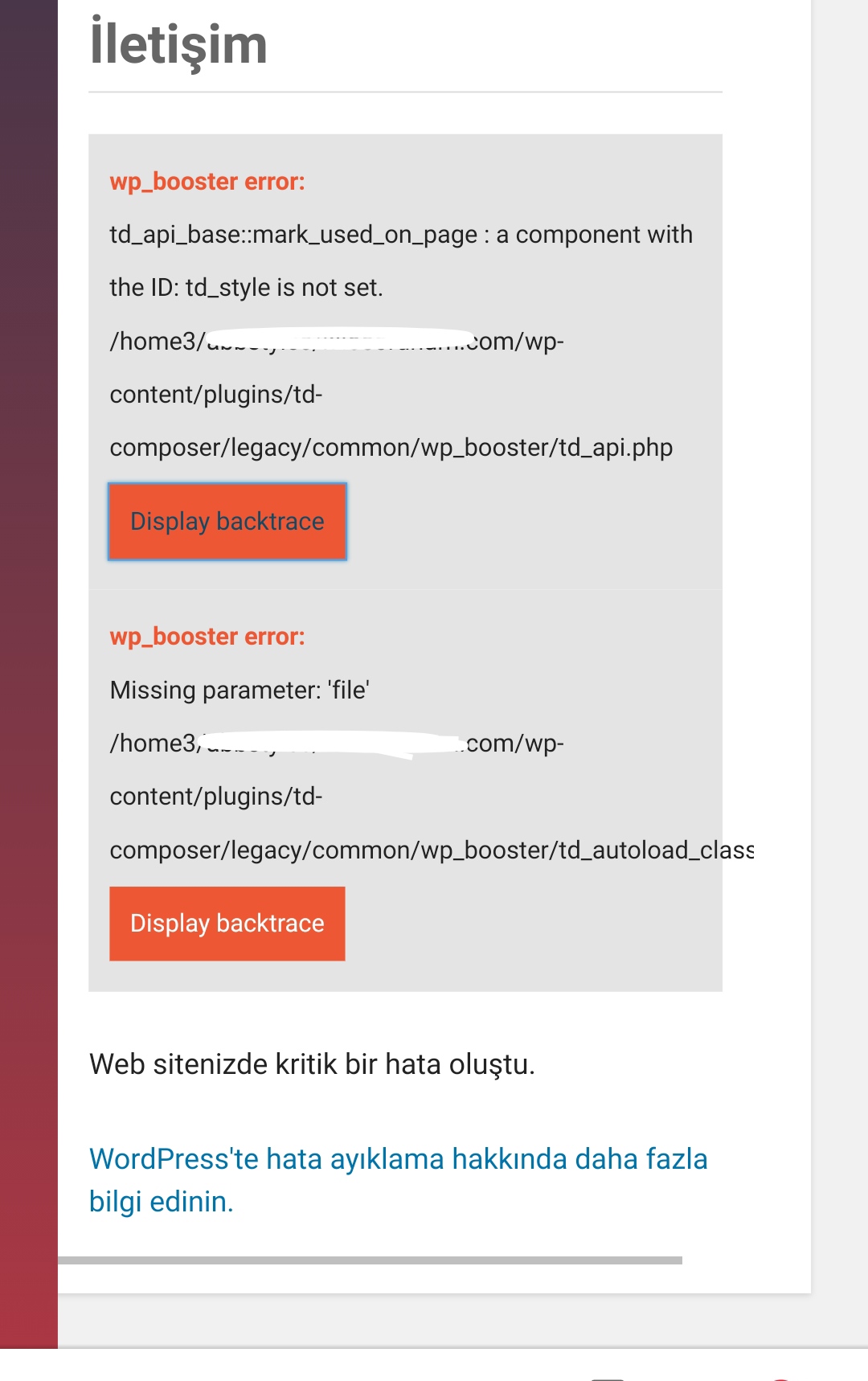
Bettina Hello!
If you created the mobile pages with TagDiv Composer, then when you install Mobile Theme plugin, your pages will be overwritten by the plugin.
The Mobile Theme is a performance optimized theme included in the Newspaper main theme and it loads only for mobile devices. It comes with it’s own templates for page, post, category, etc so your current templates from the desktop theme will get converted to the mobile theme layout. For more details, please take a look here: https://forum.tagdiv.com/the-mobile-theme/
About AMP version is going well with Mobile Theme activated only.
You can choose the way is suitable for your needs.
Thank you!
 drift1943
 Another question:
What if I choose NON-Pre-Designed Mobile Template?
I want to choose a desktop homepage template with no mobile vervion.
Will it display wrongly?
To be clear, I want to use this theme https://demo.tagdiv.com/newspaper_classic_pro/
But in my point of view, it looks ok on mobile.
So my question is:
What’s the difference between a Pre-Designed Mobile Template and Non-Pre-Designed Mobile Template?
Thank you.
Bettina Hello!
If you created the mobile pages with TagDiv Composer, then when you install Mobile Theme plugin, your pages will be overwritten by the plugin.
The Mobile Theme is a performance optimized theme included in the Newspaper main theme and it loads only for mobile devices. It comes with it’s own templates for page, post, category, etc so your current templates from the desktop theme will get converted to the mobile theme layout. For more details, please take a look here: https://forum.tagdiv.com/the-mobile-theme/
So, you can’t customize because it has only few options in Newspaper -> Theme panel -> Mobile Theme. There you will see also an option for AMP + Mobile Theme.
Thank you!
 jaimematus
Hi, I am new at Newspaper X and I am very happy with the theme. I am having an issue. I have deployd my home page with al the desired elements I wanted, but when I access the website via Mobile Phone (Mobile Version), the website theme only displays a very limiten and light version, showing just only the Recent Posts and a Grid of 3 to 5 Post Box. Can someone help me if I am missing something in the AMP plugin or in the settings of the Home PAge?
 jmkmedia
Hi, I currently have the tagdiv mobile theme and AMP deactivated as I prefer just the mobile version. However, I just noticed that while it reflected my desktop version mostly, the header still shows the template’s version. I was able to edit the homepage header using TD composer’s manager->mobile menu. However, when I click on articles or any post, the header is showing the template’s (Lifestyle Pro) too. Is there a setting I might have missed that can help me edit this part on my desktop just like I was able to with the homepage’s header?
 legolas12
Hi,
have big issue with AMP + TagDiv Mobile Theme.
Correctly plugin installed but AMP version of page cannot be displayed.
When I try to visualise the AMP version of the page, I can see it for just 3 sec, than it turns in a DESKTOP version of “404 error”.
But the strange thing is that I can see the Amp version under this 404-error-page.
Plus, Google Analytics return this error message “URL AMP di riferimento non è una versione AMP”
In fact the AMP URL of the page is something like that “https://www.socializziamo.net/fare-uno-scherzo-telefonico-con-una-chiamata-falsa/?amp”
Why is that? Any chance to fix it?
Thank you for your help
sabypHi
I have recently bought and started using the Newspaper theme and am definitely liking it so far despite some issues on my Web host. The questions below are unrelated to that though. I have one question and 2nd one is a simple request.
1. After trying the Default Demo, I chose the Magazine Pro Demo and customised it as per my needs, but I noticed a custom code in it which wasn’t there in the default demo. So will appreciate if I can know what it actually is for? The custom code that I found under Magazine Pro is “.tdc-font-tdmp {
font-family: td-multipurpose;
}”.
2. Secondly it will be very helpful if you can write a simple code helping me to customise embedded images and videos default captions to a lower size and slightly lighter font for both main and mobile theme. My guess is the same code will work for both. I do have a code from my previous theme but would prefer to use the one from you.
My website is sabysworld.com. Thanks in advance.
 Sangar
Hi,
I have installed prebuilt website with a boxed shape and grid background image.
Somehow it all disappeared and design became stretched after I set up Mobile Theme via Theme control panel.
I want to keep a boxed design with a grid background as it was already set in the prebuilt Newspaper theme.
Thanks in advance.
 festusfink
 Hello again.
I really want to solve the problem, because I really like your theme but the mobile is a huge problem.
Let me explain again;
-Think about elementor mobile design. You are making a page, add something (text box, icon box etc.) and choose the mobile version. Then you can adjust everything.
But with tagdiv composer (while the mobile theme plugin deactivated), I can make a home page design but nothing else. I added amber template and check the home page on mobile and it was perfect but when I enter any category or post page, the logo is different, style is different and the problem is that I can not edit these pages with your composer. Please let me know what is wrong with me if I am wrong, otherwise please tell me what is wrong with your side. My aim is not refuse your beautiful theme but I wasted 2 months to learn how to adjust your theme but I have nothing so far…
 twoodman
Hello again.
I have an issue with the mobile version on iphone and android. My pages on the calander is not loading and missing all the content. It works on the ipad however on the smaller screens it cut out most of the content. I would imagine this is to do with the mobile theme and or AMP. Please could you recommend what setting to use.
 Divyanshu Sharma
 Sorry for the late reply, I am unable to customize the newspaper mobile theme, the header section is completely disabled and is not getting activated, some of the pages on my website are not displaying any content in AMP on the mobile website even the AMP is enabled on page settings of respective pages in WordPress.
I want a header with the site title and tagline in the mobile theme of the newspaper and all the site pages been displayed in amp mobile theme with all the contact forms inside the pages. Please help me to achieve these criterias. You can check my site on mobile and notice the issues on your end which I am trying to explain to you above.
my site URL is https://hitechdivyanshu.com
Bettina Hello!
Unfortunately, in our theme you can not use it alone without Mobile Theme installed.
Thank you for your understanding!
 IndianStartupNews
How can i use amp without mobile theme? I’m using tech news demo
It would be great if anyone can give a documentation to implement AMP without installing mobile theme
thanks
 Calin
Calin Hi,
Top bar on mobile can be set only if you use the responsive e version and you use a custom css
.td-top-menu-full {

    display: block;

}
This code need to be set in theme panel> custom code> advance css> phone.
Thank you!

