
- ApiUsing the Theme API in plugins
- ApiPractical example – How to add a new Block and Module
- ApiAPI – Smart Lists – Introduction
- ApiAPI – Category top section style – Introduction
- ApiAPI – Category top section template – Introduction
- Apitd_api_module::update
- Apitd_api_module::add
- ApiAPI – Modules – Introduction
 Calin
Calin Hello,
If you are using the mobile theme plugin, please make sure that you have set some content in mobile editor or set to show the responsive version, you can check more about this in our documentation from here -> https://forum.tagdiv.com/the-mobile-theme/ -> http://prntscr.com/pdoa9j
Thank you!
 CA News
I created a home page from scratch and it worked fine for a time. Then I changed a setting in the Theme Panel (added a single page template to the Template Settings section) and then my home page is clipped off and the WP tool bar disappears, as if I’m viewing the site on a mobile device. I have AMP installed as well as all the standard tagDiv plugins.
My home page consists of the following components (in order from top to bottom):
News Ticker
Slide
Title
Big Grid Slide
Flex Block 1
Slide (repeated across 3 columns)
I would note that the clipping occurs both on my home page and in tagDiv Composer when I try to edit the home page.
 Vlad S
 Hello !
The designs do not match because you are using the mobile theme. The Mobile theme was specially designed for optimization on mobile devices. Unfortunately on mobile theme you cannot do much changes of design. If you want to have the same design as on desktop mode you can achieve that by simply disabling the mobile theme.
You will have to recreate your pages into the Mobile editor.
Also you can disable mobile theme on certain pages or posts by following this setting: 
Please take a look here: https://forum.tagdiv.com/the-mobile-theme/
Thank you !
 fla971
Hello
after installing the plugin for the mobile version of the newsletter theme, this error message appears on my smartphone “Fatal error: Class ‘td_style’ not found in /web/htdocs/www.softskills.site/home/wp-content/plugins /td-composer/td-multi-purpose/styles/tds_button/tds_button1.php on line 9 “. What do you have to do to fix it?
 pedroreis
 Hello,
I have done that before posting this ticket, my theme was always translated, but today i have upgraded the theme from 9.5 to 9.8, and in the mobile theme those terms are not translated.
The comments section in normal posts are also not translated. In desktop everything is ok.
What can i do?
Thank you.
 David Henry
Hi Guys,
We are using a plugin to display football fixtures on our Results page here:
https://www.wearedublin.com/dublin-gaa-inter-county-results/
It will display on the front end but when we switch to amp/mobile theme the page becomes blank.
How do we fix this?
If it cannot be fixed can we turn off Amp on certain pages?
Vlad S Hello !
Those can be hidden by going into Theme Panel – Mobile Theme – Mobile settings as you can see here: https://www.screencast.com/t/XzruGvP2
Thank you !
pedroreisHello,
Some terms are not translated in mobile theme, like “About Us”; “Follow US” inside footer.
“Search” word after click in search also not translated.
Where can i translate it?
Vlad S Hello !
That aspect is the mobile theme being rendered on desktop.
Usually this issue comes from lack of a caching plugin. We do recommend using WP Super Cache as you can see here: https://tagdiv.com/wp-super-cache-plugin-install-and-configure/
Thank you !
Vlad S Hello !
As you can see here: https://gtmetrix.com/reports/sportspoint.pk/cZUprDNS You can do some improvements. Test your website using gtMetrix and improve the results that you want.
Also for a greater page speed in the Mobile theme I would recommend using the Mobile Theme. https://forum.tagdiv.com/the-mobile-theme/
Thank you !
Vlad S Hello !
In order to have AMP working with Newspaper Theme you will have to use mobile theme. The Mobile theme was specially designed for optimization on mobile devices. Unfortunately on mobile theme you cannot do much changes of design. If you want to have the same design as on desktop mode you can achieve that by simply disabling the mobile theme.
You will have to recreate your pages into the Mobile editor.
Also you can disable mobile theme on certain pages or posts by following this setting:
Please take a look here: https://forum.tagdiv.com/the-mobile-theme/
Thank you !
 fizig313
dear sir
new theme is too slow on mobile devices
take a view
https://sportspoint.pk
 WenTraveling
I have got the feedback of my former post (#post-314162), but I still have some question.
1. I have activate AMP plugin already, but I can’t find the AMP icon on my side bar for AMP settings. I saw it on my site before, but not it is missing. How should I get it back?
2. If I follow the steps to change the mobile theme from theme panel, “USE THE MOBILE THEME FOR : Mobile +AMP”, the set of my website seen on computer will go wrong.
Thank you so much again!
my website: https://wentraveling.com/
 himanshu00123
Hi,
I have read the Tutorial of AMP implementation on https://forum.tagdiv.com/tagdiv-amp-plugin-tutorial and installed Mobile theme plugin and amp plugin from theme Plugin section and follow the steps as told in the tutorial but there is no AMP menu item in my left sidebar of admin panel below setting menu item

The single Post/Page is also not showing any AMP option like the image given below
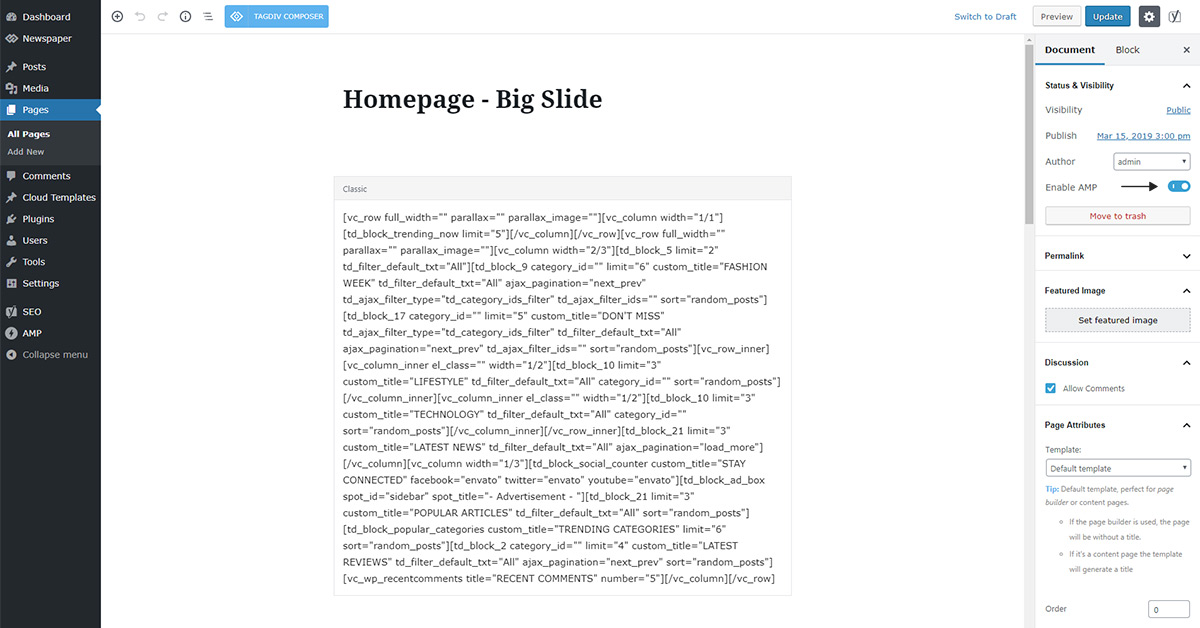
Please help
Website: hub4trendies.com
Vlad S Hello !
In order to install AMP you will need Mobile theme. Find out more about it here: https://forum.tagdiv.com/tagdiv-amp-plugin-tutorial/
Please note that this is a Custom Work request. We can offer custom work for a fee. Send us your inquiri here: https://tagdiv.com/premium-customization-services/ and you will receive a quotation.
Thank you !
Calin Hello,
I do not quite understand the problem, you activated the mobile theme and this is not apply? if is so then make sure that you clear all cache and you set the mobile theme plugin according to our documentation -> https://forum.tagdiv.com/the-mobile-theme/
If this is not what you mean, please provide some more details and screenshots.
Thank you!
Calin Hello,
1. The mobile version is look like that because you have the mobile theme plugin that provide you a better speed then responsive version of theme, but in order to achieve that speed you’ll need to create a new content for pages because in the most of cases those were made with builders ( tagDiv Composer, WPBakery ) and you need to use only the mobile editor ( you need to set the content for pages in mobile editor and this content will be display on mobile theme)
-> https://www.screencast.com/t/ebUIzt4se
Also since Newspaper v9.7.4 you can show the responsive version on mobile theme -> http://prntscr.com/oh6r2s you can check more details about mobile theme in our documentation -> https://forum.tagdiv.com/the-mobile-theme/
2. Please make sure that after you activate the mobile theme you select one of those options from them panel> mobile theme for AMP -> http://prntscr.com/pb4z2p save the settings and refresh the page, after that the amp settings will appear -> http://prntscr.com/pb4zpx
Thank you!
 howtomoney
It seems to be an application error!!
Below is my setup.
↓↓↓↓↓↓
*Use Mobile Theme For:
Mobile <=== Selected
Mobile + AMP
AMP
Vlad S Hello !
The designs do not match because you are using the mobile theme. The Mobile theme was specially designed for optimization on mobile devices. Unfortunately on mobile theme you cannot do much changes of design. If you want to have the same design as on desktop mode you can achieve that by simply disabling the mobile theme.
You will have to recreate your pages into the Mobile editor.
Also you can disable mobile theme on certain pages or posts by following this setting:
Please take a look here: https://forum.tagdiv.com/the-mobile-theme/
Thank you !
Calin Hello,
If you wan to use the responsive version of theme and you have mobile theme plugin activate, then make use that you enable this option http://prntscr.com/pcpud7
Thank you!
 Yahtzee_Wikilord
Hi
My Tagdiv Composer no longer recognizes any of my demo content posts.
It cannot edit them, nor create posts. All it can do is create and edit pages and even that’s a bit glitchy.
This is a problem because I can’t get this page to render well in the Mobile Theme:
https://www.medievilfaq.com/about-us/
It’s not a plugin conflict, I checked that on my staging site.
Please help!
WenTraveling(1) I have followed the tutor of The Mobile Theme on NEWSPAPER website, but my page still can’t show the theme on my mobile. I have checked my website on the AMP-checking website, it says the link doesn’t have AMP.
(2) Furthermore, I have installed the AMP plugin, but the AMP setting icon disappear on my sitebar of WordPress (I have seen it just minutes before). Where can I get it back?
My website address: https://wentraveling.com
 ericnyandwi
im having a problem on my webite, everytime i instal ” The tagDiv Mobile Theme plugin requires the tagDiv Composer plugin! my website goes down and stop working
 leepf
leepf When I active the plugin_tagDiv Mobile Theme, the following error occurs on page:
Warning: getimagesize(): SSL operation failed with code 1. OpenSSL Error messages: error:1416F086:SSL routines:tls_process_server_certificate:certificate verify failed in /opt/lampp/htdocs/wp-content/plugins/td-cloud-library/shortcodes/header/tdb_header_logo.php on line 611
Warning: getimagesize(): Failed to enable crypto in /opt/lampp/htdocs/wp-content/plugins/td-cloud-library/shortcodes/header/tdb_header_logo.php on line 611
Warning: getimagesize(https://www.dsez.org.cn/wp-content/uploads/2019/09/20190030a9bae8c5-6408-c14f-f90c-ce57c1779713.png): failed to open stream: operation failed in /opt/lampp/htdocs/wp-content/plugins/td-cloud-library/shortcodes/header/tdb_header_logo.php on line 611
Calin Hello,
Unfortunately we do not use the SpeedKit, therefore we can not say if this will work or not with our theme, sorry! Also we can not say which URLs you’ll need to remove to still have the mobile theme and amp activate with the SpeedKi.t
Thank you for your understanding!

