
- ApiUsing the Theme API in plugins
- ApiPractical example – How to add a new Block and Module
- ApiAPI – Smart Lists – Introduction
- ApiAPI – Category top section style – Introduction
- ApiAPI – Category top section template – Introduction
- Apitd_api_module::update
- Apitd_api_module::add
- ApiAPI – Modules – Introduction
 theMMANerd
 Thank you for the quick reply! I also one last question in regards to header style 8. It looks great on desktop but on mobile it looks very tiny and I’m getting much more traffic on moboile. Is there any option to enlarge it in the theme panel? Thank you!
 Calin
Calin Hi,
I check your link and all is seems to be normal -> https://www.screencast.com/t/GG7LY8LHUdMy , maybe this is happening when you have the mobile theme activate, if is so please check our documentation about mobile them and mobile editor for non builder pages -> https://forum.tagdiv.com/the-mobile-theme/
Thank you.
 nexttvc
 <!doctype html >
<!–[if IE 8]> <html class=”ie8″ lang=”en”> <![endif]–>
<!–[if IE 9]> <html class=”ie9″ lang=”en”> <![endif]–>
<!–[if gt IE 8]><!–> <html <?php language_attributes(); ?>> <!–<![endif]–>
<head>
<title><?php wp_title(‘|’, true, ‘right’); ?></title>
<meta charset=”<?php bloginfo( ‘charset’ );?>” />
<meta name=”viewport” content=”width=device-width, initial-scale=1.0″>
<link rel=”pingback” href=”<?php bloginfo( ‘pingback_url’ ); ?>” />
<?php
wp_head(); /** we hook up in wp_booster @see td_wp_booster_functions::hook_wp_head */
?>
</head>
<body <?php body_class() ?> itemscope=”itemscope” itemtype=”<?php echo td_global::$http_or_https?>://schema.org/WebPage”>
<?php /* scroll to top */?>
<div class=”td-scroll-up”><i class=”td-icon-menu-up”></i></div>
<?php locate_template(‘parts/menu-mobile.php’, true);?>
<?php locate_template(‘parts/search.php’, true);?>
<div id=”td-outer-wrap” class=”td-theme-wrap”>
<?php //this is closing in the footer.php file ?>
<?php
/*
* loads the header template set in Theme Panel -> Header area
* the template files are located in ../parts/header
*/
td_api_header_style::_helper_show_header();
do_action(‘td_wp_booster_after_header’); //used by unique articles
This is the only code I have in my theme header php
Calin Hi,
In order to can set a menu to mobile you need to have the mobile theme activate.
Thank you.
Calin Hi,
Please make sure that you install the mobile theme plugin that from the same package were you install the theme version.
If you have the last version of theme ( 9.2.2 ) you can get the theme from the themeforest and get the them with all files.
Thank you for your understanding.
 likocorp
 Calin,
One more question about mobile devices view.
I have popup which works fine on desktop version. I use two variants of popup – shortcodes and styles. Both works fine. But on mobile devices these popup does not work at all. When I call it – it just reload my page and popup does not show. I do not use mobile theme now.
Popup plugin support wrote the following:
We checked your website and noticed that your theme is making some changes on mobile devices (you can see it when you reload the page).
The initial set elements are being replaced in the process, that's why the popup stops working, as it can't detect the replaced element.
Please, contact your theme developers and report them this issue.
Could you please advice me what to do?
Thank you
-
This reply was modified 7 years by
likocorp.
Calin Hi,
You can use the mobile theme, make a new menu and add all links from desktop menu after that set it for mobile menu.
-> https://www.screencast.com/t/nGbMDT6xN
Hope this will help you!
Thanks.
 ibrahimakyuz
Hi, I’ve installed WordPress Mobile theme plugin was not compatible with the newspaper version because it said that it was disabled. It gives me this error
Sample:
PLUGINS DISABLED AUTOMATICALLY
The following plugins were disabled because they are incompatible with this version of Newspaper:
tagDiv Mobile Theme
For update please check our
Calin Hi,
1. This is possible only with custom css , if you need help with this please provide a link to your website in this way I will be able to provide you the right css.
2. If you are using the mobile theme you need to set the content for page in mobile editor, please read our documentation for mobile theme -> https://forum.tagdiv.com/the-mobile-theme/
Thank you for your understanding.
 Simion C.
 Hi,
So plugins belonging to this theme are the only ones that are being deactivated? Are only some of the theme plugins deactivating or all of theme plugins that are active?
There were a couple of cases where the tagDiv composer and the mobile theme plugin kept deactivating randomly, but these were very rare and hard to investigate. A solution was provided in one of those two cases
– https://forum.tagdiv.com/topic/tagdiv-composer-disabled-automatically/
Thanks
Simion C. Hi,
@trinaldao So the mobile pages are empty on mobile? Note that if you use the mobile theme plugin you will have to create two versions for each page. One with the composer, and one with the mobile editor
– https://forum.tagdiv.com/the-mobile-theme/
If you do not enter content in the mobile editor for each page, they will be empty on mobile when the mobile theme plugin is active. The plugin is optional, you can deactivate it and then the same content form desktop will appear on mobile.
If the above is not the problem in this case, I could take a look. Provide a link to such a page from your website so I can check it on mobile.
Thanks
Calin Hi,
You can try to use mobile theme, in this way you’ll avoid this problems and your website speed on mobile will increase.
Please check our documentation about mobile theme -> https://forum.tagdiv.com/the-mobile-theme/
Hope this will help you.
Thanks.
 rparlier
 Hi again,
I had already tried doing all the things suggested. I redid the steps though just in case I had missed something, and I still have the issue.
Literally deactivated ALL of my plugins, deleted the mobile plugin, redownloaded it from Themeforest, deleted cache, reinstalled it, tried to activate it, but it still won’t activate.
 TerraVenture
 Now having got working templates and having disabled the faulty mobile plug in which prevented saving I have done several hours work, gone for coffee repoened the page i had been working on and it refuses to load the circle in screen just goes round and round and error message stating :
Error at rows: 7(models) : 8(dom). The model does not match the content
Last chance saloon here this theme has proven to be problematic from the very start and still absolutely no answer to any of my issues on the for here..
Calin Hi,
The content need to be manually copy and paste but only if is not made with builders.
Please check our documentation about The Mobile Theme -> https://forum.tagdiv.com/the-mobile-theme/
Thank you.
TerraVenture For anyone else stuck on the not saving issue, I found a thread which the staff said there is a problem with the Mobile Plugin causing conflict with saving and as soon as I deactivated the plugin files saved.
It did say in the post that although the saving icon is still spinning your work would be saved however mine was not being saved. Unfortunatley over 70 of people view on mobile ..
Staff can you say when this issue will be fixed, I bought the theme because of the Mobile speed !
Calin Hi,
The mobile theme is in plugins folder.
If you don’t have this plugin in download please go to Themeforest login, and download all files ( https://www.screencast.com/t/1Sw5UyUBSxTY ); also please notice that you need to use the mobile plugin that come with that version of theme.
After you install it, if you go in Newspaper>Theme panel> Mobile theme ( https://www.screencast.com/t/P2cvJiWB0Q ) you should see it.
If you want to deactivate the theme mobile go in Plugins, and search for “mobile” ( https://www.screencast.com/t/h2T3emHI91 ).
Also please check our documentation about The Mobile Theme -> https://forum.tagdiv.com/the-mobile-theme/
If this is not working please deactivate all non theme plugins, clear all cache and try again, it can be a plugin conflict.
Let me know the results!
Thank you.
 Joe Jerde
 The only thing that worries me is that this is the only theme I use that I get this error. And I don’t put a lot of trust in what Google says as it’s always changing.
I have two other websites with identical setups (plugins, server, ect) besides the theme and they don’t get the mobile errors. So no question, it is a Newspaper theme issue.
 Olovant
 I found an article where someone asks Googles John Mueller about this specific question.
John Mueller (Google) reply:
“Okay. Now I don’t know, how what the specific page would be and where that might be coming from. What one of the things that sometimes happens is we need to be able to fetch the CSS files for these pages as well so that we can see what they look like. And sometimes we either don’t have enough time to do that for your pages, or your server is a bit slow, and we don’t have enough capacity to get that very quickly. And then the test might fail. So if we can’t get the CSS, then it might look like the page isn’t really mobile-friendly. And usually this is something that settles down over time and maybe you’ll see individual pages that fall into the state. But in general, that’s something I wouldn’t really worry about. If the page is really mobile-friendly, if for the most part other pages on your website are seen as mobile-friendly, then that would generally be fine. It might fluctuate a little bit. You might see that as a warning in Search Console but I wouldn’t worry too much about it if you’re really sure that everything else is lined up properly.”
So hopefully I will not have to abandon this theme. 🙂
 spu
spu Hi,
You can try couple of things, first activate the mobile theme of Newspaper, that will bring the speed upto/over 45 (mobile).
Next you need to check the render blocking scripts.
I used this tutorial to bring those down. (you need to understand coding for a little while)
https://searchtides.com/eliminate-render-blocking-javascript-css-fold-content/
Also I am using lot of plugins to get the work done, You can also check some for yourself.
JCH Optimize is a good one to bring the speed index up. But remember if with plugins, the website might not work properly. So, keep experimenting.
I use WP Super chache, since any other cache plugin does not make the new stories appear, and you would end up cleaning the cache every time you post a new story/article. It is not the best Cache plugin, but seems to be the only one working with Newspaper.
We also use WP Smush Pro to keep the images size low.
Some of the plugins might reduce the desktop site index, as it puts more load on server, so make sure you have good RAM and CPU on the server.
Newspaper requires good amount of resources to be quick, no matter what anyone says you need good amount of RAM and CPU for your site to be fast if you are using this theme :).
However, Newspaper is much better than other themes we have seen, as they keep it updated and their support is excellent. Only thing missing here is infinite article load and infinite smart list load. Probably we will see it in the next update. That will make bounce rate lower and also time spend on site higher.
Hope all this helps!
 detaylibilgi
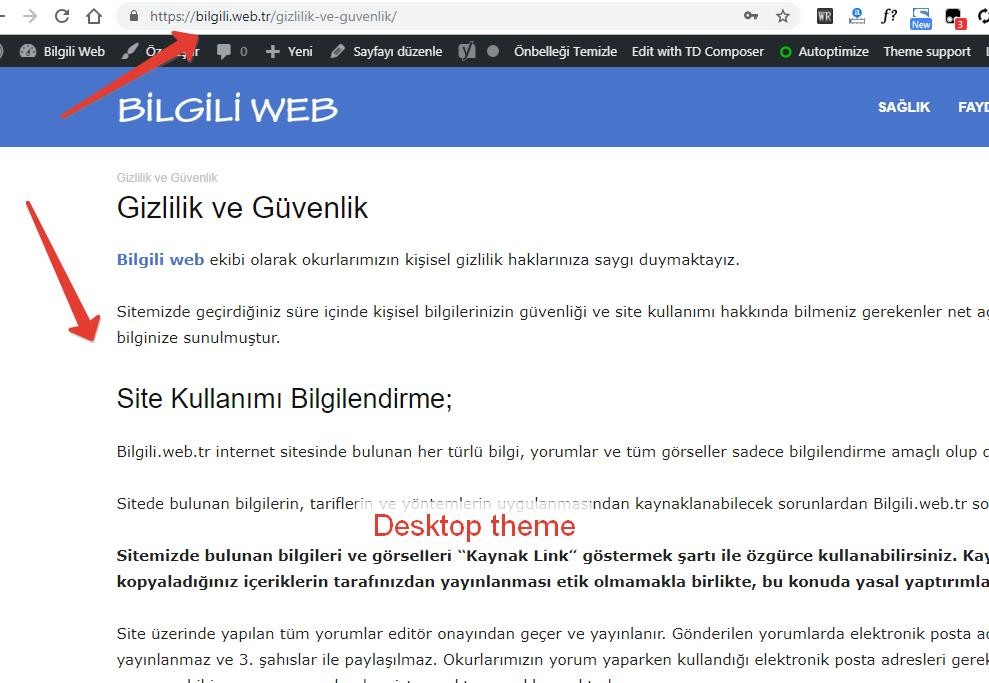
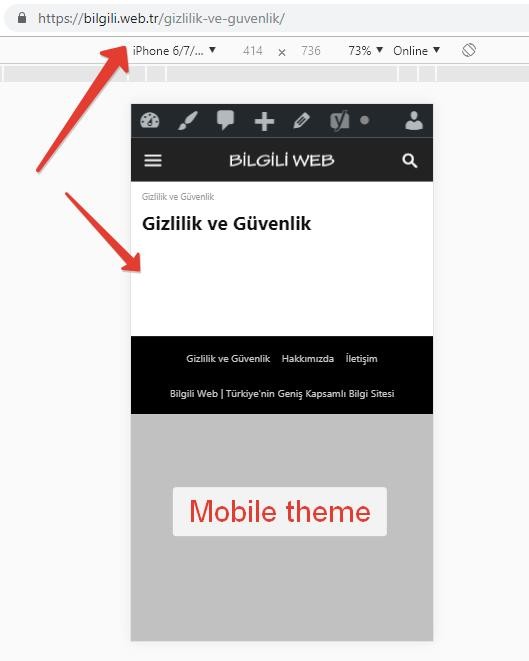
 I did a manual editing of pages using the mobile editor and the problem was solved. However, the contents of the page are not transferred to the mobile theme even if Page Builder is not used.
 GoingFor2
 To my knowledge, pages have always been like this on the mobile theme. Or at least any pages that use the Page Builder because the mobile theme doesn’t work with the page builder.
detaylibilgi9.2.2 After updating, the pages are empty in the mobile theme!
Only pages are problematic. There is no problem with blog content.
rparlierI have looked at previous posts on the same subject and tried my best to follow the directions that were given to correct the issue, but when I try and activate the plugin an error message pops up saying “PLUGINS DISABLED AUTOMATICALLY The following plugins were disabled because they are incompatible with this version of Newspaper.”
I have double-checked the version of Newspaper and am running version 9.1. I have deactivated, deleted, and reinstalled the most recent version of the plugin from the tagDiv website with the same error occurring. I am at a loss for what to do, and would really like to create a mobile-friendly interface for users.
GoingFor2I recently updated to 9.2.2, and now I have no Featured images on my homepage. Other images that are not a widget show up fine. I’ve cleared my cache multiple times to no avail, and it seems to only be a desktop issue. I’m running the mobile theme and that works fine, and even then I request a desktop version on my mobile phone, featured images appear there as well. Please help.
