- TutorialsFrom WPBakery to tagDiv Composer
- TutorialsWhat is Ajax preloading?
 spu
spu Oh,
Ok for the 2nd point my recommendation is make it such so that each scroll to the new article also changes the top URL. so that each new article is counted as a new pageview.
Is there a way to turn on/off the mobile theme?
Thanks
 sonnymarojahan
Hi,
Regarding to this post, i decide to make a new one.
I am currently facing a problem with facebook likes.
The likes counter is working on PC, but it is not working on mobile devices (i’m using the responsive one, not the mobile theme)
And, for more information, (on PC) the likes counter work instantly.
But, when i try to push the likes fb button on mobile devices, it went to facebook’s link for a while (around 0,5-2 seconds depend on the internet speed) like this –> https://www.screencast.com/t/jGahZnMdfX
and then back to the article like nothing happen.
this is the URL so you can take a closer look at it.
Thanks for your response.
 Alin
AlinHi we got a message from our hosting company saying the Ajax system in our theme is causing some 504 errors. I’m pasting the email from them below. Can you please advise.
—
Hello info@sneakerbardetroit.com,
Your ticket (#1214944) has been updated.
To review the status of the ticket and add additional comments, follow the link below:
http://help.wpengine.com/hc/requests/1214944
You can also add a comment by replying to this email.
Josh Applekamp (WP Engine Support)
Nov 7, 9:21 AM CST
Hi Mario,
Hope you’re having a great Wednesday!
I wanted to touch base with you regarding some high Ajax counts I am seeing from the sbdetroit site.
32196 /wp-admin/admin-ajax.php?td_theme_name=Newspaper&v=9.1
40522 [action] => td_ajax_loop
36184 [action] => td_ajax_search
8216 [action] => td_ajax_block
wp-content/themes/Newspaper/js/tagdiv_theme.js
13807: action: ‘td_ajax_loop’,
wp-content/themes/Newspaper/includes/wp_booster/td_wp_booster_functions.php
150:add_action(‘wp_ajax_nopriv_td_ajax_loop’, array(‘td_ajax’, ‘on_ajax_loop’));
151:add_action(‘wp_ajax_td_ajax_loop’, array(‘td_ajax’, ‘on_ajax_loop’));
japplekamp_@pod-150264:/nas/content/live/sbdetroit$ ack-grep “td_ajax_search” wp-content/themes/ wp-content/plugins/
wp-content/themes/Newspaper/js/tagdiv_theme.js
6110: action: ‘td_ajax_search’,
6146: action: ‘td_ajax_search’,
wp-content/themes/Newspaper/mobile/js/tagdiv_theme.js
938: action: ‘td_ajax_search’,
wp-content/themes/Newspaper/mobile/functions.php
90:add_action(‘wp_ajax_nopriv_td_ajax_search’, array(‘td_ajax_mob’, ‘on_ajax_search’));
91:add_action(‘wp_ajax_td_ajax_search’, array(‘td_ajax_mob’, ‘on_ajax_search’));
wp-content/themes/Newspaper/includes/wp_booster/td_wp_booster_functions.php
154:add_action(‘wp_ajax_nopriv_td_ajax_search’, array(‘td_ajax’, ‘on_ajax_search’));
155:add_action(‘wp_ajax_td_ajax_search’, array(‘td_ajax’, ‘on_ajax_search’));
japplekamp_@pod-150264:/nas/content/live/sbdetroit$ ack-grep “td_ajax_block” wp-content/themes/ wp-content/plugins/
wp-content/themes/Newspaper/js/tagdiv_theme.js
6849: action: ‘td_ajax_block’,
wp-content/themes/Newspaper/includes/wp_booster/td_wp_booster_functions.php
146:add_action(‘wp_ajax_nopriv_td_ajax_block’, array(‘td_ajax’, ‘on_ajax_block’));
147:add_action(‘wp_ajax_td_ajax_block’, array(‘td_ajax’, ‘on_ajax_block’));
These Ajax hits are being generated from the Newspaper theme. With such a high amount coming through so quickly it is overloading our server queueing system we have for requests and causing 504 errors to occur:
80 504 “POST /wp-admin/admin-ajax.php?td_theme_name=Newspaper&v=9.1
This particular theme does not allow easy updates regarding the Ajax activity. I would recommend reaching out to the theme developers to see if they can provide some input on getting their Ajax activity under control.
Beyond that everything else appears to be in good shape so far. I’ll keep an eye on the server and update you with any additional insight, but if you have any questions for me please let me know!
Thanks,
Josh Applekamp
WP Engine – Technical Project Manager – Finely Tuned WordPress
M-F 9:00am – 5:00pm CST
—
 Simion C.
 Hi,
When the mobile theme plugin is active pages will not display the same content from desktop on mobile.
Each page will need two versions, one for desktop built in any way possible, and one for mobile with the simple mobile editor
– https://www.screencast.com/t/cwW4MmEwWiv9
Note that the plugin is optional, activate it if you choose to display a different and simpler version of the website on mobile
– https://forum.tagdiv.com/the-mobile-theme/
If you want to show the same content from desktop, deactivate it.
Regarding the footer, if you disable it in the theme panel for desktop it will also be disabled on mobile
– https://www.screencast.com/t/MA9zupnIY2Uv
Thanks
 Catalin
 Hello EdTrejo,
Notice that the Mobile Theme should not be activated, sorry! This is an optional plugin which has to be enabled. That’s all. Check the documentation from here -> https://forum.tagdiv.com/the-mobile-theme/
Thanks.
Simion C. Users will be able to access the AMP version of the post only through Google search. Google will serve the page from it’s cache. That would be how Google AMP works.
The rest of the mobile website visitors will see the responsive version of the website or the mobile theme version (if the mobile theme plugin is active).
 Vickydhumale
I have installed plugin Mobile theme in that I am not able to see pages. I can see pages from Desktop version. I cannot see about us, contact us pages from the bottom page.
Here is the site link: https://herosfact.com
Also, please tell me how to remove big logo, meaningless ABOUT US FOLLOW US from the bottom of the site?
 EdTrejo
Why it is not in the Page Builder or Composer button. I need to edit the blocks in mobile.
Yes, I know that you must activate the Mobile Theme, but I still can not activate it. Help!
Thank you.

Simion C. Hi,
Our AMP plugin doesn’t have many settings at the moment, it is a simple plugin for basic AMP support.
If you require more advanced options and settings maybe consider using a different AMP plugin which can offer them. We will try to add more in our plugin in the future.
The logo used will be the one you set as the mobile logo in the theme panel
– https://www.screencast.com/t/UBxD0RY8
The logo size will be limited like this – https://www.screencast.com/t/yEXhaHj153
This cannot be changed at the moment by a setting. So this would not be according to the requirements you mention unfortunately.
Worth noting that our AMP plugin also does not have a menu option for AMP at the moment. Maybe this will be implemented in the future. Sorry for the inconvenience.
Thanks
 IFP News
 I have many questions and need your supports.
About this page which is everything about Google guidelines for the AMP: is the AMP pluging included everything like: “New metadata requirements” ? And please check somethings like Logo size 600*60 , is it for the structure data only? I have changed the mobile logo in the theme now and there are some new issues: in the mobile version the new logo (600*60) is displaying behind the old logo and in AMP the menu height is smaller than 60, please help and let me know for these.
We don’t have excerpts in the AMP articles too.
Best regards.
Simion C. Hi,
The logo will be left aligned. We based most of the design for AMP on the Yoast SEO website (similar left aligned logo)
– https://yoast.com/social-media-optimization-with-yoast-seo/amp/
The footer information should be the one you set in the theme panel, footer section. The footer text entered there will appear in the AMP version.
The mobile theme plugin can be used together with the AMP plugin. AMP versions of posts will be served by Google through the search results, the rest of the website will use the mobile theme if active. This mobile plugin is optional, when inactive the website will display the default responsive version
– https://forum.tagdiv.com/the-mobile-theme/
Please let us know if you have more questions.
Thanks
IFP News Hello
Please let me know how can I have different size of AMP logo with the mobile version and the main logo sizes for the theme?
It is different and it should be 600*60 for the AMP logo and it is not suitable for mobile and desktop footer or header logos.
 icej
icejHi,
In the past week or so the theme has been showing issues on Safari. On Chrome (my main browser) I have no issues, however, quite a few users have reported issues when accessing the website on Safari (or mobile). I haven’t changed anything in the them nor done any other updates, so not sure what’s the reason.
This is my website: https://mystartupland.com
Any help, it’s greatly appreciated.
Luca
Simion C. Hi,
Thank you very much for your appreciation. We try to add new features with each update, but we have to be careful what is added however, and also what will be the consequences.
1. Can’t say I know much about live blogging. I read some articles online to see what this presumes. The theme doesn’t have such an option at the moment, we haven’t made any tests with plugins that can offer the option unfortunately. As for plans to add this in the theme, I am not aware of them.
2. For implementing infinite scrolling in the post page there are plans. This is a much requested feature and a solution will be found to add this in the theme by default, as soon as possible.
3. For caching we tested the WP Super Cache (works properly with mobile theme plugin if used), but other caching plugins may work as well.
4. So something to compare items in a table like format or similar, that is not available in the theme or composer. I can’t make any plugin recommendations unfortunately, test the plugins you can find which can offer this functionality.
Sorry for any inconvenience.
Thanks
Simion C. Testing the same post still says it’s not mobile friendly. In the details screen it says “Other error” which is not very helpful to identify why this happens.
Seems like the theme resources are not loading on time and the menu links are detected as too close together.
Maybe you could make a quick test and deactivate all your plugins, leave only theme plugins active. Test with the tool and check if this has any effect.
Or maybe install and activate the dedicated mobile theme plugin, which should solve the problem.
Catalin Hello Pcon,
It seems to be a strange problem. I have made a test on my side, using the Mobile Theme and the embedded video links on the posts seem to work as expected on mobile devices. Make sure that you are using the latest version of the theme installed via FTP way, clear all the caches, purge CND files and check the results. If the problem is still there, please send us an email at contact@tagdiv.com with your log-in information (wp-admin) so we can further investigate it closer your setup page.
Thanks for the message!
Catalin Hello mepstein,
If you are using the General Responsive Mobile and not the Mobile Theme plugin, you should simply add a menu item from Menus and then, with a such a custom CSS code you should hide it for the desktop version.
Thanks for your understanding!
 Calin
Calin Hi,
Yes, this is possible; if you don’t use the mobile theme all you need to do is to disable the ads on which device you don’t want to be showing, please read Header ads -> https://forum.tagdiv.com/header-ads-adsense/
If you are using mobile theme please check the ads from mobile theme, please read more about it here-> https://forum.tagdiv.com/the-mobile-theme/
Hope this will help you.
Thanks.
 travelhippi
 Ok, is there a way to hide the default list of posts on the mobile theme? I don’t want it showing the posts from the default posts pages but rather my custom posts. I have a way of displaying my custom posts via another plugin but need to then hide this function of displaying the latest posts
 Pcon
PconWhy embedded you tube video are not visible in mobile theme nor the link is clickable?
See this on mobile
spu The slidehsow / list problem was on desktop.
We were using option 1, but that didnt work properly it is buggy.
So now using option 6 and 7, that seems to be working.
Once the mobile error appears again will take a screenshot.
Could be w3 cache problem too, but that is the only one that is loading the website quickly. As the theme is very heavy. Even on a 6 core CPU and 6GB ram server.
Hope the next update makes the theme light and nice to load.
Also, when is the infinite article load option coming?
Regards
 joram
joram https://www.youngclassicals.com
I do not use the mobile theme plugin.
Catalin Hello joram,
Please provide your website URL. Do you use Mobile Theme plugin?
Thanks for your understanding!
Calin Hi,
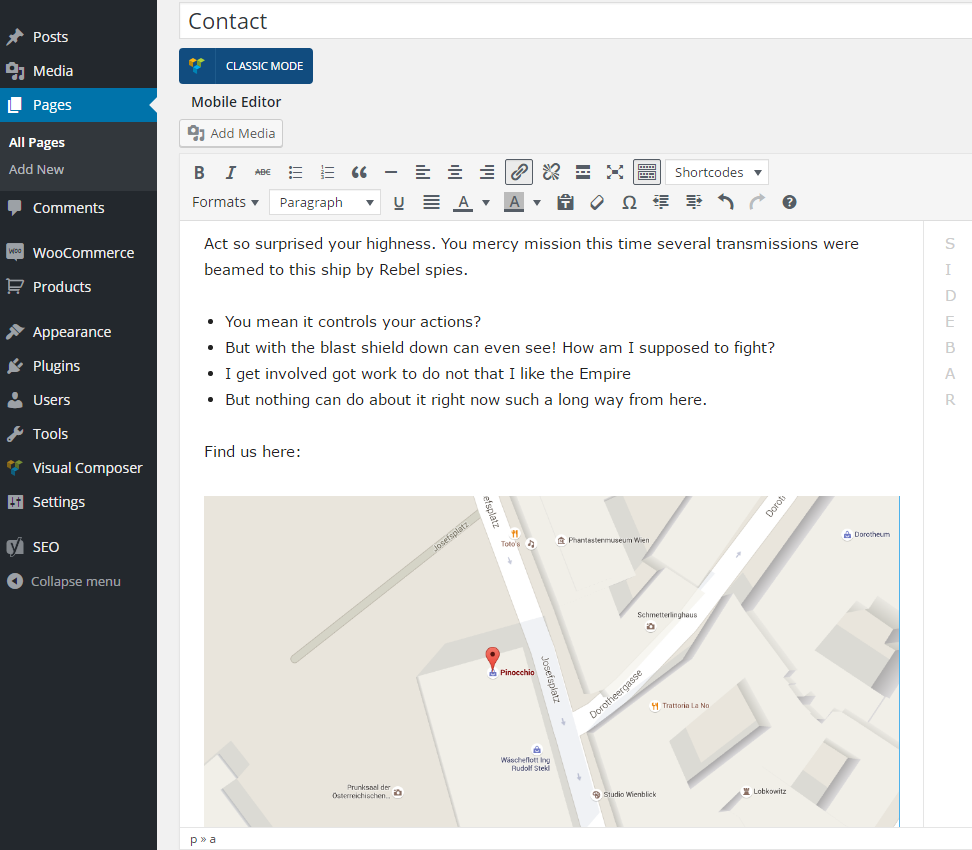
I think you have the Mobile Theme, if is so you need to make a spceial content for the mobile https://forum.tagdiv.com/wp-content/uploads/2016/01/td_find_us_here.png.
Please read more about mobile theme here -> https://forum.tagdiv.com/the-mobile-theme/
Thank you.
Catalin Hello spu,
Also, please notice that the W3 Total Cache plugin has not bee tested with our theme and it seems to be a problematic plugin and also, we do not recommend using it, sorry! Also, I have checked your website on a mobile device and it seems to work as expected. Please provide some useful screenshots with the error so I will be able to provide a more accurate response and also, so I can identify the problem.
Thanks.