
- TutorialsFrom WPBakery to tagDiv Composer
- TutorialsWhat is Ajax preloading?
 sonicstadia
 Can’t leave the site looking like that while waiting for help. I have deleted Newspaper theme and re-installed it. The Mobile theme including the problematic homepage is now displaying Desktop site… I think I can work with that until you find a solution for me
 kevinsikora
I’m using a Google Pixel 6 pro.
Steps:
- Load the page on the phone: https://www.wheredoitakethekids.com/
- Tap on the hamburger icon
When I tap on the hamburger icon, the screen shrinks. The menu doesn’t get displayed.
I’m not using mobile pages
I’m using a child theme.
I’m using version 12.0 of the Newspaper theme
sonicstadia It has gotten worse, mobile homepage is no longer displaying visuals, just static td code. Check image below: https://www.flickr.com/photos/195484089@N05/52461659209/in/dateposted-public/ post pages are working fine but not the homepage… I have no issue with Desktop site
 EmilianoB2T
 Hello Bettina, thank you for your help!
We solved deleting the Mobile plugin
 Bettina
 Hello @EmilianoB2T!
We have 3 options for mobile versions that you can use:
1. Responsive version: A responsive version of your website looks similar to the desktop version. Edit the page with TagDiv Composer. Click on the mobile viewport: https://www.screencast.com/t/XDQJedlggSB. There you can see your mobile version and edit or adjust the elements to look better.
2. Mobile pages: https://tagdiv.com/newspaper-10-3-7-update-brings-customizable-and-fast-mobile-pages
3. Mobile theme plugin: The Mobile Theme is a performance-optimized theme included in the main Newspaper theme that only loads on mobile devices. It comes with its own templates and design for pages, posts, categories, etc., so your current templates from the desktop theme will get converted to the mobile theme layout. For more information, please visit https://forum.tagdiv.com/the-mobile-theme/ and https://forum.tagdiv.com/mobile-theme-introduction/.
A full explanation is here: https://www.youtube.com/watch?v=SpGkOnJeNZY
Please disable the Mobile Theme plugin and see the results!
Thank you!
EmilianoB2THello, we have built a website and hosted on a space provided by default with a system of high speed cache, that cannot be deactivated. We also cannot change hosting.
We saw that some other users issued the same problem: cache always, for every single page, returns the first display mode (mobile/desktop) used. We have just applied ALL of your suggestion: our provider has an hight speed cache and he cannot deactivate it.
So, if the first device after a cache clearing is a mobile, than all the users, including desktop users, will see the mobile version of that single page, until the next clearing procedure.
In this way we cannot offer a professional website to our visitors and also a service to our advertisers.
This is the website: https://www.rottadeitrasporti.it/
Please, help us with a corrective update because we never seen this kind of behaviour before with a WordPress theme, and we used to set up hundreds of them.
Thank you in advance for your kind help.
 AnaBatca
 Thank you for your answer. I use Mobile Theme Plugin. Meanwhile the custom ad appears on mobile version, probably the changes apply with a delay.
Thank you! Have a nice weekend!
Ana
Bettina Hello Ana!
We have 3 options for mobile versions that you can use:
1. Responsive version: A responsive version of your website looks similar to the desktop version. Edit the page with TagDiv Composer. Click on the mobile viewport: https://www.screencast.com/t/XDQJedlggSB. There you can see your mobile version and edit or adjust the elements to look better.
2. Mobile pages: https://tagdiv.com/newspaper-10-3-7-update-brings-customizable-and-fast-mobile-pages
3. Mobile theme plugin: The Mobile Theme is a performance-optimized theme included in the main Newspaper theme that only loads on mobile devices. It comes with its own templates and design for pages, posts, categories, etc., so your current templates from the desktop theme will get converted to the mobile theme layout. For more information, please visit https://forum.tagdiv.com/the-mobile-theme/ and https://forum.tagdiv.com/mobile-theme-introduction/.
A full explanation is here: https://www.youtube.com/watch?v=SpGkOnJeNZY
If you need to use the mobile version 1 or 2, then you need to disable the Mobile Theme plugin.
The Mobile theme has only some settings and can not be customized with the TagDiv Composer. Check this thread where we discussed it: https://forum.tagdiv.com/topic/amp-and-mobile-theme-plugins-issues-with-google-analytics-and-ads-sense/
Thank you!
AnaBatcaHello,
please help me solve an issue: I have Newspaper theme on the website https://parenting20.ro/ and I use Mobile theme for mobile. Google Ads are running ok, but I cannot place any custom ads on the mobile theme. There is no option for an image ad. I tried to ad a code like this in the General Ads section of Mobile Theme section:

But it isnt working. Neither in Article Ads section. Please help me understand what I do wrong and how to solve the problem so the custom ad could appear on the mobile version of the theme?
Thank you!
Ana
sonicstadiaI have been trying to use the Newspaper Mobile Theme for two weeks straight now. At first, the mobile theme wasn’t working, but after changing the Desktop Pages template from the Cloud Library, it worked (only temporarily). Now each time I make the smallest of changes to the site, it goes back to the Desktop site, and I can’t fix it unless I activate another WordPress theme, then switch back to Newspaper. Even creating a blog post resets the theme to the Desktop site every time. This is very frustrating. Somebody, please help.
Bettina Hello @meri!
You can not customize the mobile theme layout so much from the theme panel settings. The answer, unfortunately, is no.
Make sure you did not set anything in the settings, maybe check on your SEO plugin’s settings. If not, then you can add this code:
.td-author-line {

    display: none!important;

}
Thank you!
 bjpscott
Hello, I run a mma news site bjpenn.com. After upgrading to the cloud templates for single pages (desktop and mobile). It seems that the sidebar is sticky sometimes which is costing us revenue. The sidebar is sticky sometimes and sometimes not. I am tryin to find out if there is some kind of script that is render blocking this sidebar to fully load with stickyness. or some other script that is interfering with the load of themes sidebar. https://www.bjpenn.com/mma-news/exclusive-interviews/max-griffin-says-dana-white-and-mick-maynard-told-him-he-beat-neil-magny-hopes-to-submit-tim-means-at-ufc-vegas-63/. if you go to the home page or article and scroll down you will see the sidebar disappears and you have to scroll up then back down to get it to stick as it is supposed to. please assist.
 damir78
 ok, thanks for the answer.
1. do you mean newspaper?
2. ok, maybe do some action for the New Year holidays 🙂
I managed to expand the width of the template to 1200px and on the first P+V website, I got 90 for mobile / 95 desktop on the google page speed test
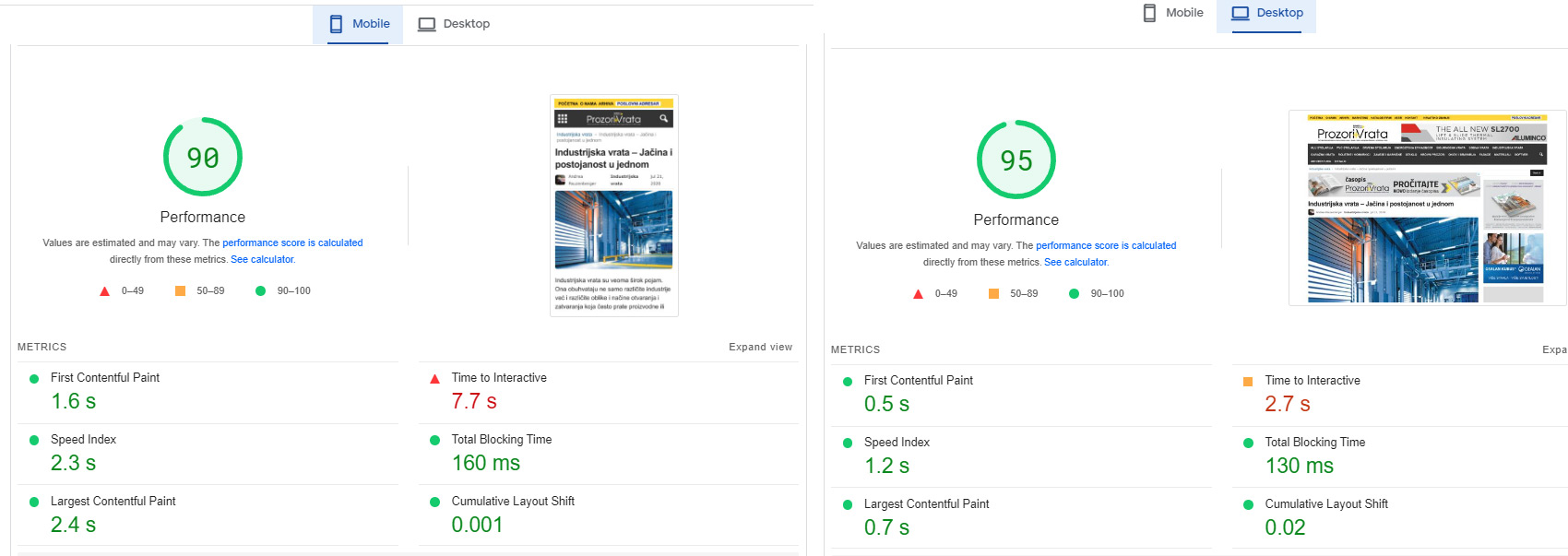
Although it is a huge website with over 20 google dfp banner positions.
I had to modify your Newsmag/style.css and td-composer/legacy/Newsmag/assets/css/td_legacy_main.css a lot
there is still space for reduction and a better rating.
On the other Podovi website, I didn’t change those two files, so far.
I just minified them, I get 83 mobile / 93 desktop
Basically, these two files must definitely be reduced, they are too big and too unused.
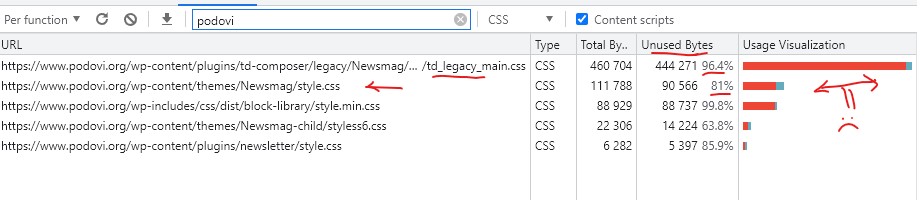
Basically, I am satisfied with the template. I will probably try the newspaper as well, because I am planning to upgrade one of those two web portals soon.
 meri
meriHi,
Let’s take https://www.creermalin.fr/contenus/astuces-pour-creer-facilement-un-calendrier-editorial/ as an example.
Question 1: would it be possible to add the category (but not the date) like on https://ibb.co/jJG6yWv but with the mobile theme?
Question 2: if it’s not possible on the mobile theme, how can I remove “-” after the author’s name? You can see it on https://ibb.co/Vx3xF34
Thanks
 jasaj
jasaj Dear Anamaria,
This issue is not always but it happens from time to time on both platforms iOS and Android. When we catch it refresh of the page solves the issue but we can not tell our readers to do that.
This is an issue only on the mobile version!
Regards,
Jasa
 wpjim23
Hi I have a problem that you might help. How my website works is it sends post data to firebase, and firebase is linked to my mobile app to display the same content as shown on my website.
I have recently been made aware that there is a problem with the images loading on different devices. The image urls of each post (which are just the image urls to the image saved on my wordpress database) don’t seem to load on some devices (the images just appear as empty white images similar to when you open the website and the lazy load forces images to first appear as white), but on other devices they load fine.
Did you have any ideas on what could be causing this?
I have tried disabling different plugins to find the problem but haven’t been successful, and there doesn’t seem to be a link between older and newer versions of android because I have heard feedback that the images worked fine on android 9.
My website is https://balancednewssummary.com/ and you can find the mobile app download link on the website if you wish to see the problem.
If you can direct me to a more suitable forum that would also be helpful!
Bettina Hello @raha2124!
This issue with the Mobile version on Desktop has been discussed already here: https://forum.tagdiv.com/topic/mobile-site-displaying-on-desktop-site/
Thank you!
Bettina Hello Dilyana !
For AMP, there should be some special fields: https://prnt.sc/gzpHHKYcVC7G but you need to select the mobile theme + AMP : https://prnt.sc/JlZPaVKh7xnk
Thank you!
Bettina Hello @dpernar !
Unfortunately, you do not have any option to add the subscribe form to the mobile theme plugin.
Thank you!
 raha2124
hey, i have been designing my website for too long, but every time it gets screwed up with little error and doesn’t seem to revert despite restoring backup. it’s loading newspaper discover the art of published mobile version while I have chosen crypto newspaper black theme. it gets normal while clicking on the second page. but on homepage. it’s loading different theme along with mobile theme. please help me. i could share you link if you prefer private conversation. at present, I’m sharing you image for clarity.

 Dilyana Gaytandzhieva
 Thank you so much for the advice. I copied and pasted my Google Ads Sense code (Auto Ads) to all places possible in Newspaper -> Theme panel -> Mobile theme -> Mobile ads and the Google Ads still do not appear. The the js in Custom code says it is not for AMP so I did not paste the code there
 dpernar
Hi,
I am using mobile plugin on my site CuriousMatrix.com.
Is there any easy way to add newsletter/subscribe form? On desktop theme there is newsletter directly by tagdiv (connected with mailchimp in my scenario).
Currently I am using mailchimp code on my mobile pages but it is slowing down my page.
Any advice would be appreciated.
Bettina Hello Dilyana !
We recommend using only one cache plugin, the WP Super Cache plugin with this configuration: https://forum.tagdiv.com/cache-plugin-install-and-configure
Do not use multiple cache plugins!
Add the ads code in the Newspaper -> Theme panel -> Mobile theme -> Mobile ads or the js in Custom code.
Thank you!
Dilyana Gaytandzhieva Thank you so much, I am using WP Super Cache Plugin and will follow the recommendations. When I am using AMP Plugin and the Mobile Theme plugin together, I don’t see Google Ads showing at all. They show on the desktop version only but not on the mobile version+AMP. Do you have instructions how to insert the Google Ad Sense code and with which plugin working with the two plugins mentioned above?
Bettina Hello Dilyana !
We have 3 options for mobile versions that you can use:
1. Responsive version: A responsive version of your website looks similar to the desktop version. Edit the page with TagDiv Composer. Click on the mobile viewport: https://www.screencast.com/t/XDQJedlggSB. There you can see your mobile version and edit or adjust the elements to look better.
2. Mobile pages: https://tagdiv.com/newspaper-10-3-7-update-brings-customizable-and-fast-mobile-pages
3. Mobile theme plugin: The Mobile Theme is a performance-optimized theme included in the main Newspaper theme that only loads on mobile devices. It comes with its own templates and design for pages, posts, categories, etc., so your current templates from the desktop theme will get converted to the mobile theme layout. For more information, please visit https://forum.tagdiv.com/the-mobile-theme/ and https://forum.tagdiv.com/mobile-theme-introduction/.
A full explanation is here: https://www.youtube.com/watch?v=SpGkOnJeNZY
If you need to use the mobile version 1 or 2, then you need to disable the Mobile Theme plugin.
This issue with the Mobile version on Desktop has been discussed already here: https://forum.tagdiv.com/topic/mobile-site-displaying-on-desktop-site/
Thank you!
