
- TutorialsFrom WPBakery to tagDiv Composer
- TutorialsWhat is Ajax preloading?
 Lauren Yeomans
Hi I am having some issues with my theme, I have updated my banner but when I scroll on a mobile it goes to the old newspaper banner.
thats my URL and the only issue is when its on a mobile https://allnftspace.com/
thanks !
 knthdgd
Hi tagDiv.
This is kind of strange, and I it is a bit hard to explain it.
Let me try to explain:
1) This is the live portrait viewport of my website, which is the correct version, and as it should be:
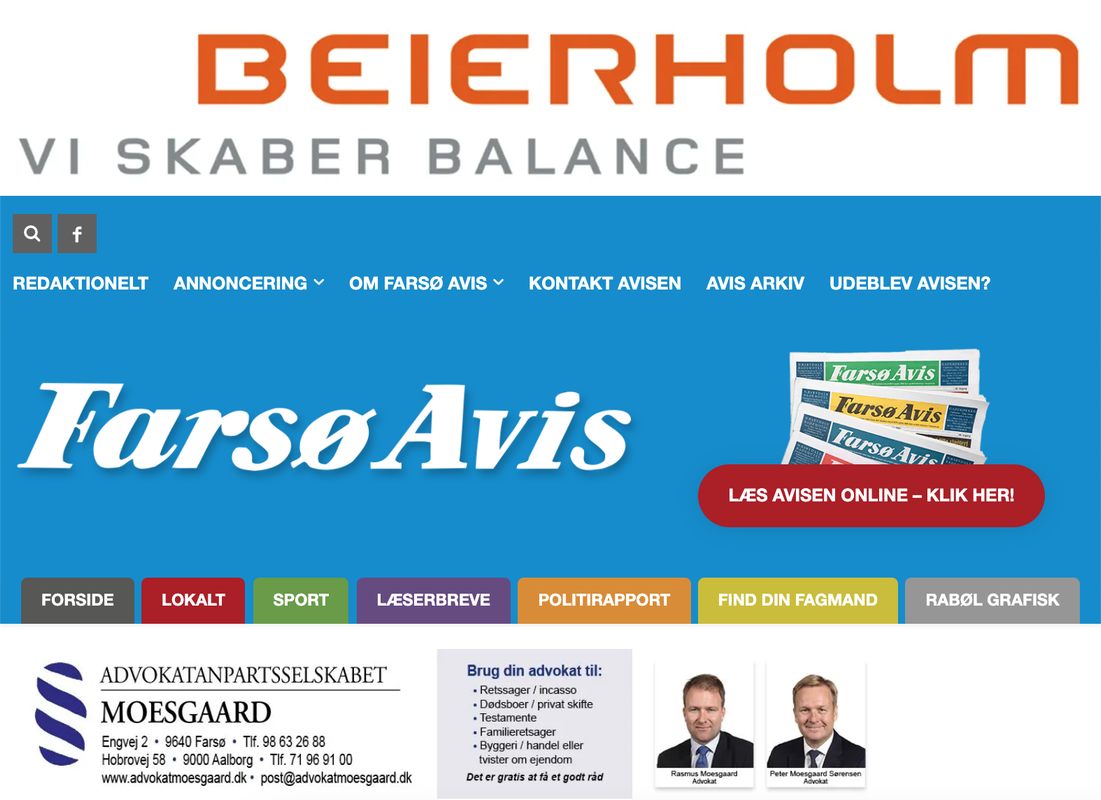
2) Suddenly when working in the Visual Composer, it showed this “Fatal error” in the bottom:

3) I then exited the Visual Composer, and then opened it again. The error was now gone. But now my header on Portrait View in the Composer is suddenly fucked up (but only in Visual Composer, not on the live site):
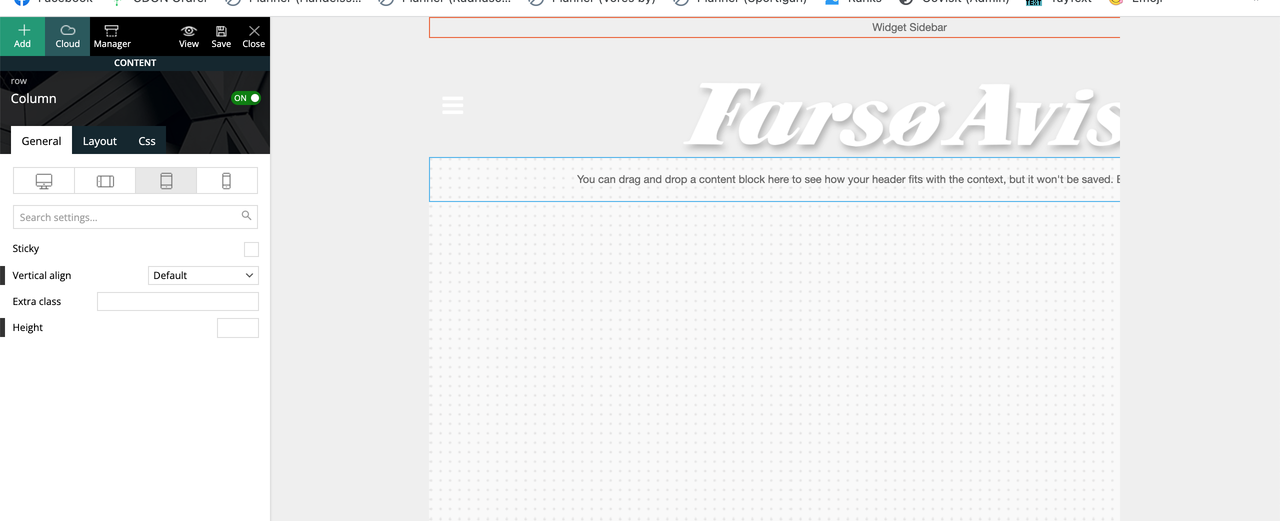
Seems like it suddenly applied/overwritten the header from the “Mobile View” to the “Portrait View”?
 vikasnangia
We are using the Single Post Template – Magazine PRO on our blog details page.
We have turned off “light box” from the settings of this template, which disabled it on the desktop site, but has not disbaled it on the mobile site.
We are also using the recommended tagDiv Mobile Theme. What are we missing? Why isnt the lightbox turning off on the mobile?
 theprescotttimes
https://theprescotttimes.com/
Theme shows desktop version on mobile
mobile theme off
amp off
cache cleared
no caching plugins
same when all plugs deactivated
 ikaris
Hi,
I have created and applied the Medicine Pro Header Template with all the edits I preferred to all my pages. However, when I access posts on mobile, the header is not being used. How can I apply the template for my posts as well?
Thanks!
vikasnangiaHi Guys,
On the theme we are trying to replicate, lazy loading seems enabled. Specifically speaking, images are only downloaded from the server when the user scrolls down.
On our site, however, this is not the case. All images get downloaded as soon as the page loads. Both on the mobile site and the desktop site. We are using the mobile theme.
Are we missing a setting? In the Theme Panel – > Image Loading Animations is ON.
We are currently using the Mobile theme that comes with your theme.
Looking at our waterfall, it seems that
vikasnangiaIt isnt clear whether we’re supposed to use both the tagDiv Mobile Theme and the AMP plugin?
When we turn on both, the Mobile Theme setting do not properly apply on the Blog Details page. Specifically speaking the colors we have set for the meny background, title background and search background do not apply. The home , category and tag pages appear as expected.
When we turn OFF the AMP plugin, everything appears as expected, with the proper colors.
Any ideas, why your color setting stop working on the blog details page when AMP is turned on?
 sylentears
Hi.
I am using simple vector based logo for quick loading in .SVG file format. you can see here. bestnewsstudio.com 1.
on desktop it working fine, no issue. but on mobile devices its not loading. its using builtin font or some thing else.
can you help to figure out this issue?
 hfrevolution
 Hi Bettina,
The menu is working on some phones, but most phones show this as the menu: https://www.screencast.com/t/hfREl8cjq
Also, the mobile site keeps toggling between a mobile version and a responsive smaller version of the desktop website. How can I get it to stay consistently one or the other?
 Bettina
 Hello @ikaris!
The image background can be changed from Theme panel -> Background -> Mobile menu/search background, the social networks can be edited from Theme panel -> Social Networks and the colors from here: https://www.screencast.com/t/hcRoHastuO
Thank you!
ikarisHi,
So, I am using the Medicine Pro Mobile Header Template. Its working well. However, when I press on the 9 dots on the left side of the header, it brings me to the menu (as it should). However, I need to make changes to the colour and other parts of it. How do I edit this? I can’t seem to find the option. Thanks!
Bettina Hello @kmos!
You need to take into account:
External factors: server speed, if you are using CDN or not, the external resources loaded by your website like ads, fonts, tracking scripts like Facebook Pixel, Google Analytics, Twitter analytics, Hotjar and so on.
Internal factors: the number of elements on the page, image size, image formats, if you are using mobile optimized layouts, console errors.
Our developers are working a lot to improve the page speed in every update.
As a suggestion, disable the lazy load animation. Other starting points to improve your website page speed are here:
– https://forum.tagdiv.com/how-to-make-the-site-faster/
– https://forum.tagdiv.com/topic/score-100100-pagespeed-with-newspaper-wordpress-theme/
– https://www.infophilic.com/get-almost-100-pagespeed-newspaper-theme/
– https://developers.google.com/speed/docs/insights/v5/about
– https://www.youtube.com/watch?v=tnkVapqhIHc
Please check the tutorials from those platforms gt metrix and Google Pagespeed Insights and I’m sure you can increase the page speed.
Please note that page speed is not covered by the support team: https://forum.tagdiv.com/newspaper-theme-support/
Thank you for understanding!
 Anamaria
 Hi,
I just answered here in your own topic: https://forum.tagdiv.com/topic/my-mobile-theme-is-not-working/ please check it.
Thank you!
Bettina Hello @hfrevolution !
I’ve checked your website and it seems to work well: https://www.screencast.com/t/mK8s80Wk
If the menu is configured (you choose a mobile menu), then please make sure it’s not a cache plugin, deactivate all the cache plugins that you have, clear all cache and try again.
Let me know the results!
Thank you!
Anamaria Hello,
If you want to use a mobile theme plugin also, on the homepage, then enable it, edit the page in editor -> https://imgur.com/OTAJQSS
Also, please check this topic where I explained each mobile version -> https://forum.tagdiv.com/topic/mobile-version-not-working-properly-2/
Thank you!
 abbey4biz1
I made a complain that my mobile theme is not reflecting on mobilde device, instead, it’s loading the normal mobile view; what can I do?
 Bruno Riggs
Hi,
How can I make a header with one style and the stick header with another style? This for Desktop, Tablet, Mobile….
If you look at the Pulses Pro demo theme, you’ll see what I’m talking about, when the menu turns into a stick it changes the place mark.
Thanks
hfrevolutionHi,
The menu seems to glitch on and off on my mobile site (www.healthfitnessrevolution.com). Oftentimes, it only shows “click here- to use the wp menu builder” rather than the actual menu.
Please advise.
abbey4biz1Hi, pls mobile theme not working when I try to access my site homepage: smedigest.com.ng
But when I go through other articles, it loads up.
Bettina Hello @tomjose!
If you mean the page speed is slow, then you need to take into account:
External factors: server speed, if you are using CDN or not, the external resources loaded by your website like ads, fonts, tracking scripts like Facebook Pixel, Google Analytics, Twitter analytics, Hotjar and so on.
Internal factors: the number of elements on the page, image size, image formats, if you are using mobile optimized layouts, console errors, if you are using the Standard Pack plugin on not, if you are using PRO demo or a standard one.
Also, to increase the page speed you can check these similar topics for more solutions:
– https://forum.tagdiv.com/topic/optimize-script-to-improve-site-speed/
– https://forum.tagdiv.com/topic/a-few-tips-for-newspaper-x-speed-high-cpu-usage-issues/
– https://tagdiv.com/how-to-increase-page-loading-speed/
– https://forum.tagdiv.com/how-to-make-the-site-faster/
– https://forum.tagdiv.com/topic/score-100100-pagespeed-with-newspaper-wordpress-theme/
– https://www.infophilic.com/get-almost-100-pagespeed-newspaper-theme/
– https://developers.google.com/speed/docs/insights/v5/about
– https://www.youtube.com/watch?v=tnkVapqhIHc
Please check the tutorials from those platforms gt metrix and Google Pagespeed Insights and I’m sure you can increase the page speed.
Please note that page speed is not covered by the support team: https://forum.tagdiv.com/newspaper-theme-support/
Thank you!
Bettina Hello MINA!
Make sure you have the Standard Pack plugin installed and active.
Please add this CSS code in Newspaper -> Theme panel -> Custom code -> Custom CSS:
.td-header-style-7 .td-header-sp-logo img {

    max-height: none;}
It seems that your letters are ok now on mobile: https://www.screencast.com/t/qsprt3HNgCCX
If the problem is still there, then please make sure it’s not a plugin conflict or a cache issue, that’s why, deactivate ALL plugins except tagDiv ones, also if you are using a cache plugin, deactivate it, clear all cache and try again.
Let me know the results!
Thank you!
 jasaj
jasajAfter we update Newspaper theme to 11.4. our logo in the header starts to be out of the original proportion (.
Link to our webpage:
https://mina.news/
It should be like on link below:
https://mina.news/wp-content/uploads/2021/05/MINA-LOGO-01.png.
The second issue we have with the last update is “large letters” on mobile phones web browsers.
Screenshot:
https://mina.news/minabigletters/://mina.news/minabigletters/
Thanks in advance!
MINA
Anamaria Hi Karin,
So, your client uses the mobile theme plugin, but the mobile theme is disabled on the homepage, right?
Also, she created a mobile menu for the posts and pages where the mobile theme is enabled and she set the menu in Theme Panel -> Mobile Theme -> Header -> https://i.imgur.com/8dAeJRZ.png, so you can set the other menu for the homepage in Theme Panel -> Header -> Main Menu -> https://i.imgur.com/onc8Lik.png if she uses a standard template for header from Theme Panel or you can set it with tagDiv Composer on the viewport for phone -> https://i.imgur.com/T9gLYs1.png
Hope this helps you!
Thank you!
Anamaria Hello,
Seems you have the mobile theme plugin activated -> https://i.imgur.com/PlHYVdz.png, please deactivate it, clear all cache and check after the mobile version.
Also, please check this topic where I explained each mobile version -> https://forum.tagdiv.com/topic/mobile-version-not-working-properly-2/ and choose what mobile version you want.
Hope this helps you!
Thank you!
Bettina Hello @hanna2390!
About your server, please contact your host provider and check if the issue is coming from them or not.
For the page speed, you need to take into account:
External factors: server speed, if you are using CDN or not, the external resources loaded by your website like ads, fonts, tracking scripts like Facebook Pixel, Google Analytics, Twitter analytics, Hotjar and so on.
Internal factors: the number of elements on the page, image size, image formats, if you are using mobile optimized layouts, console errors, if you are using the Standard Pack plugin on not, if you are using PRO demo or a standard one.
Also, to increase the page speed you can check these similar topics for more solutions:
– https://forum.tagdiv.com/topic/optimize-script-to-improve-site-speed/
– https://forum.tagdiv.com/topic/a-few-tips-for-newspaper-x-speed-high-cpu-usage-issues/
– https://tagdiv.com/how-to-increase-page-loading-speed/
– https://forum.tagdiv.com/how-to-make-the-site-faster/
– https://forum.tagdiv.com/topic/score-100100-pagespeed-with-newspaper-wordpress-theme/
– https://www.infophilic.com/get-almost-100-pagespeed-newspaper-theme/
– https://developers.google.com/speed/docs/insights/v5/about
– https://www.youtube.com/watch?v=tnkVapqhIHc
Please check the tutorials from those platforms gt metrix and Google Pagespeed Insights and I’m sure you can increase the page speed.
Please note that page speed is not covered by the support team: https://forum.tagdiv.com/newspaper-theme-support/
Thank you!



