
- ApiPractical example – How to add a new Block and Module
- ApiAPI – Smart Lists – Introduction
- ApiAPI – Category top section style – Introduction
- ApiAPI – Category top section template – Introduction
- Apitd_api_module::update
- Apitd_api_module::add
- ApiAPI – Modules – Introduction
- ApiUsing the Theme API in plugins
 stephanwhelan
Hi team – is there a means of changing the position of the Ads displayed on AMP version of the template. The Mobile theme has an option to show ads above the body content, but the AMP version only has one option and it appears above the title (i.e. so first thing the user sees). We’d like to get them to match.
 Carlnec
Hello, please how do I add images like adverts or banners on the Newspaper mobile theme?
The option is only available on the main theme.
 Ramletb
 I rolled back to 10.4 and it’s still broken on mobile
 Testventure
Hi Tagdiv Team,
I have the issue that the mobile Version (AMP) is sometimes loaded on random sites on Desktop PC.
First I thought WP-Rocket causes the issue. Than I deleted WP Rocket and switched to WP Supercache as you recommended. I followed all your settings.
But the issue still remains wit WP Supercache.
Any suggestions how I can solve this?
Thank you

 rirakond
hello there,
i know that “siteground” is recommended for hosting.
but i tried and install in 10web, because it is powered by google cloud.
then i checked site looks and speed both in mobile and pc, but its looks was not that good as demo and also lower page speed than demo. let me how may i get these.
and in this link “https://brixly.uk/wordpress-hosting/” you can see “pro plan” for wordpress, will it be good for newspaper?
I hope you understand what i tried to explain.
specially i want this site to be fast with 100 page speed for mobile browser.
and for that what i need to do please let me know with a good descriptions.
Thank you guys.
“Newspaper” its a nice creation.
 AhmadiKatu
Hi,
i already using 2 pre-design templates from tagDiv Cloud Library on my new page. But unfortunately it’s can’t display on mobile AMP. How to make sure all the pre-design template that we used can display on mobile AMP? can we do that?
thanks dan regards
 johnsnow
 i sort it out, but how to change the background of image in mobile menu?

johnsnow another question, where to change the color of mobile version menu?

johnsnow Thank you for your answer.
Another question: Why google indexes a website different from its original design?
like for a mobile page?
-
This reply was modified 5 years by
johnsnow.
 Humayun
Hello,
We can’t edit web home page & mobile home page, errors are showing like.
Errors at columns elements: 4(models) : 7(dom). The model does not match the content Current state has involved an issue. You could try an UNDO operation (CTRL+Z / CTRL+SHIFT+Z)
stephanwhelanHi support – upgraded to Newspaper 11 and doing some tests. Looks like the Mobile Theme has an issue. On first load the search icon doesn’t appear and the logo is offset to the left. This is on all pages on the mobile theme version. After about 15-20 seconds the search icon appears and the logo resets properly. See examples:
https://pasteboard.co/K8mv6vk.png
https://pasteboard.co/K8mvl0q.png
 haizattabdul
Hi i just updated newspaper theme 11 but the my website got a missing/broken menu and search button in homepage.
URL: https://www.yoy.my/
Photos: 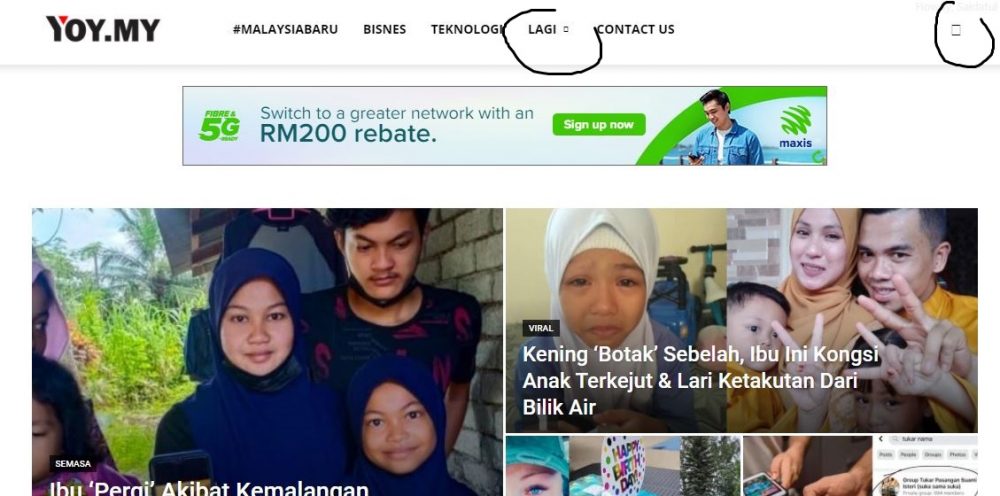
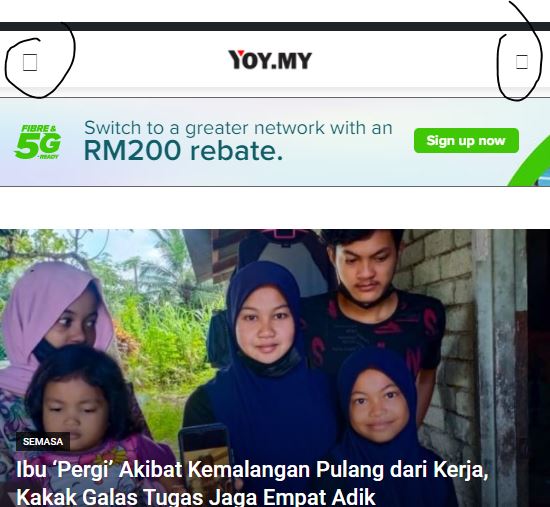
Please help.
 Bettina
 Hello!
No, it won’t update automatically because they are independent from each other. So, if you will change the desktop page, then you should go to your mobile page and change it there too.
If you will choose to use a responsive version, then you won’t have this problem.
A responsive version of your website is looking similar like on desktop, edit the page with TagDiv Composer, click on the mobile viewport: https://www.screencast.com/t/XDQJedlggSB ; there you can see your mobile version and you can edit the elements there.
Thank you!
 Jeewan
 factsbin
Hii, My website is showing different menu on mobile view and header ad is not showing as well on mobile view.
https://factsbin.com That’s my website and the problem is still not solved …
Please help me regarding this issue
Thanks
 frullino2
Hi I have a problem: if I visit the site with chrome everything is fine but if I open it with firefox the homepage (only the homepage) is that of the mobile theme. What can I do? Thanks so much.
 setteseitennis
Hello,
Second Newspaper licence, first time issue with this element. I’ve added the mobile menu to a customised Retro Blog Pro template and, when clicked on, it is not displaying properly (in all viewports). See here:
and
Could you please help fix it?
Domain: https://ur-milano.it/
I can provide admin credentials if needed.
Thank you!
Edo
 channeld
Hi. Can you please check this? https://www.fmh.gr/wp-content/plugins/td-composer/legacy/Newspaper/js/tagdiv_theme.min.js?ver=11. What is that? Where it is used and how it can be unloaded?
The magnific popup code is shown as unused js.
I also run the clean css and generate fallback css for the theme. But it doesn’t seem to clean. See the pagespeed results: https://developers.google.com/speed/pagespeed/insights/?url=https%3A%2F%2Fwww.fmh.gr%2F&tab=mobile
 Anamaria
 Hello, Andrea,
Please let me know what setting do you use mobile+amp or amp,
Since when did you notice that this problem occurred?
Also, please do a test using only the plugins from the theme plugins and see if this issue persists.
Thank you!
Anamaria Hello,
I made a new test and seems to work well, please if you can and want to please make a staging website where you have mobile + AMP and send me a video so you can understand how it works for you.
Thank you!
 Breinblik
 Hey Bettina,
I wasn’t talking about a specific page. What i ment was in general. Every time a change is made to a page the mobile page needs to be changed to right? It won’t update automatically? Is there a more clever way to do this without having to change both the normal page and the mobile page?
Bettina Hello!
I am not sure I fully understand what you are looking to edit. Can you please provide screenshots, more information and an url to your website?
Please check also some tips about mobile pages:
– https://tagdiv.com/newspaper-10-3-7-update-brings-customizable-and-fast-mobile-pages/
– https://www.youtube.com/watch?v=SpGkOnJeNZY
Thank you!
Bettina Hello!
Please check on your mobile version the settings from the flex blocks.
If everything there is alright and the same as desktop, then we need to take a look to see what happened there.
Please contact us via email at contact@tagdiv.com and provide the following:
– admin url and credentials
– a link to this topic in order to identify you
Our team will take a look!
Thank you!
Anamaria Hello,
You can disable the back to top from Theme Panel -> Template Settings -> ToTop button => https://www.screencast.com/t/JVYklvqk
Also, if you use mobile theme, you can only hide it using custom code, but for mobile responsive version and mobile page will apply the option from Theme Panel.
Thank you!
 Nagarig
 @Bettina If we disable Google Fonts and Mobile Google Fonts from Theme panel font customization settings, it will not show any fonts on site? Or then fonts will be served from Server Side? We don’t have to upload custom fonts right? We can use default theme fonts and at the same time we can disable Google Fonts, right?
-
This reply was modified 5 years by
Nagarig.


