No search results were found in Documentation!
 SP1
SP1 Found the annswer on Plest forums.
To fix the issue, try to add the following lines in Domains >domain.com > Apache & nginx Settings > Additional directives for HTTP:
<IfModule mod_security2.c>
SecResponseBodyLimit 546870912
</IfModule>
And press apply.
 kibiribi
 I’ve solved after Server changes
Domains > example.com > Apache & nginx Settings
fastcgi_buffers 8 16k;
fastcgi_buffer_size 32k;
proxy_buffer_size 128k;
proxy_buffers 4 256k;
proxy_busy_buffers_size 256k;
 Anamaria
 Hi,
if you are wondering where to find this file .htaccess, then check this guide -> https://www.hostinger.com/tutorials/create-default-wordpress-htaccess-file -> https://wordpress.org/support/topic/htaccess-file-in-nginx/
Thank you!
 Fudster
 hmm I tried uninstalling tagdiv and reinstallnig.
I changed the try url function in nginx
Also changed my htacess.
No luck.
Here is my .htaccess
# BEGIN WordPress

# The directives (lines) between "BEGIN WordPress" and "END WordPress" are

# dynamically generated, and should only be modified via WordPress filters.

# Any changes to the directives between these markers will be overwritten.

<IfModule mod_rewrite.c>

RewriteEngine On

RewriteRule .* - [E=HTTP_AUTHORIZATION:%{HTTP:Authorization}]

RewriteBase /

RewriteRule ^index\.php$ - [L]

RewriteCond %{REQUEST_FILENAME} !-f

RewriteCond %{REQUEST_FILENAME} !-d

RewriteRule . /index.php [L]

</IfModule>
# END WordPress
<IfModule mod_security.c>
SecFilterEngine Off
SecFilterScanPOST Off
</IfModule>
<IfModule mod_substitute.c>`
SubstituteMaxLineLength 10M
</IfModule>
<IfModule mod_headers.c>
Header always append X-Frame-Options SAMEORIGIN
</IfModule>
-
This reply was modified 4 years by
Fudster.
 Calin
Calin Hi DFC005,
Maybe there are some configurations made, you can try this article -> https://ubiq.co/tech-blog/redirect-404-url-nginx/
Also, it is possible that this to be done in the error page nginx, you can check this topic https://www.howtoforge.com/community/threads/how-to-disable-error_page-nginx-directive.71331/
Another suggestion is to ask your host, maybe they can help you with this, I think that they will know what need to be done. Here on theme support all we can do is to search on google and provide some answers from there.
Thank you!
 DFC005
 We’ve already reviewed the first link and it wasn’t helpful at all.
As mentioned, this just worked “out of the box” with Apache and I had assumed it would be similar Nginx.
Here’s an example of a site on the old server: https://www.zerotackle.com/oops/
And here’s an example of a site on the new server: https://www.zerowicket.com/oops/
How do we tell Nginx to point to the Newspaper theme 404 page?
Cheers,
Matt
Calin Hi DFC005,
I can not say that I know how to do it, but I think that the Nginx has set a custom 404 page -> https://ubiq.co/tech-blog/how-to-create-custom-404-page-in-nginx/
Also, I found an article similar with the situation explained by you https://www.digitalocean.com/community/questions/custom-wordpress-404-page-not-loading-nginx-404-page-loading-instead
I hope this will help you!
DFC005Hi there,
We’re in the process of moving our websites from an Apache setup across to Nginx.
Everything has been going fine so far except for the 404 pages. In Apache, if the user visited a page that didn’t exist, they got the custom 404-page setup in the theme templates.
But with Nginx, the user is getting the default Nginx 404 page and we’re unsure how to resolve this issue. Obviously we need to somehow point to the correct file/page.
Does anyone have a solution to this? I assume we’re just missing something simple.
Cheers,
Matt
 Bettina
 Hello Robert!
Please check this article too and give it a try: https://darryldias.me/2018/get-gutenberg-working-wordpress-nginx/
Hope that helps you!
Thank you!
 Robert Turner
 Hi Bettina
I didn’t mention issues with the TagDiv composer, that’s functioning fine. It’s the post editor in WordPress that isn’t showing all the options for quotes, ie: no block or pull quote option? It’s simply not there. It disappeared three updates ago, around the same time we migrated to Nginx which is why I assume the problem is related.
I don’t however see how permalinks, which are functioning perfectly, could affect this part of the editor. Do you suggest the workaround you offered would resolve issues in the post editor?
Robert TurnerHi
We’ve had an issue with selecting quote types, present for the last three updates. In the post editor, no choices show up other than the standard quote. I suspect it’s a plugin conflict although we’ve disabled these individually. I notice the problem is not present on a standard Apache server, but we’re running Nginx on this particular site. Could this be causing the problem? The website address is https://medika.life.
 razin223
 Hi,
Thanks for the update. Yes, it was nginx. That was the culprit. The problem is now solved.
Thank you very much for the quick support.
Regards
Calin Hi razin223,
If I understand correctly, you are using Nginx, this may need some special settings, for example this one -> https://i.imgur.com/79ZWBlv.png -> https://forum.tagdiv.com/tagdiv-composer-not-working/
Also, what theme and WordPress versions are you using?
Maybe is possible to configurate the permalinks like in this article -> https://tecadmin.net/nginx-for-wordpress-permalinks/
Thank you!
 Lalit
LalitHi,
For a few days, my site often appears to be offline or unresponsive.
Getting reports via jetpack monitor feature. The following report, I am getting-
Site did not load when Jetpack Monitor last checked on it.

What's happening?
Your site is responding intermittently, or extremely slowly. This can indicate an overloaded, under-powered, or misconfigured server. Your site is probably loading for some users, but not for everyone.

Error reference: 200700494/intermittent

What should you do now?
Start by visiting your site to see if you're able to load it. Jetpack Monitor may have just recorded a momentary glitch that's since been resolved, and you can ignore this email.
If you're unable to load your site, check your host's control panel or contact their support team: they'll have more detail about what is happening. Be sure to share the error information above with them.
Activity log: https://drive.google.com/file/d/1BGaBQm0nA8BCnwJ_OJEzOawsaeTXWpSl/view?usp=sharing
Please help to fix.
My site hosted on Digitalocean 1gb ram plan using nginx on ubuntu 20.4
Thanking yiu
 LPH
LPH Hi,
Thank you for replying, Anamaria. As stated, I’ve tried on several different development environments and the thumb settings do not save. Other parts of the panel save.
Cloudflare is not used. I disabled all plugins, except the tagdiv composer.
It’s not on the live server or a test server.
There are no error messages in the server logs.
PHP 7.1.33
PHP 7.4
WordPress 5.8.2
Server Software: nginx/1.21.4
Server Protocol: HTTP/2.0
Anamaria Hello,
I saw you have an older version of theme 8.0.1, so if you want to update the theme, please update on staging or subdomain => https://forum.tagdiv.com/how-to-update-the-theme-2/, also, please make a full backup -> https://www.youtube.com/watch?v=LAJXrSI-dDA,activate the tagDiv Standard pack plugin to keep the website look,
Here you can find information about the changes that have occurred in each update over time https://tagdiv.com/newspaper/
Also, these are some articles about your issue
-> https://kinsta.com/blog/502-bad-gateway/
-> https://www.wpbeginner.com/wp-tutorials/how-to-fix-the-502-bad-gateway-error-in-wordpress/
-> https://wordpress.stackexchange.com/questions/135960/wordpress-admin-ajax-php-returns-502-bad-gateway
-> https://www.digitalocean.com/community/questions/nginx-returns-upstream-sent-too-big-header-while-reading-response-header-from-upstream
Thank you!
Anamaria Hi,
As far as I know, Nginx usually uses as a cache plugin, Litespeed and it can interfere with the theme when don’t recognize mobile theme plugins and mobile page, so please clear your cache on the host and see if the problem persists, also, you can ask it if can disable that plugin.
Thank you!
 iamkingsleyf
 We use NGINX only hosting, no idea if that is also affecting it…
Here is a link https://thexplorion.com/richest-mormons-in-the-world/
 leon_hzz
 I use newspaper 11.1 ,WordPress 5.8. already tried to reflash all cache and disable plugin to find the erorr, but it also not work. video format can not be select,no matter what i do.
PHP:7.4
Linux: centos
Nginx: Nginx 1.20.1
Mysql:5.7
imported theme demo is : fashion pro.
Category Template – Mintyside PRO
Single Post Template 10 is not work with video.
and what i want is use single post template 10 with video[cloud template import].
-
This reply was modified 5 years by
leon_hzz.
 kompic
 I tried this on Nginx, Apache, Litespeed, Nginx over Apache hosting, and the results are always the same.The filter is not working regardless of changing the plugins folder name. So, it is not working with caching.
On the homepage you will see the flex box 5 with 3 elements. They change position if the caching is off. If it is ON, then they don’t change position.
 xxxLesy
 After much more testing I found the culprit:
In Plesk under Apache & nginx Settings for each site you have to disable “Enable nginx caching”.
It doesn’t seem to negatively effect speed results and Google PageSpeed now always pulls the correct version of the site for each mobile and desktop test.
 arvindk
I am trying to run update from my admin end. The update is failing with error:
The update process is starting. This process may take a while on some hosts, so please be patient.
Enabling Maintenance mode…
Updating Theme Newspaper (1/1)
Downloading update from https://cloud.tagdiv.com/wp-content/uploads/2021/03/Newspaper.zip…
Unpacking the update…
Installing the latest version…
Removing the old version of the theme…
Warning: chmod(): Operation not permitted in /usr/share/nginx/html/wp-admin/includes/class-wp-filesystem-direct.php on line 173
Warning: chmod(): Operation not permitted in /usr/share/nginx/html/wp-admin/includes/class-wp-filesystem-direct.php on line 173
Warning: chmod(): Operation not permitted in /usr/share/nginx/html/wp-admin/includes/class-wp-filesystem-direct.php on line 173
Warning: chmod(): Operation not permitted in /usr/share/nginx/html/wp-admin/includes/class-wp-filesystem-direct.php on line 173
Warning: chmod(): Operation not permitted in /usr/share/nginx/html/wp-admin/includes/class-wp-filesystem-direct.php on line 173
Warning: chmod(): Operation not permitted in /usr/share/nginx/html/wp-admin/includes/class-wp-filesystem-direct.php on line 173
Warning: chmod(): Operation not permitted in /usr/share/nginx/html/wp-admin/includes/class-wp-filesystem-direct.php on line 173
Warning: chmod(): Operation not permitted in /usr/share/nginx/html/wp-admin/includes/class-wp-filesystem-direct.php on line 173
Warning: chmod(): Operation not permitted in /usr/share/nginx/html/wp-admin/includes/class-wp-filesystem-direct.php on line 173
Warning: chmod(): Operation not permitted in /usr/share/nginx/html/wp-admin/includes/class-wp-filesystem-direct.php on line 173
Warning: chmod(): Operation not permitted in /usr/share/nginx/html/wp-admin/includes/class-wp-filesystem-direct.php on line 173
Warning: chmod(): Operation not permitted in /usr/share/nginx/html/wp-admin/includes/class-wp-filesystem-direct.php on line 173
Warning: chmod(): Operation not permitted in /usr/share/nginx/html/wp-admin/includes/class-wp-filesystem-direct.php on line 173
Warning: chmod(): Operation not permitted in /usr/share/nginx/html/wp-admin/includes/class-wp-filesystem-direct.php on line 173
Warning: chmod(): Operation not permitted in /usr/share/nginx/html/wp-admin/includes/class-wp-filesystem-direct.php on line 173
Warning: chmod(): Operation not permitted in /usr/share/nginx/html/wp-admin/includes/class-wp-filesystem-direct.php on line 173
Warning: chmod(): Operation not permitted in /usr/share/nginx/html/wp-admin/includes/class-wp-filesystem-direct.php on line 173
Warning: chmod(): Operation not permitted in /usr/share/nginx/html/wp-admin/includes/class-wp-filesystem-direct.php on line 173
Warning: chmod(): Operation not permitted in /usr/share/nginx/html/wp-admin/includes/class-wp-filesystem-direct.php on line 173
Warning: chmod(): Operation not permitted in /usr/share/nginx/html/wp-admin/includes/class-wp-filesystem-direct.php on line 173
Warning: chmod(): Operation not permitted in /usr/share/nginx/html/wp-admin/includes/class-wp-filesystem-direct.php on line 173
Warning: chmod(): Operation not permitted in /usr/share/nginx/html/wp-admin/includes/class-wp-filesystem-direct.php on line 173
Warning: chmod(): Operation not permitted in /usr/share/nginx/html/wp-admin/includes/class-wp-filesystem-direct.php on line 173
Warning: chmod(): Operation not permitted in /usr/share/nginx/html/wp-admin/includes/class-wp-filesystem-direct.php on line 173
Warning: chmod(): Operation not permitted in /usr/share/nginx/html/wp-admin/includes/class-wp-filesystem-direct.php on line 173
Warning: chmod(): Operation not permitted in /usr/share/nginx/html/wp-admin/includes/class-wp-filesystem-direct.php on line 173
Warning: chmod(): Operation not permitted in /usr/share/nginx/html/wp-admin/includes/class-wp-filesystem-direct.php on line 173
Warning: chmod(): Operation not permitted in /usr/share/nginx/html/wp-admin/includes/class-wp-filesystem-direct.php on line 173
Warning: chmod(): Operation not permitted in /usr/share/nginx/html/wp-admin/includes/class-wp-filesystem-direct.php on line 173
Warning: chmod(): Operation not permitted in /usr/share/nginx/html/wp-admin/includes/class-wp-filesystem-direct.php on line 173
Warning: chmod(): Operation not permitted in /usr/share/nginx/html/wp-admin/includes/class-wp-filesystem-direct.php on line 173
Warning: chmod(): Operation not permitted in /usr/share/nginx/html/wp-admin/includes/class-wp-filesystem-direct.php on line 173
Warning: chmod(): Operation not permitted in /usr/share/nginx/html/wp-admin/includes/class-wp-filesystem-direct.php on line 173
Warning: chmod(): Operation not permitted in /usr/share/nginx/html/wp-admin/includes/class-wp-filesystem-direct.php on line 173
Warning: chmod(): Operation not permitted in /usr/share/nginx/html/wp-admin/includes/class-wp-filesystem-direct.php on line 173
Warning: chmod(): Operation not permitted in /usr/share/nginx/html/wp-admin/includes/class-wp-filesystem-direct.php on line 173
Warning: chmod(): Operation not permitted in /usr/share/nginx/html/wp-admin/includes/class-wp-filesystem-direct.php on line 173
Warning: chmod(): Operation not permitted in /usr/share/nginx/html/wp-admin/includes/class-wp-filesystem-direct.php on line 173
Warning: chmod(): Operation not permitted in /usr/share/nginx/html/wp-admin/includes/class-wp-filesystem-direct.php on line 173
Warning: chmod(): Operation not permitted in /usr/share/nginx/html/wp-admin/includes/class-wp-filesystem-direct.php on line 173
Warning: chmod(): Operation not permitted in /usr/share/nginx/html/wp-admin/includes/class-wp-filesystem-direct.php on line 173
Warning: chmod(): Operation not permitted in /usr/share/nginx/html/wp-admin/includes/class-wp-filesystem-direct.php on line 173
Warning: chmod(): Operation not permitted in /usr/share/nginx/html/wp-admin/includes/class-wp-filesystem-direct.php on line 173
Warning: chmod(): Operation not permitted in /usr/share/nginx/html/wp-admin/includes/class-wp-filesystem-direct.php on line 173
Warning: chmod(): Operation not permitted in /usr/share/nginx/html/wp-admin/includes/class-wp-filesystem-direct.php on line 173
Warning: chmod(): Operation not permitted in /usr/share/nginx/html/wp-admin/includes/class-wp-filesystem-direct.php on line 173
Warning: chmod(): Operation not permitted in /usr/share/nginx/html/wp-admin/includes/class-wp-filesystem-direct.php on line 173
Warning: chmod(): Operation not permitted in /usr/share/nginx/html/wp-admin/includes/class-wp-filesystem-direct.php on line 173
Warning: chmod(): Operation not permitted in /usr/share/nginx/html/wp-admin/includes/class-wp-filesystem-direct.php on line 173
Warning: chmod(): Operation not permitted in /usr/share/nginx/html/wp-admin/includes/class-wp-filesystem-direct.php on line 173
Warning: chmod(): Operation not permitted in /usr/share/nginx/html/wp-admin/includes/class-wp-filesystem-direct.php on line 173
Warning: chmod(): Operation not permitted in /usr/share/nginx/html/wp-admin/includes/class-wp-filesystem-direct.php on line 173
Warning: chmod(): Operation not permitted in /usr/share/nginx/html/wp-admin/includes/class-wp-filesystem-direct.php on line 173
Warning: chmod(): Operation not permitted in /usr/share/nginx/html/wp-admin/includes/class-wp-filesystem-direct.php on line 173
Warning: chmod(): Operation not permitted in /usr/share/nginx/html/wp-admin/includes/class-wp-filesystem-direct.php on line 173
Warning: chmod(): Operation not permitted in /usr/share/nginx/html/wp-admin/includes/class-wp-filesystem-direct.php on line 173
Warning: chmod(): Operation not permitted in /usr/share/nginx/html/wp-admin/includes/class-wp-filesystem-direct.php on line 173
Warning: chmod(): Operation not permitted in /usr/share/nginx/html/wp-admin/includes/class-wp-filesystem-direct.php on line 173
Warning: chmod(): Operation not permitted in /usr/share/nginx/html/wp-admin/includes/class-wp-filesystem-direct.php on line 173
Warning: chmod(): Operation not permitted in /usr/share/nginx/html/wp-admin/includes/class-wp-filesystem-direct.php on line 173
Warning: chmod(): Operation not permitted in /usr/share/nginx/html/wp-admin/includes/class-wp-filesystem-direct.php on line 173
Warning: chmod(): Operation not permitted in /usr/share/nginx/html/wp-admin/includes/class-wp-filesystem-direct.php on line 173
Warning: chmod(): Operation not permitted in /usr/share/nginx/html/wp-admin/includes/class-wp-filesystem-direct.php on line 173
Warning: chmod(): Operation not permitted in /usr/share/nginx/html/wp-admin/includes/class-wp-filesystem-direct.php on line 173
Warning: chmod(): Operation not permitted in /usr/share/nginx/html/wp-admin/includes/class-wp-filesystem-direct.php on line 173
Warning: chmod(): Operation not permitted in /usr/share/nginx/html/wp-admin/includes/class-wp-filesystem-direct.php on line 173
Warning: chmod(): Operation not permitted in /usr/share/nginx/html/wp-admin/includes/class-wp-filesystem-direct.php on line 173
Warning: chmod(): Operation not permitted in /usr/share/nginx/html/wp-admin/includes/class-wp-filesystem-direct.php on line 173
Warning: chmod(): Operation not permitted in /usr/share/nginx/html/wp-admin/includes/class-wp-filesystem-direct.php on line 173
Warning: chmod(): Operation not permitted in /usr/share/nginx/html/wp-admin/includes/class-wp-filesystem-direct.php on line 173
Warning: chmod(): Operation not permitted in /usr/share/nginx/html/wp-admin/includes/class-wp-filesystem-direct.php on line 173
Warning: chmod(): Operation not permitted in /usr/share/nginx/html/wp-admin/includes/class-wp-filesystem-direct.php on line 173
Warning: chmod(): Operation not permitted in /usr/share/nginx/html/wp-admin/includes/class-wp-filesystem-direct.php on line 173
Warning: chmod(): Operation not permitted in /usr/share/nginx/html/wp-admin/includes/class-wp-filesystem-direct.php on line 173
Warning: chmod(): Operation not permitted in /usr/share/nginx/html/wp-admin/includes/class-wp-filesystem-direct.php on line 173
Warning: chmod(): Operation not permitted in /usr/share/nginx/html/wp-admin/includes/class-wp-filesystem-direct.php on line 173
Warning: chmod(): Operation not permitted in /usr/share/nginx/html/wp-admin/includes/class-wp-filesystem-direct.php on line 173
Warning: chmod(): Operation not permitted in /usr/share/nginx/html/wp-admin/includes/class-wp-filesystem-direct.php on line 173
Warning: chmod(): Operation not permitted in /usr/share/nginx/html/wp-admin/includes/class-wp-filesystem-direct.php on line 173
Warning: chmod(): Operation not permitted in /usr/share/nginx/html/wp-admin/includes/class-wp-filesystem-direct.php on line 173
Warning: chmod(): Operation not permitted in /usr/share/nginx/html/wp-admin/includes/class-wp-filesystem-direct.php on line 173
Warning: chmod(): Operation not permitted in /usr/share/nginx/html/wp-admin/includes/class-wp-filesystem-direct.php on line 173
Warning: chmod(): Operation not permitted in /usr/share/nginx/html/wp-admin/includes/class-wp-filesystem-direct.php on line 173
Warning: chmod(): Operation not permitted in /usr/share/nginx/html/wp-admin/includes/class-wp-filesystem-direct.php on line 173
Warning: chmod(): Operation not permitted in /usr/share/nginx/html/wp-admin/includes/class-wp-filesystem-direct.php on line 173
Warning: chmod(): Operation not permitted in /usr/share/nginx/html/wp-admin/includes/class-wp-filesystem-direct.php on line 173
Warning: chmod(): Operation not permitted in /usr/share/nginx/html/wp-admin/includes/class-wp-filesystem-direct.php on line 173
Warning: chmod(): Operation not permitted in /usr/share/nginx/html/wp-admin/includes/class-wp-filesystem-direct.php on line 173
Warning: chmod(): Operation not permitted in /usr/share/nginx/html/wp-admin/includes/class-wp-filesystem-direct.php on line 173
Warning: chmod(): Operation not permitted in /usr/share/nginx/html/wp-admin/includes/class-wp-filesystem-direct.php on line 173
Warning: chmod(): Operation not permitted in /usr/share/nginx/html/wp-admin/includes/class-wp-filesystem-direct.php on line 173
Warning: chmod(): Operation not permitted in /usr/share/nginx/html/wp-admin/includes/class-wp-filesystem-direct.php on line 173
Warning: chmod(): Operation not permitted in /usr/share/nginx/html/wp-admin/includes/class-wp-filesystem-direct.php on line 173
Warning: chmod(): Operation not permitted in /usr/share/nginx/html/wp-admin/includes/class-wp-filesystem-direct.php on line 173
Warning: chmod(): Operation not permitted in /usr/share/nginx/html/wp-admin/includes/class-wp-filesystem-direct.php on line 173
Warning: chmod(): Operation not permitted in /usr/share/nginx/html/wp-admin/includes/class-wp-filesystem-direct.php on line 173
Warning: chmod(): Operation not permitted in /usr/share/nginx/html/wp-admin/includes/class-wp-filesystem-direct.php on line 173
Warning: chmod(): Operation not permitted in /usr/share/nginx/html/wp-admin/includes/class-wp-filesystem-direct.php on line 173
Warning: chmod(): Operation not permitted in /usr/share/nginx/html/wp-admin/includes/class-wp-filesystem-direct.php on line 173
Warning: chmod(): Operation not permitted in /usr/share/nginx/html/wp-admin/includes/class-wp-filesystem-direct.php on line 173
Warning: chmod(): Operation not permitted in /usr/share/nginx/html/wp-admin/includes/class-wp-filesystem-direct.php on line 173
Warning: chmod(): Operation not permitted in /usr/share/nginx/html/wp-admin/includes/class-wp-filesystem-direct.php on line 173
Warning: chmod(): Operation not permitted in /usr/share/nginx/html/wp-admin/includes/class-wp-filesystem-direct.php on line 173
Warning: chmod(): Operation not permitted in /usr/share/nginx/html/wp-admin/includes/class-wp-filesystem-direct.php on line 173
Warning: chmod(): Operation not permitted in /usr/share/nginx/html/wp-admin/includes/class-wp-filesystem-direct.php on line 173
Warning: chmod(): Operation not permitted in /usr/share/nginx/html/wp-admin/includes/class-wp-filesystem-direct.php on line 173
Warning: chmod(): Operation not permitted in /usr/share/nginx/html/wp-admin/includes/class-wp-filesystem-direct.php on line 173
Warning: chmod(): Operation not permitted in /usr/share/nginx/html/wp-admin/includes/class-wp-filesystem-direct.php on line 173
Warning: chmod(): Operation not permitted in /usr/share/nginx/html/wp-admin/includes/class-wp-filesystem-direct.php on line 173
Warning: chmod(): Operation not permitted in /usr/share/nginx/html/wp-admin/includes/class-wp-filesystem-direct.php on line 173
Warning: chmod(): Operation not permitted in /usr/share/nginx/html/wp-admin/includes/class-wp-filesystem-direct.php on line 173
Warning: chmod(): Operation not permitted in /usr/share/nginx/html/wp-admin/includes/class-wp-filesystem-direct.php on line 173
Warning: chmod(): Operation not permitted in /usr/share/nginx/html/wp-admin/includes/class-wp-filesystem-direct.php on line 173
Warning: chmod(): Operation not permitted in /usr/share/nginx/html/wp-admin/includes/class-wp-filesystem-direct.php on line 173
Warning: chmod(): Operation not permitted in /usr/share/nginx/html/wp-admin/includes/class-wp-filesystem-direct.php on line 173
Warning: chmod(): Operation not permitted in /usr/share/nginx/html/wp-admin/includes/class-wp-filesystem-direct.php on line 173
Warning: chmod(): Operation not permitted in /usr/share/nginx/html/wp-admin/includes/class-wp-filesystem-direct.php on line 173
Warning: chmod(): Operation not permitted in /usr/share/nginx/html/wp-admin/includes/class-wp-filesystem-direct.php on line 173
Theme update failed.
An error occurred while updating Newspaper: The update cannot be installed because we will be unable to copy some files. This is usually due to inconsistent file permissions. 404.php, images/icons/newspaper.eot, images/icons/newspaper.ttf, images/icons/newspaper.svg, images/icons/newspaper.woff, images/admin-panel/logo-panel.png, images/no-thumb/medium_large.png, images/editor-style/grid-sidebar-desktop.gif, images/editor-style/grid-no-sidebar-desktop.gif, loop-single.php, loop-archive.php, comments.php, search.php, bbpress.php, tag.php, tagdiv-deploy-mode.php, font-newspaper.css, archive.php, attachment.php, sidebar.php, functions.php, author.php, searchform.php, style-woocommerce.css, translation/pt_PT.po, translation/fi.po, translation/tr_TR.mo, translation/nl_NL.mo, translation/el.mo, translation/pt_PT.mo, translation/pl_PL.mo, translation/hi_IN.po, translation/id_ID.mo, translation/ur_IN.po, translation/ru_RU.po, translation/es_ES.mo, translation/el.po, translation/es_ES.po, translation/de_DE.mo, translation/ja.mo, translation/de_DE.po, translation/tr_TR.po, translation/ro_RO.po, translation/th.mo, translation/id_ID.po, translation/ur_IN.mo, translation/th.po, translation/ro_RO.mo, translation/hi_IN.mo, translation/pl_PL.po, translation/mr_IN.mo, translation/default.po, translation/ja.po, translation/default.mo, translation/ta_LK.mo, translation/ta_LK.po, translation/nl_NL.po, translation/ru_RU.mo, translation/mr_IN.po, translation/fi.mo, gutenberg-editor.css, style-bbpress.css, style-buddypress.css, header.php, category.php, woocommerce/archive-product.php, woocommerce/single-product.php, index.php, editor-style.css, loop.php, page.php, footer.php, screenshot.png, includes/tagdiv-page-generator.php, includes/wp-booster/wp-admin/images/font/tagDiv.woff, includes/wp-booster/wp-admin/images/font/tagDiv.ttf, includes/wp-booster/wp-admin/images/font/tagDiv.svg, includes/wp-booster/wp-admin/images/font/tagDiv.eot, includes/wp-booster/wp-admin/images/plugins/tagdiv-amp.png, includes/wp-booster/wp-admin/images/plugins/cloud-templates.jpg, includes/wp-booster/wp-admin/images/plugins/invoice.png, includes/wp-booster/wp-admin/images/plugins/plugins-installed-success.gif, includes/wp-booster/wp-admin/images/plugins/social.png, includes/wp-booster/wp-admin/images/plugins/td-composer.png, includes/wp-booster/wp-admin/images/plugins/tagdiv-newsletter.png, includes/wp-booster/wp-admin/images/plugins/label.png, includes/wp-booster/wp-admin/images/plugins/visual-composer.png, includes/wp-booster/wp-admin/images/plugins/rev-slider.png, includes/wp-booster/wp-admin/images/plugins/mobile.png, includes/wp-booster/wp-admin/images/plugins/standard-pack.jpg, includes/wp-booster/wp-admin/images/plugins/success.jpg, includes/wp-booster/wp-admin/tagdiv-view-welcome.php, includes/wp-booster/wp-admin/css/plugins.less, includes/wp-booster/wp-admin/css/wp-admin.css, includes/wp-booster/wp-admin/css/general.less, includes/wp-booster/wp-admin/css/wp-admin.less, includes/wp-booster/wp-admin/css/welcome.less, includes/wp-booster/wp-admin/plugins/class-tagdiv-current-plugins-deactivation.php, includes/wp-booster/wp-admin/plugins/class-tagdiv-theme-plugins-setup.php, includes/wp-booster/wp-admin/plugins/class-tgm-plugin-activation.php, includes/wp-booster/wp-admin/plugins/class-tagdiv-old-plugins-deactivation.php, includes/wp-booster/wp-admin/tagdiv-view-support.php, includes/wp-booster/wp-admin/js/tagdiv-theme-plugins-setup.js, includes/wp-booster/wp-admin/tagdiv-view-header.php, includes/wp-booster/wp-admin/tagdiv-view-theme-plugins.php, includes/wp-booster/tagdiv-remote-http.php, includes/wp-booster/tagdiv-options.php, includes/wp-booster/tagdiv-admin-notices.php, includes/wp-booster/tagdiv-log.php, includes/wp-booster/tagdiv-util.php, includes/wp-booster/tagdiv-global.php, includes/wp-booster/tagdiv-wp-booster-functions.php, includes/tagdiv-panel-docs.php, includes/js/tagdiv-theme.js, includes/js/tagdiv-theme.min.js, includes/tagdiv-config.php, style.css, single.php
I even tried to chmod entire wp-content directory and its ALL subdirectories to 777 but still the error. Can anyone please help me sort this issue out???
xxxLesy Thank you Bettina,
Site: https://www.student.si/
PS: https://developers.google.com/speed/pagespeed/insights/?url=https%3A%2F%2Fwww.student.si%2F
Notice on mobile PS it mostly pulls desktop view (big grid: 1 large article + 3 in row bellow) instead of mobile theme (1 banner + grid: 3 articles in a colum) resulting in huge LCP as it renders desktop size images.
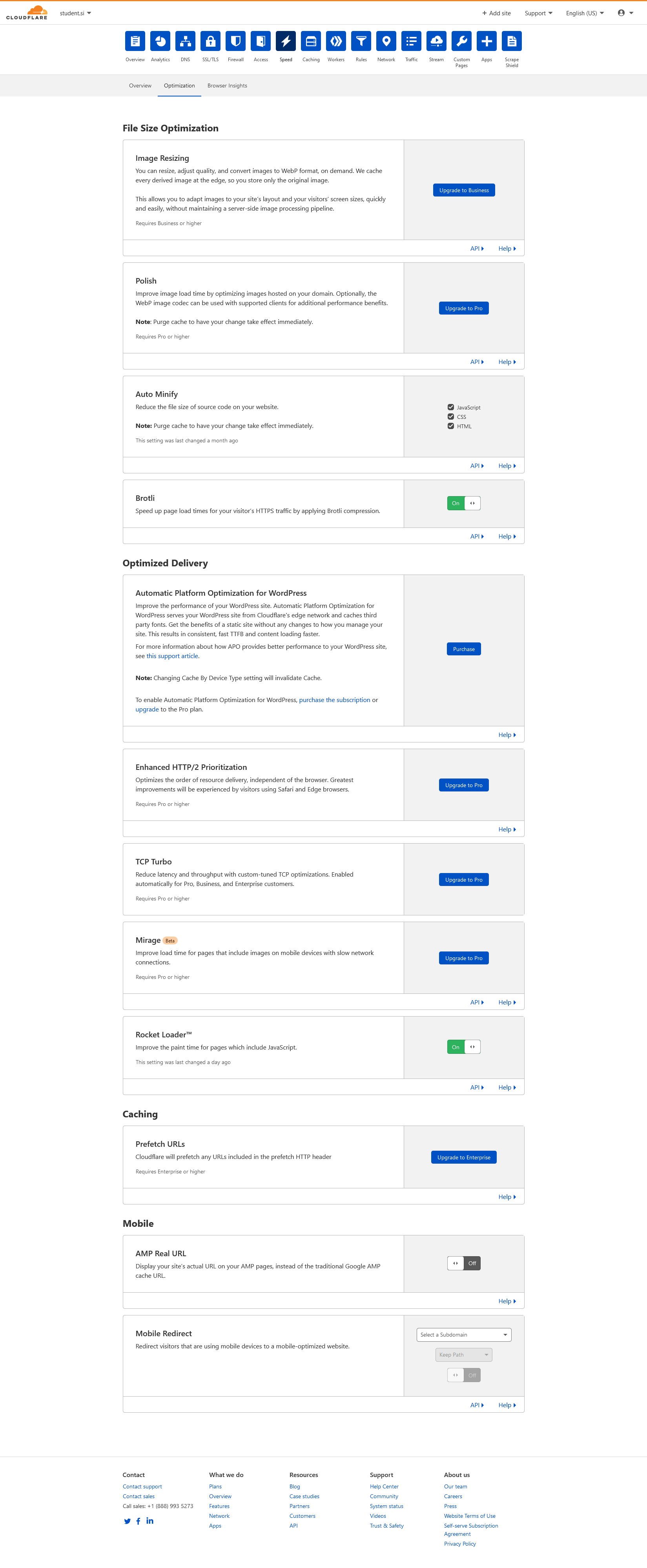
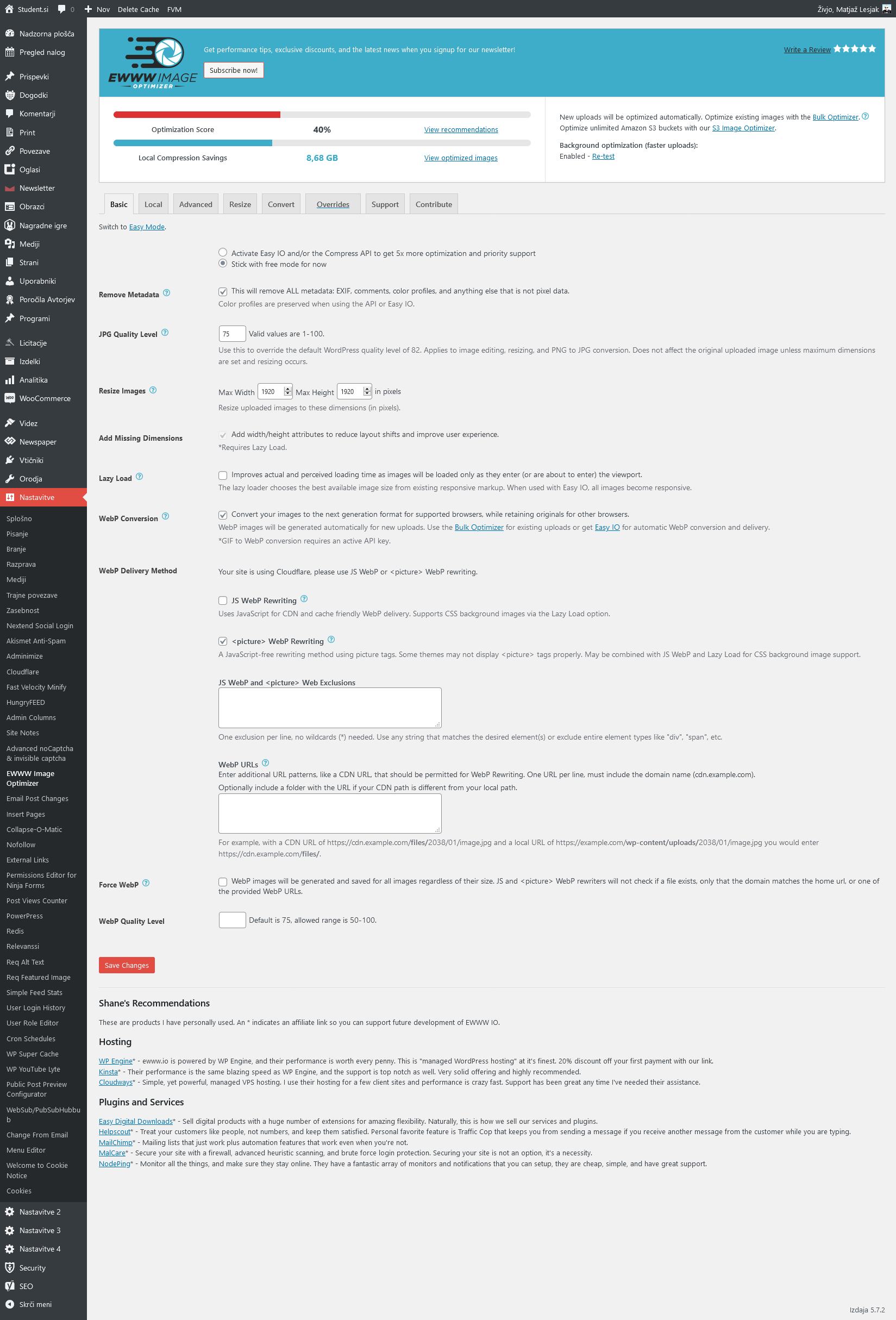
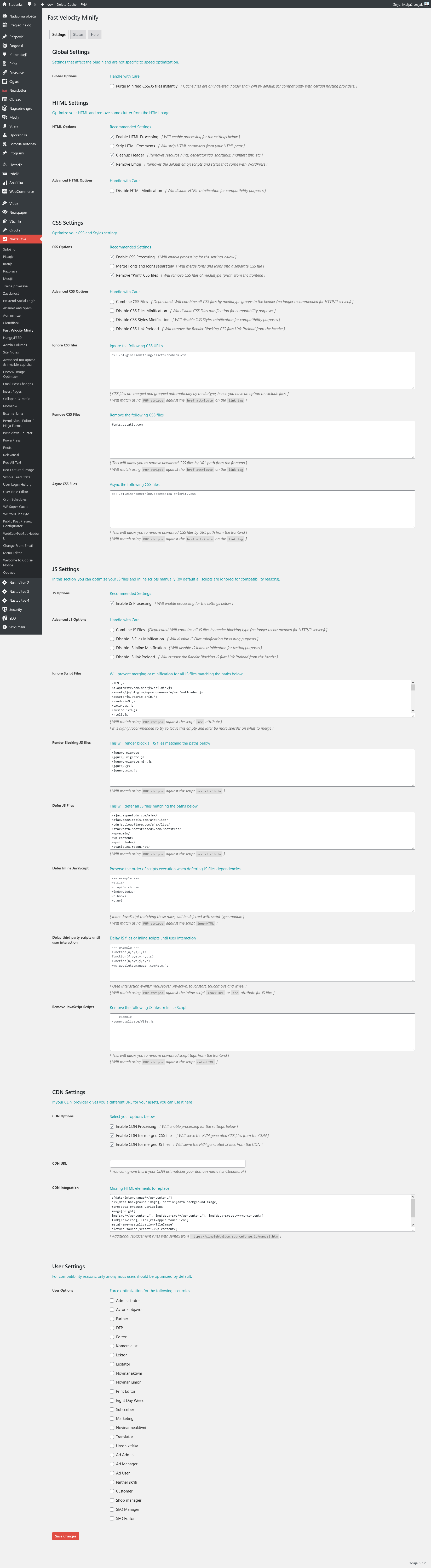
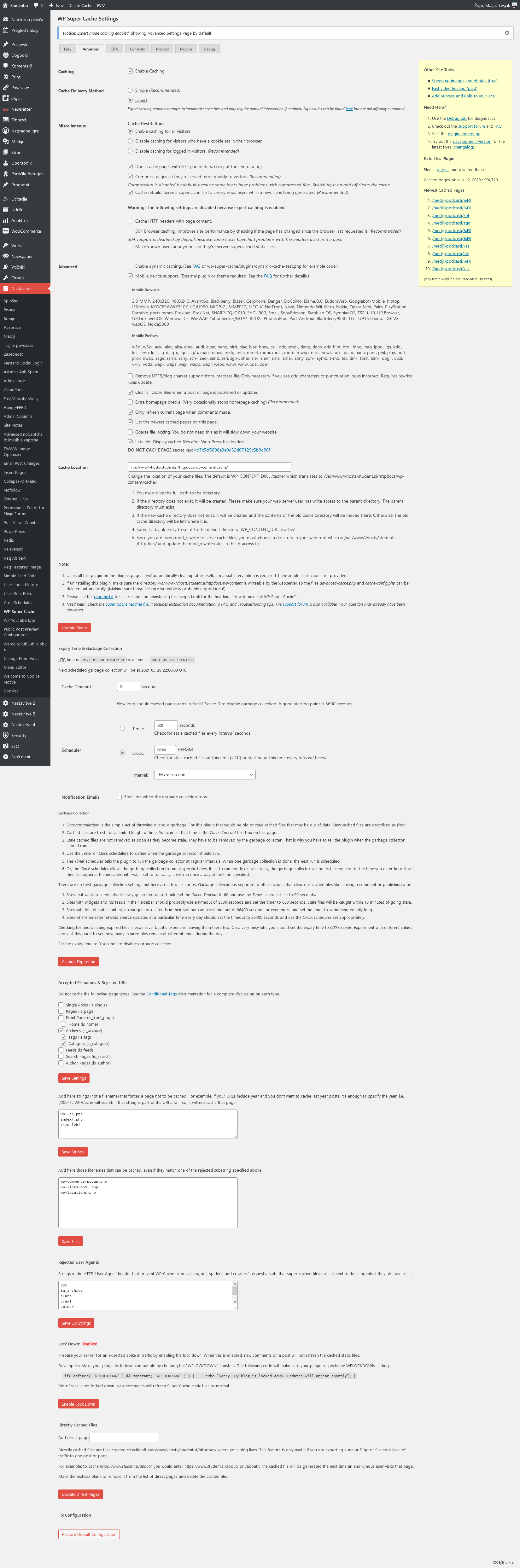
Relevant settings screenshots:
Cloudflare: https://student.si/wp-content/uploads/cloudflare-st.png
Ewww: https://student.si/wp-content/uploads/ewww-st.png
FVM: https://student.si/wp-content/uploads/fvm-st.png
Supercache: https://student.si/wp-content/uploads/supercache-st.png
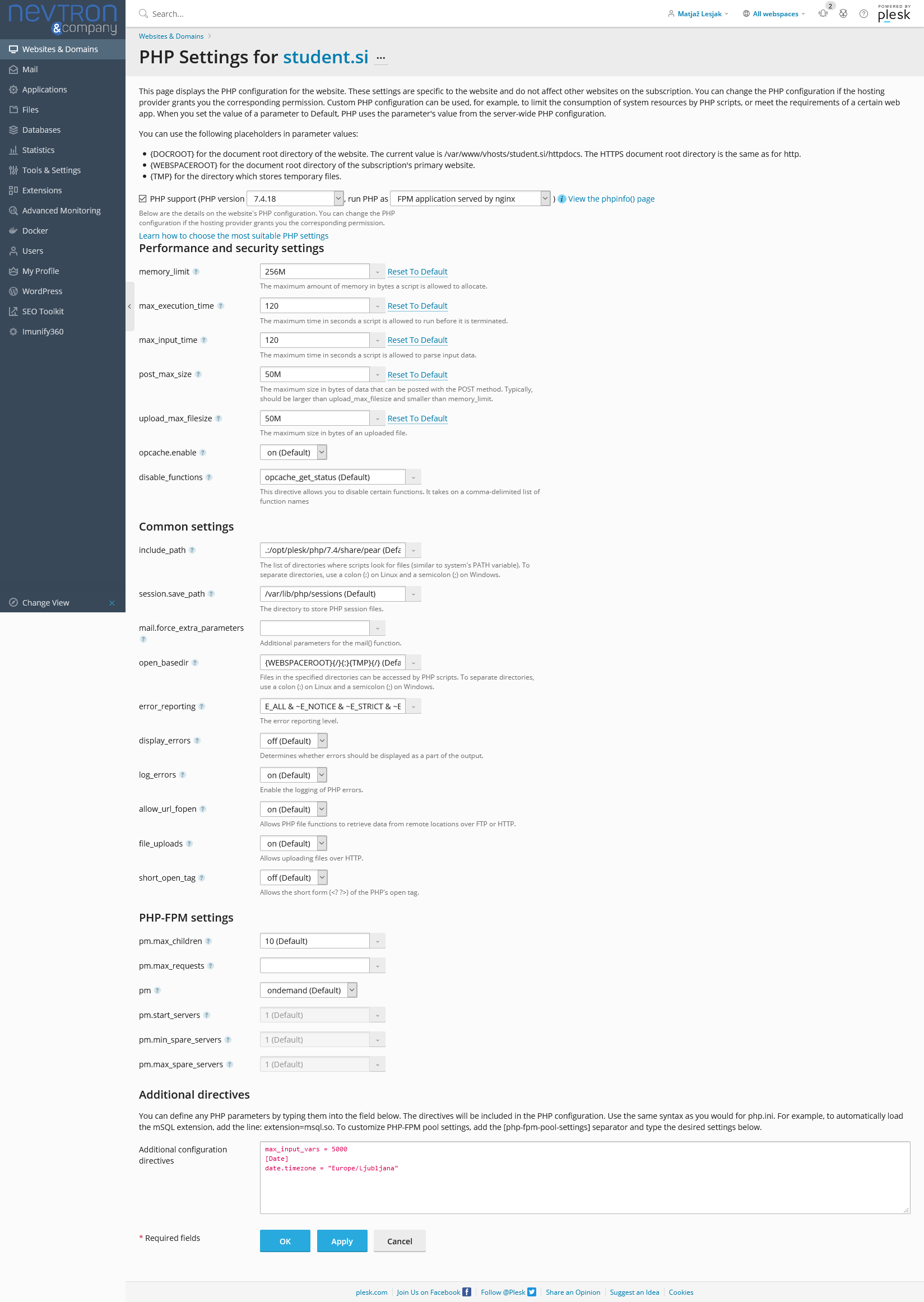
Php: https://student.si/wp-content/uploads/php-settings.png
Apace & Nginx: https://student.si/wp-content/uploads/apache-nginx.png
-
This reply was modified 5 years by
xxxLesy.
 thelastpoet
 I will like to add to this and share my setup.
1. I always start with the foundation, The hosting. I host on Digital Ocean – DO Link it is one of the best VPS hosting and quite affordable. This allows me to control what I install.
I use Nginx rather than Apache for the server since it’s fast and easy to implement http/2, which helps speed up things. Digital Ocean has a handy tool that can help you configure the best Nginx Settings for performance and security. It is available here: https://www.digitalocean.com/community/tools/nginx.
For my setup, I have Ubuntu 20.04, Latest Nginx, Mysql 8, and PHP 7.4. I also add Redis Cache since I am using AMP on my site.
Then make sure the php.ini is set to these values – https://forum.tagdiv.com/system-status-parameters-guide/.
2. WordPress
When it comes to WordPress, I make sure I have the latest version and only install the plugins I need and keep them to the basics.
This is categorized under – Theme specific plugins like Tag div composer, tagDiv Cloud Library, tagDiv Mobile Theme (since I use AMP). I don’t install the others.
Then I get one for security, for speed; I get caching and image compression, SEO, contact form, and user tracking.
I have – Yoast, Ithemes security, Google Sitekit, WP ROCKET, Imagify, Forminator, and Redis Object Cache.
The plan is to use few plugins as much as possible.
3. Theme customization – I follow most of the guides here, but I don’t enable lazyload in theme settings, and I make sure not to load google fonts. (There is a feature in tagDiv composer where you can use only system fonts).
4. WP Rocket – I enable most of the features, and since using the mobile theme, I enable mobile cache. The most important feature is where you can delay Javascript execution; it does wonders.
The rest will depend on your setup. I think the theme has improved, and it is not a challenge to achieve good lab scores.
I am waiting to see how field data will change over time.
*Pardon my English.
 kant2453
 I am using Nginx Server with PHP 7.4.3
Everything is working fine on local, but when i am trying to edit the theme using Tag Div Composer on server. It is giving me the same error.
“Error at zones: 3(models): 10(dom). The model does not match the content Current state has involved an issue. You could try an UNDO operation (CTRL+Z / CTRL+SHIFT+Z)”
Do i need to make any changes on my server side?
Is the PHP version too high?
Is the theme built to be used only with Apache server?