
- NewspaperWP Rocket and Newspaper Theme: Optimization Guide
- TutorialsFrom WPBakery to tagDiv Composer
- TutorialsWhat is Ajax preloading?
 Calin
Calin Hi,
Unfortunately we did not tested the SG Optimizer plugin and therefore, we cannot say for sure if it will work or not as expected with the theme, sorry! Also, we cannot provide support for untested plugins.
This is our list with tested plugins with our theme -> https://www.screencast.com/t/cmPkh9jba4sZ
Support Policy -> https://forum.tagdiv.com/support-policy-2/
Thank you for your understanding!
 money@followyou
 I check it. The problem is coming because of the SG Optimizer plugin. It may be conflicting. But I strongly need that plugin. I can’t uninstall it.
The problem is coming after I updated the theme. It’s working fine before the update. Please tell me the solution. It’s very problematic.
 Vlad S
 Hello !
We are sorry for the inconvenience but unfortunately SG Optimizer plugin has not been tested using the Newspaper Theme and we cannot offer support for untested plugins. We do recommend removing it.
Thank you for your understanding !
money@followyou Yes the SG Optimizer plugin is conflicting with it. What to do now. Because I strongly need that plugin
 joe90s
 I’m not sure which plugin is the cache plugin? The only plugin I can see that may handle cache is “SG Optimizer” but I need this plugin in order to make my website load quick and optimal as it’s part of my hosting package.
There also seems to be another strange layout on the homepage now?
Vlad S Hello !
This comes from the Autoptimize settings. But if you want you an use this CSS code: @media (max-width: 767px) {
div.td-header-style-1 .td-header-sp-logo {
display: none;
}} (edited)
The code must be inserted here: https://www.screencast.com/t/J1Nxw5s5
Thank you !
 Ahtesham
 We have tried all the things that you’ve mentioned above. The site is too big..we have more than 15000 pages on it, and it caters to 300k page views per day. It crashed yesterday, and the server-side person told us to talk and optimize the site with theme creators hence I am here. How can we resolve this? This is really important for me because the site is completely down now.
 Thomas
Hello
On our site https://www.virtualmagie.com/
we updated the theme and activated the Standard Pack to make the current look OK.
To use the new code optimize PRO version, I want to create a new template.
So I created a new page with nothing on it and first choose one of the PRO template header.
But it show me immediatly the current header and not a new one I choose.
And impossible to change.
When I go in Cloud Templates and try to edit a fresh PRO menu, I had these errors messages:
The current content hasn’t been created by TagDiv Composer!
Error at rows: 2(models) : 1(dom). The model does not match the content Current state has involved an issue. You could try an UNDO operation (CTRL+Z / CTRL+SHIFT+Z)
I want to create a fresh new PRO template, activate it on the site and desacticate the Standard PAck plugin after.
What I have to do to achieve that?
Regards
 tgamble
I would like my mobile content to be above the homepage grid, not below. It’s the introductory content to the site, so it has to start at the top above posts. Is there some custom code I can use to overwrite this or is there a setting? i tried turning of the mobile version but i would rather use the optimized version of the site.
https://drive.google.com/file/d/1OT9s-iVxcsCEoGbSqFzCUfOAc_egA1jZ/view?usp=sharing
 smehr1
 @co50 I think Calin was trying to tell you where the dpi settings were, if you would like to adjust the threshold to display retina images down to 100dpi.
Also a part of retina is set in this file -> http://prntscr.com/pt251i -> wp-content/plugins/td-composer/legacy/common/wp_booster/td_util.php and this file -> http://prntscr.com/pt25ns -> wp-content/plugins/td-composer/legacy/Newspaper/js/tagdiv_theme.js if you change the tagdiv_theme.js you’ll need to mimify the code en replace the one from tagdiv_theme.min.js
That seems to be the main cause of your issue and I would personally not consider it a “bug” – its just how they have their theme configured to keep images / page sizes optimized for faster load times.
 Edward
 With your permission I will add a small comment.
SVG (Scalable Vector Graphics) is an XML-based vector image format, so it’s better to create your logo in a vector editor (I recommend Adobe Illustrator for example). After re-saving your logo to SVG format, optimize it via this service: https://jakearchibald.github.io/svgomg/ which guarantees the correct rendering in all modern browsers.
 Grexi126
Hey there,
I updated the theme yesterday. Still trying to get rid of all the dependencies ^^
I tried to set a Cloud Library Header but the Ad is not centered and looks like its loading slow and weird. The main menu shows up a few seconds after the header has been loaded. Any ideas?
Yes, I deactivated plugins (especially Autoptimize, Super Cache and Critical CSS) and meet alle requirements.
Best,
Greg
 Mercurial
 Had the same surprise when you switched off Visual Composer and i had to work 2 months for fix everything.So before updating i’ve tried on the staging version of our news website with high traffic, a lot of templates, more than 354.000 articles, completely optimized for speed, with a good ranking on google.
It will take months of debugging for have it back to normality, and in the meantime the speed with this Standard Pack it’s completly gone and so the rankings and the time and money we invested in the website.
What’s wrong with you TagDiv? I’m not going to switch to X cause this will take the same time to switch to a new and more stable template.
It will be nice from you to set a real SMOOTH Transition to this messy update.
In the meantime i’m searching for a plan B.
Best.
Antonio
 Alina S
Hello, Community!
We know you all want to make your website faster :), we want that for you, too. Newspaper theme 10 brings you a new way to build a faster WordPress website. For the first time in WordPress, you have the freedom to choose how much code the theme is loading and optimize your website’s performance straight from the beginning.
To give you this functionality, we’ve introduced a new plugin called the Standard Pack (available to you for free.) When you update to Newspaper 10, you must activate this plugin, or your website will display the shortcodes on the frontend. We cannot make the plugin automatically activate for you, so you’ll need to go to WordPress Admin area > Newspaper Theme > Plugins and enable the Standard Pack plugin.
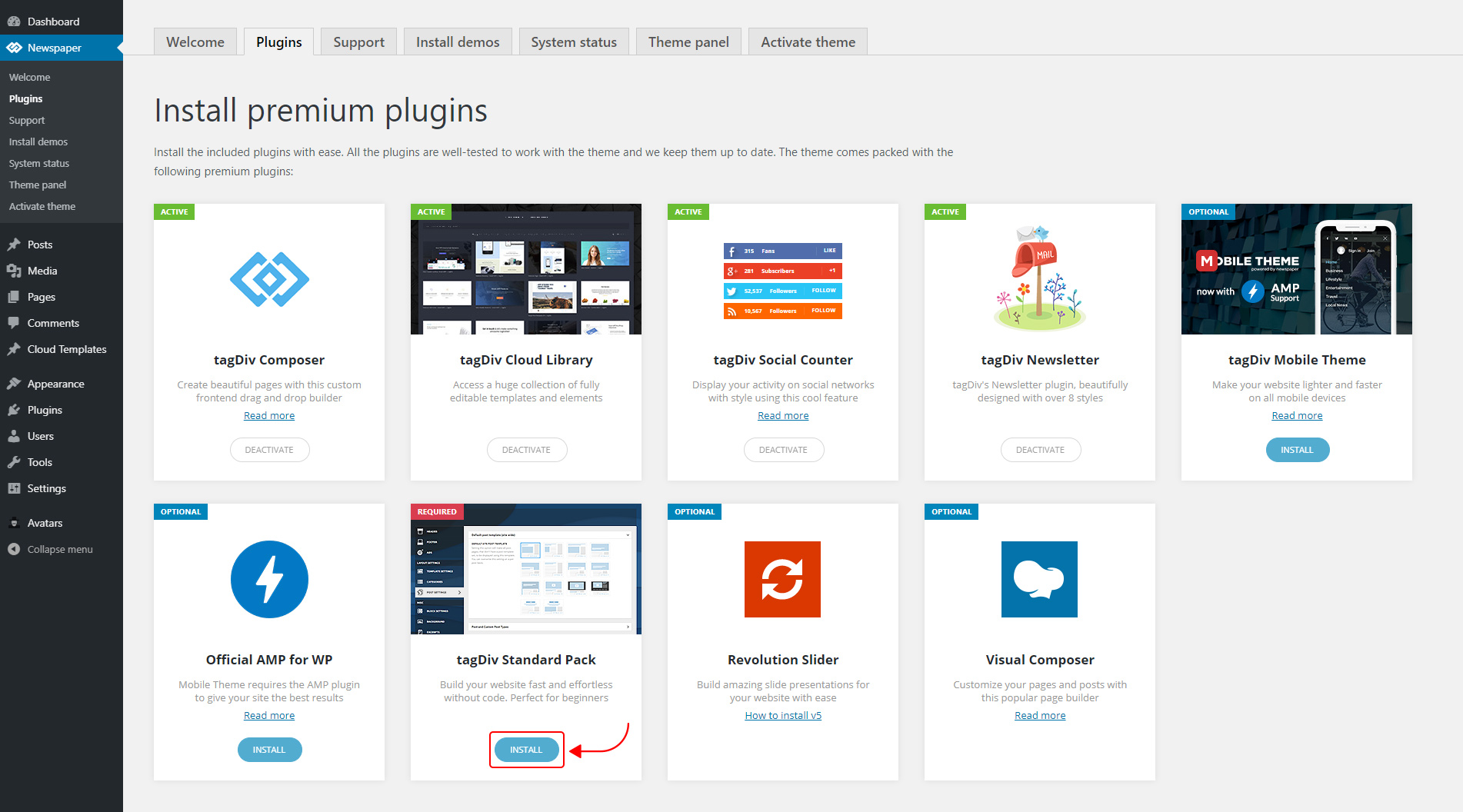
The new Standard Pack Plugin has two functions:
– it brings all the functionality you love in the previous versions
– allows you to separate things when you want to build everything customized and go for website’ performance.
The complete list of templates influenced by the Standard Pack plugin:
In the theme panel:
15 Headers
8 Category templates
10 Big Grids
19 Modules for blocks
14 Single post styles
14 Footer templates
In the tagDiv Composer:
25 Blocks
12 Big Grids
10 Big Grid Full
1 Big Grid Slide
Extra
All the demos that are not marked as PRO Demos.
You can find more details on how to use the Standard Pack Plugin in the dedicated article. When your website has no more dependencies on the Standard Pack plugin, you can deactivate it to increase the page loading time and performance.
If you need the previous version, you can download it from here (Newspaper v9.8).
I hope you’ll enjoy this update!
Thank you!
 bdorin
 This conflicts is between wp-optimize and wp super cache, i know i’ve seen it and test it, in my opinion if you know to setup wp-optimize stay with that plugin or choose wp super cache
 jas4512
 you were right
i just spent 2 hours on this.
this culprit was ‘SG Optimizer’ plugin from Siteground.
you have leave everything ON EXCEPT ‘Defer Render-blocking JS’
that will show feat image for post template 8 on mobile and desktop.
fixed. btw, im not sure if ‘Defer Render-blocking JS’ is useful or not but i rather have my feat image show on mobiles.
Calin Hi,
I’m not very sure but is possible that next mount to be a theme update that well be more optimize, unfortunately I do not know the features from this update, sorry!
Thank you for sharing with us your experience!
 Sibi Paul
 Before That…
Spend some time with GTMetrix, web.dev , Pingdome Tools etc Speed tester sites…
Then Check File Size…
Most Important in Optimization
1 – Reduce file size as much as possible…
2 – see step 1
3 – everything else, can be done through Cache Plugins Like WP Rocket
4 – Suggest Best Hosting to People
NB: Page Optimization is the Number shows Near to Page Speed, But That is WRONG.
Page Speed & Optimization is Entirely Different 🙂
Some times Over Optimization Kills Page speed.
I have obtained 100 out of 100 in page speed.
but, when I tested Site loading time, it was 1-second delay than other site scored 96 in page speed.
we have to focus on Real Page Speed ( The Real Loading Time ) – Absolutely NOT The Page Speed Score ( Optimization ).
Keep in Mind External Files Can’t Optimized ( Adsense, analytics, FB Pixel etc… )
But, I have done this too 🙂
by hosting external files locally, and created cron job to auto update external files…
Later I understood… That just Increase page speed score, not the REAL PAGE SPEED
🙂
Trust me, I can share you more info, That will make Newspaper theme Better in Page speed 🙂
Thank Me Later as Contributor 🙂
Calin Hi,
This problem can be caused by the error that you have in console -> http://prntscr.com/pp7e50
Please make sure that all the settings are like in our requirements, please follow the guide carefully
– https://forum.tagdiv.com/requirements-for-newspaper/
and please increase all requirements that are lower, and follow all steps.
Please make sure that you do not have a plugin conflict with untested plugins, please deactivate all non theme/tested plugins, also if you are using child theme, clear all cache and try again.
Also the speed of your website depends on how well your site is optimized, if you follow the steps which are presented in this tutorial here -> https://tagdiv.com/how-to-increase-page-loading-speed/ you’ll be able to increase the speed of your website.
Also you can check this similar topic for more solutions: -> https://forum.tagdiv.com/topic/optimize-script-to-improve-site-speed/
Thank you!
 meri
meri Hi Calin,
So, I removed cloudflare and Fast Velocity Minify and WP Optimize.
The only cache left is LSCache. That’s all. Nothing else.
In the Theme Panel, my mobile theme is set to Mobile + AMP.
In the AMP menu, the settings are:
– Website is checked
– Your install is configured via theme to use the Trasitional mode
– Supported templates: Posts, Pages, Singular and Homepage are checked
In Yoast AMP, only Posts and Pages are enabled.
But still, I have this bug on desktop:
https://ibb.co/qMQvCmj
https://ibb.co/hfb1TT2
How can I fix this once for all?
If we cannot fix this issue, is there a way to fully disable AMP?
Thanks
Calin Hello,
The speed of your website depends on how well your site is optimized, if you follow the steps which are presented in this tutorial here -> https://tagdiv.com/how-to-increase-page-loading-speed/ you’ll be able to increase the speed of your website.
Also you can check this similar topic for more solutions: -> https://forum.tagdiv.com/topic/optimize-script-to-improve-site-speed/
Thank you for your understanding!
meriHi,
My websites are showing AMP pages on desktop from time to time: https://ibb.co/cgtpmnH
I use LSCache + Fast Velocity Minify on one.
I use WP Super Cache + Fast Velocity Minify + Cloudflare on the other one.
I use WP Optimize on both of them but the cache is disabled on this plugin.
I’ve been looking everywhere and tried to change some setting but I really don’t understand this behaviour.
Maybe is it due to my AMP setting?
Here is a screenshot: https://ibb.co/Hgh4Vjr
Should I change something?
Thanks
Calin Hello,
The speed of your website depends on how well your site is optimized, if you follow the steps which are presented in this tutorial here -> https://tagdiv.com/how-to-increase-page-loading-speed/ you’ll be able to increase the speed of your website.
Also you can check this similar topic for more solutions: -> https://forum.tagdiv.com/topic/optimize-script-to-improve-site-speed/
Thank you for your understanding!
meri Hi,
Why don’t you answer my question about the black background on mobile menu?
WP Optimize caching is disabled.
I removed WP Super Cache.
So only Autoptimize is on.
Thanks
Vlad S Hello !
Mobile Theme and Amp have the same layout.
This is mobile version but without Mobile theme plugin: https://ibb.co/fHkgfzb
Also we have checked your website and it appears that you are using multiple cache plugins that conflict. Autoptimize, Wp Optimize AND wp super cache. That setup will cause issues with any theme.
After clearing your cache you can see that now your website works on mobile theme as you had it active before.
Thank you !
