Sir,
I am using Newspaper Theme for My Website https://www.fastunlocker.com
My Server is Litespeed Enterprise Hosted in AWS
CDN Enabled
Optimized Using Litespeed Cashe
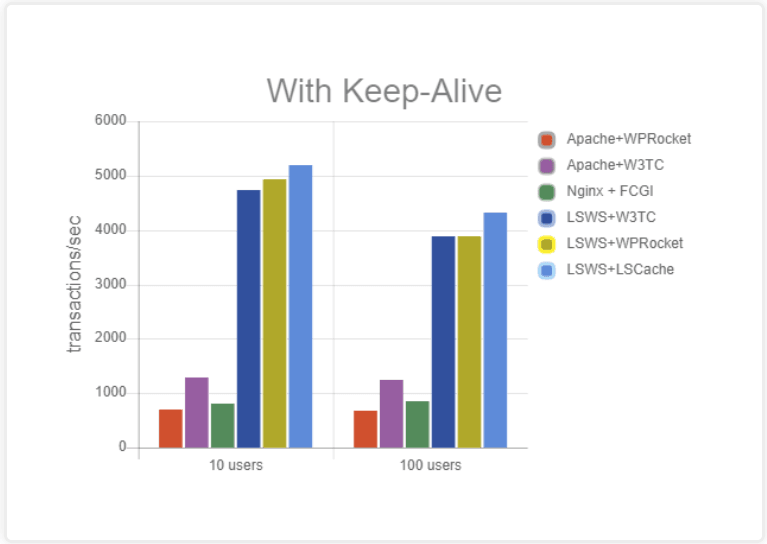
Refer this Page – https://blog.litespeedtech.com/2019/05/20/litespeed-cache-vs-wp-rocket/
Also, Check this Image – https://blog.litespeedtech.com/wp-content/uploads/2019/05/LSCWP-vs-WP-Rocket-a.png
Sir, I am almost happy with Everything in Newspaper Theme.
But,
Some Filesize is very huge in the Newspaper Theme.
When Compared to My Other Providers.
I have Subscription in Mythemeshop, GeneratePress… etc
When I Test Page speed after activating those themes,
Page size is around 60KB to 100KB
But, Newspaper Theme Page Size is 360+ KB
So, I would Like to Mention Two Test results
1 – https://gtmetrix.com/reports/www.fastunlocker.com/wa68Rx4a
2 – https://gtmetrix.com/reports/www.fastunlocker.com/PhPoslVb
The second one is the Newspaper Theme’s
I Really Appreciate its Facilities, When Compared to Other Themes… Newspaper is Fully Loaded.
I need a Small Help to Reduce the Size of Some Files.
site.com/wp-content/themes/Newspaper/images/icons/newspaper.woff?16
site.com/min/e7ce4.css
site.com/min/fe6e6.js
Kindly Help me on this…
The page is Optimized Great, But Size is High…

Hi,
We understand that right in this moment our theme is quiet have, but we hope that in the coming update our theme will be more light.
What you can do is to check our guide for speed optimization, maybe you can find something that will help you -> https://tagdiv.com/how-to-increase-page-loading-speed/
There are many optimization guides provided by our users here in the forum, some made by us, you could check some of them too
– https://forum.tagdiv.com/cache-plugin-install-and-configure/
– https://forum.tagdiv.com/how-to-make-the-site-faster/
– https://www.infophilic.com/get-almost-100-pagespeed-newspaper-theme/
– https://forum.tagdiv.com/topic/score-100100-pagespeed-with-newspaper-wordpress-theme/
– https://forum.tagdiv.com/topic/newspaper-theme-speedify-your-website/
– https://forum.tagdiv.com/topic/tutorial-chriss-custom-optimizations-for-functions-php-etc/
– https://forum.tagdiv.com/cloudflare-cdn/
– https://forum.tagdiv.com/topic/theme-causing-high-cpu-usage-2/
– https://forum.tagdiv.com/topic/sql-querys-high-cpu/
– https://forum.tagdiv.com/topic/newspaper-theme-slow-to-respond/
– https://premium.wpmudev.org/blog/optimizing-your-wordpress-database-a-complete-guide/
– https://underconstructionpage.com/optimize-wordpress-database/
– https://crunchify.com/better-optimize-wordpress-database-all-in-one-guide/
Thank you for your understanding!
Thanks for Sharing Thos URLs…
Majority of the People Thinks Page Speed Optimization is the Number.
I have a clarification there…
Because I am working on this from last 4 Years… ( Page Speed )
100/100 Has no Value 🙂 , trust me…
So, Over Optimizing will Impact Negatively.
When Working on Page Speed,
Most Important Thing is
1 – Page Size ( low size take less time to download ).
2 – avoid invalid requests.
3 – reduce requests.
4 – Compression
5 – Loading Time
6 – all other optimizations…
My Suggestions to TagDiv Team is Test Generatepress theme,
They are using same files ( WOFF )
but their files are size low, and Tag Div’s files are High Size.
if you only focus to reduce file size, almost all problem will be solved…
the second thing is inline js scripts…
kindly check my two reports from GT matrix… there go to waterfalls section.
and spend some time there to see the difference…
the report shows the WP Default theme ( twenty nineteen ) and Tag Div Theme.
if you want me to activate Generatepress and generate a report in gtmatrix I will do it…
all my sites, which used generate press given me better results than default theme.
Take this post seriously… Thanks
That is Actually Expected
GeneratePress is the Light Weight & High-Speed Theme I ever Used.
Still, I’m Having an Active License… But I use Newspaper Theme on Almost all My Sites.
Because of its Features…
Still, I Love GP 🙂
I wish GP Optimisation Should be in Newspaper.
it’s my dream, I’m sure you can do it, you’ll do it 🙂
Thanks.
Before That…
Spend some time with GTMetrix, web.dev , Pingdome Tools etc Speed tester sites…
Then Check File Size…
Most Important in Optimization
1 – Reduce file size as much as possible…
2 – see step 1
3 – everything else, can be done through Cache Plugins Like WP Rocket
4 – Suggest Best Hosting to People
NB: Page Optimization is the Number shows Near to Page Speed, But That is WRONG.
Page Speed & Optimization is Entirely Different 🙂
Some times Over Optimization Kills Page speed.
I have obtained 100 out of 100 in page speed.
but, when I tested Site loading time, it was 1-second delay than other site scored 96 in page speed.
we have to focus on Real Page Speed ( The Real Loading Time ) – Absolutely NOT The Page Speed Score ( Optimization ).
Keep in Mind External Files Can’t Optimized ( Adsense, analytics, FB Pixel etc… )
But, I have done this too 🙂
by hosting external files locally, and created cron job to auto update external files…
Later I understood… That just Increase page speed score, not the REAL PAGE SPEED
🙂
Trust me, I can share you more info, That will make Newspaper theme Better in Page speed 🙂
Thank Me Later as Contributor 🙂