
- ApiAPI – Top Bar Template – Introduction
- ApiAPI – Single Template – Introduction
- ApiAPI – Footer Template – Introduction
- ApiAPI – Smart Lists – Introduction
- ApiAPI – Thumbnail – Introduction
- ApiAPI – Category top section style – Introduction
- ApiAPI – Category top section template – Introduction
- ApiAPI – Modules – Introduction
- ApiAPI – Blocks – Introduction
- ApiAPI – Header style – Introduction
- ApiUsing the Theme API in plugins
 Alin [tagDiv]
 Hi,
The articles ads are a part of the content and it is not so easy to change the position. The best solution is to use a custom ad in post template where you want it to be displayed. You will have to edit post template that you use and place a custom ad above the featured video(or featured image if you edit also other templates) using do_shortcode function – http://screencast.com/t/2QpXfrwnarp and you may need additional css customizations – http://screencast.com/t/C83dfVmJW
<?php echo do_shortcode('[td_block_ad_box spot_id="custom_ad_1"]');?>
.single .td-a-rec-id-custom_ad_1 {
margin-bottom: 0 !important;
margin-top: 40px;
}
Thanks!
-
This reply was modified 11 years by Alin [tagDiv].
 airrocker
Our instagram follower count is reading zero in the Social Counter widget.
-We are running v4.6.3 of Newspaper
-We are using v2.10 of the plugin
-We do not have a caching plugin running
-I attempted to change the instagram user name to another account, but it still read zero (and continued to read zero once I changed it back to ours)
-I tried updating the Social Counter plugin to v3.0 and it crashed our site with the following error: Fatal error: Call to a member function get_map() on a non-object in /home/(servername)/public_html/wp-content/themes/Newspaper/includes/widgets/td_page_builder_widgets.php on line 11
Are there any other things we can try without updating our theme? It’s in the long-term plan, but would rather not at the moment.
Thanks!
Alin [tagDiv] Hi,
1. If you need more custom ads you have to edit td_config.php and add it like this: http://screencast.com/t/pWYaylHiQg Then just make add it in td_panel_ads.php file – http://screencast.com/t/UB3dwNgI68
Now you can add your code in Theme Panel > Ads – http://screencast.com/t/z3ROmJFEL and display it in your page – http://screencast.com/t/aNBwX5azB
2. The theme doesn’t have an option to have a different header ad for each category(or other template) and you will need custom work to achieve that, unfortunately we cannot provide any type of custom work at this time,sorry! You can add a condition here to display a different ad on a specific category – http://screencast.com/t/XOj3fyH8J If you don’t know how to do it I suggest to hire a professional to do this for you, also you can try to find and use a plugin.
Thanks for suggestions, I have added this on our to do list and we will try to improve this in future, however we have over 250 features on our list we have to pick very carefully what we implement.
 wagner
I tried updating via the auto-update Envato plugin from 4.6.3, but it ended up wrecking my site and had to do a complete site restore. Looking at the documentation, the script seems to be what I want as I keep my content and theme settings among other things. However the documentation screenshot 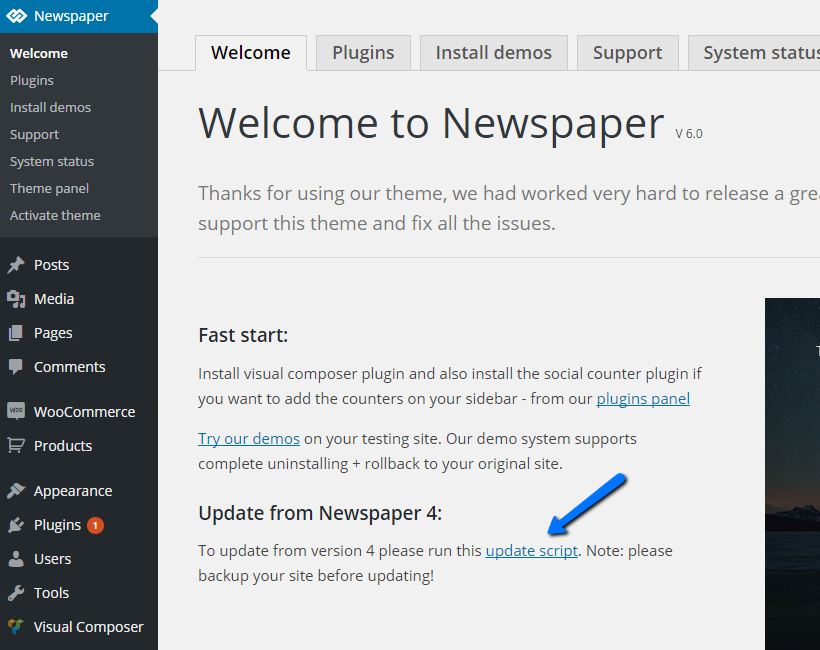 shows Newspaper v6 running with a link to the script in a text box that’s part of a Newspaper sidebar menu. I don’t have that with v4.6.3 and it’s not clear where/how I would run it from the documentation as this link in the Newspaper submenu seems to be the only way to run the script…

 Bryson T
 Child themes are a nice way to do things without the fear of being overwritten on update. For those who use the UI to update, can’t beat it. I typically try to not use @import or includes if at all possible, to reduce http requests, so I like to copy the parent style.css into the child style.css and remove the imports. Keeps things smoother and accomplishes the same thing.
Not too sure how that would work for the functions file, but my assumption is that it would break it based on the same reasoning you gave. Maybe not with the new theme.
Of course, given that the child theme is having other issues, and since I’m never opposed to more speed (GT Metrix score of 91 without a caching plugin so far – W3TC encrypts my pages for some reason and displays the code), I’m thinking about switching back to the parent theme. My custom CSS is all in the theme panel anyway, and my edits to header.php and td-module-single.php are pretty basic.
If I could just find a way to speed up the loading of ads from AdSense through AdZerk then I’d be blazing along. Your tips certainly help in the meantime.
 Breakwater
Hello again,
Been using Newmag since December 2014. Love the theme! Just have one recent problem.
I’ve gone back to using an adsense leaderboard above the menu with header style #3. http://bit.ly/1AOikBD
After three (3) days there is still no ads displaying.
When I use the Google Adsense troubleshooting guide, it says I should be able to see the entire adsense google code snippet in source. However, when I look at source, the adsense code is missing and all that is visible is the call for the script. http://screencast.com/t/IzORd9qMFzw
This is a persistent issue. It hasn’t been a problem until now because I had local banner ads in there to use.
I can not get google adsense to appear there and this is important to fix. I have a complicated setup and any number of variables could be effecting it. I use Cloudflare, WPEngine, the Themes aggressive speed modifications/custom ad engine and any number of WP plugins are all likely candidates for interference.
I have tried to paste the code directly into the theme panel, no effect.
I have tried using AdRotate to show the ad, no effect.
I DO have google adsense in other places on my site and that is working ok. I have two search bars, one adsense in inline ads and one adsense in article bottom ads. These are currently working.
I would much appreciate some special attention to this issue. Thank you.
Bryson TOn my homepage at InsideTheStar.com, I’m using Block 18 at the top of the page to show one large post, and then two smaller posts. The Large post uses the thumbnail size 696×385.
Here’s a screenshot of the problem I’m having:

Notice the grey bar at the bottom of the thumb indicating the thumb isn’t filling the thumbnail block fully. I’ve checked in inspector and disabling the width and max-with 100% allows the height to fill the space, but obviously creates other problems.
I used the “View Image Info” tool in FireFox and included that data in the shot as well. It shows on the pointed line that the image loads at the right size (as cut by them theme on upload) but is being resized a little smaller somehow.
I’ve checked all plugins and can’t find the problem. Using an identical setup on my dev site (dev.insidethestar.com), I’m not having the same issue. This is happening regardless of what image shows there. The one pictured is actually is actually the front of a YouTube video that the theme generated.
I’ve regenerated all thumbs multiple times and checked the theme settings: all thumbnails sizes are turned on. I’m not using the Photon feature in Jetpack, since that has caused this problem before.
Any ideas what’s causing this?
 MrOrsh
Just updated to the 6.2 version from 6.1 and now at every page the theme first loads the theme defaults when it comes to colors and fonts, these stay loaded for about a secound or two and them my own changes to colors and fonts is applied.
This makes the whole page “jump” and change fonts and colors from the default ones to my custom ones. No custom CSS changes made for fonts or colors other than links. Used the built in accent color.
Please refer to my page so see the issue (also try one of the articles to see the fonts change). This was NOT an issue with the 6.1 version, so something must have changed to cause this. Looks extremely tacky :-/
 12familyde
hello there …
i have seen, that some of the selectable post styles are having quite dark header elements. For example the video style 11. And some other styles, which are using a dark-grey overlay over the article header-image.
There are two reasons, why i would like to change this design-behaviour:
1: I am using the light colored version of the theme. So all colors are very light and friendly. While choosing post style 11 (which is nice because of the additional adspace) the completely header section (the video section) looks like a dark styled theme. This not very cool and looks strange for my site. As it’s a parenting, family and baby related site. All colors should be light and friendly.
2: If I would choose (for example) post style number 3, I am getting a dark grey overlay over my header image. Again, I have chosen a light colored version of the theme. The thing is, that I adjusted all theme related colors to fit my needs (of course). So what I would see, when choosing post style number three, is a dark grey article-title above a dark grey image overlay. This does not look really nice …
The same problem appears with all other post styles (also with number 11). There are dark grey article-titles above a dark drey background…
So I either would need a solution for having automatically change the title colors for these post styles, when selected, or need the chance of choosing a lighter background for these post styles, to fit the rest of my layout.
I think this is a very complex need. But I think that I may not be the only one, who would be more than happy to have a hardcoded solution for this…
Thank you and warmest regards! 🙂
Torsten
 Andrei L.
 Hi
I am not sure what you mean but if you want add a new element to appear you need to modify the file which correspond to the post template you’re using. For example if you’re using post template style 2 the file is: loop-single-2.php like here: http://screencast.com/t/KizmqVAgz
If you want to use do_sortcode function please check this post as reference https://forum.tagdiv.com/topic/add-ads-code-just-below-the-share-buttons/ You can use any other shortcode instead of custom ad shortcode, just take your shortcode from a page http://screencast.com/t/h8Dg06bSE5H
Please provide more details if this is not what you mead!
Thanks.
-
This reply was modified 11 years by Andrei L..
Alin [tagDiv] Hi,
You will have to add your code in header.php where the body tag is – http://screencast.com/t/ukcovv7i8h and the other code where the advert will appear. The theme ad system was designed for adsense code but you can also try to add it in Theme Panel > Ads section – http://screencast.com/t/IckVfivoLW depending where you want to display it, please also check documentation – https://forum.tagdiv.com/header-ad/ For pages you can use Ad box block to display your advert in the content – http://screencast.com/t/EMPFNvzf
Hope this helps!
-
This reply was modified 11 years by Alin [tagDiv].
 Pippa
PippaHi there, I am about to change from Thesis, to Newspaper 6. I run BuySellAds on my site (in the sidebar) BuySellAds give me two code snippets. One to put in where the advert will appear, but another that has to appear on every page at the very top of the <body>
Could anyone help me by explaining exactly how to place this code when I switch themes? I do have some very basic coding knowledge and FTP access but am not an expert, so it needs to be a ‘for dummies’ explanation. 🙂
Many thanks for your help, Pippa
 Daniel Finch
 Everything worked great!
About number 4–I’m using adsense but I’m also using Ad Rotate Pro and inserting the shortcode into the header ad section in the newspaper dashboard. It worked fine with all other versions.
 wcsindia
 Hi,
We have also used header ads, sidebar ads in our blog. Why those are not getting displayed…??
In other pages, mid-ads are getting displayed.
What is the exact issue…???
Kindly please look into this matter and resolve the issue asap…
wcsindia Dear Sir,
Please find the below link
http://patidarpost.com/shree-rasaliya-triveni-mahotsav/
Also please check other links as well, ads are not getting displayed.
Alin [tagDiv] Hi,
The smartlists content isn’t supposed to show the ads as its handled different as in case the post’s content isn’t using smartlists so that’s why it has this behavior.
You can use ad spot’s shortcodes to place ads inside smart lists content if you like or another solution is to display a custom ad like this – http://screencast.com/t/ekXH40AYW it will be repeated on your smartlist for example if you use smartlist that slides – http://screencast.com/t/PCTTXIXD – http://screencast.com/t/Ngf0q5Xv
We also have this on our requests lists and we will consider trying another approach on this in future updates to have more control to the smartlist.
Hope this helps!
-
This reply was modified 11 years by Alin [tagDiv].
 yash3339
Hi,
I’ve been wondering how I can ad 468 x 15 and 728 x 15 ad units below the nav bar. Visual composer allows me to add these ad units where I want on the homepage, but I’m at a loss when its other pages and posts.
Any help would be appreciated. TIA!
 Radu
Radu Hi,
I tried to load the ads on my local WordPress install but it seems that they are tied to the domain name. But here is a list of steps:
– the code for the head section http://screencast.com/t/UMGU1juR87I can be added here: http://screencast.com/t/uAwJEfJ8J
– paste the ad code here http://screencast.com/t/tVRWVnnw5Yp (please note that this will add the ad to single template 7, if you want to use another single template, edit the appropriate loop file.)
 MLHS
MLHS Another thing: the ads that are at the tops and bottom of the content (the in-content ads) are aligned right and I am not able to find anything in the theme panel or in the documentation.
Thanks
 bgo
bgo Hi,
thnx the date/author can be found a bit lower on the page  . I dont have any other plugin’s running on this site as on my others.
regarding the errors, for sure i will take a look at it. Compression is mostly done by cloudflare. Why am I doing this? My score wassent good enough at google pagespeed. But again, i wil take a closer look at this.
 elvinf
Hi,
I am following the tutorial here: But can’t get the ad to show. All I see on the footer is [td_ad_box spot_id=”custom_ad_1″]. Can someone take a look? http://tinyurl.com/footer-ad-css
I also like to know how do I add it above the footer across the entire site.
Also, the top menu and sidebar color seems to revert to an old setting then jumps to my current setting. Why does it do this? I made the color selections through the theme panel not custom css.
Thanks..
 simchris
 Well, if it’s working right on 5 sites, and theme not working right on one; them likely you might want to try reinstalling the theme.
Remember to DELETE old theme folder, not over-write.
I don’t see the author byline and date on your page here under the headline where it should be:
http://welketonic.be/whitley-neill-dry-gin/
So, if it’s printing on page likely an HTML bug with the inline ads in your story breaking something, or some other issue on page.
Your page has a whole bunch of errors when checking in Chrome/Console (press F12 to see your errors!). Likely want to fix those first before doing anything else.
 Emil G
 Hi,
We use xampp installs for testing, we didn’t tested other tools so i cannot recommend you something else.
First backup the site files and database, in case something goes wrong you just use the backup to restore the site. Usually c-panel comes with an option for this, or you could do this manually – https://codex.wordpress.org/WordPress_Backups
You can’t keep the old theme in the same folder, you either delete it an install the new one or move it to another location.
In v6.1 we fixed some of the issues which were reported on v6.0:
[ Version 6.1 ]
- improvement: added global colour for block headers in General theme colors section
- improvement: now you can change the fonts on Lists in post content from Theme panel
- improvement: added .screen-reader-text class for better usability
- improvement: visual composer updated to the latest version
- improvement: better documentation + first video tutorials
- fix: UI improvements, key images now have a specified height, this prevents repaints and it makes the page appear that it loads faster
- fix: unique articles work now as expected
- fix: better review import from version 4
- fix: speed booster 4.1 works better now + buddyPress fix
- fix: big grids on iOS where missing titles until touch
- fix: block 20 css fix + speed booster
- fix: content bottom and top content ads css fix for safari, firefox and IE
- fix: various css fixes
- fix: social counter instagram
- fix: main menu z-index
- fix: missing Ajax filter option for IOS slider
- fix: visual composer single image block alignment issues
- fix: space issue when turn off the top menu on header style 12
- fix: the ajax dropdown filter sometimes disappeared when the mouse was moved down to select ca category
- fix: ajax filter - was deselecting all the selected filters from the page on click
- fix: better alignment on reviews
We may consider releasing beta versions in the future, thanks for your suggestion.
Thank you!
-
This reply was modified 11 years by Emil G.
Emil G Hi,
The theme ads og data only for the image, you could delete it from here – http://screencast.com/t/t9gXKHEiuu1P
If the duplicate og’s are still there check the other plugins.
Thank you, Emil G.
 surfpark
 1. How do I erase the excess pink space from the top of footer to snap closer to logo and same with bottom of footer to snap closer to social icons?
I think those areas have some padding due to the possibility to include some ads in those spaces. It looks like the height of the footer is hardcoded to be 1164×389. It is element ‘td-footer-wrapper td-footer-template-4’. You could change it in your style sheet.
2. How do I make the social icons in footer menu a bit bigger? And how do I make the hover colour on those icons a solid purple colour instead of the colours constantly changing?
The footer social media icons are designed to be 40×40. You’d have to change the styles too. Look at the following elements in your CSS: td-social-style-2 and td-icon-font. If you’re going to make several edits to the stylesheet, consider making a child theme.
3. Chris’s Pagespeed Custom Code no longer works (the one that you post at the end of the functions.php – will he be coming out with a new one that works with Newspaper 6?)
Have you upgraded to v6.1 of the theme?
4. How do I move the bottom share options (at the end of my posts), above my taboola advertisement so that they appear right at end of article?
Go to your dashboard. Theme Panel>Post Seetings>Sharing. You should see toggles to move the social sharing buttons.
5. Is there a code so that my custom ad 1 will appear underneath (or above) the author box?
I’m not sure if it always inserts it below ads. I think the author box is placed there via the posts template. You can attempt to mess with the posts templates to see if another one places the author box higher. Go to dashboard. Theme Panel>Post Settings>Default Post Template.
