
- ApiAPI – Top Bar Template – Introduction
- ApiAPI – Single Template – Introduction
- ApiAPI – Footer Template – Introduction
- ApiAPI – Smart Lists – Introduction
- ApiAPI – Thumbnail – Introduction
- ApiAPI – Category top section style – Introduction
- ApiAPI – Category top section template – Introduction
- ApiAPI – Modules – Introduction
- ApiAPI – Blocks – Introduction
- ApiAPI – Header style – Introduction
- ApiUsing the Theme API in plugins
 marnick
Hi!
I uploaded all the logo’s in the recommended size. But for me the logo is taking way too much space in the header.
I prefer using Style 7, only that the logo is using the same height as the rest of the menu row (or at least around the same amount of height/space). So with this, I also get more space for menu buttons, before they fall of to the next row.
I checked lots of other topics around the same issue, but could not find a suitable fix for me.
So could you please help me out. To make myself more clear, you can check this image: 
Thanks!
 Simion C.
 Hi,
What header style are you using? With CSS that could be possible. An alternative would be header file modifications.
The ad space in the header is reserved, not displaying an ad will not re-arrange all the other header elements.
The ads will display differently depending on style used
– https://forum.tagdiv.com/header-styles/
Please mention the header style or provide a link to your website and details about how you want it to look.
Thanks
 mckeec1
Hello,
I’m a front end developer who has been using the Newspaper theme to make a website for a client, and while it is a really great theme we have noticed some problems with it that we cannot seem to fix.
Problem 1: This is probably the biggest issue that we have with the page. There are syntax errors with the generated content and the parent theme stylesheet that will mess up how content loads on the front page. I saved the source code to a document and ran it through a validator which told me a list of the errors.
Problem 2: There is something that will randomly push .td-header-menu-wrap down sometimes. I would say 2 out of 5 times it loads properly, however the other 3 times it goes into our slider which is very distracting, especially considering that it is one of the first things you see on the page.
Problem 3: We have the Revolution slider which came with our theme and for some reason whenever the slide changes, it creates a div with a black background with a low opacity. This is a small issue but we have been trying to get rid of it for a while and have no way of fixing this without editing the code of the plugin which is never recommended.
If there is any info that you need before working on this please let me know.
I really appreciate you helping us out with this!
 zhongmeigames
 To further clarify the issue:
I made a test post to see what would happen on mobile. The theme updated properly. However, once I deleted the test post, the test still appeared on mobile (and leads to a 404).
So now I have the correct layout on mobile, but it shows a test post that leads to a 404 as the first post on the page.
So it appears I can only update the layout of the front page on mobile IF and ONLY IF I have the content to make a new post.
I’m sorry but that isn’t what I expect from a premium product, so there must be some way to fix this without using the mobile theme plugin, yes?
I don’t want to use the mobile theme plugin if possible because I have some unique elements on the front page that I would like to be display on mobile.
Oh, and a lot of my images are also simply not loading at all on the mobile version, which is another thing that cannot go unfixed.
Please help.
Thanks
 Ryansmccain
 Thanks for the response. Yes, I am using Jetpack for this. It’s the only reasons I have Jetpack installed. Everything else is disabled.
I changed the popular post number from 3 to 6 and it doesn’t even load the animation like its trying to load more posts. The next button works fine for other blocks.
I made a video you can watch here if you’d like.
If I change the pagination to LOAD MORE, the loads the same 3 posts.
-
This reply was modified 8 years by
Ryansmccain. Reason: added bit about the LOAD MORE button
 Sirstevemedia
 The ADsense display on other websites accurately, On every page. except only my website using the newspaper theme. Can it be due to Yoast Plugin, Jetpack or Wp super cache? becos this is the only third party plugin i installed along with the default newspaper plugins. pls respond back as soon as possible.
N.S: I followed the documentations accurately on seeting the wp super cache plugin.
 cahpolli
 Hi!
No, It is the other way.
The backgrounds of the rows load slow while the content loads faster.
Sure, there is an example:
https://naturam.com.br/ubatuba/praias/
Thanks!
 artzcorp
Hi. I’m David. We are running Newspaper 8.5 and our category pages are simple. They use Module 3 which displays a grid of story thumbnails and titles 3 across and the height is set to infinity. Every 4th row the grid shows only 1 thumbnail instead of three across like all other rows. Here’s an image:
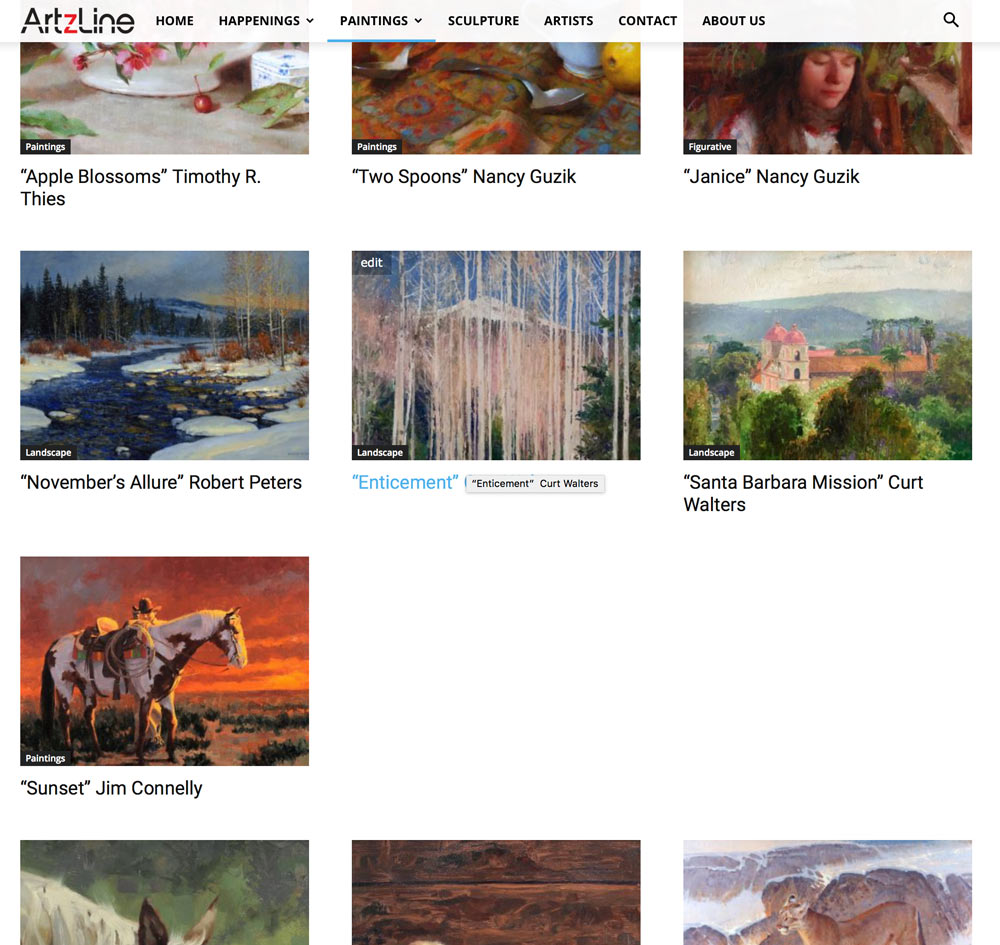
This is site wide on all categories that use Module 3 which is the only module that is appropriate for us.
We’re not sure why it’s always every 10th image (every 4th row.)
Can you help us correct this issue?
Thanks!
 Azulita
Hello ! I suscribed to Google AdSense 2 days ago and since this morning, i have too many ads on my website.
For example, my homepage : https://stephenkingfrance.fr
I only want the one on the top (bottom of the main menu). But too others are showing : bottom of the list of articles and above the footer (above the instagram widget !).
In the back office i disabled everything but header ads (and sidebar ads), but it is still there.
Any help please ?
Thank you !
 Bogdan B.
 Hello,
Unfortunately we are not an authority in google ads so we cannot make a statement on whether your new ad implementation will have any repercussions or not. You should definitely contact google and present the situation as they can provide a proper response for your particular case. We can only assure you the theme will render the ads if they get delivered by google. We cannot say for sure about any other situation regarding the ads themselves and how and if they get delivered by google.
Thank you for understanding.
 rocketman
 HI Catalin,
1. Here is the URL for post, Here is the URL for page.
2. Thank you
3. Here is the URL , notice how the 728×90 banned at the bottom of post is getting cut off on the right. Its like that for every post. I think that can be fixed by widening the container globally as it will fix the problem by placing ads in between posts.
4. Take a look home page, specifically the footer. Now take a look at another page, specifically the footer; notice they don’t have ads. Now look at a category, and now a post; notice the footers, they have ads. I was able to add the ads via the ads under theme panel under Footer top but for some reason the pages don’t show the ads.

 politico
Hello,
IS THERE ANY WAY TO HAVE THE “NEWSPAPER” THEME AUTOMATICALLY MOBILE OPTIMISED WITH ALL THOSE PAES AND POSTS? INSTEAD OF MAKING EVERY PAGE/POST Mobile-optimised, MANUALLY? THE TECHNOLOGY HAS GONE TOO FAR. Nowadays, IT CREATES UNNECESSARY WORKLOADS TO KEEP BUILDING POSTS AND PAGES SEPARATELY, ONE FOR WEB AND OTHER FOR MOBILE. This idea is just out-dated.
CAN WE JUST DO THE WORK ONCE AND THE THEME WILL MAKE THAT WORKING FOR BOTH WEB AND MOBILE WITHOUT REQUIRING ANY EXTRA MANUAL WORK SEPARATELY?
We need the answer urgently as we may need to find another theme as it wouldn’t be good for us to keep it. Thanks
Bogdan B. Hello,
The only article ads provided by our theme are presented here:
https://forum.tagdiv.com/article-ads/
Sorry but there are no other inline ads we can provide
Thank you!
 dia-C
dia-C More on the topic…
1. Indeed, not all fonts support all characters. I have found Vietnamese supported Google fonts. This site was very helpful: https://vietnamesetypography.com/type-recommendations/
2. It looks like your screen cap when I narrow the Chrome browser on my iMac, but when I view it on my iPhone 5 with both Safari and Chrome, it looks like my original screen cap. Any idea?
3. I am hoping to display the category above the post title (like the screen cap). Is it possible for you to provide CSS?

4. OK, changed the reading setting as you suggested and it feels better. Thank you! There is another question regarding Load more button. I need space between the button and the header. Please provide CSS.

Thanks for your help!
-
This reply was modified 8 years by
dia-C.
 muhannad
Hi
All my websites pages get an AMP error
I updated my Theme to V 9.0.1, i deleted the old AMP plugin, i am now using AMP Plugin Version 1.2 | built on 10.08.2018 17:39 , i cleaned all database tables , i am sure, i am using the right google ads format
on Google Amp test
keep giving this error
(Invalid CSS stylesheet
The author stylesheet specified in tag ‘style amp-custom’ is too long – document contains 62049 bytes whereas the limit is 50000 bytes.)
this is the code make the problem
<script type=”application/ld+json”>{“@context”:”http:\/\/schema.org”,”@type”:”Article”,”mainEntityOfPage”:”https:\/\/5bestthings.com\/different-kinds-of-headphones-and-best-headphone-brands\/”,”publisher”:{“@type”:”Organization”,”name”:”5 Best Things”,”logo”:{“@type”:”ImageObject”,”url”:”https:\/\/5bestthings.com\/wp-content\/uploads\/2016\/09\/logo_new2.png”}},”headline”:”Different Kinds of Headphones and Best Headphone Brands”,”datePublished”:”2018-02-06T22:37:13+00:00″,”dateModified”:”2018-02-06T22:37:13+00:00″,”author”:{“@type”:”Person”,”name”:”Reed Cooper”},”image”:{“@type”:”ImageObject”,”url”:”https:\/\/5bestthings.com\/wp-content\/uploads\/2018\/02\/Different-Kinds-of-Headphones.png”,”width”:1025,”height”:640}}</script>
<meta name=”generator” content=”AMP Plugin v0.6.2″ /> <style amp-custom>
it keep using code from old version form the plugin ,
How i can fix this , here is an example page
https://5bestthings.com/ways-to-get-along-well-with-others/amp/
Please help into this matter , thank you in advance
Regards
Muhannad
 jlbrown66
 Good morning Catalin — I am having a very similar problem, and hoping to get some help to figure out what I’m doing wrong. The Adsense ads appear perfectly in the sidebar, but when I use the same code (or any Adsense code, actually) in the inline, article top or article bottom options, the ads never appear. (When I try to view the source code for the page, the sidebar ad code appears, but nothing from the other ad options.)
The website I’m working on is learn-your-iq.com
All advice appreciated, thank you!
 Catalin
 Hello Nicerightnow,
Sorry, but please notice that the AMP has another functionality and set up than the default one. All the AMP ads which should have to be added here -> https://www.screencast.com/t/ALDft4X5EH
Thanks for your understanding!
Bogdan B. Hello,
1. Please choose another font that can display all your language specific characters properly. Not all fonts support all characters.
2. The flex block now shows up fine. I can detect no issue with it: https://www.screencast.com/t/tHM9G47wp00
3. You can add a title to the block and have the category name in the block title. Use the tagdiv composer block settings to add a block title. https://forum.tagdiv.com/block-settings-guide/
4. Sorry but the load more works after 2 loads of posts. You can limit the posts showing on your category page from here though: https://www.screencast.com/t/9czvY2BZ7 This will limit the posts and you will get the load more button sooner.
Thank you!
Simion C. Hi,
I would have no idea how those ads work unfortunately. We have not made any testing with such ads. If you use the theme panel ad spots the functionality is simple, enter the ad codes in the desire spot and the theme will try to display them. Could be an incompatibility or a configuration problem.
Maybe some other users who use AdSanity with the theme successfully could share their experiences with it.
Thanks
 raphagui
 That inside the circle is the author name and the date. I wanna the author name and date continue in all my articles, but I don’t wanna the link to author page. I already did that in other template. How can I Do that in this template?
d 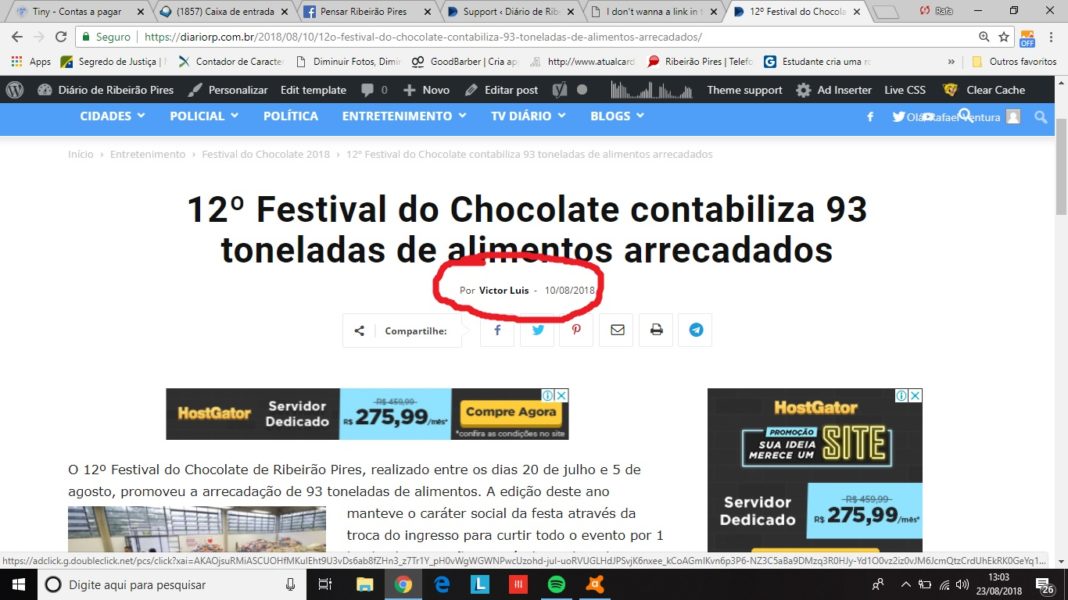
 sebkuhnert
 Hi again,
Another question – how can I select the language for each and every ad? For example, our site is localised into 3 languages, we are using Sidebar, Header and all 5 Custom ads, and we want to display EN ads on EN pages, DE ads on DE pages and RU ads on RU pages, but I don’t see how I can do this.
Thanks
 desbravandomadrid
 Hi Simion,
Thanks for your reply.
After a while I understood what the problem was: while installing the template, all the failes containing “ad” or “ads” were not being uploaded (didn’t understand why). I just reuploaded the template, making sure all the files were there and it is now working!
I have other questions, but I’ll open a new thread!
thank you anyway.
susana
Simion C. We placed a message in the theme panel smart sidebar setting
– https://www.screencast.com/t/JtdI70ZGRy
Best not to place Google ads in smart sidebars, it may cause problems. Other ads should have no problem.
SirstevemediaMy google adsense does not display everytime. And sometime does not display in every posts. i dont have any other plugins except the ones i bought with Newspaper theme. Am i the only one facing this?
 NickDeBaerdemaeker
Hi,
currently we have four columns with content.
They each have a load more button at the bottom, but clicking on one of the columns only expands that column.
Is it currently possible to combine those buttons into one, so that when clicked all columns load more content ?
We’re hoping to keep the columns since we don’t want to mix the articles through eachother but keep them sorted this way.

