- Apitd_api_single_template::update_key
- Apitd_api_single_template::update
- Apitd_api_single_template::add
- ApiAPI – Single Template – Introduction
- ApiPractical example – How to add a new Block and Module
- ApiAPI – Category top section style – Introduction
- Apitd_api_module::update
- Apitd_api_module::add
- ApiAPI – Modules – Introduction
- Apitd_api_block::update
- Apitd_api_block::add
- ApiAPI – Blocks – Introduction
- ApiUsing the Theme API in plugins
 Bettina
 Hello!
It is possible to insert a different menu for each page only if you have a different cloud header template for each page.
Thank you!
 a_l
a_l Hi Calin,
Thank you for your reply. This worked for the Homepage, where I am able to access the sidebar via the TD composer.
However, I am not sure how to do this for the sidebar on the “posts,” as to my knowledge I cannot access the posts using the TD composer (only using the Theme Panel, which does not provide this “sticky” option). I am using Default Post Template style 1.
-Am I able to access posts using the TD composer, and if so, how?
-If I can’t access posts via the TD composer, how could I make the post sidebar selectively sticky?
Thank you for your time.
 EDCResearch
I need to create a side content area.
The catch is that I need one for both Pages/Templates built with the TagDiv composer, and Posts made without it (using the default single.php).
Is here a way to add some html using hooks? How can I hook after the Header (which is built with the Tagdiv Composer) Click here to see what I am after
 Nielsen
Hi there.
I can’t figure out what caused my pages to have a limited width. My homepage had a top image (like a banner) in full width and it is limited now. I created a test page and imported a page template that is full width – this page got also a limited width, different from it’s normal layout. Where can I check what could limit it?
Also, looking a the documentation, when I got to this page:
https://forum.tagdiv.com/page-templates-2/
See that in the first image it says that I can work on the Page Settings inside of tagdiv Composer. But when I click on the button that gives me access to the option “Menu Setting” and “Page Setting”, there is only “Menu Settings”, I cannot see the option “Page Settings”.
What should I do?
Thanks.
 loslunes
 Cleaning caches doesn’t work. I did it yesterday and the only solution is downgrading to WP553 or use enable jQuery migrate helper to change jQuery version.
My problem is only in home page (newspaper pro cloud one) and as I said I had to install jQuery migrate plugin. But a the plugin said, this should be only a temporal solution until you solved it with a template update 100% compatible with Wp5.6
 Calin
Calin Hi prakharjeevan,
I think that what you want to say is that there is no social share on ‘Single post template 61 – GadgetsPro’ if is so you can add theme using tagDiv Composer -> https://i.imgur.com/7S3ePMl.png -> https://i.imgur.com/PJ0S5Uv.png -> https://i.imgur.com/b8gS3PG.png
Hope this will help you!
 nearview
 Thanks, Calin, but that sets the sidebar for ALL pages on the site. We still want the default sidebar on other pages on the site and only want to change the sidebar on just the BuddyPress pages (groups, activity, members). We tried changing the sidebar in the template settings on the actual pages themselves, but it appears BuddyPress is pulling in the default sidebar no matter what we do.
-
This reply was modified 5 years by
nearview.
Calin Hi,
I think that this problem is because the cache plugin that you are using is not recognize or is not set to be clear when a cloud template or mobile page was edited with tagdiv Composer.
Thank you!
Calin Hi,
You can achieve this if you are using a cloud templates. For example you can set a cloud header as individual on category cloud template from tagDiv Cloud library -> https://i.imgur.com/G4YnfT7.png -> https://i.imgur.com/p8dtees.jpg -> set an individual header -> https://i.imgur.com/NOpScB9.png after that set the category template on the category -> https://i.imgur.com/jR1MDOy.png
Also you can duplicate de cloud templates -> https://i.imgur.com/XOIl0Np.png and using tagDiv Composer change only the cloud header.
Thank you!
Calin Hi,
Unfortunately there is no option for this, you can achieve the hours ago on blocks only with custom work.
For this you can use this article -> https://mekshq.com/change-wordpress-date-format-to-time-ago/ or the official documentation -> https://developer.wordpress.org/reference/functions/human_time_diff/
There are also plugins that can be use for this -> https://wordpress.org/plugins/meks-time-ago/
If you want to use the “Time ago format” you need to use a single post template from tagDiv Cloud Library and edit it with tagDiv Composer click on single post date and enable the “Time ago format” -> https://www.screencast.com/t/2G5ogZnde0JZ
Thank you!
 Robert Turner
 Hi Calum. Thanks for the response. Irrelevant of what the cause may have been people are having huge issues. I can tell you now after days of trying that no amount of optimisation is going to resolve the issue. You have a problem and if Google is responsible for it, that’s a problem you need to address.
In the meantime you have thousands of clients that are freaking out because of their web stats. You guys need to address this. I also see the problem as your old templates are reliant to load on the very scripts that are slowing down the pages.
Not sure how you are going to do this. We are trying to upgrade to a new Pro template but your latest update has broken the image function on the Tagdiv template builder. That’s an issue that needs to be addressed ASAP.
Calin Hi ludyma, the there as a little change in our welcome section where are display the essential settings for our theme https://i.imgur.com/kFFehz4.png also link to documentation and support.
As for the new option of mobile page described here -> https://tagdiv.com/newspaper-10-3-7-update-brings-customizable-and-fast-mobile-pages/ this option is to can create mobile pages using tagDiv Composer, also now this option is availed to create cloud templates for mobile theme too, to can set the layout you want to mobile website.
If you wat a specific information about one option or something like this, let me now!
Thank you!
Calin Hi,
For this you can use the page template default -> https://i.imgur.com/gsB9Vj1.png -> https://forum.tagdiv.com/page-templates-2/
Hope this will help you!
Thank you!
Calin Hi Robert Turner, this problem appear when google added the Largest Contentful Paint (LCP) and Cumulative Layout Shift(CLS), the problem is that if we are make now changes in standard post templates to prevent this problem then at he structure of standard post templates will change and all website that use a standard template will no longer work and will need to be rebuild, that is way our developers didn’t made any changes to the standard pack until now. using standard pack will be load more resources that is need.
That is way we recommend to use a pro demo, is no need to install a different demo, you can simple get the cloud templates from cloud library and set theme in theme panel.
Also the website performance is not only about the the standard pack or cloud template, is about content ads, external resources …
For the moment the only solution without changing the standard templates is to try to optimize your website as good as you can.
https://tagdiv.com/how-to-increase-page-loading-speed/
Also you can check this similar topic for more solutions: -> https://forum.tagdiv.com/topic/optimize-script-to-improve-site-speed/ -> https://www.infophilic.com/get-almost-100-pagespeed-newspaper-theme/
– https://forum.tagdiv.com/topic/a-few-tips-for-newspaper-x-speed-high-cpu-usage-issues/
– https://tagdiv.com/how-to-increase-page-loading-speed/
Hope this will help!
Thank you!
 Vlad S
 Hello !
Standard pack was designed for people who do not want to upgrade to newer version for different reasons. But If you have updated or plan on keeping your theme up to latest version the Cloud library plugins are the way to go. They offer way more options to customize, they will use only the resources needed. No more extra resources. But as mentioned, you will have to make your templates because making an option to just switch everything to cloud library by the flick of the button is not possible.
Indeed this is a big concern and our developers are daily trying and testing the results so they can make sure that they do their best in optimizing. There are plenty websites that do use Newspaper Theme and have very good page results with a lot of content.
@Robert Turner, @fkvs please provide a link to your website so we can take a look.
Thank you !
 klaerwerk_admin
Dear TagDiv Team,
since the last Update our menu is not working (sub-menus are not opening), at least in FireFox, but only on the Home-Page (which is not generated by a Category Template).
This is the page where the menu is not working:
https://klaerwerk.info/home/
Appreciate your help!
André
 ThomasMaes
 I fixed the color and image by updating the theme.
But I now have this problem:
I am creating a post template so I inserted a row and divided it in 2 colums 1 for post and 1 for sidebar.
my problem is that when i click on view on mobile, the “sidebar” is really thin .. how do i delete the sidebar for mobile or put it so that it’s displayed under the sidebar on mobile?
Also is there a single “post” title shortcut? the single “page” title isn’t using my H1 font that I entered in theme panel.
Is there any way to put “single post author” and “single post date” next to each other in the column that I created for the post? I Don’t want to start messing with more rows again, I have 1 row with 2 columns left = post right = sidebar –> I want to add the single post author and single post date next to each other in the left column.
ThomasMaesHello,
I am creating a post template so I inserted a row and divided it in 2 colums 1 for post and 1 for sidebar.
my problem is that when i click on view on mobile, the “sidebar” is really thin .. how do i delete the sidebar for mobile or put it so that it’s displayed under the sidebar on mobile?
Also is there a single “post” title shortcut? the single “page” title isn’t using my H1 font that I entered in theme panel.
Is there any way to put “single post author” and “single post date” next to each other in the column that I created for the post? I Don’t want to start messing with more rows again, I have 1 row with 2 columns left = post right = sidebar –> I want to add the single post author and single post date next to each other in the left column.
ThomasMaesHello, I created a new template with tagdiv composer for posts and while I was creating it I noticed that I wasn’t able to change colors or put in images from media gallery.. Any way to fix this??
I went to my pages to see if i could still change colors or images in my homepage and it’s also not working. No images are showing up it’s like it’s stuck and when I click for color i get 6 small circles with colors instead of the usual grid to choose color and even if i type #FF8400 for example nothing happens.
Also I put a “page title” on top of my post template that I am creating but It doesn’t use the H1 font that I set in the theme panel. I tried just typing a sentence and give it H1 but it’s also not showing in the “single post content” shortcode. Why is there not a “single “post” title shortcode instead of the single “page” title? How do I make the H1 show on the page with the font from the theme panel?
loslunesSince the last wordpress update that I have just installed, I can´t see thumbs in home page and also the menu is not clickable. I have used jquery migrate helper and issue has been solved but please solve the problem with template compatibility so we don´t have to use one more plugin.
I know downgrading to wordpress 5.5 is another solution. Many thanks.
 Frydenborg
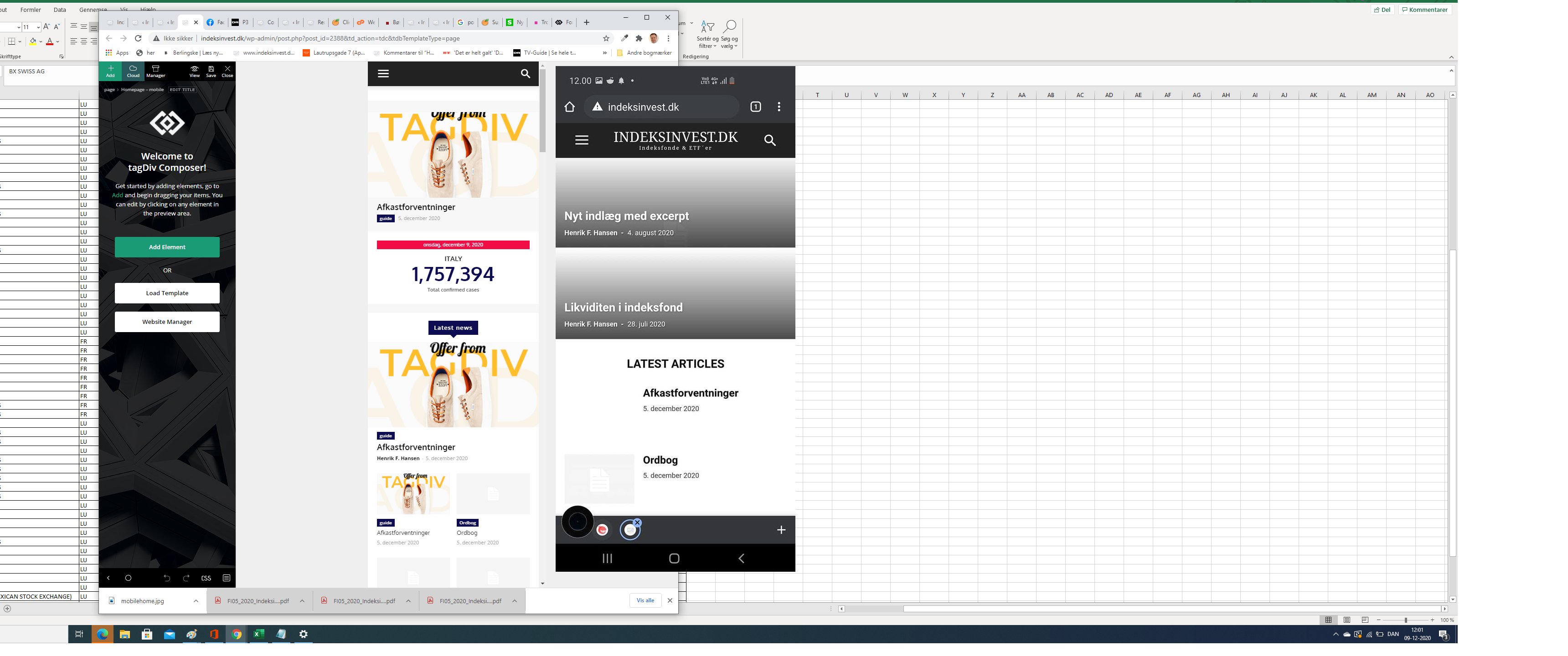
Apparently, my site on my mobile (indeksinvest.dk) looks quite different from I see in tagdiv Composer when I edit mobilpage home (see screenshot), I have tried to delele cache.
1. How can I make the site looks the same at mobiles as the mobile home page template in tagdiv Composer?
2. How can I change text logo font at mobile pages?
Robert TurnerDear Tagdiv
Could you please provide a definitive answer on when this issue will be resolved? We run a big site on the Medical theme and use the standard plugin. Suggesting we change to a pro theme on a live site isn’t a solution unless you are offering to redo pages and pages of different templates we have built.
Our page loads speed nearly trebled after installing 10.3.8 and the new update hasn’t resolved this. It is costing us on Google and I am certain that most of your other customers are facing a similar situation. We now experience page loads of up to 13s on some pages.
If you have an alternative workaround in the meantime that is actually practical, please share it and I don’t mean caching and minifying scripts. It doesn’t impact the issue. Alternatively, I’d like a definitive answer on how long this will take to resolve. Obviously, if you continue selling this product as is, you are selling a defective product to the public, as it will seriously compromise any website that uses your older templates. Lightweight and speedy is all that counts today.
I would also recommend strongly that you send out a notification to all your customers about the issue, rather than leaving them running about in the dark trying to figure out why their sites are suddenly so resource intensive and slow to load.
I look forward to your response.
Regards
Robert Turner, Medika.life
 Opjeklompen
 It can be exactly like the post template, but then for ‘page’ content.
OpjeklompenHi, I have old (clean) wordpress content (not build an other pagebuilder). I can’t seem to find an option to make one ‘content-page-with-sidebar-standard-template’?
https://www.screencast.com/t/3tG75jpm
Robert Turner Honestly, I would avoid wasting any more of your time and rather put pressure on tagDiv to sort it out. Until it’s fixed, they are selling an oxcart for a theme, snails could pass it, and they are aware of that. Their entire catalog of older templates that rely on the plugin is effectively useless. You cant use them and if you have, then you have a serious problem. Like we do. Telling us to switch to a Pro theme is an impractical copout.
Be interesting to see how they respond and if they do in fact issue a warning to their new customers about this issue and notify existing customers rather than leave them in the dark and struggling like idiots.
If you’re going to try the rollback I’d only suggest it if you haven’t updated to the latest WordPress. Backup your database and then just rollback. If it bombs, you can often recover by reinstalling the newer version and manually activating the theme plugins from the theme pages.