
No search results were found in Documentation!
 obiwan
Hello,
(Using the latest version)
– Flex Loop Filters: Is there anyway to make it load results in ajax?
a. The filtered field are hidden when selecting an option. (any options)
b. The page keep reloading at each selection
– Flex Loop Sorting Options: This is returning results in ajax. Why not the above?
a. There’s only 3 options: Oldest posts, Modified date, Alphabetical A -> Z
b. How can we had options? Real Estate standards have (price asc/desc), size (asc/desc), year built.
Thank you
 Anamaria
 Hi,
You can customize the category template. For the category template, please use posts loop; if you have set a posts loop then will display all posts in this category or you can use Flex Block/Big Grid Flex and set the filter to “Category -Current category” => https://i.imgur.com/7P99qx0.png and this is why the block will display posts for each category. So, please check the settings.
Thank you!
 Hindistack
Hello,
Is it possible to implement a filter for the ‘flex block/flex loop’ using an ACF (Advanced Custom Fields) select field? For example, if I select ‘Book’ from the select field, could I configure it to display only posts related to books within the ‘flex block/flex loop’?
Thanks in Advance
Anamaria Hi,
I said only to use cloud templates; you can create as you want the template. You can create your modules and use the flex block builder to display it -> https://forum.tagdiv.com/modules-builder-newspaper-theme/ -> https://forum.tagdiv.com/flex-block-builder-flex-loop-builder/
If you import only a template, then the colors and settings are applied only on that template; I said to change the blocks and the template to be able to turn off the tagdiv standard pack plugin because this plugin will be deprecated. You already have a cloud template for posts, authors, and categories. Maybe you have only cloud templates and don’t use elements from the standard pack plugin.
From what you said, I understood that you have more widgets displayed only a few days before the event. Is this correct?
You can add a page on the homepage, but this can be done in an iframe, and the content will load from both pages; what I can suggest is to use modal popup -> https://forum.tagdiv.com/modal-popup/ and set the page there. Then, the content will be loaded only where the button is pushed, depending on what trigger you set.
For optimization, please set the height and width of the logo https://pagespeed.web.dev/analysis/https-www-cinefilia-ro/lys3ldwyle?form_factor=desktop, and you can use the option from Theme Panel – Block Settings -> inline css. You can enable the options and do a page speed test to see if it will improve. If you want, you can contact us via email at contact@tagdiv.com, and there, we can communicate in Romanian.
For the jetpack newsletter, https://i.imgur.com/dsCY1BV.png please use this code
.wp-block-jetpack-subscriptions__container .wp-block-button__link {

padding: 8px 12px;

margin-top: 20px;

background-color: #561D5E;

}
Thank you!
Anamaria Hi,
Please let me know if you have a cpt in the directory, if not, then please edit the search template, select the posts loop block, and delete the post type -> https://imgur.com/5OGNAVh and check after.
Thank you!
 Bettina
 Hello Narendhar!
1. A shortcode can be inserted by using the element called “Column text” or “Text with title”. For example, in the step3 here: https://forum.tagdiv.com/add-cryptocurrency-price-ticker-widget/
“Column text” and “text with title” elements have a button called “edit content” and if you click on that button, the WP Editor will open, and you can add some text/code/shortcode there. Close the WP Editor from X, save the changes from Composer and view the page to see the changes.
2. You can build a sidebar with the TagDiv Composer. Steps:
1. Insert one new row (or delete an existing one).
2. Divide into two columns (2/3 + 1/3).
3. You can add whatever element you want to the second column and consider it a sidebar.
You can also split the row into many columns and set a width for each column: https://prnt.sc/SUVH-Y15HNL9
3. The shortcode Posts Loop has numbered pagination.
4. You can choose a bullet list in Gutenberg editor or in the WP Editor from the shortcode text with title or column text.
Thank you!
 Calin
Calin Hi thalesbrandao, for this you’ll need to edit the single post template file that you are using for posts. For example if you are using style 1 the file path is – wp-content/plugins/td-composer/legacy/Newsmag/parts/single/loop-single-1.php set your code under the get_title() – https://i.imgur.com/OBvFW8O.png
Also, you can set the edited files in a child theme – https://forum.tagdiv.com/the-child-theme-support-tutorial/
I hope this will help you!
Bettina Hello Yanko!
Yes. You can have a cloud template for tags or categories. In their pages, you can use flex loop to display the posts automatically. You can create something like this: https://prnt.sc/OQgTIn0c2sP6 similar as in this demo: https://demo.tagdiv.com/newspaper_app_find_pro/ -> https://prnt.sc/YlrS68z1TXED
Thank you!
Bettina Hello!
1. Yes, you can share it.
2. There is no bug. Please provide an example where this element called posts loop is not working properly. So, I can check it.
3. Yes. Because you need custom code.
4. We do not have any other elements that have the same features as the posts loop. Sorry!
5. Yes, you are right! I will add this feature to our list. But I’m not sure if this will be considered a new feature in the next update or when exactly this block will be released. So, the fast solution is custom work.
Thank you so much for your understanding!
 the-website-builder
 Thanks a bunch for your prompt reply.
Ok referring to the same numbers above again:
1) Ok I understand its pro-services then for this piece. If I pay for something, can you also make it available in all future releases for everyone? I dont just want to buy a one-off custom fix that I will have to support forever on my own or with pro services through future product updates. I know this is a simple feature that will benefit everyone.
2) Regarding this https://prnt.sc/gjfNEMD7RE7I Can you please see if the same thing happens to you when you install the full Crypto Pro Template Demo with all example data? Im just trying to get the Posts Loop on the Home Page to work properly in the way I described. I agree it doesnt make sense why the excluded posts that I specified from one category, that I dont want to show up on the Posts Loop element, are still showing up only when logged out. I do need to use the Numbered Page Pagination…so I think the easiest solution is to figure out if theres a bug or something, and just get the Posts Loop Element working, since that Element already has what I need and I just need it to function properly. The Flex Block 1 works perfectly fine when excluding individual posts, so you would think that if this issue was with another plugin conflict on my site or something, that even the Flex Block 1 Elements woukd be having the same difficulty hiding specific posts with no category filter enabled, and it works perfect. The fact that this Posts Loop Element looks fine in admin mode/logged-in and then completely ignored the hidden posts properties when logged-out is very strange. I checked for plugin issues and CSS conflicts but Im not seeing anything.
3) How would you go about adding/creating a new block with new features? Are you referring to pro services here for this as well?
4) Are there any other blocks that you know of, where I can style them exactly the same as the Posts Loop, but still exclude categories? What other Elements could I try? There’s so many elements that I havent looked through every single one yet. Again Im just trying to stylize another Element to look the same as Posts Loop, with Numbered Pagination, and I can filter categories or posts from it. Pretty simple I hope.
5) Aside from pro services, and with the understanding that you folks can only provide support here, how does tagDiv go about taking feature requests in-general? I feel like every user of Newspaper Theme would want to be able to have the ability to use Numbered Pagination on a block of posts while being able to filter posts and categories. Im not sure sure how much pro services costs for this but if its not a lot of extra money then sure I maybe I’ll considee funding it. From a coding perspective, everything already exists and is written, I just need a Posts Loop Element with category filters, OR I need a Flex Block 1 Element with Pagination, and if that means just merging the functions of both into a new Block then that sounds possible and not that difficult to do in the future. Flex Block 1 already supports pagination, just not Numeric Pagination, so I just dont understand why its a difficult think to add the extra form of Pagination to Flex Block 1. Once again though, if there’s any other alternatives, Im happy to try it. Im just very curious how tagDiv handles feature requests. It sounds like there arent feature requests and just pro-services for anything that doesnt currently exist in terms of functionality? I just want to make sure I understand the full picture.
Thanks in advance one more for your time and help. 🙂
Bettina Hello!
Yes, this kind of pagination is not available for the Flex Block 1 element.
This feature should work well: https://prnt.sc/gjfNEMD7RE7I (Check if you do not use some extra plugins that may interfere there.)
The Posts Loop element doesn’t have a tab with all the filter options, like flex block elements.
The Posts Loop is automatically filtering the posts depending on the cloud template you set (for example, on the category page, there will be posts from that category).
1. This will require custom work, which is not covered by the support team.
For customization and other services, you can contact our custom work team here: https://tagdiv.com/premium-customization-services/.
2. Something should interfere there. I’ve tested this feature on the latest update of the theme and plugins, and it is working well.
3. The blocks are different and work differently. We cannot change the way blocks work, but we could add a new block with new features.
Thank you so much for your understanding!
the-website-builderHi there!
So I went down a deep and dark rabbit hole and I’m going crazy. I hope that you can please help me with this, even if its a feature request, I believe this is a simple change for you folks and I hope that you’ll implement this option/feature in your next release…and if you can please tell me what I need to modify as of right now to get this working…
I installed your Crypto News Pro Premade Template demo on my website and I absolutely love it. I’m trying to keep the original look and feel while just customizing my colors right now.
The issue that I ran into, is with the Posts Loop showing certain categories and posts that I didnt want to show up.
I did notice that your Posts Element has an “Exclude Post IDs” field, and this was good enough for me. I happily entered in -234, -456, -567, and so forth and I watched my Posts disappear one by one, which was exactly what I wanted. It was a pain to have to list all of the individual posts though. I do wish and hope that you folks can please consider adding an “Exclude Category IDs” option to the Posts Loop Element in the future.
I thought everything was fine, I saved my changes, and while logged-in as the WordPress admin, everything on the Homepage looked great, the posts I didnt want to see were not showing up.
Then I went to the front-end view of my website as a non-logged-in-user, and ALL of the posts that were hidden from my Posts Loop Element are still showing up. I cleared my WordPress cache, I completely disabled my WordPress cache, I flushed my browser cache, I tried multiple browsers and multiple PCs and multiple devices….somehow the “Exclude Post IDs” option works perfectly fine while logged-in as the WordPress Admin and editing the Homepage…but non-logged-in end-users still see all of the posts. Sad times for me 🙁 I spent many hours playing around with this to no avail.
Next, I searched in your forums and found another post with an answer from tagDiv staff stating that the Posts Loop does not support the filtering of categories, and I’m not sure if that was old and outdated info because there was no mention of excluding posts, which the Posts Loop Element cleary looks like it can/should at least filter Posts (even though its not working properly for me right now)… the result of this tagDiv forum post was to instead use another Element type like a Block, so that you can filter categories properly.
In my case, I prefer using the Flex Block 1, so I chose that and I began painstakingly recreating my new Flex Block 1 Element on my Homepage to look EXACTLY like the original Posts Loop Element on the Crypto News Pro template. I then tested that filtering my categories and posts per my preferences is working perfectly, and that’s good to go….
Everything is now perfect, EXCEPT for the fact that the Flex Block 1 Element does NOT offer a “Normal numbered” Pagination option like your Posts Loop Element does. The only options I have are to use left and right arrows (Next Previous ajax), load more, and infinite load….
1) So I need your help please. I really, really, really want/need to have the Page Numbers for pagination on the Flex Block 1 Element Is this something that you can help me enable right now? If so, I can be on my happy way and move forward. (PLEASE!).
2) If this cannot be done with making the Flex Block 1 user Numbered Pagination, then can you please explain and help me figure out why I’m having that particular issue that I described above, where the Posts Loop Element has the “Exclude Posts” option, and its works while I’m logged in as the WordPress Admin, but it doesnt work while I’m looking at the website as a regular non-logged-in user?
3) Also, can you please consider adding Category Filtering to the Posts Loop element in a future release as well?
Thank you very much in advance, for your time and help with explaining this issue to me. I hope you can help me get either my unwanted posts hidden properly on the Posts Loop Element, or that you can help me get Numbered Pagination working on the Flex Block 1 element.
This is the only issue preventing me from going-live on my website right now. I would be very grateful if you can help me resolve this soon.
Bettina Hello @akami!
Make sure you do not use any offsets. The posts loop will automatically filter the posts from that category. Try to use a flex block instead of a filter and see the differences.
Thank you!
 akami
akamiEven though I set Limit post number: 18 posts, it still shows only 5.
https://mikuchananime.com/twixtors-flowframes/
 sjgold
 I will use a static page, I was showing you it should work.
The fact that you do not support standard WordPress loops is pretty much a reason to ask for a refund. I showed you that I can not even get JUST the custom posts in the blocks.
Do you have any code that would work for your loops? How would I get just the Custom posts to show up?
Bettina Hello @sjgold !
We recommend you to use a static page for your homepage and choose the one you use from that dropdown, so you can customize it with the TagDiv Composer.
Please note that you can not display both posts and CPTs in a tagdiv block, only posts or only CPTs. The code you applied only affects the standard WordPress loops while our loops work differently.
Thank you!
sjgold Let me try to explain with images…
https://imgur.com/a/7p5OZbe
So the first image shows what I refer to as the query loop and the results it gives. As you can see the first post is the Warhammer post.
Then we changed the settings so the homepage is just the latest posts. You will note there are 2 posts above the Warhammer post, which is due to the custom posts that are generated from the YouTube API and pushed into WordPress. This is due to the code we inserted into the standard YouTube query that appends in the proper custom posts.
The query is shown in the last image and this is the standard way that you would do this according to WordPress. I believe that you are NOT generating the info in the blocks the standard way which is stupid if that’s the case. I assure you this is 100% why I bought the theme as you stand it will deal with custom posts… but your definition of custom posts is more custom fields like ACF would do.
Then I show you that it is pulling all categories, and I show you moving to just the category that contains those custom posts and how it comes back with no results.
Bettina Hello @heisks !
Unfortunately, I can’t see your capture. Try to use a flex block and check if that block is working. The posts loop is filtering the posts automatically depending on the page template.
Thank you!
sjgold Hi, I am not sure what more I can explain.
I pull information from the Youtube API and a custom post is created. I want to have those items in the custom post show up in a standard query loop result from the tagdiv loops. But it does not, nor can i just filter to that category and have it show up.
It will show up if i set things to be a static page that just displays the most recent posts if i include the code piece i added but it will not show up in a tagdiv results loop. what other information do you need?
 heisks
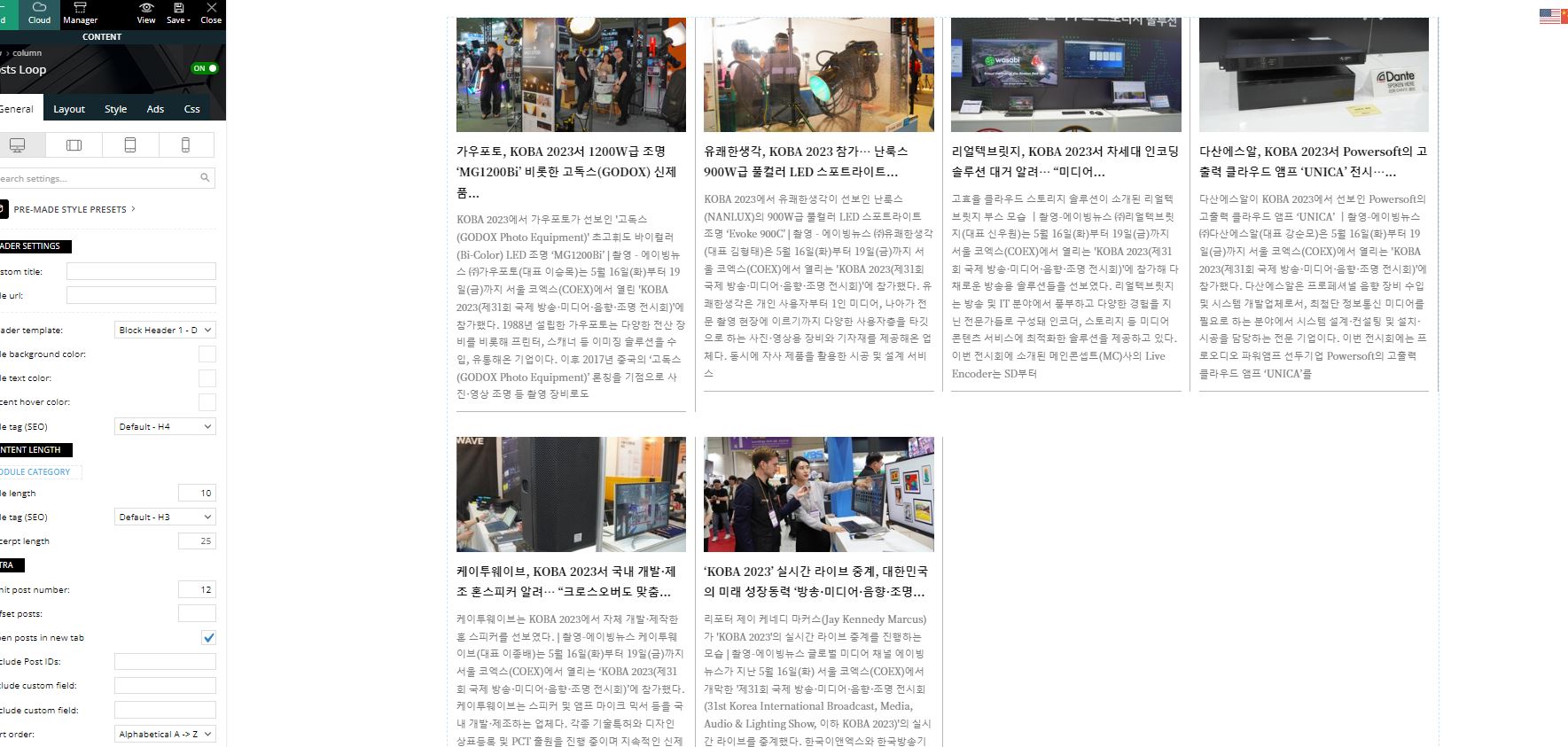
There are 105 posts in the category/KOBA.
I set 12 limit posts numbers but shows only 6 posts in the grid module(post loop).
How I could fix it?
sjgoldHello there…
So I want to have a series of custom posts that are assigned to a specific category show up in a standard posts query for say most recent or whatever. I have some PHP code that should append the query loop with the proper calls for the custom posts but they are not showing in the tagdiv custom loops. BUT if I go to a static page they do show up in the standard WP latest posts.
On top of this if I try to set just the custom post’s category in the query loop of say most recent posts or something for testing they do not show up at all. If I go to a category page for that category they do show up.
Bettina Hello @rosemarie !
Oh, sorry! Please use the posts loop element: https://prnt.sc/P–Zz7xw6df0
Thank you!
 agiannaros
 I understand Bettina. For a post to be displayed twice is a dealbreaker. Is there something me or the theme’s development team can do to tackle this bug?
In the end of the day, I want to use Flex Block or Posts Loop to display all of the posts of a single category with random order and pagination at the same time. I do not think that this is a special request.
Anamaria Hello,
I think that you use a new prebuilt website. You need to edit the prebuilt website select the block and set a module https://forum.tagdiv.com/modules-builder-newspaper-theme/ or you can use the posts loop element -> https://forum.tagdiv.com/posts-loop/
Thank you!
agiannarosHello everyone,
I am a newbie when it comes to your theme and the tagDiv Composer. Though I believe there is still some way to go regarding the development of the tagDiv Composer, I find it a very good builder that has all the required elements to build a news portal. My first attempt at utilizing your Newspaper theme to build such a portal is with the http://www.vasilisaivalis.gr website.
On the aforementioned site, I have created a Category template using the Cloud templates. This template utilizes the Flex Block 1 to present some people (candidates). Each person (candidate) on this list has a single post dedicated to him. So, the Flex Block 1 takes on the task of presenting all the posts that belong to the post category “Candidates” and it does that in a very good way.
A required characteristic of this presentation is that the Candidates (posts that belong on the post category named “Candidates”) are being displayed in a random order rather than alphabetically, time added or any other way for obvious reasons. Unfortunately, the “random” sort order does not work as intended. To be more specific, I guess there is a bug due to which some of the 111 candidates (the plan is that another 70 candidates at least will be added on the list) appear twice on the list (or three times I guess). Therefore, if candidate A appears on the list twice, in addition to the obvious problem that arises, there will be on candidate from the rest that will never appear because his slot will be taken from the candidate A. It seems like the database query that is being sent when loading more candidates via pagination method does not take into account the candidates (posts) that already appeared. Screenshot of the problem here.
Am I doing something wrong with the Flex Block 1 configuration? I guess if this bug actually existed then someone would have already brought it to your attention and you would have already fixed it. Using the Posts Loop widget would be more than fine for me but it does not seem to provide the random sort option at all. The initial Newspaper theme deployment was at version 12.5 and I just upgraded it to 12.5.1 but nothing changed. The WordPress core is at version 6.3.
I would be more than happy to provide administrator credentials to the support staff of the development team if needed. Until the problem is fixed, I am using the Posts Loop 2 widget with the “oldest posts” sort order.
Thank you for taking the time to read my topic.



