Simion C.
 Hi,
Assuming there are enough posts in the category, the post loop should display them. I see that the loop has an offset of 3. If there are more than 3 posts they should appear in the loop below the slide. Like in this category page https://realtyaggregator.com/category/latest-news/
Are there more than 3 posts in the category? Or if you remove the offset do the posts appear? -> https://prnt.sc/a39rTov04p1M Normally the offset is used to avoid displaying again the same posts that are displayed above.
Let me know.
Thanks.
 Calin
Calin Hi,
The Flex Block Builder is the correct element to use when you want to manually add taxonomy filters for your Custom Post Types. You can see an example here: https://i.imgur.com/C0reStv.png.
The Flex Loop Builder, on the other hand, works similarly to the Flex Loop and Posts Loop elements. When it’s used within Cloud Templates, it will automatically filter results based on the template context. For example:
– on a Category template, it will automatically filter by the current category.
– on an Author template, it will automatically display posts from the current author.
Let me know if you need help deciding which approach is best for your use case.
Thank you!
Calin Hi,
I made some tests on my install and everything seems to be ok, but there were a few users with a similar problem, so please check the solution from this guide https://forum.tagdiv.com/topic/flex-block-1-keeps-loading-the-same-posts/
Another solution will be to replace the loop with a flex block.
 Koder
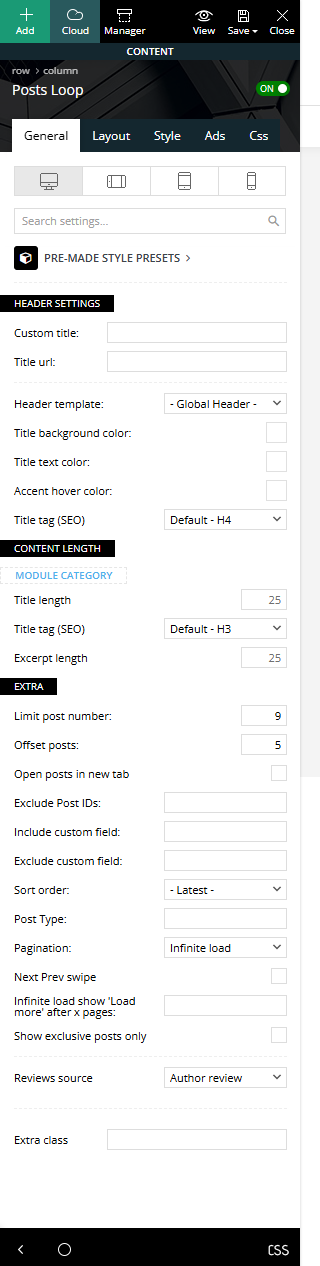
KoderI have a “Posts Loop” block, it has the Pagination “Infinite load” function, as well as skipping 5 posts. Only 9 posts are displayed in the block, and when loading the following posts, the 9th post is duplicated, that is, the 9th and 10th posts are the same (You can see on the screenshot:https://i.ibb.co/HfJVbhc6/Screenshot-2.png). What could be the problem? screenshot of the block settings:https://i.ibb.co/GfjZCxjm/Screenshot-3.png
 FranceGallCollection
 Thank you for your reply. I hope I’ll be able to wait, as I am currently migrating my entire website to CPT UI and I want to offer an AJAX filter system; I really would have preferred to stay with TagDiv. I’ll keep an eye on this.
In the meantime, during some tests (without AJAX) but still using the Flex Loop filters, I noticed an issue: the item count displayed does not reflect the actual number of posts. You can see it on this test page: https://francegallcollection.fr/disques-test2/
If you click on “LP (33 tours)” (https://francegallcollection.fr/disques-test2/?tdb_tax_formats=lp-33-tours), you’ll see that there are clearly more than 10 items. Do you have any solution for this?
Thank you again for your help,
Stéphane
Calin Hello,
1. Please edit the cloud category template and select the first block, then look in the filter tab and set the filter on the current category. Also, check the second block, the posts loop, and in general, look for offset, make sure that the number of articles is set above, so those will not repeat – https://i.imgur.com/HQp7gF8.png – https://i.imgur.com/Qqia5ii.png
2. Are you referring to the fact that the articles are repeated? If so, then there are 2 options:
– use the unique article option.
– edit the page using tagDiv Composer and on each block set a category filter.
Thank you!
Calin Hi,
You are right regarding the theme blocks. If you have a site with categories like “Movie News” and others, it becomes much easier to create a single cloud template that will work for all categories. To achieve this, you can use the Flex Posts Loop element. It will automatically filter and display articles from the category you are currently viewing, so there’s no need to add additional filters.
If the element is placed on a standard page, it will display the latest articles from all categories.
Thank you!
 gm-2
gm-2Hi everyone,
I’m fairly new to the Newspaper theme and I’ve run into an issue I can’t seem to solve.
In the tagDiv Flex Blocks, I don’t see any option to use numbered pagination. It only offers Infinite Load, Load More, or Previous/Next.
On the other hand, the Post Loop module does support numbered pagination, but it doesn’t include category filtering (there’s no Filter tab like in Flex Blocks).
My goal is to build a movie/TV blog, and for example on my “Movie News” page, I want to show only posts from the Movie category with numbered pagination at the bottom.
Right now I can’t find any module that supports both category filtering + numbered pagination in one place.
Am I missing something? Would appreciate any guidance.
Thank you!
 yml-support
Dear Support Team,
we are using the Newspaper 12.7.3 theme and have noticed a category filtering issue with the Flex Loop Builder module.
The Flex Loop only displays posts if the parent category is explicitly selected on the post – even when the post is correctly assigned to a child category.
In our case, posts that are assigned only to a child category are not shown in the Flex Loop, unless the parent category is also manually selected. This differs from the behavior of standard loops (e.g., Posts Loop), which correctly display posts based on the selected child category, regardless of whether the parent is also assigned.
This behavior is inconsistent and leads to missing posts in the Flex Loop that are correctly categorized under the child category.
Can you confirm whether this is the intended behavior or a bug?
If this is the intended logic, can you please explain why the parent category must be selected explicitly, even when the child category is already assigned?
And is there any way to configure the Flex Loop Builder to behave like the standard loop and include posts assigned only to the selected child category?
Best regards,
 Bartek00
I use the Classic template.
At the very top I have Flex Block 2 and the latest post is displayed there. Below I have Posts Loop and I would like the latest posts to be displayed there, but apart from the one displayed in Flex Block. This means that the newest ones will be displayed in Posts Loop, but without the most recently written ones. I don’t want a duplicate on the home page.
 racqueltomaz
I have a blog page (/blog) built with TagDiv using the Posts Loop component. Pagination is set as Normal Numbered. However, whenever I try to access any of the following pages, I get a 404 error (URL structure looks like this: /blog/page/2/)
Wordpress Reading settings don’t include Blog as the Posts Page (because that would break the page I created in TagDiv), but even when I set it up as the Posts Page, pagination doesn’t work.
Category pages are working fine, though. The only issue I’m having is with the main Blog page.
 dlogan2023
I added the post loop and selected popular posts – 7 days. Does it take a while to show up? I also enabled it in the block settings option. Is there anything else I need to do to make them show up? Thank you
 zarbos
Hi
I installed the todaynews theme demo, and a single post repeats a loop of 5 or 6 posts on the same page.
I can’t understand out how to fix it.
Regards
Paolo
 sunnypeter
Hello tagDiv Support Community,
I’m using Newspaper Theme v12.7.1 for my site https://www.diplopolis.com.
I’ve created a custom taxonomy called “Location” using the Custom Post Type UI (CPT UI) plugin. Based on all that I have read, the taxonomy is attached to standard Posts and set to be public, queryable, and has archives enabled.
My goal is to display articles grouped by their Location — for example, all posts tagged “Europe”, “Ukraine”, “Russia”, etc.
What I’ve tried so far:
Confirmed that the taxonomy appears in the WordPress admin and that posts are assigned to their respective Location terms.
Flushed permalinks by going to Settings>Permalinks and Saving Changes.
Enabled the taxonomy in Theme Panel → CPT & Taxonomy. I see Location listed there.
Attempted to use tagDiv Composer → Flex Loop / Loop Grid/Custom Field and couple of other elements, but I cannot find a clear way to filter posts to be displayed by my Location taxonomy.
I also created a Cloud Library → Custom Taxonomy template and assigned it to “Location”, and made it Global but the archive pages still do not display the posts as expected.
I’ve read the documentation on CPT, but I’m still unable to get posts to display per Location on either the archive pages or custom pages.
Could you please guide me step-by-step. It would be very helpful if you could provide me all the steps just in case I have missed something:
Which Element/Module to use for display and the correct way to configure the element/module to show posts filtered by the Location taxonomy.
Any additional theme settings or steps I might have missed to make the taxonomy available to Composer filters.
Whether there are any known compatibility issues with CPT UI in v12.7.1.
Any screenshots or references to the right documentation/video would be much appreciated.
Thank you for your help!
Best regards
Simion C. Hi,
Maybe the block and the post loop from the category template aren’t configured correctly.
The block at the top seems to display the same posts regardless of what category I check. Please make sure the block is using the correct filter in the composer https://prnt.sc/rk4HPzG_1SJm
Not sure about the post loop below the block however. If you add a new post loop does it display posts?
If you want I can take a closer at this. You can send us an email at contact@tagdiv.com and provide admin login for the website, then I can check directly on the website.
Thanks.
 jimmamal
Hello,
I have create ACF post that I added on my page by Flex Loop.
How can filter the showing posts by one attribute or author or custom field?
https://www.icloud.com/iclouddrive/01b4TiDed6Bgn10uvh25DF_NA
Can you explain how can I use the Include custom field and other fields on EXTRA. Can you give an example.
I tried to add there taxonomies from ACF by it is not filter the showing results.
Are there any other way to show the ACF type by filter the results (not by add any ?author=123 on URL).
Thank you in advance.
 Julie
JulieHi,
I’m currently trying to achieve the following:
1) I want to be able to hide the featured image placeholder if no featured image is set for a post, for example in the Post Loop.
2) I want to exclude posts that have no featured image in the Big Grid Flex 2.
Does anybody know how to implement these settings?
Calin Hi,
Could you please contact us via email, create a staging environment, and provide access to it? I just tested it and, for me, the posts loop 2 is working correctly, so I believe there are some settings or a specific situation that is causing this issue.
Thank you!
 David
DavidEnvironment
Newspaper 12.7.1 (fix claimed in 12.6.9)
WP 6.4.2, PHP 8.x
Permalinks: “/%category%/”
All caching/minification plugins disabled; server cache purged
Issue
On two independent sites, Posts Loop 2 still renders only a handful of posts on the front end—even though the Composer preview shows the full list.
Workaround
Switching to the Flex Loop Builder block surfaces all posts correctly.
Expected
Posts Loop 2 on category templates should output all posts exactly as shown in the preview.
—
Thanks for looking into restoring full loop support!
DavidHey there!
It would be great if Flex Blocks could show the last modified date, just like the Post Loop block does with its “Show modified date” checkbox.
Right now, even though we can sort posts by “last modified”, it still shows the published date – which makes the order look wrong or confusing.
Adding that checkbox to Flex Blocks would make everything more consistent and clear for readers. Hope you’ll consider it!
Thanks a lot!
 nearview
Is there a way to hide the featured image in a Flex Loop block when no featured image is uploaded? Right now, the system displays a default placeholder image in those cases. We’re working with a publisher who has a mix of posts—some with featured images and many without—so the result is a Flex block full of placeholders, which isn’t ideal.
What we’d love to do is have the posts without a featured image just display the title and excerpt, while still showing the full layout (image, title, and excerpt) for those that do include one. Is there any way to accomplish this with the current TagDiv Composer setup?
At the moment, I’m hiding the placeholder using CSS:
.td-image-container:has(.td-thumb-css[data-img-url*=”td_696x0.png”]) {
display: none;
}
This works, but I’m hoping there’s a more integrated solution—ideally something built into the editor that would prevent the markup from being output entirely, rather than hiding it with CSS.
Thanks so much for any guidance you can provide!
 mottoyou
Hi there,
I’m having an issue with the Flex Loop Builder pagination. With this element, I’m listing a few custom post types, using a custom module template for them, and I’ve set the pagination type to “Normal Numbered” to list the posts across multiple pages.
So far, pagination has been working fine, but today I’ve noticed that it no longer displays the numbers at the bottom, or sometimes displays fewer pages, even though there are multiple pages available.
For instance, this Flex Loop Builder contains 11 pages of posts and, being on the 4th page, it displays them correctly:
https://prnt.sc/nPcbfUmme8Rw
On the 3rd page though, only 6 pages are listed, and the rest are missing:
https://prnt.sc/jnmttp3nbRjV
This sometimes happens on any other number – fewer pages are listed when there are more posts on the following pages, or the pagination disappears completely.
I would really appreciate your support in this regard!
Thank you!
 pointsplaybook
Hello,
I’m trying to build a new page on my blog. I want to use the “Post Loop” element on my new page. When I drag it into a column, it shows “no post to display”.
The post loop element on my home page is working though. Both have all the same settings. Not sure what the issue is.
Thanks
 Olof Strömbäck
Of course! Here’s your revised message with a question at the end:
—
Hi there!
I’ve created a page that displays the latest articles using the “Post loop” element from the tagDiv Composer. The most recent posts appear just as I intended, but when I click on any of them, instead of being taken to the individual post, I’m redirected to a post grid with no content. Here’s what it looks like:
https://imgur.com/GSwUYkp
Do you know what might be causing this, or how I can fix it so that the links go directly to the individual posts?
Thanks 🙂
mottoyouHi there,
I’ve set the Flex Loop Builder to sort the standard WP posts using Flex Loop Filters.
The two taxonomies I’m using as filters are the standard WP “category” and “post_tag”: https://prnt.sc/X8Ge5XrQphcG
However, on the front end I’ve noticed that selecting a term from “post_tag” along with a specific “category” term (with “Multi-Selection” enabled for both), doesn’t give the expected results, even though some posts belong to both the selected tag and the chosen category.
For instance, selecting a specific tag, the posts are filtered accordingly; furthermore, keeping the selected tag and adding a category-specific term, the posts are no longer filtered, but remain the same, just according to the selected tag.
I saw on one of your demo sites – “Doctors PRO” – that by having different taxonomies as filters and selecting different terms, doctors are filtered properly, based on multiple selection from different taxonomies. I know those are custom taxonomies, and doctors are a custom post type.
I’m wondering how I could get standard WP posts to filter properly when selecting both a tag-specific term and a category term.
Your support in this regard would be much appreciated!
Thank you!