No search results were found in Documentation!
 Ersoy B.
Before I was using function.php for ASC using the codes below.. Well, modifying in every update, sure 🙁
add_action('wp_head', 'custom_change_posts_order');

function custom_change_posts_order() {

	global $query_string;

	if (is_category(array(33,34,35,36,37,38,39,44,48,49,51,53))) {

		$posts = query_posts( $query_string . '&orderby=date&order=asc' );

	}

}
Now, I’ve started to use “Nomad Demo” and this is not working.. I think I need to change something about POST LOOP but I don’t know how. Well, my knowledge about codes is minimal..
 finester11
 Thanks, Calin. Is there a way to make this work if, for example, one block might need to be “latest” but another might need to be “random” or “featured”…? For example, I’d like the first block to show 3 Featured posts (so I would only have 3 posts categorized as Featured at one time)…but in random order. Or specified by post ID. Then in my “Latest” block (which is a post loop), I’d like those to be the latest, but exclude anything in the first block. Thanks!
 Paradoxer
 I guess this is a tangential issue, but the problem I have when I use the mobile theme plugin is that the search bar appears under a Google ad, like so: https://i.imgur.com/ZFSLWSH.png
The “X” can still be touched properly without it hitting the ad, but it looks poor and confusing.
When I do not use the mobile plugin and opt for the desktop presentation, the search bar appears properly, over the ad and anything else.
However, on the other end, if I go for the desktop presentation, I am encountering a bug where all the elements of a posts loop (featured image, headline, excerpt, category, etc.) are misplaced and intersect with each other poorly on mobile. Examples:
https://i.imgur.com/PuSFDJZ.png
https://i.imgur.com/fqSTVlZ.png
Basically, I’m encountering frustrating bugs no matter which option I’m going for.
Paradoxer I’ve checked that documentation, but it does not tell me how to change something like the look of the custom title that I can with the tagDiv Composer. For example, I would want to change the color from blue to something else, or the design overall (that goes for the widget section titles, as well):

As I mentioned, I tried to use the default template and use the “Posts Loop” block, but that resulted in a bug for mobile where the titles overlaid the featured images inappropriately on mobile, so I opted for the other template. It did give me more customizability for desktop, however.
-
This reply was modified 7 years by
Paradoxer.
Paradoxer Also, related to that, I would like to know how to edit aspects of the posts loop using the “Pagebuilder + latest articles + pagination” template.
Using TD Composer, and inserting the “Posts Loop” block that way, I’m able to freely modify the presentation such as the image sizes and how the “Custom title” looks (I don’t want it in the default blue). I experienced bugs on mobile using this method, so I decided against it.
But when I use the default “latest articles” given with the template, I find the options available in the WordPress editor’s “Posts Loop Settings” to be restrictive.
ParadoxerI just purchased the Newspaper theme and I’m trying to build a basic homepage using the “Pagebuilder + latest articles + pagination” template. According to this guide, I should be seeing extra options for “Homepage Latest Articles” and “Homepage Loop Filter” which will let me customize the latest posts element, however I am not seeing them. I do not see an option to “Enable Visual Composer,” either.
Both the provided “tagDiv Composer” and “WPBakery Page Builder” plugins are installed and activated.
 cc.mark
 Hi. I’m also having trouble trying to change the number of posts that appear on the homepage. I have the homepage set to static page – using Newspaper V9.2.
When I go to Homepage Latest Articles, there is no tab for Posts Loop Settings. I’ve tried with both Gutenberg and with the Classic Editor Plugin activated. I do not see the option either way.
Please see screenshot here:
https://www.dropbox.com/s/05yku1u3458nq9v/Screenshot%202019-02-02%2022.02.09.png
Please help. I’ve spent hours searching for a solution to this. Thank you!
finester11Is there a way to make sure posts aren’t duplicated, e.g., on homepage, even if you have several separate sections/elements, etc.? I use a 3-post top block, a post loop below, and a custom sidebar. I’d like to be sure no posts are duplicated between all those. Thanks!
 Vincenzo_20
 Very well Simion!
How can I remove the placehorder in the ‘posts loop block’?
 GIKA1949
Hi tagDiv Team!
I have set up a custom Search Results Page using a blank tagdiv-cloud template. To display the search results I use the “Posts Loop 2” Module and it works fine. The only thing I am missing is the possibility to sort the results by name and not by -I think- currently latest. Could you give me a hint how I could change that (either in Newspaper itself or in a/which? theme file)?
Thanks for you help,
Andreas
 esemmel
I’ve been looking to change over to this theme. However each time I do, it seems I run into another issue.
When I install a demo theme (without content) sometimes the images in my posts (created while using another theme) show, with others demo’s they do not.
When I try to use the cloud templates, for some templates they load in and are editable in the page editor – other times, they never load and the page editor seems to get caught in a loop and just spins. I was told to deactivate the mobile theme plugin to fix this. Problem is, I never had that plugin active.
I install a demo theme – such as “Blog fitness” to give myself a starting point, and it starts off well. Then I try to build out a sidebar and start by adding the tag div social counter widget and that causes some conflict that results in all the images in the content column not loading. I tested that around 4 times.
It’s a shame because the ease of the customizations of this theme and the choices by clicks, as well as the many other features, brought me to it. But, it just seems to be very buggy in unpredictable ways and various times.
Vincenzo_20 Hi Simon,
if I hide thumbnail in flex box, all posts will be without images. I don’t want this. Not all my posts have images. When I decide to insert a single post without image I would like the text to align naturally to the left.
Example: https://www.washingtontimes.com/sports/
If you remove in the loop an image for single post, text align to the left.
I believe that we need to modify modules file (div)
 mesut
mesutHello there ,
picture link : https://i.hizliresim.com/gr94BN.jpg
I need to adjust the homepage. this area does not appear to me
There is no longer this field?
 Calin
Calin Hi,
All blocks have pagination (but not numbered) in filter.
In order to have breadcrumbs on page you need to set the page template on pagebuilder + page title -> https://www.screencast.com/t/G8jb66QhNqu
Unfortunately the blocks do not have numbered pagination only the post loop , blocks have only the sample pagination -> https://www.screencast.com/t/tijKnnph4pqk
filtered posts by category -> https://www.screencast.com/t/ln6dbqYRuq
Thank you for your understanding!
 pbc
pbcHi, I’m trying to create a blog page with pagination, filtering, and breadcrumbs.
I tried post loops, but they don’t have the option to filter posts for the specific category.
So I tried block 21, but it doesn’t have numbered pagination and breadcrumbs. What can I do, in order to create the page with numbered pagination, breadcrumbs and filtered posts by category?
Thanks
finester11 (Sorry to double-reply…but I just noticed, it looks like the behavior on the default “Lastest Articles” section is different, if you use Pagebuilder + latest articles + paginator for the page: In that case, it loads the next group of posts and hides the sections above “Latest Articles”. That behavior seems good for what I want. Is there a way to enable *that* behavior with the post loop I’m using?
Calin Hi,
In order to do that you need to edit the loops fro the templates you are using on your posts, for example if you are using single post template 1 you need to edit loop-single-1 , here is the path to those files wp-content/themes/Newspaper/loop-single-1.php
-> https://www.screencast.com/t/BxorAbCmn
-> https://www.screencast.com/t/Cfh0ajcXow
Hope this will help you!
Thanks.
 3ftDeep
 Just as a follow up on this, if anyone else wants to do the same thing:
To ‘fake’ a sticky post in the mega menu (make specific posts always appear first in the mega menu), this is part of my workaround;
Create a post with a far future publish date (I used year 2500) but using the code above in functions.php to publishes it rather than scheduling.
This post then appears first in megamenu in date order.
I then had to place the ‘post masonry grid’ within this post via VC so it acted like a category. The post grid element for VC allows you to select a category for the post grid. Once set, I also had to exclude the main post I created from the grid as it was displaying code in the excerpt; some sort of odd ‘post in a post’ loop.
I actually wanted 4 specific posts to always display in the mega menu so I adjusted the far future date of each by a year so they would always appear first and in order.
Hope this might interest someone else.
Not perfect, but it does what I needed.
Calin Hi,
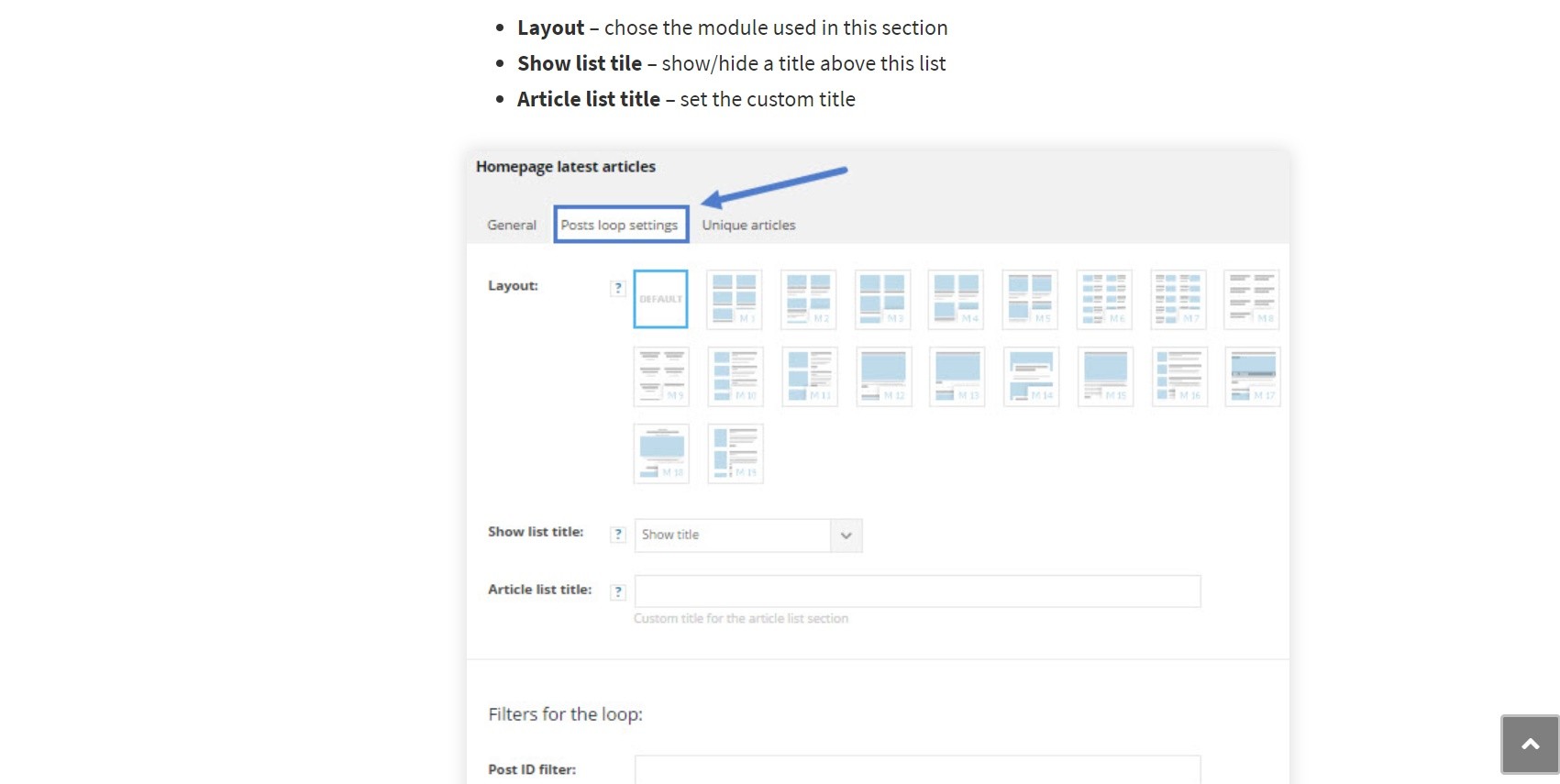
In order to change the post that appear in Latest Articles you need to go in homepage, click on edit and look for Latest Articles, change from general to posts loop settings and look for limit post number.
-> https://forum.tagdiv.com/page-templates-2/
Thanks.
 datt
datt Hi,
the filter works correctly..because I tryed to set up added this setting: (https://drive.google.com/open?id=1h4ZOkMNKY9apBGZjjUvhHMHhuvOHR9Yi) and finally it works…but Today I am in allert: becuase the posts that there are into “All” (in italian: Tutte) hasn’t all posts that there are in the other categories, like: cronaca, politica, economia… etc. Moreover the All’s loop posts is update to yesterday (https://drive.google.com/open?id=1h7qP0wfgxsA0w2Le95py9VX63zBCfiZb)! differently of loop’s posts for example of “politica” (https:https://drive.google.com/open?id=1OTPaHyD2y_Lj_f-t_4SvKdFhWbKBxi9x).. In fact This it has rightly the today’s articles; like the the other categories but this it’s not been for “All”!
Here site login credentials: https://drive.google.com/drive/folders/1FTd-9REcinTt5EApxYAz23rfDk2u0mpH?usp=sharing
Thank for support
Help me please
-
This reply was modified 7 years by
datt.
Calin Hi,
In may case I sow only 136 pages, maybe you have some posts set to hide ( private ), and those post will appear in loop only if you are login.
-> https://www.screencast.com/t/KzFghMZZtv
Thank you.
Calin Hi,
On post loop you can hide only the post -> https://www.screencast.com/t/1QN7MQ9sd
you can exclude the posts from that category, or you can replace the post loop and set a block were you can exclude the category.
Thank you for your understanding.
 akshem
We are using Post Loop block but the pagination is incorrect.
It creates 138th page when there are no posts to show.
URL: https://www.techuntold.com/page/138/ (WON’T SHOW content in Post Loop block)
But it’s there if you see in the pagination.
datt Hi Calin, thank for you support.
Here the screenshots: https://drive.google.com/drive/folders/1WtP7IeBfZUEdeQesFD1-H-pQVYXb8MMo So, I wan’t the Category “Pubbliredazionali” (id:14493) in my loop of posts..also other categories are recalled and this should not happen..
Again Thank you
 nhatkymua
Hi there, I can not click on any post, and page-nav from Posts Loop on mobile screen, at homepage
Its link https://tincongnghe.com/