
- NewsmagSmart sidebar
- NewspaperSmart Sidebar
 Alin [tagDiv]
 Hi,
I have checked and article from your site and the sidebar is sticky – http://screencast.com/t/UawinScMwG6 so please clear all caches. For pages please check this guide how to make it sticky – https://forum.tagdiv.com/smart-sidebar-2/
If you need more assistance regarding this or you have other issues with the theme please note that we will get in touch with you Monday – http://screencast.com/t/5EQlEtXSFCp
Thanks for understanding! Happy new year!
 Watashi10
Hi,
I noticed that the post views counter is not working anymore after updating to the latest version of the Newspaper theme.
I didn’t change anything on the theme, and everything was fine before updating. This issue and the fact the the smart sidebar is not working either are the two things I noticed until now.
My website is: http://www.cronicasgeek.com
Some of the latest posts that where published after updating the theme and which are not recording the hits:
http://www.cronicasgeek.com/2015/12/ian-murdock-fundador-debian-linux-ha-muerto/
http://www.cronicasgeek.com/2015/12/tormenta-solar-tocara-la-tierra-la-noche-ano-nuevo/
I also have the “ajax views count” enabled, as always.
Hope to solve the issues soon.
Thank you very much!
Best regards,
Elvis B.
Watashi10Hi, I encountered this problem after updating to the last version. The smart sidebar is enabled but it’s not working.
I have exactly the same options as before updating to the new version, but it seems that the smart sidebar doesn’t want to activate on category pages.
Maybe you guys can help me to solve this issue. Thank you very much!
My website: http://www.cronicasgeek.com
 bullet550cc
after the latest update, following are the error’s i am facing
1) Website not working on twitter app on mobile
2) website not working on facebook app on mobile
3) Smart sidebar not sticking
4) Article repeating on load more (very old bug)
 Bogdan B.
 Hello,
The smart sidebar does not support a background color from visual composer as the container changes when it starts to stick. You can add a background color using css just to the container that moves, but it will be without the padding: http://screencast.com/t/aCLsGjtMez
Thank you!
Bogdan B. Hello,
Please disable all your plugins except visual composer, clear your cache and purge cdn files if you use it. This could be a plugin conflict so please let us know if the problem is still there afterwards.
As a note, the smart sidebar will not be removed from your homepage if it was added in visual composer on the row. If this is the case, you will need to remove this class from the row settings: http://screencast.com/t/uaxcHcEL.
Thank you!
 crmnldan1729
 Theme Panel Not Woking
Yesterday I have renamed my HTaccess file name ( Because the admin panel is redirecting to the same page again and again ) . I have just checked that. Not only Smart Sidebar option : Nothing from Newspaper themepanel is working. I checked with so many options just now. Please someone help 🙁
Few minutes back i have updated my theme and and wordpress.
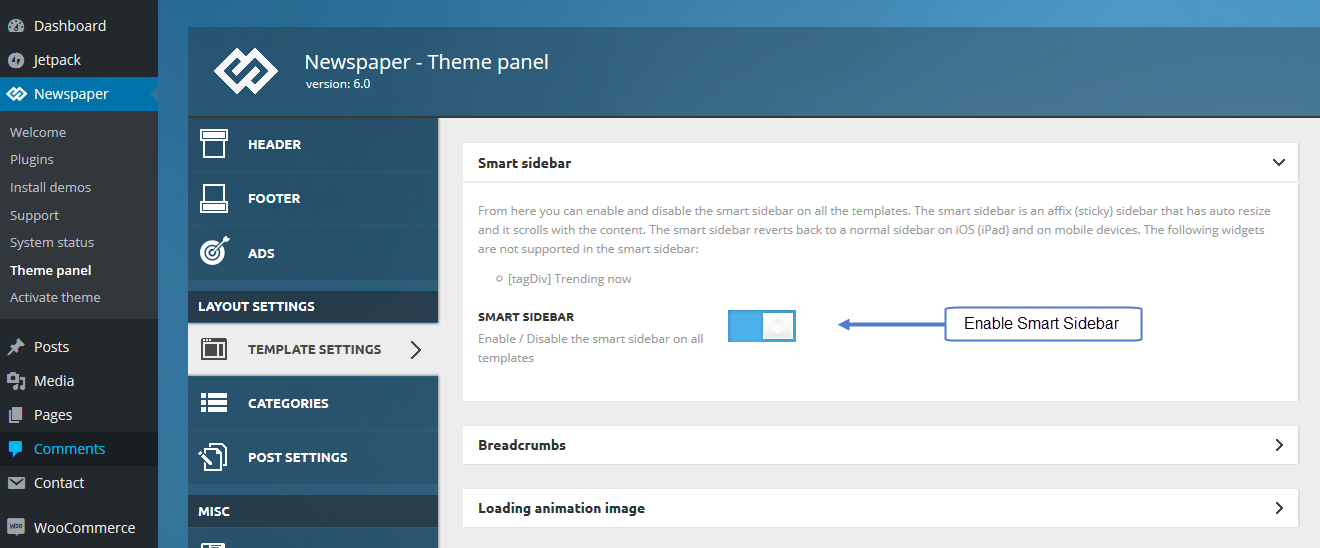
crmnldan1729I have disabled Smart Sidebar. But it is still showing. I have tried enough times enabling it and disabling it. But No USE. Please help 🙁
 Andrei L.
 Hi
To achieve that you have to change the page structure a bit. You can use the page template default and add a new block to duplicate the latest article part. You can use block 3 for example to reproduce this part of your site: http://screencast.com/t/8a1cBZ4Vyc Your layout in Visual Composer should be similar with this one: http://screencast.com/t/tuRD1YJNSC To make the sidebar scroll down with the page you have to make it sticky: https://forum.tagdiv.com/newsmag-smart-sidebar/ – http://screencast.com/t/5avIgqnDO1
Hope this help.
Thanks!
 manilashaker
 “Cameltoe”?
Found the culprit, it’s the Autoptimize plugin that conflicted the smart sidebar and ajax preload. Thanks for the help.
Bogdan B. Hello,
You can remove the sidebar from the post when you create it: http://screencast.com/t/iRWyTjnjPCw
You can alternatively delete it from the code. For smartlists we reccoment post style 5 as this post template does not show featured image. You can edit this file: http://screencast.com/t/GsjkyPXkbe and comment out or delete the highlighted code. this will remove the sidebar entirely from the whole website.
Thank you!
manilashaker Hi catalin,
I tried disabling plugs in on the main plugins tab of WordPress as well as the plugins on NewsMag panel. But it didnt work. My suspects are the new plugs in installed by my friend:
Autoptimize
Optimizes your website, concatenating the CSS and JavaScript code, and compressing it.
EWWW Image Optimizer
Reduce file sizes for images within WordPress including NextGEN Gallery and GRAND FlAGallery. Uses jpegtran, optipng/pngout, and gifsicle.
Unveil Lazy Load
This plugin makes lazy-image-load possible to decrease number of requests and improve page loading time, and uses a lightweight jQuery plugin created by optimizing Unveil.js in order to only load an image when it’s visible in the viewport.
ZenCache
ZenCache is an advanced WordPress caching plugin inspired by simplicity. Speed up your site (BIG time!) with a reliable and fast WordPress cache.
But not sure on which one from them or if there is any.
The AJAX Preload stopped working last week while the Smart sidebar just a couple of days ago, I can’t track if which plugin has affected it.
My other suspect for the Smart Sidebar is that I put an tagdive Slide. I already removed it tho.
Thanks
 moazam
 Hi Bogdan,
Thanks for the reply and proposing a solution.
I think this solution is not good because every smart post will require a CSS change. I am thinking to use custom fields.
I am currently using child theme. Do you know which file I have to edit if I have to remove sidebar entirely?
I understand this question does not cover your support policy. So, it’s fine for me if you can’t answer this question.
Thanks,
Moazam
Bogdan B. Hello,
Unfortunately you cannot hide the sidebar based on smartlists but you can hide it based on post id’s. Every post has a unique id you can see with your browser inspector: http://screencast.com/t/LOWjAktF
Fopr example the post id from the above screenshot is 1385 so i would use css to hide the sidebar on that particular post like so:
.postid-1385 .td-main-sidebar{

display:none!important;

}
You can use this code to apply it to your particular posts you want to use smartlists on. Simply copy and paste the code then change the id. (you can get the id from the back-end as well: http://screencast.com/t/gYFV7SoYF)
Thanks.
manilashakerHi guys,
My website is manilashaker.com. I just noticed that both smart sidebar and ajax preloading in category are not working anymore. I checked the settings and still found that smart sidebar is turned on in the panel.
I am not sure if this started happening when I put a slider on the side bar, but right now I already removed the slider. I already refresh the cache and tried on other browsers, still the smart siderbar wont work. It doesnt stick on the right.
The ajax preload is several days not working already since I noticed it.
Thanks
moazamHello,
How do I turn off sidebar for smart list only?
Thanks,
Moazam
 James Christou
We are currently using version 2.3 of Newsmag, and we are encountering a challenge that your team may have some insight of how to solve this.
We are using the sticky menu option, and we added another sticky <div> underneath the sticky menu.
Because of having the 2nd sticky div, the smart-sidebar isn’t working properly. It looks cut-off.
After a quick investigation, we found that by changing the value of td_affix_menu_computed_height = 100 at Line 4429 will solve the issue.
We have created a child theme for CSS and modules and blocks alteration. However, is there a way to override a javascript function at tagdiv_theme.js in our child theme? We do not wish to make modification / changes to tagdiv_theme.js – because we would like to keep upgrading the theme whenever there is new upgrade of the theme.
Any advice will be greatly appreciated.
Thanks.
 Catalin
 Hello solo,
The meta box contains some information about the post, such as: Author name, Post date, views and comments. If you want to remove this, on your all post pages, it is necessary to use a BIT of Css to hide them. Please try the code below and place it in your Theme panel->Custom Css area, like this: http://screencast.com/t/1rsaswhD9vXj
header .meta-info {

display: none;

}
The result: http://screencast.com/t/IGHRpE7IRJ
You can create your side bar if you are using the Visual Composer like in the next screenshot -> http://screencast.com/t/jbNcO9iPlIqg . For more information about how to use this, please consult our documentaion here: https://forum.tagdiv.com/newsmag-how-to-use-visual-composer/
Also, for more information about post templates, smart side bar, please consult this: https://forum.tagdiv.com/newsmag-post-templates/ – https://forum.tagdiv.com/newsmag-smart-sidebar/
You can take a look over our You Tube section, because this contains a lot of tutorials and it may be useful
https://www.youtube.com/results?search_query=tagdiv+newsmag+
Hope this helps and let us know how it goes!
If is not what you mean, please provide more details about this, so I can be able to provide a more accurate response!
Thank for choosing our theme and thank you for your message!
 mtman
mtman Hi Bogdan,
Just closing this out on my question about the sidebar. After I removed the Chris Custom Mods, the smart sidebar started working as intended in Chrome again. I didn’t go through the Chris Custom Mods line by line to figure out what part of it was causing the issue, but I might do that later since I liked having some of the Chris Custom Mods to make the site run faster.
 marcelo
Hello
When I see my website from a smartphone
My website is http://www.templodosucesso.com.br
Is not showing my sidebar banners; (inside categories); Main page the sidebar is ok, but when clicked in one categorie from menu, the sidebar is empty.
At a desktop, normal cpu, the sidebar is O.k in every categories
the only add-banner that is seen on smartphone, Is the header add, and the footer add.
Thanks
Bogdan B. Hello,
The smart sidebar was meant to scroll to the bottom of the post. It only stops if you have 2 sidebars set to scroll, then the first one will stop and the second one will scroll further. Please check this behavior on our demo as well: http://demo.tagdiv.com/newspaper/ (i could not recreate your issue or i did not understand it properly) If the demo does not behave such as your sidebar, please check to see if you do not have any open tags in your post (text edit mode not visual). This is the main reason a sidebar breaks.
P.S. The above bug is related to keyboard scrolling (jumping from top to bottom and back to top using the [home] and [end] keys. the bug was not yet fixed in version 6.6.)
Thank you!
mtman It appears I have a similar issue related to the smart sidebar with Chrome. With the smart sidebar option turned on in the theme panel, in the Microsoft Explorer and Firefox browsers, the sidebar scrolls to the bottom of it’s contents and stops while the main article window continues scrolling to the bottom of it’s content. However since the 6.6 newspaper upgrade, in the Chrome browser, the sidebar scrolls to the bottom of it’s contents and then keeps scrolling past the end with whitespace as the main article window scrolls to the bottom of it’s content. Obviously I would prefer for the smart sidebar in Chrome to behave the way it does in explorer and firefox and not scroll past the end of the sidebar with whitespace.
Is this related to the same sidebar chrome bug that is discussed here?
Andrei L. Hi
Thanks @doucare1971 for your suggestion.
@AWAY FROM LIFE I’ve checked your site and the smart sidebar works fine now. If you will need other instructions please let us know.
Thanks!
Bogdan B. Hello,
Te smart sidebar was coded to work with the scroll function of the browser. By using the keyboard home and end you jump from one state to another without using scroll. I will add this to our list of fixes and we will look into it for a future update.
Thank you for pointing this out.
 hbger
hbgerFirst of all, I need to clarify I am a big fan of Newspaper.
I just want to understand some important features.
Does the theme provide the function of customizing appearance for mobile and desktop versions ?
Please check the examples below:
http://www.smartm.com.tw/
http://www.smartm.com.tw/Article/31373738cea3
The sidebar will disappear when it turns into mobile version.
Could we do that in the Newspaper theme?
Many many thanks for your response. 🙂
Gabriel
