
No search results were found in Documentation!
 Simion C.
 Hi,
Normally each element has its own default CSS, which is replaced if the element is customized in the composer. However, it’s strange that CSS used by the column title element affects other headings. The CSS is applied via a unique class, not targeting headings. Like in the code you provided, the unique class is .tdi_51, and unless this class is set on a heading then the CSS should not apply to it.
Could you provide a link to where I can see this issue? If you can’t provide a link in the forum, please send us an email at contact@tagdiv.com and we can continue there.
Let me know.
Thanks.
 aerosurfer
My Website is using Newspaper Theme and there are other pages on the website also.
The images on my Newspaper posts pages (Home Page, News Page, Events Page) have suddenly become very slow to load – 20 seconds. The images on other pages on the site load quickly. (eg. https://www.hazelgroveweb.co.uk/visitors/hazel-grove-picture-gallery/ – https://www.hazelgroveweb.co.uk/hazel-grove-services-shops/)
Also I have 3 other websites using virtually identical settings – Themes, Plugins etc but different content and they are not experiencing this issue.
Slow pages:
https://www.hazelgroveweb.co.uk
https://www.hazelgroveweb.co.uk/hazel-grove-news/
https://www.hazelgroveweb.co.uk/hazel-grove-events/
https://www.hazelgroveweb.co.uk/hazel-grove-club-news/
Other sites using same theme etc.
https://www.poyntonweb.co.uk/
https://www.poyntonweb.co.uk/poynton-news/
https://www.poyntonweb.co.uk/poynton-events/
https://www.bramhallweb.co.uk/
https://www.cheadlehulmeweb.co.uk/
It’s strange that it’s just the one website that is having this problem and it happened recently after several months of no issues. Can you help me fix this?
aerosurferMy Website is using Newspaper Theme and there are other pages on the website also.
The images on my Newspaper posts pages (Home Page, News Page, Events Page) have suddenly become very slow to load – 20 seconds. The images on other pages on the site load quickly. (eg. https://www.hazelgroveweb.co.uk/visitors/hazel-grove-picture-gallery/ – https://www.hazelgroveweb.co.uk/hazel-grove-services-shops/)
Also I have 3 other websites using virtually identical settings – Themes, Plugins etc but different content and they are not experiencing this issue.
Slow pages:
https://www.hazelgroveweb.co.uk
https://www.hazelgroveweb.co.uk/hazel-grove-news/
https://www.hazelgroveweb.co.uk/hazel-grove-events/
https://www.hazelgroveweb.co.uk/hazel-grove-club-news/
Other sites using same theme etc.
https://www.poyntonweb.co.uk/
https://www.poyntonweb.co.uk/poynton-news/
https://www.poyntonweb.co.uk/poynton-events/
https://www.bramhallweb.co.uk/
https://www.cheadlehulmeweb.co.uk/
It’s strange that it’s just the one website that is having this problem and it happened recently after several months of no issues. Can you help me fix this?
 Lamb
LambDear team,
I have a strange issue. When a user subscribes to a plan (managed by optin builder) he is added to users list in wp admin but not added to the leads list on optin builder..
Do you know what could be the reason for that .. ?
It used to work perfectly but for a reason I don’t know it doesn’t work anymore.
Best,
Lamiaa
 Calin
Calin Hi,
First, what you should do is to test it logged in so no cache is applied and see if the situation persists.
The next step will be to use only tagDiv plugins to see if the problem persists.
IF the problem is still there, what you can do is to try a different template for the search results – https://i.imgur.com/gO5mbA0.png or try to regenerate the thumbs https://forum.tagdiv.com/thumbnails-fix-strange-looking-images-on-blocks/
Thank you!
 Giport
 Hi, Calin
Thank you for the quick reply!
1. Of course, the tagDiv Mobile plugin and the amp plugin have been disabled and even removed. I wrote about this in the first message. I’ve already dealt with the problem myself. I think this will be useful to many, because I have encountered similar problems with people after removing the tagDiv Mobile plugin.
You need to delete the “Mobile Template” in this place. https://skr.sh/sXC1bg0kOan which is unclear when it was created there. )
2. On this point, you did not understand my question. I understand that the dfi plugin tagDiv Mobile is not supported by a third-party Forum plugin from WpForo. Although it’s strange, this is also one of the best forum plugins, can you adapt your plugin to their forum?
But I was asking how to make the Forum directory now. https://dev.giport.ru/forum didn’t use the tagDiv Mobile plugin, but used the adaptive version of the site? There must be some kind of hook in this regard, and you should have foreseen it. Your tagDiv Mobile plugin cannot support third-party plugins for themes, product catalogs, forums, etc
. There may be other catalogs on other sites that are better displayed through the regular adaptive version of the site.
3. A strange argument for such wonderful developers of the best WordPress theme.)
1 GB of disk is enough for 2000 screenshots if you limit the upload of files weighing no more than 500 KB.
If screenshots are not deleted, people will not post the same problems less, because screenshots can help you understand the essence of the problem and their solutions. But OK, I get it.)
Thank you for your efforts and the best theme for WP!
=======================
Привет, Калин
Благодарю за быстрый ответ!
1. Разумеется, плагин tagDiv Mobile и плагин amp были отключены и даже удалены. Я об этом писал в первом сообщении. С проблемой разобрался уже сам. Думаю многим будет это полезно, т.к. встречал похожие проблемы у людей после удаления плагина tagDiv Mobile.
Нужно удалить шаблон “Mobile Template” в этом месте https://skr.sh/sXC1bg0kOan который непонятно когда там создался. )
2. По этому пункту вы не поняли мой вопрос. Я понимаю, что dfi плагин tagDiv Mobile сторонний плагин Форума от WpForo не поддерживает. Хотя и странно, это тоже один из лучших плагинов для форума, может вы адаптируете свой плагин под их форум?
Но я спрашивал, как сделать сейчас, чтобы каталог Форума https://dev.giport.ru/forum не использовал плагин tagDiv Mobile, а использовал адаптивную версию сайта? Должен ведь быть какой-то хук на этот счет и вы должны были это предусмотреть. Ваш плагин tagDiv Mobile не может поддерживать сторонние плагин тем, каталогов товаров, форумов и т.д.
На других сайтах могут быть и другие каталоги, которые лучше отображать через обычную адаптивную версию сайта.
3. Странный аргумент для таких замечательных разработчиков лучшей темы для WordPress. )
1гб диска хватит на 2000 скриншотов, если сделаете ограничение на загрузку файлов весом не более 500кб.
Если скриншоты не будут удаляться – люди не будут меньше размещать одинаковые проблемы, т.к. по скриншотам можно понять суть проблемы и их решения. Но ок, вас понял. )
Благодарю вас за труды и лучшую тему для WP!
Calin Hi,
As far as I know, the WP_User_Query is used in a single plugin from the Newspaper theme, which is the tagDiv Cloud Library https://i.imgur.com/cegZL4k.png. The strange thing is that I can not recreate this situation on my install. Could you please contact us via email at contact@tagdiv.com and provide a temporary wp-admin access to investigate this situation?
Thank you!
Calin Hi,
For me it is looks like this – https://i.imgur.com/OsK8c4c.png
Using the code I provided looks like this – https://i.imgur.com/YD7WsBq.png. The strange thing is that it should look the same to you.
Thank you!
 Arturooooooo
Hello Team,
I am having issues applying category templates to my pages using tagDiv Composer on my website https://www.anglertest.de
As a starting point I used the aniglobe category template renamed it to koedertest-category and adjusted it to my needs but the changes are not beeing applied.
1) There is no way for me to switch the category in the composer to preview it in the composer
2) When visiting a category the “edit in tagDiv Composer” button is not visible
3) Not a single category template is ever beeing applied to categories. I have set the template as global without success. Changing the template on-the-fly from the frontend did not work. Setting the template from the theme panel category settings did not work either.
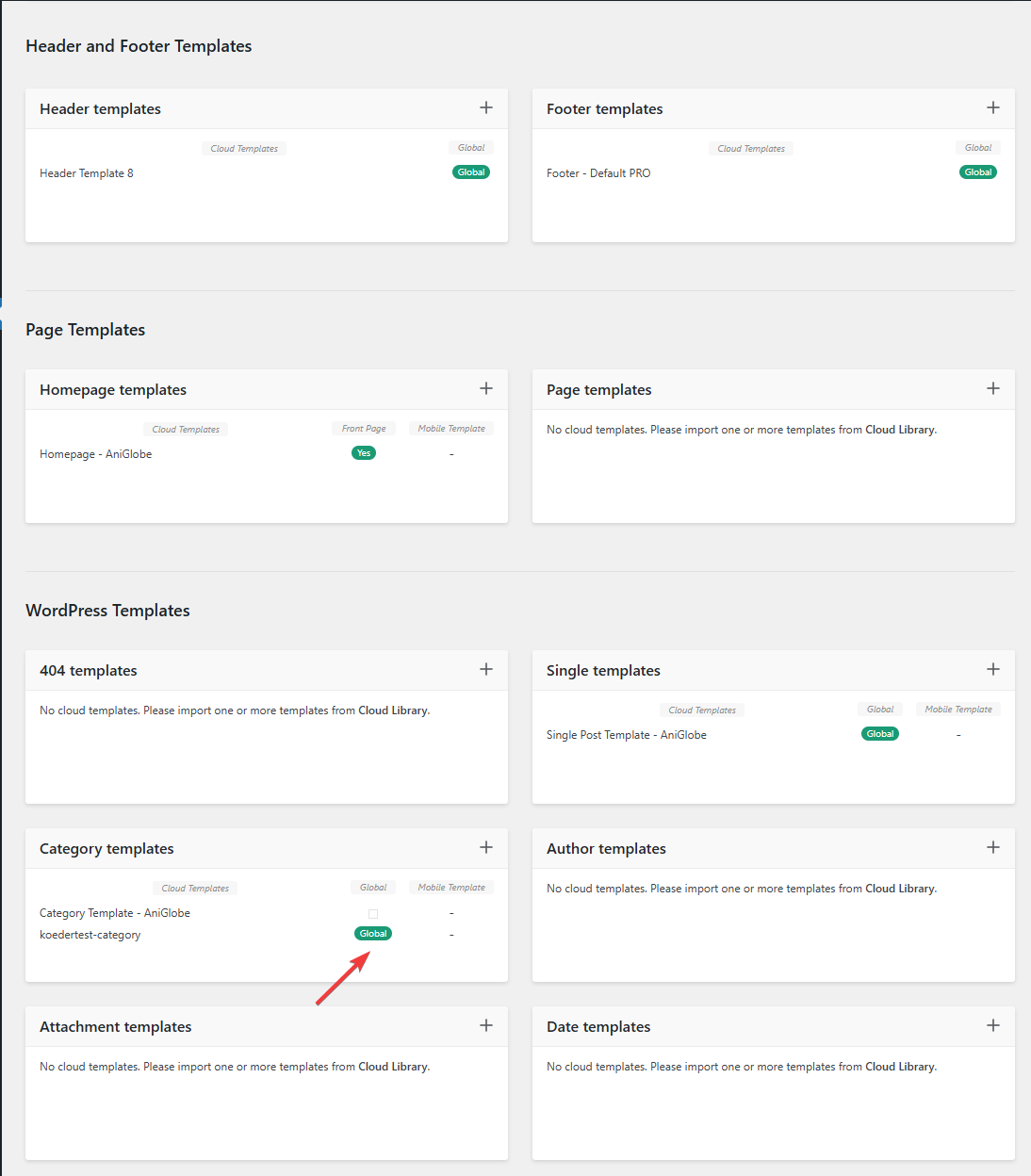
In this picture you can see that my template should be assigned globally
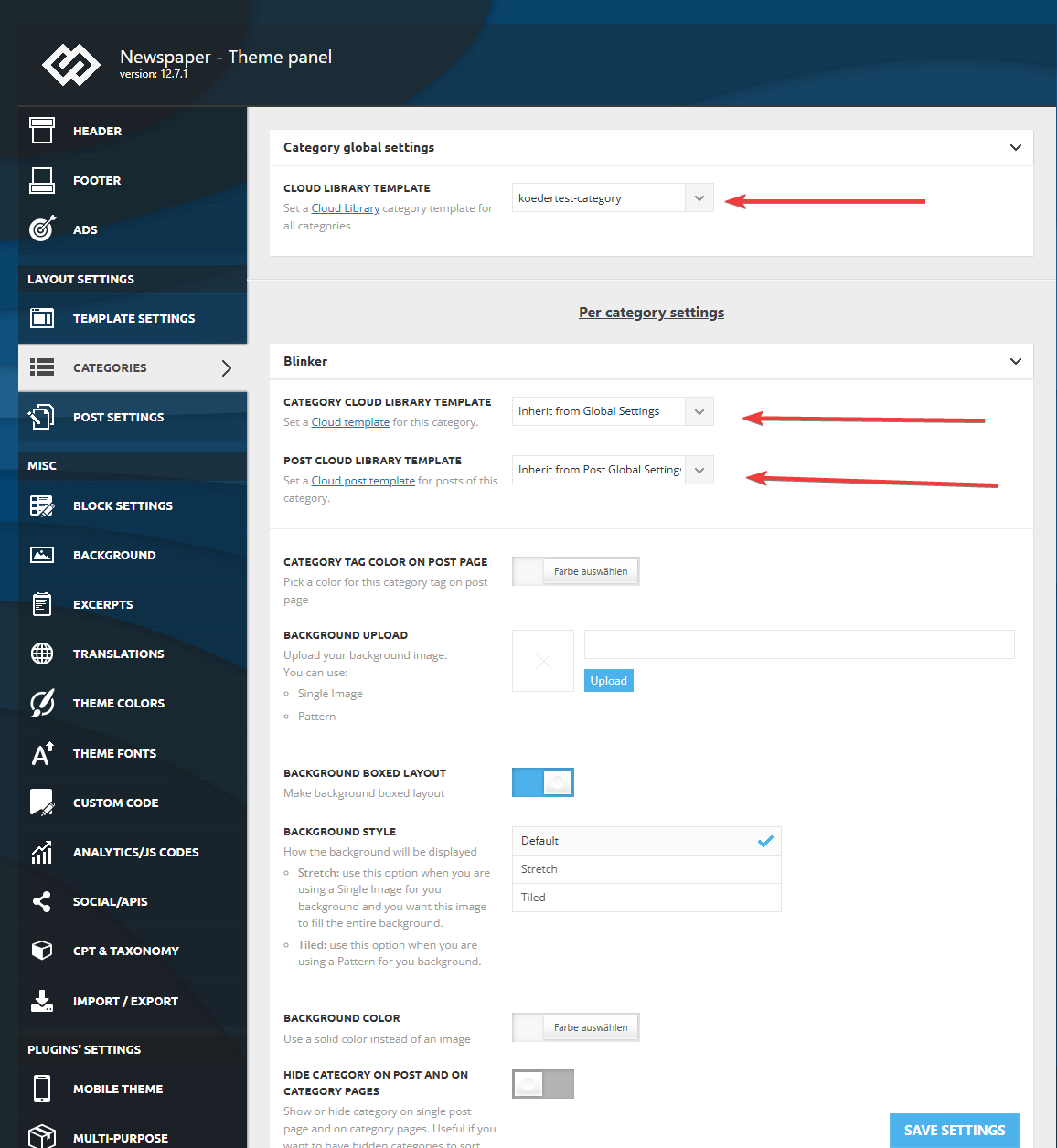
I made sure that in the theme panel under categories that the same template is globally set and checked every category underneath to inherit from global settings.
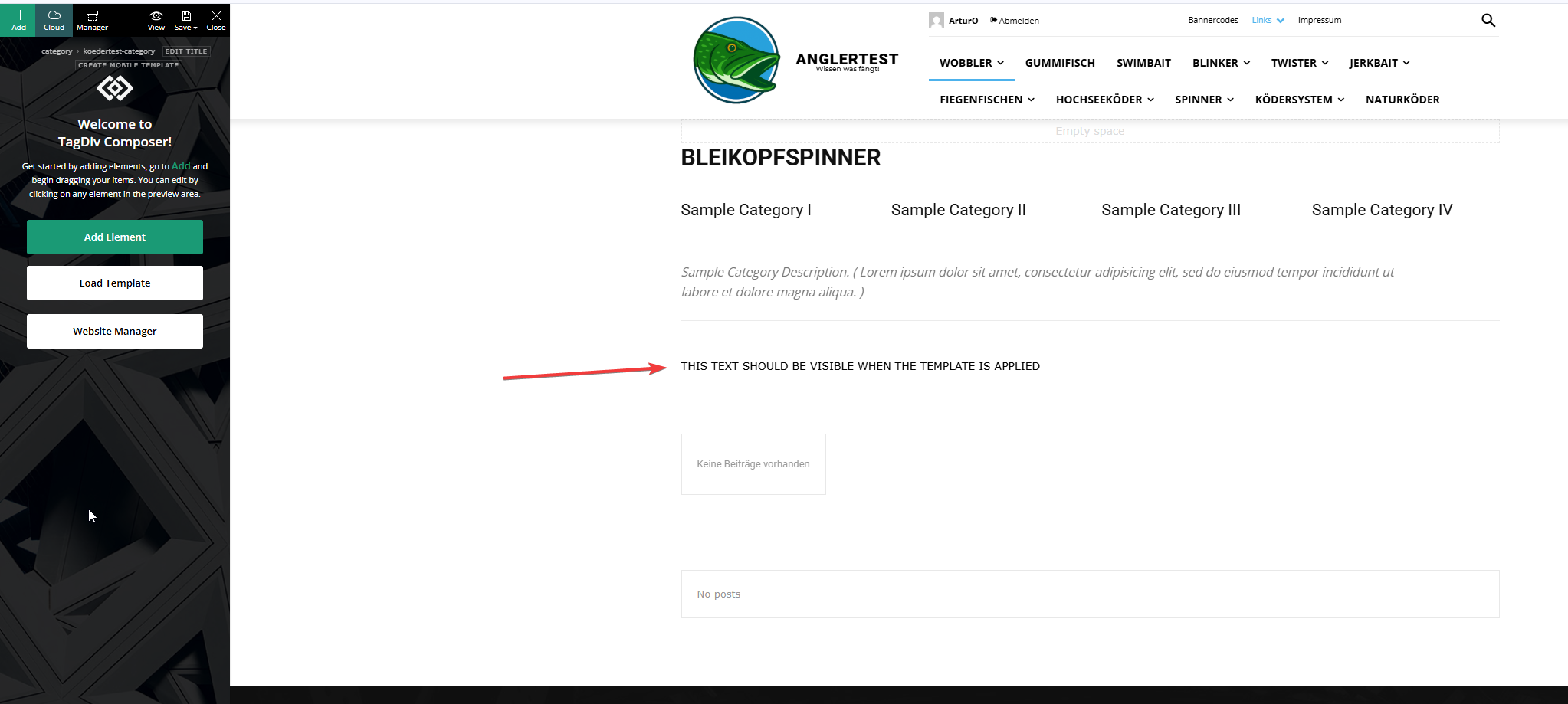
This is the actual template and I added an html block to verify if the template was assigned.
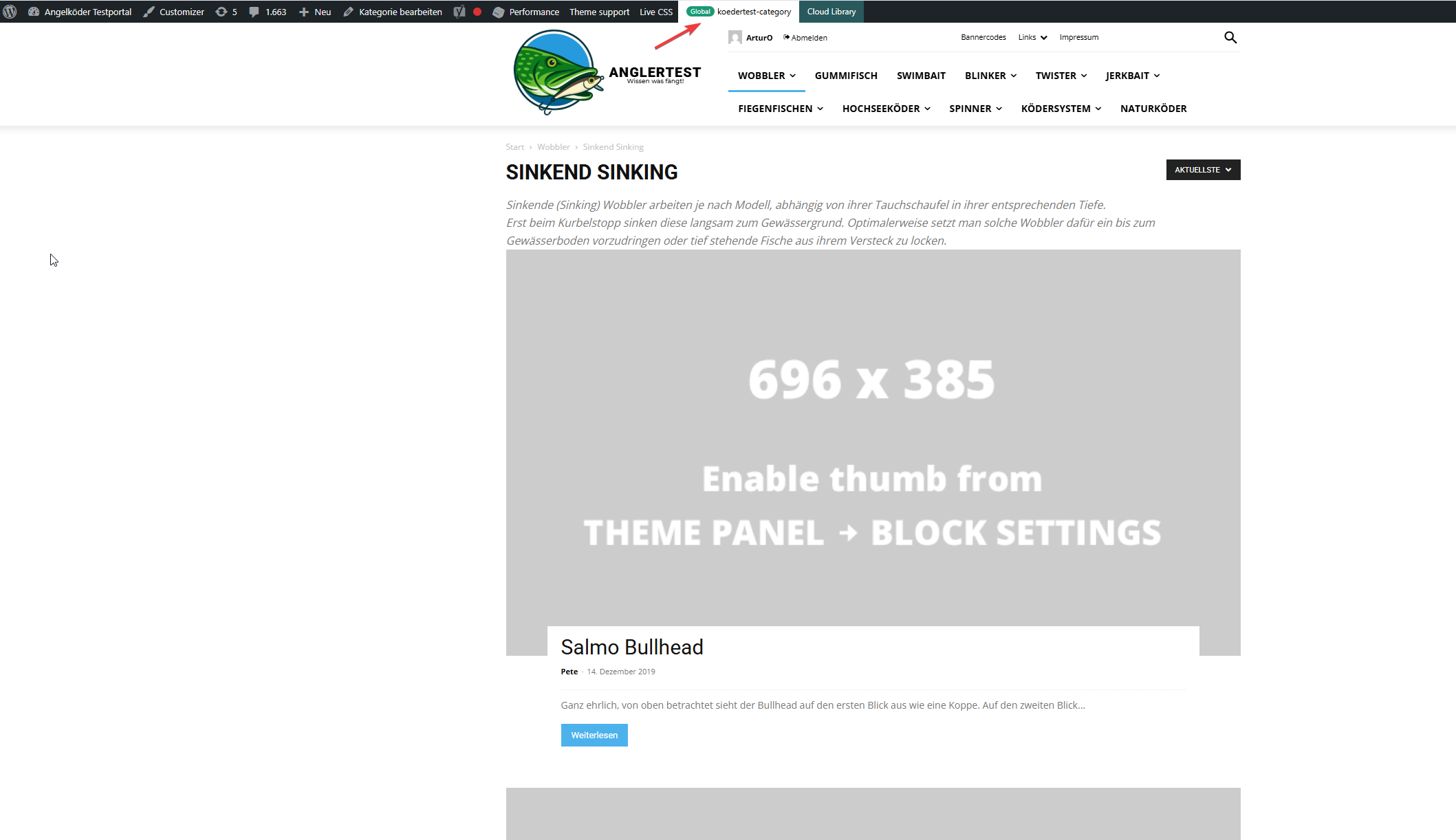
In this picture you can see that the template for the “wobbler” category looks completely different.
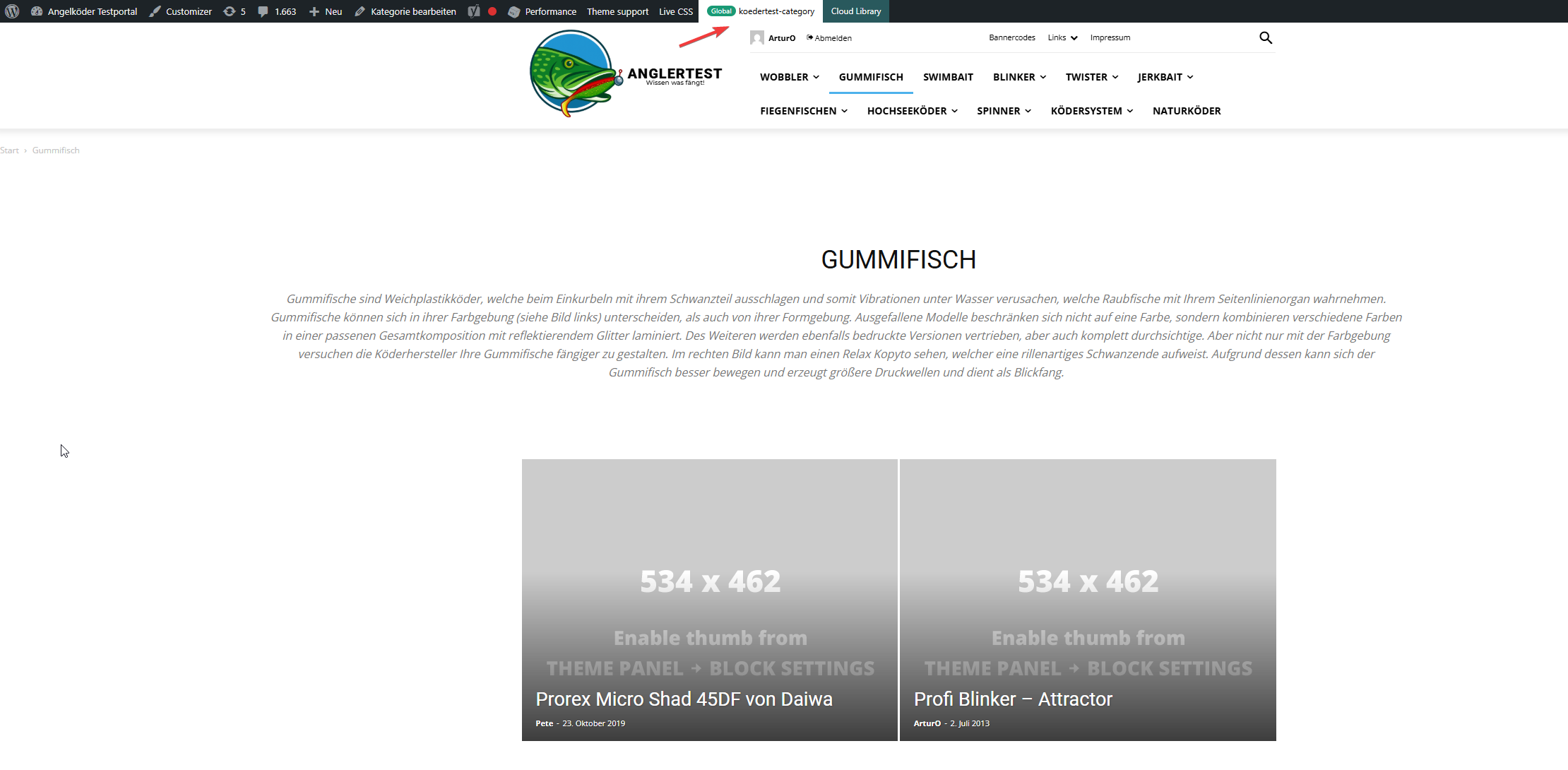
Strange enough, the template for the “gummifisch” category looks slightly different with the same theme applied (see arrow up top), the text I inserted to check was nowhere to be found (not even in source code)
In the very beginning I installed the aniglobe templates intially without demo content, but changed up the templates one-by-one. I did not find any option to disable or uninstall the prebuild website.
In my endless tries with different configurations I was not able to aplly the template, but I found something interesting which might explain the bugs I encounter.
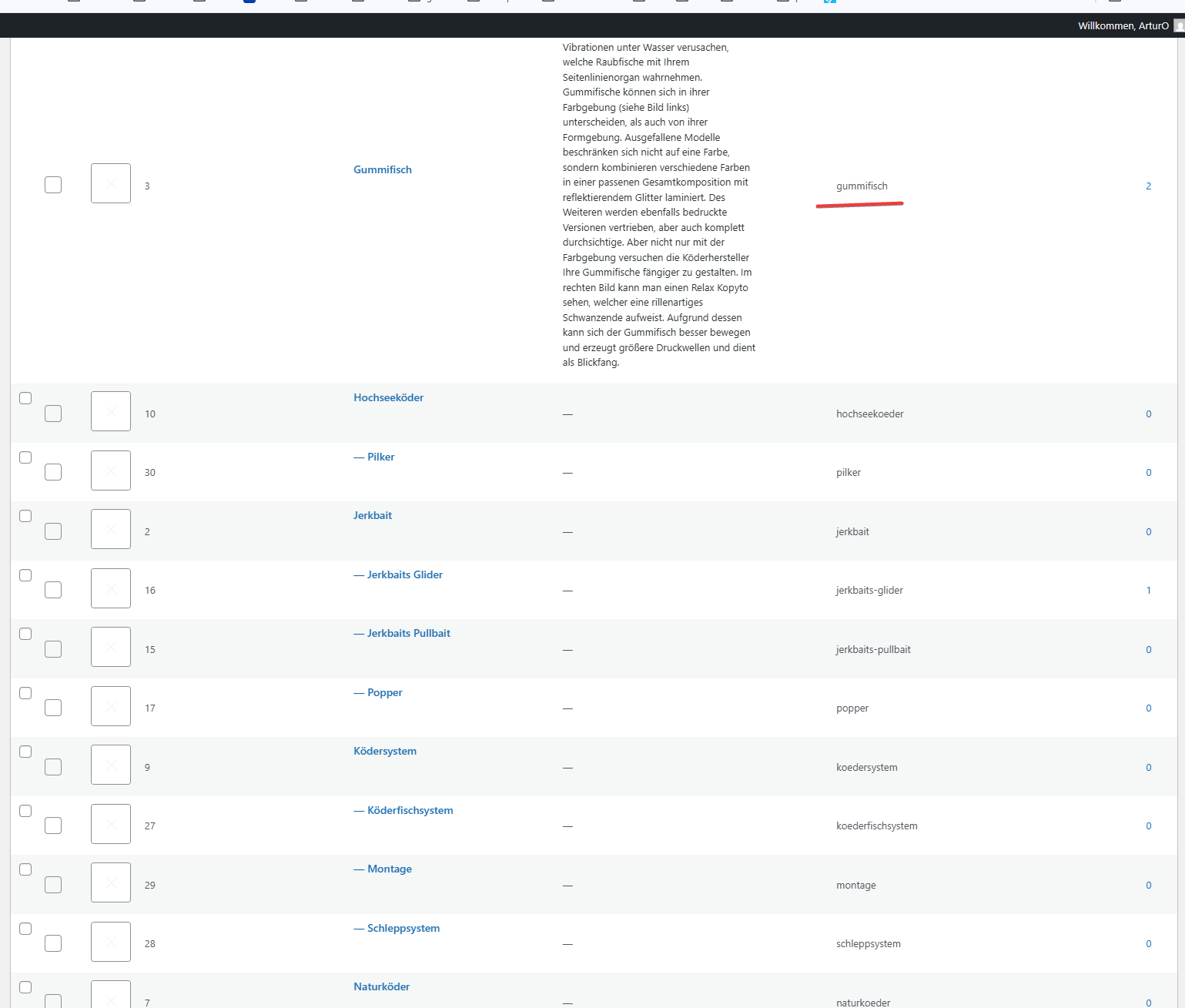
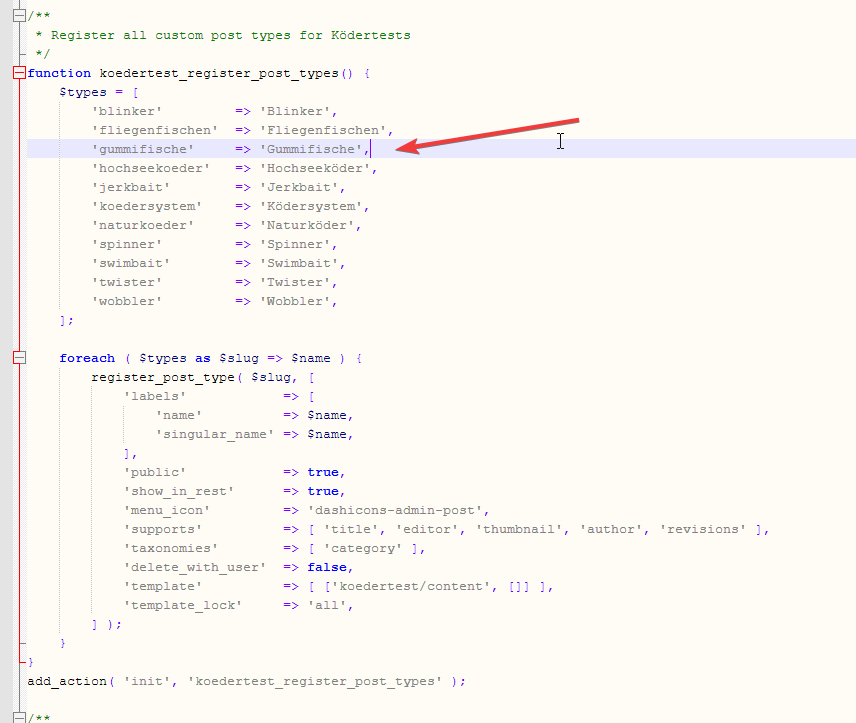
In those pictures you can see the categories I use and the post_types I register. The post_types are using those categories and I make sure that every post of those post_types has at least one category assigned. All post_types share the same categories (native category from wordpress).
The permalink structure is setup like /%category%/%postname%.html for every post_type. Category basis is set to “angelkoeder”.
Every category is named after a post_type. Nested categories are not named after post_types.
The only exception is the category “gummifisch” where post_type “gummifische” articles are categorized under. I might have missed the “e” when I set this up in 2013.
Somehow this category looks different as you can see in the above screenshot.
Furthermore I discovered that, when I change the template in the theme panel to “no template” (but do not save those settings) it reveals the settings I made previously with “Module 14” as article display view. You can see in the screenshot above for the “wobbler” category that this is the applied design even though the bar on top suggests my custom “kodertest-category” template is supposed to be applied.
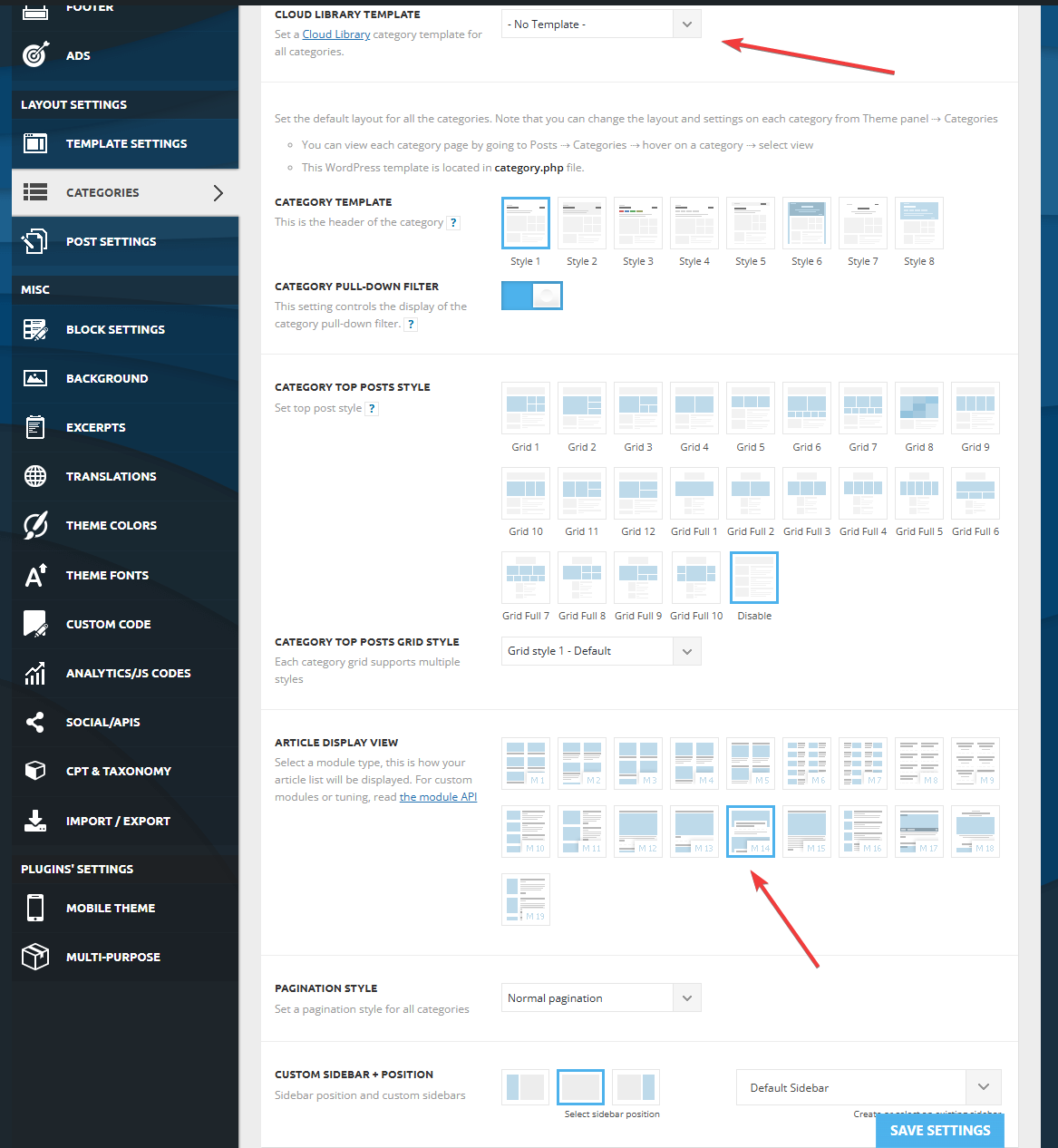
Any help is highly appreciated. If needed I can provide further screenshots.
Thank you for your help.
 Lex404
I get this strange error for the user group = editors.
Doesn’t happen to admins and if I switch an Editor to Admin, the error disappears. If I switch them back to Editors, it comes back.

From the admin panel, everything works, no errors.
If I click on the error, it redirects me to wp-admin/admin.php?page=td_licence_panel where editors shouldn’t have access but it says REGISTERED and Active
I tried to Unassign and re-assign but still persists.
 olejohan
 Hi again Calin
Maybe you misunderstand me.
Do you have a mail where I can send you screenshots?
I am creating the page in WordPress editor (and on the bottom you choose the Post template: (I assume that are how you would like the page to be setup (page layout))
And I assume you then should able able to edit it, independently without it then affect all other posts, including demos?
The strange thing are that all post was correct, I have been working on the site for about two weeks and all was ok, until suddenly every post was the same.
I assume if it was template affected, it would change all post in the same moment, not weeks later 🙂
I want to leave the side as it is (if you want to look at it) – if not I will reinstall it, staring over again, uploading the posts from xml file – so I not lost much (I hope), still it would be interessting to know why it actually happened.
website: http://www.pomeranian.dk
-
This reply was modified 1 year by
 Calin.
Simion C. Hi,
That’s very strange. I found the login for the website and I tested this on your website, looks fine for me https://prnt.sc/PKsbjTeEArki
Have you tried it with a different browser as a test? Maybe its a browser issue. Please try it and let me know.
Thanks.
 knthdgd
I try to create an inner row with 15 inner colums side by side.
But why can I only choose between your 11 pre-defined column structures? That seems really strange?
Why not let me do my own structure, like 1/15 ?
Calin Hi,
I tested with three emails, and all of them were sent successfully.
Could you please create a new email address and ensure that it don’t contain any unusual characters or formatting? It’s important that both the email address and the message content are clean and free of strange characters or code.
Thank you!
LambHello Team,
For a reason I can’t see, the secondary menu in the home page:
A) https://www.captainforest.com/ or this page : https://www.captainforest.com/about/
-> here you see “human powered media” in one line
B) Is different from the second menu in this page: https://www.captainforest.com/subscription-plans/
or this page : https://www.captainforest.com/webtv/ or this page : https://www.captainforest.com/contact-us/
-> here you see “human powered media” in two lines
I copied pasted the entire second menu from home page to the other subscription plan page -> it changes nothing.
Do you know why?
 mottoyou
 Never mind! I cleared my browser cache and it seems to have fixed the problem.
It was strange as it happened suddenly, out of nowhere…
 sparky263
I am trying to tidy up my SEO and I have a strange thing happening: on my home page. I have 3 h1’s with the first two being blank h1’s (see images from Marketing Syrup). But when I clone that page and the clone is of course not the home page, then I have only the h1 tag I want. What’s the problem and what’s the solution?
Here’s the home page: https://onlineinvestmentconference.com/
And here’s the cloned home page: https://onlineinvestmentconference.com/home-page-seo-finder-2/
Image from Headline counter (Marketing Syrup):https://imgur.com/a/QKkXLBa
sparky263I am trying to tidy up my SEO and I have a strange thing happening: on my home page I have 3 h1’s with the first two blank h1′ (see images from Marketing Syrup). But when I clone that page and the clone is of course not the home page, then I have only the h1 tag I want. What’s the problem and what’s the solution?
Here’s the home page: https://onlineinvestmentconference.com/
And here’s the cloned home page: https://onlineinvestmentconference.com/home-page-seo-finder-2/
Image from Headline counter (Marketing Syrup):https://imgur.com/a/QKkXLBa
 dorseteye
Hi Guys,
We’re migrating servers and we’ve just migrated everything to our staging/temp domain but main homepage images have been set to ‘blank’. Also article images have been set to blank. Strangely, the article title is also ‘Sample Page Title’ and we’re not quite sure why?
Live domain: https://dorseteye.com/
Staging/test site: https://dorseteye-u47296.vm.elestio.app/
Example article:
https://dorseteye-u47296.vm.elestio.app/dorset-man-among-victims-of-air-india-flight-ai171/
https://dorseteye.com/dorset-man-among-victims-of-air-india-flight-ai171/
Cleared cache and updated everything. Have disabled WP-Rocket.
I was going to use a regenerate thumbnails plugin but we have allot of images so I wanted to ask here first.
Thanks
 kestasve
 Any more ideas? 😀
Done recent suggested steps still no success. Now instead transparent menu is light gray. https://prnt.sc/iIF2tFacRKM-
https://prnt.sc/OjXlJaYx5dGr
This is really strange.
 shanean1
 Yeah,
Strangely 3 months later, I have this issue back again.
Any ideas on what could be the cause? I believe I am storing variables in object cache, so it shouldn’t need to ping for every single wp_admin request…
 kroshan
 I have identified the problem, it is due to LiteSpeed cache plugin. Even in default config light mode it is crashing. Strange.
Calin Hi,
For this you can use the steps indicate by us in this guide – Thumbnails – Fix strange looking images on blocks
Thank you!
 SYAZ
SYAZ👋 Hello tagDiv team & community,
I’m currently building my personal digital magazine site using Newspaper Theme 12 and I’ve run into a strange layout issue that I can’t seem to resolve on my own. I’d really appreciate any help or insight you can offer!
🔍 The Issue:
The footer and content on post pages appears misaligned to the left side — but only on:
Category pages
Single post pages
It renders perfectly fine and centered on:
The homepage
Custom static pages (like “Privacy Policy” “Join Syaz+,” etc.)
🧪 What I’ve Tried:
Zeroed out margin/padding via tagDiv Composer
Checked all footer row/column settings (full width, centered content, etc.)
Applied custom CSS (example below), but this affects global layout and causes issues elsewhere
Inspected with dev tools — the td-container inside .td-footer-wrapper seems to shift left on posts/categories
You may view the issues when visiting my site on an actual mobile phone, weird thing is: the issues doesn’t show up on the tagDiv Composer’s mobile view.
🌐 My Website:
https://syaz.co
⚙️ Theme Version & Setup:
Theme: Newspaper 12
Composer: tagDiv Composer
Footer: Custom Footer Template from tagDiv Cloud Library
No caching/minification plugins running while debugging
💡 Desired Outcome:
I’d like the footer to remain centered consistently across all page types, including:
Category archives
Single blog posts
🛠️ Optional CSS I tried (not reliable):
body.category .td-footer-wrapper .td-container,
body.single-post .td-footer-wrapper .td-container {
margin-left: auto;
margin-right: auto;
text-align: center;
}
🙏 Any help is appreciated!
I’m hoping someone might’ve encountered this before — or if tagDiv devs could shed some light on what might be causing this layout behavior across different templates.
Thanks in advance,
Syazwan Razali
 percezioni
 Hello, please note that for now i don’t have any social account, all field are empty and in theme panel > social > social networks i have selected “disable”.
I think is strange that the theme put 404 unnecessary links.
The website is under construction but you can see in source page https://www.mytraveltoparis.com/louvre-pyramid-paris-the-modern-icon-of-a-historic-museum/



