
- NewsmagCustom Post Type Support
 Vlad S
 Hello !
Please follow this tutorial in order to fix the thumbnails: https://forum.tagdiv.com/thumbnails-fix-strange-looking-images-on-blocks/
Thank you !
 azmifauzan
Hi,
I’ve just upgrade my website theme to newspaper X from newspaper 9.
Upgrade went smooth and success. But i found same strange in my post view. Author box became mess in desktop view.
Author info and the gravatar not align anymore. What can i do to fix this?
Here example of my website post:
https://greatnesia.com/historical-museums-in-jakarta-that-you-must-visit/
https://greatnesia.com/amazing-tourist-attractions-in-magelang/
 MeloMelai
Hi, I have problems with categories and tags when I create a new article.
This happened even before upgrading to version 10.
In summary, when I write a new article and create new categories or new tags, strange things happen:
– The categories I create do not appear immediately, and sometimes do not appear at all.
– Same thing for the tags, I have to wait about 3 seconds to see if it has taken them or not. In some cases they disappear after I entered them.
I leave the link for a demonstration video, I hope it is more comprehensive than what I wrote. At the beginning of the video I made some confusion in entering the categories but it is possible to see the problem anyway.
Rest at your disposal.
https://drive.google.com/file/d/1EZwIkZtcrRiCjidXT-hCxeTXYCdtAWKl/view?usp=sharing
Vlad S Hello !
Please make sure that you have made the update correctly. We recommend deleting the older version of the theme and plugins and install the new one, overwriting the files of the theme could cause issues. Also please watch our tutorial regarding images here: https://forum.tagdiv.com/thumbnails-fix-strange-looking-images-on-blocks/
Thank you !
 Calin
Calin Hi,
The retina is displaying on 4k -> https://www.screencast.com/t/8AKD57Jb please make sure that the thumbs that you are using are enable in theme panel -> http://prntscr.com/pskyg1 also make sure that you regenerate the thumbs using this tool, after that the retina images should display on 4k.
IF there is still a problem, please provide me a link where I can inspect your website.
Thank you!
Calin Hello,
You can resize the thumbnails using this documentation -> https://forum.tagdiv.com/thumbnails-fix-strange-looking-images-on-blocks/
Hope this will help you better!
Thank you!
Calin Hi,
The thumb for the images from block 25 need to be on 450px height -> http://prntscr.com/ps4g3w from what i can see your images are smaller, also from what I can see all your images are somaller -> http://prntscr.com/ps4ixb please try the thumb regenerate from this documentation -> https://forum.tagdiv.com/thumbnails-fix-strange-looking-images-on-blocks/
Also you are using http and https, please use only https you can fix this using a plugin like Really Simple SSL-> http://prntscr.com/ps4jvg
Thank you!
 Duvelix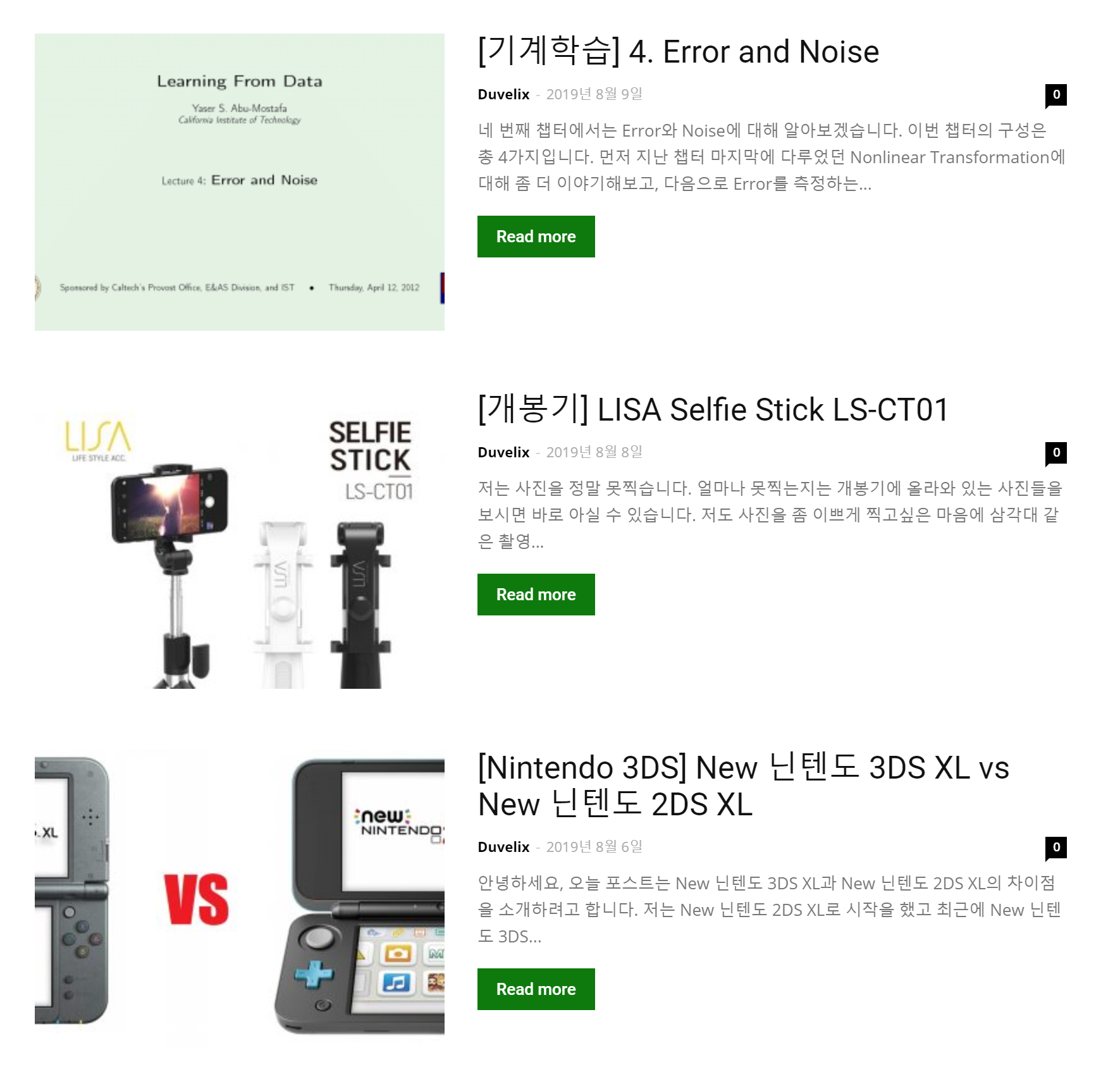
Hello, I am using Block 12 of the Newspaper Theme.
As you can see in the picture, there is a problem that the picture looks strange because the current thumbnail size does not fit.
I’m curious about the size and ratio of thumbnail images recommended by the Newspaper Theme.
It would be nice if you could tell me what size looks good on both PC and mobile environments.
Calin Hello,
Please make sure that you do not have a plugin conflict with untested plugins, please deactivate all non theme/tested plugins, also if you are using child theme, clear all cache and try again.
Also if your thumbs look like this -> http://prntscr.com/ppzq7n -> https://forum.tagdiv.com/thumbnails-fix-strange-looking-images-on-blocks/
Thank you!
 maaikewind
 Ah, I figured it out. Somehow I have to change those settings on the individual text thingies instead of in the general settings. Strange. Anyway, never mind.
maaikewind Hmm, a follow up question. Strangely enough, the lists on pages that I create with the Composer still look different.
See this page: https://www.fuckdiestudieschuld.nl/over-dit-blog/
Any thoughts?
Thanks!
Calin Hi,
Please make sure that you do not have a plugin conflict with untested plugins, please deactivate all non theme/tested plugins, also if you are using child theme, clear all cache and try again.
Also if your thumbs look like this -> http://prntscr.com/ppzq7n -> https://forum.tagdiv.com/thumbnails-fix-strange-looking-images-on-blocks/
Thank you!
Calin Hi,
From what I can see in your screenshot, there is a problem, the block 14 need to be like this -> http://prntscr.com/ppzpc9 please make sure that you do not have a plugin conflict with untested plugins or some custom code, please deactivate all non theme/tested plugins, also if you are using child theme, clear all cache and try again.
Also if your thumbs look like this -> http://prntscr.com/ppzq7n -> https://forum.tagdiv.com/thumbnails-fix-strange-looking-images-on-blocks/
Thank you!
 Artemide
hello, I recently installed a demo but I can not find a way to modify a part of the home page, where there is the block named “last articles” in the end of the body
That is strange since it is not editable neither with div composer nor from widgets section
Here is where you can find the page http://www.braintechdev.it
thanks for you help
 Slimhuis
 Hi Vlad,
I have arranged the HTTPS via my hosting provider.
The news articles are HTTPS, the website is HTTPS only the headers are HTTP. Its strange, but I have no idea how to fix this. Its not a ”big problem”, but i want to fix it.
-
This reply was modified 6 years by
Slimhuis.
 rcieslak
 Thank you
that’s strange. For me – Jetpack caused my problem.
Once I uninstalled it, everything came back to normal for mobile version.
Maybe some temporary issue.
Calin Hi,
Ur theme is using the thumbs , so all the featured images should be some thumbs, in this way you’ll have the perfect view for those featured images.
Thumbnails – Fix strange looking images on blocks -> https://forum.tagdiv.com/thumbnails-fix-strange-looking-images-on-blocks/
If this is not what You mean, please provide some more details
Thank you!
 Zorrofantasy
Hello
I have a strange behavior on my site.
It is more obvious to see on the mobile version(but it occurs on desktop version as wheel), every time a page is loaded or new access to the home page is sliding from left to right.
Could you please help me to disable this unwanted effect ?
Could you also help me to find why the loading time of my site is so slow
nguyenhoangminhson@gmail.com
 romkilla
Hello I have a strange behavior on my site.
It is more obvious to see on the mobile version(but it occurs on desktop version as wheel), every time a page is loaded the “search” page is sliding from left to right.
Could you please help me to disable this unwanted effect ?
Could you also help me to find why the loading time of my site is so slow.
Thanks.
 Benedict Paramanand
Hello My URL is – “sustainabilitynext.in”
From today morning, I am getting a strange error.
It is showing on dashboard, at a glance area as “1 URL w/ new AMP errors”
If I click on it it takes me to “AMP Validated URLs”
where it shows “The site is using transitional AMP mode with auto-sanitization turned on, the validation errors found are already automatically handled.”
How can I fix this error? Can you please help me?
 moneymake
I have two questions.
This is my site. ===> https://moneymakinginfor.com/
1) I can’t see images on my mobile screen
Question description image ===> http://carloansinfor.com/wp-content/uploads/2019/10/mobile.jpg
2) PC screen loading is strange.
Question description image ===> http://carloansinfor.com/wp-content/uploads/2019/10/screenshot.jpg
Vlad S Hello !
You will have to regenerate your thumbs because they have probably broken links. Find out more about it here: https://forum.tagdiv.com/thumbnails-fix-strange-looking-images-on-blocks/
Thank you !
 benj0612
 Hi,
Thank you for your feedback.
Problem 1 Amazon : still a problem of display of my Amazon products on iPhone and Samsung tablet. As shown in my picture. No orange arrow to slide to the next product.
Amazon told me maybe something is not configured to display on mobile, but I read every parts in Theme Panel and didn’t see anything.. Very strange.
Problem 2 : On computer, the counter of Facebook like is okay, but on mobile and tablet the counter is always at ZERO … Why ?
 taransuri
 Thank you Vlad. I will do that and see if that works. It is strange as it will look fine for a few hours and then it would revert back to a mobile theme, even on desktops.
Calin Hello,
This can be a plugin conflict, please deactivate ALL non theme plugins, also if you are using child theme or cache plugin, deactivate them, clear all cache and try again.
Also from what I can see your thumbs do not display correctly -> http://prntscr.com/pke32r
Thumbnails – Fix strange looking images on blocks -> https://forum.tagdiv.com/thumbnails-fix-strange-looking-images-on-blocks/
Thank you!


