NexusFred
 Hello,
“– All rows and columns have width settings. So in page and cloud templates where you can use the tagDiv composer, you can have custom widths.”
Yes in PAGE, not in POST
“- Regarding this gutter, I don’t exactly understand what it is supposed to do.”

“– The post title in cloud templates has padding and margin settings, all elements in the tagDiv composer have this in the CSS tab”
Yes in PAGE, not in POST
“– Regarding the reviews, you could create a review … Most if not all the elements can be saved once configured and re-used.”
Yes in PAGE, not in POST
“– For what element would you like to chnage the image size? Maybe there is a way.”
If I change the Content/Sidebar ratio to 75%/25% and the container width like this
.td-container{width:1114px !important;}
.td-pb-span8{width:75% !important;}
.td-pb-span4{width:25% !important;}
like you take a pre-sized image as Featured Image, this one will not have the correct width so I will need a new Featured Image size to fit the new content div size.
And I cannot use a CSS resizing because the Featured Image selected is smaller than the new content width, so it’s will be an enlargement CSS resizing who always provide a blurry outcome
“There are plans to add a scrollbar to the composer element list in coming updates.”
Great !! Thanks a lot, that will be very appreciated 😉
“The theme has predefined ad spots …”
Really you need to make a little survey of your competitors about that, your Ads system is really outdated and inefficient.
-No shortcode ad
-No default ad per category
-No Post ad override
-No Campaigns manager
-No Banners manager
-No Ad Blockers Fallback
“While the theme is compatible with the Woocommerce plugin, it doesn’t have specific settings for it like other themes that are built with this in mind. If you want to set up a shop and have questions let me know.”
I do not ask to Newspaper to be like Porto or Flatsome but some templates for it will be welcome. Do not forget that not all Newspaper build a website for the glory, they want also make money. It’s a little annoying to add a lot of “add_action” and “add_filter” into the functions.php just for some Woocommerce customisation.
Newspaper is real good theme, I like the Demos, his stability, but in one year I do not notice a significative evolution of his functionalities.
-No Header builder.
-No Footer builder.
-A non interactive Reviews system (readers can’t write their own reviews).
-A outdated Ad system.
-No Social Media Auto Publish.
-A complicated way to add Custom Posts.
-No dissociation between Custom Posts and Taxonomies.
-No Featured Image thumbnail in the POST list.
-No Smart Thumbnail Generator (choose the point of interest of the image).
Ok we can do all that with external plugins, but as you know more external plugins you have, more bugs you get. All this functions build by the Theme builder will work better than external ones.
Your builder is great but we do not build a new PAGE everyday, but POSTS !
Best Regards
Nexus
 salimd83
Hello
I copied my website folder and database from online to my locahost. All is working fine but the TD composer is not working.
I can see my previous changes in the viewer but the are not displayed on the editor.
Example: I previously set color red for header, now if i change the color the color the TD composer just keeps loading forever.
Best
 nikos mantis
Hello team im a new customer, purchased your theme and i have some issues.
I wrote also on comments but i didnt took a clear answer so i respond here.
Well my point is to create a homepage with full width and left sticky sidebar.Also in middle i want to bring other posts and right a sidebar i dont care to be sticky though.Thats what my layout i want it to be but the point is i cant create left sticky sidebar in full width with visual composer and if i try to switch to tagdiv composer it says that the page was not created by td composer and it loads infinetely.
So how can i achieve that?I saw that in options i can create smart sidebar on left for categories only but how i can do this for homepage also?
2)is it possible somehow to have hamburger menu on homepage?
Thanks for assist team !Have a nice day!
 simchris
Hey folks
totally not critical thing; just noted the readme.md for TD_Composer still references the old beta github URL, and dev support forum; both which are now 404
ref package in ‘all files’ download / plugins
Version: 2.3 | built on 13.12.2018 8:45
Might want to start using https URLs in all the files, at some point 😉
	Plugin Name: tagDiv Composer

	Plugin URI: http://tagdiv.com
Only noticed as was prepping for upgrade from NM 3.1 to NM 4x…
Feel free to delete this post after making note of my pestering 🙂
 Prateek
Hello, team tagDiv.
I embedded MailChimp form in my template. Everything’s fine but I wanted to change some colors so that my form can match with my theme.
There were three colors that were not changing.
1) Input placeholder color.
2) Input background color.
3) Input border color.
Please see this image for more clarity.
 pawanpepz
Hi, I’ve been using Newspaper theme for a long time and I love it. I started using TDComposer recently on my primary Jaipur city travel blog (linked) where I’m facing strange issue.
A strange white bar is always there above first element in TDComposer and Top Menu bar. I couldn’t find any way to fix it. Any help will be appreciated.
 Catalin
 Hi,
If you want to add the Newsletter to your Post Sidebar, you have to create a Custom Post Template using the Cloud Template Library and add this element with TD Composer plugin on your sidebar, like this -> https://www.screencast.com/t/5dljsKX5l
Thanks.
 docktera
Hi,
When we edit a page – which was successfully build with TD Composer – to update for example “Yoast SEO” settings and update the page using the blue WordPress button “Update”; then after opening TD Composer again, all content line breaks / new lines are removed from “Column text elements” when opening the text element with the “Edit Content” button.
How can we prevent this behavior?
Thank you!
 rifqiazizi
In my web I use the Newspaper 9 gaming theme.
I want to add a navigation button with a fixed position when the user accesses using mobile on each posting page and page.
Screenshot : https://pasteboard.co/HZJ2fIP.jpg
I want add this code :
<div class="navbar">
  <a href="#"><i class="tds-icon td-icon-whatsapp"></i><br>WA</a>
  <a href="#"><i class="tds-icon tdc-font-tdmp tdc-font-tdmp-old-phone"></i><br>TELP</a>
  <a href="#"><i class="tds-icon td-icon-whatsapp"></i><br>WA</a>
</div>
I have used these 3 ways:
1. Newspaper > Theme Panel > Custom Code > {add script html}
2. Add html scripts on wp-content/themes/newspaper/footer.php and wp-content/themes/newspaper/mobile/footer.php
3. Add html script with visual composer.
I used this method successfully, but only on the front page.
how can the script that I use be used on every page, post page ?
 Calin
Calin Hi,
If you want to edit the ads from pages you’ll need to use tagDiv Composer -> https://www.screencast.com/t/vuYVacgUxl
Also you can use custom css -> https://www.screencast.com/t/o9kPnQBy5s1
.td-adspot-title {

    color: red;

    font-size: 14px;

}
You need to set the code in Newspaper > theme panel>Custom code >Custom css and all titles of ads will have that font size and color
Thank you for your understanding!
 Paradoxer
 Also, related to that, I would like to know how to edit aspects of the posts loop using the “Pagebuilder + latest articles + pagination” template.
Using TD Composer, and inserting the “Posts Loop” block that way, I’m able to freely modify the presentation such as the image sizes and how the “Custom title” looks (I don’t want it in the default blue). I experienced bugs on mobile using this method, so I decided against it.
But when I use the default “latest articles” given with the template, I find the options available in the WordPress editor’s “Posts Loop Settings” to be restrictive.
 ORBGaming
 Alright that makes sense – I’m not running both, I like the TD Composer A LOT so I just wanted to make sure in advance. Appreciate the help.
 ktchicago
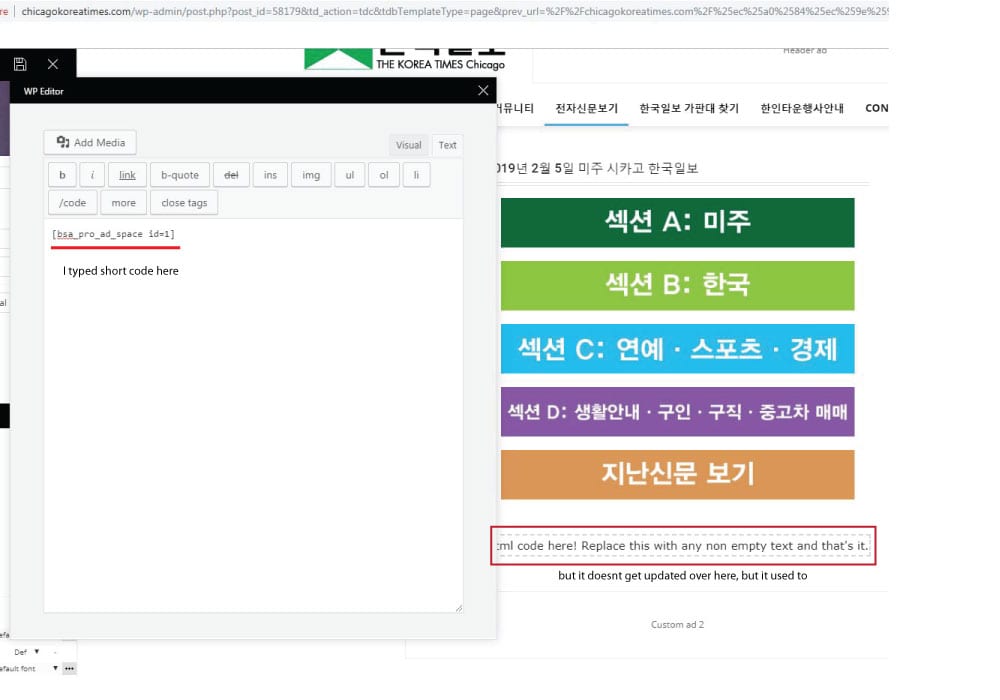
 the short code worked when I edit the page with WP bakery, but the error message appears when I tried to edit the page with TD composer after editing page with wp bakery.
It used to work fine, but the contents I wrote on column text box doesnt get updated as I write on it. I tried it again after disabling all plugins I installed recently, but it still was same :/
http://chicagokoreatimes.com/wp-content/uploads/2019/02/columntext1.jpg
 pete@e-production.net
 Upon reinstalling Cloud Library I get this error when I try to use it. I was starting to like the results of my layouts but these roadblocks are killing me — and my wife who’s business is ready to kill me.
Fatal error: Out of memory (allocated 184811520) (tried to allocate 147775 bytes) in /hermes/bosnaweb16a/b1871/nf.greatcompanions/public_html/newsite/wp-content/plugins/td-composer/includes/tdc_main.php on line 609
Paradoxer Hello Calin,
The confusion I have with that documentation is that I never had any kind of Visual Composer plugin until now. the only ones I have ever had are the ones that came with the installation files for Newspaper, which were “js_composer” and “td_composer.” I’m not sure if I’m supposed to install both, or just td_composer.
 Simion C.
 The classy demo uses a cloud template for the posts, you can change it to a different template if you want to.
With the introduction of the cloud library plugin, now post templates and many other templates can be created with the tagDiv composer
– https://forum.tagdiv.com/tagdiv-cloud-library-plugin/
There are templates designed by us which can be imported
– https://affiliate.tagdiv.com/#/load/All
Also there are blank templates which can be used to create a template from scratch. Using cloud templates is not mandatory, the default post templates are still available.
You can install the demo with no content, this way only the theme panel settings will be imported. This demo has an additional stylesheet but it is minimal indeed
– http://prntscr.com/mghck5
Most of it’s design is made in the composer directly with the available settings. Flex blocks were used mostly and these have a great deal of options and settings. We tried to keep the design similar to the erotic demo but there were some changes.
The class td-erotic is no more, it is now td-classy. This was one of the reasons the erotic demo has been modified.
You can remove the body class if it remained in the theme pane, it has no purpose anymore. Unless you used it in custom CSS code.
If you need help with anything else let me know.
PrateekHi, team tagDiv.
I want to know about two things here.
1) I created a page with TD composer using Flexbox-1 to create a lates posts section but I couldn’t find any option to add numbered pagination.
2) Once I am done, how can I save this template? The changes made through the theme panel can be saved from the export option. But, how a template created from TD composer can be saved?
Great day 🙂
 great1212
I have used an image in my shop which I made using the TD Composer. The problem is that the image is not showing properly in mobile devices. What size should I used for the image to look correctly in all devices including the mobile devices???
 pbc
pbc Hi, I’ve been able to add this field, following the documentation Here
I was able to add my custom block to the TagDiv Composer, and it displays the field content on the authors’ page correctly. But I have this error:

Here’s the code I pasted inside td_block_creative.php
<?php

class td_block_creative extends td_block {

    function render( $atts, $content = null ) {
        parent::render( $atts ); // sets the live atts, $this->atts, $this->block_uid, $this->td_query (it runs the query)

        global $tdb_state_author;
       // $author_description_data = $tdb_state_author->description->__invoke( $atts );
        $author_loop_data = $tdb_state_author->loop->__invoke( $atts );

        $buffy = ''; //output buffer

        // when no data - return empty on frontend
        if ( empty($author_loop_data['author_id'])) {
            return $buffy;
        }

        $buffy .= '<div class="' . $this->get_block_classes() . '" ' . $this->get_block_html_atts() . '>';

            //get the block css
            $buffy .= $this->get_block_css();

            //get the js for this block
            $buffy .= $this->get_block_js();

            $buffy .= '<div class="tdb-author-descr">' . get_field('additionalinfo', 'user_'. $author_loop_data['author_id'] ) . '</div>';

            $buffy .= '</div>';

        $buffy .= '</div>';

        return $buffy;
    }

}
Files: td-creative-plugin.php and style.css I left without changes. Please help me to fix this error.
Thanks
-
This reply was modified 7 years by
pbc.
Catalin Hi,
Please notice that we do not recommend using both plugins at the same time, sorry! Might appear some issues in the theme. Use only TD Composer, clear all the caches and check the results. If you need more assistance, in this case, you should provide your website URL and some useful screenshots with the problem so I can identify it closer.
Thanks for your understanding!
Simion C. Hi,
You mean the post sharing? – http://prntscr.com/mgagsw this will appear only in the post pages. One way of removing it for specific posts would be to use some CSS.
For example by using the unique post ID, and remove the top sharing
– http://prntscr.com/mgahg7
Or bottom sharing – http://prntscr.com/mgahw4
These are the codes used in the example
.postid-1003 .td-post-sharing-top {

display: none;

}

.postid-1003 .td-post-sharing-bottom {

display: none;

}
Or use cloud post templates, you can design these with the composer
– https://forum.tagdiv.com/tagdiv-cloud-library-plugin/
Here you can preview and even edit the cloud post templates designed by us
– https://affiliate.tagdiv.com/#/load/Single
It can be seen that the sharing is an element in this post templates, so you can use a template that contains the sharing element, and another one that doesn’t. Apply them to the posts as needed.
Thanks
great1212 lucie_barragan
Dear,
I try to change the height of slider on https://www.beart.fr/ to 300px
From TD composer the bloc id it is td_bloc_slide, this component do not own a height settings.
So I try to add an extra css class: slidershow
.slidershow {

    height: 300px !important;

}
While the component get the expected height the title disapeared !
Thanks for your help
pete@e-production.net After removing the calendar plugin this text appears in wordpress above the page I’m trying to edit: Notice: Trying to get property of non-object in /hermes/bosnaweb16a/b1871/nf.greatcompanions/public_html/newsite/wp-content/plugins/td-composer/includes/shortcodes/vc_row.php on line 366 Notice: Trying to get property of non-object in /hermes/bosnaweb16a/b1871/nf.greatcompanions/public_html/newsite/wp-content/plugins/td-composer/includes/shortcodes/vc_row.php on line 373 Notice: Trying to get property of non-object in /hermes/bosnaweb16a/b1871/nf.greatcompanions/public_html/newsite/wp-content/plugins/td-composer/includes/shortcodes/vc_row.php on line 366 Notice: Trying to get property of non-object in /hermes/bosnaweb16a/b1871/nf.greatcompanions/public_html/newsite/wp-content/plugins/td-composer/includes/shortcodes/vc_row.php on line 373 Notice: Trying to get property of non-object in /hermes/bosnaweb16a/b1871/nf.greatcompanions/public_html/newsite/wp-content/plugins/td-composer/includes/shortcodes/vc_row.php on line 366 Notice: Trying to get property of non-object in /hermes/bosnaweb16a/b1871/nf.greatcompanions/public_html/newsite/wp-content/plugins/td-composer/includes/shortcodes/vc_row.php on line 373 Notice: Trying to get property of non-object in /hermes/bosnaweb16a/b1871/nf.greatcompanions/public_html/newsite/wp-content/plugins/td-composer/includes/shortcodes/vc_row.php on line 366 Notice: Trying to get property of non-object in /hermes/bosnaweb16a/b1871/nf.greatcompanions/public_html/newsite/wp-content/plugins/td-composer/includes/shortcodes/vc_row.php on line 373 Notice: Trying to get property of non-object in /hermes/bosnaweb16a/b1871/nf.greatcompanions/public_html/newsite/wp-content/plugins/td-composer/includes/shortcodes/vc_row.php on line 366 Notice: Trying to get property of non-object in /hermes/bosnaweb16a/b1871/nf.greatcompanions/public_html/newsite/wp-content/plugins/td-composer/includes/shortcodes/vc_row.php on line 373 Notice: Trying to get property of non-object in /hermes/bosnaweb16a/b1871/nf.greatcompanions/public_html/newsite/wp-content/plugins/td-composer/includes/shortcodes/vc_row.php on line 366 Notice: Trying to get property of non-object in /hermes/bosnaweb16a/b1871/nf.greatcompanions/public_html/newsite/wp-content/plugins/td-composer/includes/shortcodes/vc_row.php on line 373
 239style
I apologize in advance, but I am fairly new to this theme. I’m trying to modify a demo theme with TD Composer.
I’m trying to change the element in a sidebar (witch is currently the advertising element). When i click on it, i get the form to change where the ad comes from, but I want to delete it and add a widget box in the same location.
I see how to delete the insisting Ad box but when I click on the “column empty” box I don’t a list of the different options.
Hope that makes sense. Any guidance appreciated
Thanks