
- Apitd_api_top_bar_template::update_key
- Apitd_api_top_bar_template::update
- Apitd_api_single_template::update_key
- Apitd_api_single_template::update
- Apitd_api_footer_template::update_key
- Apitd_api_footer_template::update
- Apitd_api_smart_list::update_key
- Apitd_api_smart_list::update
- Apitd_api_thumb::update_key
- Apitd_api_thumb::update
- Apitd_api_category_top_posts_style::update_key
- Apitd_api_category_top_posts_style::update
- Apitd_api_category_template::update_key
- Apitd_api_category_template::update
- Apitd_api_module::update_key
- Apitd_api_module::update
- Apitd_api_block::update_key
- Apitd_api_block::update
- Apitd_api_header_style::update_key
- Apitd_api_header_style::update
 rman
rmanHi all,
My website with the Newspaper theme has been shut down by my host because one file contains malware. Someone has manually inserted the malware into that file. The problem is that I don’t know what part of the code is malware, so I don’t know what to remove in the code in order to get my site up again.
My site also runs on Newspaper version 4.6.1, and I really cannot and really do not want to upgrade to the latest version because I have modified the theme so much that it would be impossible to update to a newer version.
The infected file is “Newspaper/includes/td_wordpres_booster.php”. Could you please send me a clean version of that file for me to replace my old file?
Or alternatively please tell me what part of the code I should remove to remove the malware:
 afzal2580
 please add sticky advertise option on your next update
 hildi
hildiHi,
I have the same problem for a couple of weeks (since your update to 8.7) : I installed the last version of the theme through FTP on my website (before, I desactivated ALL plugins). (I followed these steps : https://forum.tagdiv.com/install-via-ftp/) I activate it, type my register number in, and clic on the install button in order to install the TagDic Composer plugin… and IT FAILS :
“Cette extension ne dispose pas d’un en-tête valide. (no valid header)
Téléchargement du paquet d’installation depuis https://…mysite…/wp-content/themes/Newspaper/includes/plugins/td-composer.zip?uid=5a99aa9185cc4…
Le téléchargement a échoué. Not Found”
Ihave been waiting for 3 weeks and hoped that the update of the 27th Februar would have fix the bug (I read a lot of messages on the forum about people encountering problems with TagDiv Composer since these 3 weeks). Now I can not wait any more (my client does not understand) and I need help URGENTLY.
Thanks
 dartsworld
I upgraded to 8.7.2 yesterday, and I have noticed that the social Icons are displaying a little weird now.
https://www.dartsworld.co.uk/2018-coral-uk-open-friday-update/
 Satwik
 Check out this official guide
 cgray
cgraySupport Team,
Our group is new to using WordPress and despite having a developer we are trying to b. I saw that a host feature automatically updates WordPress but not the theme which we were told needs to be done manually. Please advise as to the steps I need to take to update to the Newpaper 8.7 theme and if this can be done through the hosting platform. Thanks for all of your help.
Regards,
C.Gray
 amerikaliturk
 My site slowed as well after the update. the frond end and the admin dashboard takes longer to load.
I was doing some seo on the previous theme to make it load faster and was doing well but then i updated the theme and now it seems slower.
This is the url http://173.254.28.157/~amerikal/
Can you please check it and if possible point me to what I’m missing to speed it up?
Thanks
 Earned Media
 Yeah this update was BS. So far their only response was sorry it may not work with untested plugins. We are at 16 sec load times with this new update. Before the update it was working fine with the plugins and had a load time of around 3 secs. Unacceptable is right.
 Bogdan B.
 You also need to update the AMP plugin. It will not update automaticaly along with the theme. If you updated it already, please contact us on our email address at contact@tagdiv.com and provide a link to your site and wp-admin (login information and admin rights) so we can login and investigate. Please also include a link to this conversation.
Thank you!
 madworks
Hello guys,
our website 24ora.com works completely fine on desktop .. but we are having a lot of issues with mobile.
For example:
– Slider is not working correctly
– menu & search button is not clickable
– We are also having some ads issues.
We have updated to the latest version 8.7.2 but it didn’t help. We also tried the mobile theme and still the menu button or search button is not clickable
 pavel@earnware.com
 This specific website, WellnessPursuits.com was updated and added the plugin on March 1 and still it shows an error.
Did you updated it on March 2?
Thanks!
 OverheadOnline
 Hello Bogdan,
thanks for your answer.
I did use the files from the theme package and updated via FTP. I did the following:
- rename unzipped local Theme and Plugin Folders to filename-update
- uploaded the folders to the location they belong
- rename existing files to filename-old
- delete the -update – Part from uploaded folders
- delete the (…)-old Folders
I did this with the Theme and all the Plugins on this screenshot
tg-amp and tg newsletter were not active before but they are now. Error massage persists.
Is it necessary to update the child-theme too? I’m still using previous versions child-theme.
Thank you!
-
This reply was modified 8 years by
OverheadOnline.
-
This reply was modified 8 years by
Bogdan B. Hello,
We have already added this suggestion to our list for future updates.
Thank you!
Bogdan B. Hello,
Please also update your tagdiv composer plugin as well (it is not updated automatically) by disabling and deleting the plugin and then installing it again from the main theme package you download from envato.
Also make sure the tagdiv multi-purpose plugin is active.
Thank you!
Bogdan B. Hello,
This was fixed in the current version of the theme and plugin
Please update your theme by using this guide: https://forum.tagdiv.com/how-to-update-the-theme-2/ and then disable and delete your current amp plugin and then install it again from the new theme package you downloaded from envato.
Thank you!
 bogdand
 Hello Bogdan,
Are you sure we need more than 128MB memory to render a page with this update of the theme? Usually it is enough.
I don’t remember to set more memory than default in none of many WordPress websites we maintain.
Thank you!
 Simion C.
 This should not be a problem, the full theme package contains exactly what I mentioned above. The other one contains only the theme zip file, nothing else.
If you updated to the latest version and there is still a problem, please send us an email at contact@tagdiv.com and provide admin login information, as well as FTP access. Make a backup of the website before.
Also include a link to this topic in the email.
Simion C. Hi,
In core the themes are similar but there are details in each theme that are specific only for one or the other. These details are what makes them different.
The design possibilities with the Newspaper theme are many, there are also many pre-made demos available for install
– https://demo.tagdiv.com/select_demo/select_demo_newspaper
The tagDiv composer and multi-purpose plugin have a lot of options, many more are coming in future updates.
Thanks
Bogdan B. Hello,
Sorry for the inconvenience but it seems the blocks lost their color picker in the new version of the theme. We changed the color picker implementation and it seems it is no longer compatible with the visual composer plugin
As the theme gets updated, more and more features will be added to our own page builder and it seems there will be incompatibility issues with VC. We recommend using the tagdiv composer plugin.
We will no longer provide any new future options for VC so it is in a way ‘deprecated’ in our theme
Thank you for your understanding.
OverheadOnlineHello there,
Just updated to 8.7. so far everything seems to be working fine, except one error message on a particular site: https://overhead.at/foto-des-monats/
I don’t quite understand it yet.

thanks
patrik
Bogdan B. Hello,
Please make sure you install the latest version of the theme (8.7.2) and also update your tagdiv composer plugin by disabling and deleting the current one you have installed and then installing it again from the main theme package you download from envato.
Thank you!
Simion C. Hi,
The Envato plugin method is not so reliable, based on user feedback. You could try either through WordPress or FTP. These should work properly, please try one of them instead of the Envato plugin update e method.
Let us know if you have problems during or after the update, mention them here and we will help you.
Remember to make a full website backup before updating, this is always recommended.
Thanks
pavel@earnware.comHello!
Getting this error on all AMP websites, please fix with the next update:
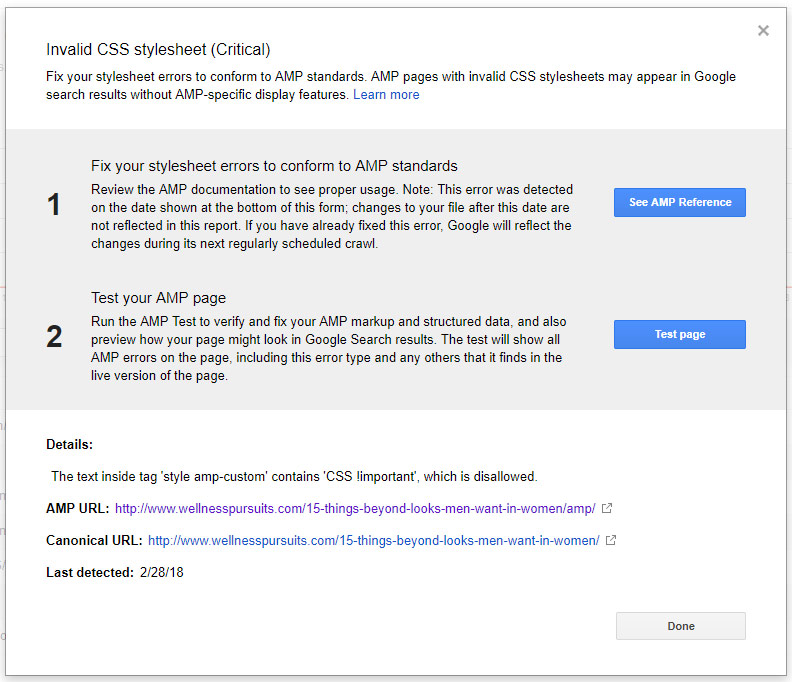
There’s a style with !important somewhere in the AMP pages, that needs to be fixed,
Thanks!!
 Catalin
 Hello ncguynet,
Please update the theme via FTP way according to our documentation from here -> https://forum.tagdiv.com/install-via-ftp/ and leave to active only the plugins that come bundled with the theme core files, clear all the caches and check the results. After you have followed all of these steps, please let us know if you will encounter any others problems.
Thanks for your understanding!
Catalin Hello Lasyte_Solutions,
Please provide some screenshots with this issue so I will be able to investigate it closer. Notice that we do not have any bad reports in this case and we recommend to update the theme to the latest version of it via FTP way.
Thanks for your understanding!
