
 Hassan Zia
 Update
here is the link how is it showing
http://www.screencast.com/t/kb7oKu7NaYgQ
while it should look like this
http://demo.tagdiv.com/newspaper_black/
 Walther
 Hello again,
I have run some more tests. I have deactivated all my plugins except Visual Composer and then reactivated all my plugins in a different order. To my surprise, all plugins are running now and everything seems to work fine, including the moble menu.
Can the order in which you reactivate plugins after an update indeed matter?
This is a mystery to me.
BR, Walther
 Akif Hameed
Hi,
I’ve noticed, my theme is creating problem that happens automatically. It shows the mobile version on desktop. Sometimes it shows the mobile version on homepage ‘tycoonzfitness.com’ and sometimes this thing applies on individual post. However, I didn’t make any change. But as I login to wp admin of my website. The problem looks solved but after 3 to 4 hours problem raised again. I’m really worried about it. My theme is updated. I’m using w3 total cache plugin.
Regards
 Dorcas_
 I have one more question.
When I update a post, the visualizations counter is reset. Oh any way I fix this?
 CS
CSI just updated one of the main pages on our Newspaper based site: wwww.civilianstrong.com/about/
For some reason when I refresh the page it shows an older version of the page.
I have tried using an incognito window and emptying my cache with no luck.
Suggestions?
Walther Hello Bogdan,
Now, this is strange. I have tested with VC and Contact Form 7 active. No problems. So I thought that Contact Form 7 might have a conflict with one of my other plugins, not the theme as my first guess was (sorry for that!). Then I activated one plugin after the other but the issue with the menu and the header on desktop did not reappear. However, then I saw that the mobile menu didn’t work (wouldn’t open any pages, had additional arrow down buttons).
To me it seems that Contact Form 7 conflicts with WP Lightbox 2 (or the other way round). If I have both enabled, I have issues.
I will update another site with exactly the same configuration next week and see how that goes.
Thanks for your help!
BR, Walther
WaltherHi,
I have updated to v. 7.4 on one of my Newspaper sites today. As a result I got the mobile menu on top of my header on desktop, and the header was showing an additional sitename under the logo. I cleared all caches and deactivated all plugins except VC and WP Super Cache. When I reactivated my plugins one by one, it turned out that Contact Form 7 was causing this behaviour. As both theme and plugin versions have been around for a few weeks, I suppose that nobody else has run into this.
Could you please have a look at my site and see if it is indeed Contact Form 7 that is causing this? The site is http://www.sverigetips.se. (Contact Form 7 is deactivated now.)
I can send you login details if you want to have a look. Please let me know.
BR, Walther
 Catalin
 Hello nano2408,
We are glad that you enjoyed building your website with our theme! I’ve checked, and your website is registered in our database, so you don’t need to submit it again.
We’ll update the showcase in the shortest time. Our designers will analyze your site, and they will make a decision as soon as possible.
Thank you for understanding!
 Bogdan B.
 Hello,
Both plugins (revolution slider and visual composer) are bundled free of charge with our theme so you do not have to buy them. Updates are provided by us, not the plugin author or wordpress. You can ignore the update messages you see in your dashboard and install the updates we release along with the theme. This should help: https://forum.tagdiv.com/how-to-update-visual-composer-plugin/
Visual composer is a required plugin as our theme elements depend on it so they can display properly.
Revolution slider is not required as our theme can function properly without it.
Unfortuantly we cannot offer you guidance on how to use revolution slider as it;s a very complex plugin. You should check the official site and documentation for the plugin. There are also many youtube tutorials on how to use it.
The demo sliders we provide bundled can be found in the main theme archive adn can be imported again at any tome. Please use this guide: https://forum.tagdiv.com/import-revolution-sliders-on-demos/
Thank you!
Bogdan B. Hello,
I have checked your site and saw that there is a html error in each block . There is an empty paragraph after each thumb. That paragraph is not coming from our theme so it;s probably a customization you made or a plugin conflict. Please check your custom code in the theme panel or your child theme. If you did not update your child theme, please do. This topic explains it better: https://forum.tagdiv.com/topic/setting-up-child-theme/
If you need to you can always replace the theme files again if you know there is customization but you are not sure what it is. You can use this guide and choose the ftp method to update: https://forum.tagdiv.com/how-to-update-the-theme-2/
Thanks.
Bogdan B. Hi,
It should work from the child theme and it should also work from the custom css box in the theme panel .If it doesn’t that means there is a problem. The child theme could be thee culprit. Did you update your child theme since you created it? a child theme is not update proof. This topic describes it better: https://forum.tagdiv.com/topic/setting-up-child-theme/
You should update your child theme as well if you have not already.
Thank you!
 simchris
 Likely time out connecting to FB. Not much else you can do about that.
Some people take different approach and make “static” widgets, and then once a week manually update the numbers. Kind of more elegant way to do it if time permits. (Pages load faster too!)
 remiclassic
 It looks like it updated itself. Sometimes it shows 0 then it shows the number. It’s strange.
remiclassicHello,
Facebook never seems to display the amount of fans I have on the Social. Instagram seems to have the same problem. I have followed the instructions. I have updated the plugin as well. Any ideas what I am doing wrong? This seems to be an ongoing issue for me.
View it at the bottom. http://www.normandescendants.org/topics/vikings/
simchris Make sure you update Visual Composer plugin also!
remiclassicHello,
I updated my theme to latest and got this error.
Fatal error: Call to undefined function vc_shortcode_custom_css_has_property() in /home/appspart5788/public_html/normandescendants.org/wp-content/themes/Newspaper/vc_templates/vc_row.php on line 55
http://www.normandescendants.org
How can I fix this?
simchris I updated the older SSL/https thread also with code examples ! 🙂
See
https://forum.tagdiv.com/topic/moving-to-ssl/#post-140870
simchris As an update to this older thread; most hosting providers worth their salt are now moving to support “https everywhere” initiative with free SSL certs for https via “Let’s Encrypt,” even on shared IPs. Note using this type of cert will mean OOOOOLD web broswers might not be able to access website at all since they can’t support modern secure standards — and, really, should NOT even be used on the web. SO, some kind of ‘sniffer’ to say “hey, dummy, update your browser to Chrome…” is worthwhile.
you should also add a block like so in your htaccess file above the #wordpress stuff…
e.g., (note; this example is using pretty permalinks with post name; so don’t use my wordpress code unless you want to; this is just example of how to put in the EXTRA stuff ABOVE the #wordpress stuff!)
**this presumes APACHE server.
<IfModule mod_rewrite.c>
RewriteEngine On
    RewriteCond %{SERVER_PORT} !^443$
    RewriteRule (.*) https://%{HTTP_HOST}%{REQUEST_URI} [R=301,L]
</IfModule>

# BEGIN WordPress
<IfModule mod_rewrite.c>
RewriteEngine On
RewriteBase /
RewriteRule ^index\.php$ - [L]
RewriteCond %{REQUEST_FILENAME} !-f
RewriteCond %{REQUEST_FILENAME} !-d
RewriteRule . /index.php [L]
</IfModule>
ALSO: in your wp-config.php file, this is useful:
define('WP_HOME', 'https://SITEHERE.com');
define('WP_SITEURL', 'https://SITEHERE.com');
define('WP_CONTENT_URL', 'https://SITEHERE.com/wp-content' );
define('WP_PLUGIN_URL', 'https://SITEHERE.com/wp-content/plugins' );
define('FORCE_SSL_ADMIN', true);
Finally, in some setups you might find this more useful to put at top of htaccess than my first example — basically a slightly different way of doing it:
<IfModule mod_rewrite.c>
RewriteEngine on
RewriteCond %{HTTPS} !=on
RewriteRule ^(.*)$ https://%{HTTP_HOST}/$1 [R=301,QSA]
</IfModule>
*updated : Oct. 27, 2016 / 12:19pm PDT.
-
This reply was modified 10 years by
simchris.
 Jens
JensHi There,
I got a small probleme: I crashed the slider or the carousel on the homepage of the theme travel-blog.
I need your support now and ask for your support.
How can I recreate it again?
How can I exchange the pictures with own pictures?
Is visual composoer necessary? Or slider revolution? Both are providing updates (not free)?
How to Build an own slider/carousel for every page and implement it into the pages, above the posts? With Pics, framesize like in travel-blog or full size, or post size?
I am very thank full for your help,
Jens
 Dilogis
 Hi,
I resolve the problem whith this solution :
Put on the top of the style.css file :
@font-face {
font-family: ‘newspaper-icons’;
src: local(‘newspaper-icons’), url(images/icons/newspaper-icons.woff) format(‘woff’);
}
@font-face {
font-family: ‘newspaper’;
src: local(‘newspaper’), url(images/icons/newspaper.woff) format(‘woff’);
}
It’s not a good idea because of css file will be updated on the next theme update but it doesn’t work when i put it on a child theme or il the custom CSS box inside the admin panel…
 tecmoc
 Hi Catalin, thanks for your answer,
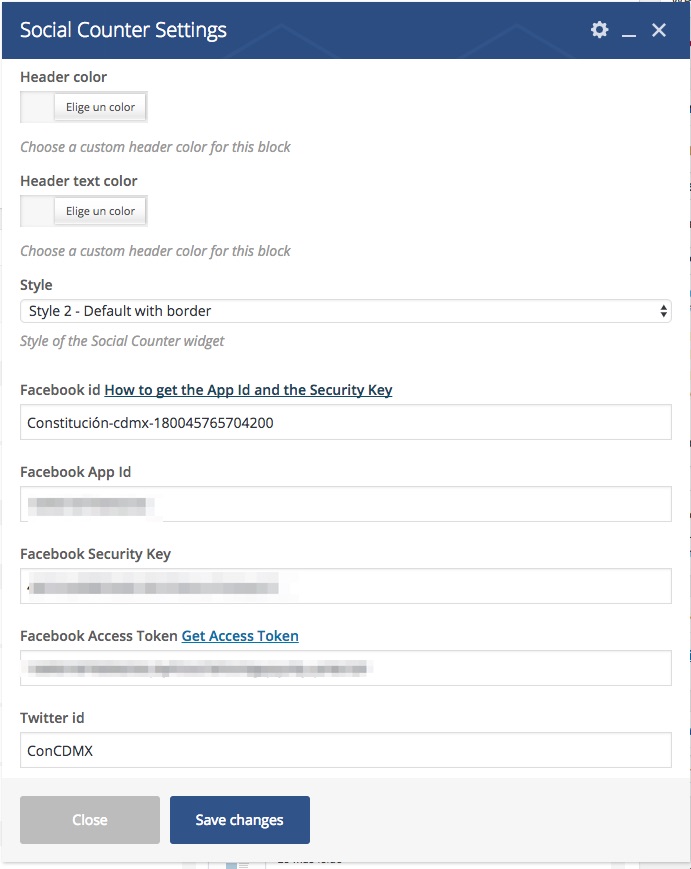
I followed up what you told me and update the theme and the plugins, just like you told me, but Social Counter still doesn´t work with the facebook app. Do you have any idea?, What it could be happening?, Could you please help me? I send you an image of Social Counter inside the Visual Composer page.
Catalin Hello Chito,
In a future update, it is possible but we cannot say for sure if it will get done in the next update because we have a big list of fixes, improvements, and suggestions to implement. It’s hard to filter them and select which one gets implemented now and which one gets postponed. The developers decide if it gets done or not, though.
Thanks for your understanding!
 rlaparre
 Update, this caused too many issues for my users and I had to disable SSL across my entire website. As soon as I did that the login on mobile started working flawlessly again. What could be the possible fix?
Thanks
 Manuela
 Hello Bogdan:)
So I pasted that file to the New folder Newspaper-child on my Cpanel and I activated the child theme.
Can you give me some advice, so then in the future I don’t bother you with this…
In the Child theme fuction.php … Can I paste with out problems codes, as codes to change something in a plugin?
Then… When the father theme gets updated, What does it happens with Newspaper?
Do you recommend to do changes in the function.php using a Child Theme, or there is any better practise?
Thank you
Manuela
 newsguru
 I have update both the template and the visual composer and yet the big grid slide element is still not in the element
