
- NewsmagHow to update a plugin
- NewsmagHow to update the theme
- NewsmagHow to update the WPBakery plugin
- NewsmagCategory templates
- NewsmagWhat’s included in Newsmag theme package
- NewsmagAjax view count
- NewsmagSmart Lists
- NewsmagFeatured images
- NewsmagFeatured image or video
- NewsmagModal window
- NewsmagtagDiv slider gallery
- NewsmagVideo playlist
 Calin
Calin Hi,
You need to click for check for updates – https://i.imgur.com/BkmLC6i.png
Thank you!
 kajx
kajxHow do I update/remove sites on my registration? Some sites have not been active in years.
 bengyeow
So that we can all look up to date? Thank you.
 ruilavrador
ruilavrador Hi,
it’s not showing in the updates.
Thank you.
Calin Hi,
Yes, the theme update should be displayed in the Neaspaper theme in the update tabs, click on check for updates.
Also, before the update, make sure you’ll have a full backup. https://forum.tagdiv.com/how-to-update-the-theme-2/
Thank you!
ruilavrador Hy Calin, thanks for the reply. Current version of my websites theme Newspaper is 12.6.8., shouldn’t the update show up on the theme panel as usual? Thank you!
Calin Hi,
Please make a full backup of your website and update the theme to the latest version, Newspaper v21.7.1 – https://i.imgur.com/qoKwDsn.png Composer version Version 5.4.1
Thank you!
 slivertorp
 Thank you so much, it resolved the issue!
Is it a fix that you can roll into the next update by any chance to fix this issue for everyone?
 Ans
Ans Please press the 2nd button in thumbnail regeneration plugin to see if these td_xxx sizes’ image can be generated in server? Thank you.
My expericence: thumbnail regeneration plugin can show the td_xxx sizes in dashboard page but cannot regenerate those images in server in real run after pressing the button.
(FYI, the thumbnail regeneration plugin not updated for 2 years)
 regio-online
 Hi Calin,
Thanks for that insight. I have create a clone of my website, since the livesite is updated every day a staging site with ability to push to live is the right choiche.
I created a subdomain as domain and put cloned the livesite to that domain. Works great.
Now I am troubleshooting the datbase, mainly concentrating on postmeta since that is a 2.6GB table. Using an SQL query I listed the top 200 of heaviest rows (in datasize) from postmeta.
The largest by far are 2 rows called tdc_history with combined 259766.0000 of bytes. Do I read this as only 0,25MB or are it realy 2597660000 bytes (not point used) wich would be 2597.66MB.
But since it is the largest row, could this row be deleted? I also see a lot of rows starting with _oembed_ scoring high as well. Although I have no clue if they are theme related, could these rows be deleted as well?
Awaiting you answer eagerly this time!
Calin Hi,
In this case, please connect to ThemeForest and download the Newspaper theme package from our account. Inside the package, locate the latest bundled version of WPBakery for WordPress.
Next, disable the current WPBakery plugin on your site. After updating your theme and other components, install the updated WPBakery plugin provided in the theme package.
Thank you!
 magda
magda Hello,
trying to update from PHP 7.4.33 to PHP 8.3.23 and the site crushes.
I have noticed that the issue is caused by WPBakery Page Builder plugin
WordPress 6.8.2
Newspaper 12.7.1
Calin Hi,
Yes, using the theme option to update should not affect your settings: https://forum.tagdiv.com/how-to-update-the-theme-2/.
However, we strongly recommend creating a full backup before proceeding—just in case something goes wrong, you’ll be able to revert the changes safely.
Thank you!
 malayalam_news
If I update the theme through the WordPress dashboard, will settings such as the cloud templates, menu, etc, remain unchanged?
Calin Hi Don,
Did you have auto-updates enabled for your plugins or theme? That could be one of the possible causes of the issue.
In this case, I recommend checking whether the theme plugins you were previously using are still installed and activated. If they are missing, you can reinstall them by going to Newspaper > Plugins in your dashboard.
Also, if the widget appears when you view the template using tagDiv Composer on a single post, it likely means the widget is still set under Appearance > Widgets. Please check there to confirm whether it’s assigned to the sidebar or has been moved to the “Inactive Widgets” section.
Thank you!
 sanjeevk765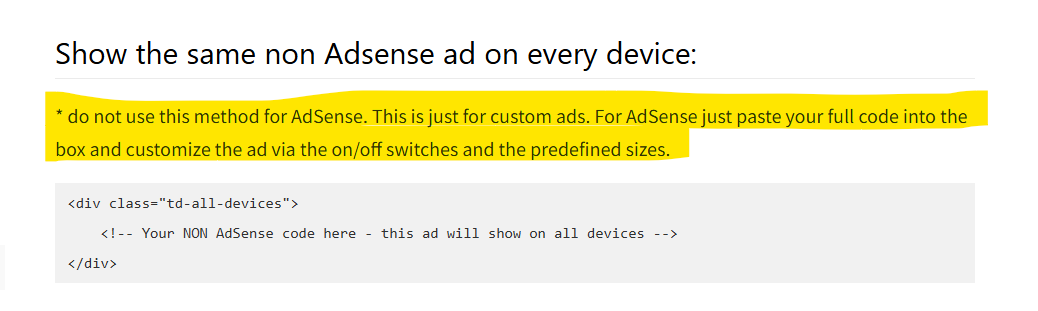
https://forum.tagdiv.com/using-other-ads-non-adsense-ads/
Documentation is not fully updated. There are 3 more places where sentences saying the same thing on the same page. Please update it thoroughly. I attached an example screenshot.
thankyou
Calin Hello,
We apologize, that part of the documentation was not adapted. We have updated it now. Thank you for your understanding.
If is an image/banner, then you can remove the ad banner using the theme panel option – https://i.imgur.com/UMekhGI.png if is an adsense code, then you need to use a code like this one – https://wpadvancedads.com/disable-adsense-on-mobile-devices/
Thank you!
Calin Hi,
Please download the updated tagDiv Composer plugin from the following link: – https://cdn.tagdiv.com/wp-content/uploads/2025/05/td-composer.zip
After downloading, replace the existing plugin on your website with this one. It includes a fix implemented by our developers.
Thank you!
 joray25
https://mklocalmotoring.com When I try to update any adjustments to the website, the save settings pop-up doesn’t appear, and no updates can be made
 ahmedkhaled912
Hi TagDiv Support,
I’m using the latest version of the Newspaper theme (v12) along with the TagDiv Composer plugin. I’m currently encountering a critical issue: whenever I try to edit any page using TagDiv Composer, I get a 404 error.
Here’s what I’ve done so far to troubleshoot:
Updated WordPress, the Newspaper theme, and all plugins to the latest versions
Resaved permalink settings
Cleared all cache (browser, site, CDN)
Deactivated all other plugins to check for conflicts
Verified that the pages exist and are using the correct templates
I also enabled debugging and noticed this warning in the logs:
Function _load_textdomain_just_in_time was called incorrectly. Translation loading for the “td-cloud-library” domain was triggered too early.
(From: /wp-includes/functions.php on line 6121)
This may point to an issue with how the theme or plugin handles translation loading, possibly affecting the TagDiv Composer’s ability to load edit URLs correctly.
Can you please advise:
Is this a known issue in the current version?
Is there a patch or update available to resolve this?
Are there any specific server settings or requirements (e.g., rewrite rules, PHP version) that I should verify?
Looking forward to your help as this is preventing us from editing content on the site.
 digitalaimmedia
Our Editors are unable to make changes to their pages as the license shows them an inactive error, though administrators are able to make edits without issue. Theme is version 12.7.1 i believe this is the latest update.
 568Winmk
 Hi Calin,
I’ve updated the .htaccess file as you suggested and also cleared the cache, but unfortunately, the template issue remains. Whenever I click on “Edit,” it redirects me to the homepage, and I’m completely unable to make any changes.
Could you kindly provide further assistance? Thank you!
Here’s a screenshot for reference:
 c.deluca
Hi! i have my site http://www.scienzepolitiche.unina.it not working on mobile devices since the last update of wordpress. In the specific: when i load the home page on iphone (example) it seems ok but as soon as i navigate through the internal pages, they show “blank” with the text: exit mobile version. If i click on this, everything goes ok.
Please could you help please? In the settings i use “Use AMP for mobile” as other settings (Mobile or Mobile+AMP) make the site work even worse on mobiles. Please help. Carlo
 jasondannelly
 This is for google responsive ads that I am dropping into the header ad box in the theme panel. You can see I have the script updated on my theme panel (Photo below). I save the setting. But the code on my site is still showing the old adsense account (second photo below). Ads will display from the old account, but not from the new account. My ads.txt file is updated as well.
I’ve cleared the cache as well and it still does not update.


-
This reply was modified 1 year by
jasondannelly.



