Calin
Calin Hi,
Is very important when you update the theme to make sure that all theme plugins will be installed and updated. If those are not automatically installed, then they need to be installed from Newspaper > plugins.
If you can make a staging and update the theme there, we can take a look and see if there are any problems with teh update.
If everything looks correct when you are logged in, it is likely related to the cache; clear the cache, and if you are using a CDN/Cloudflare, purge it.
Thank you!
Calin Hi,
I do not follow. Could you please provide some more details?
Do you want to install a mobile plugin?
If you want the exact same content on mobile as on desktop, there is no need to create mobile pages or use the tgDiv mobile theme plugin; the desktop version is responsive and can be used.
Currently, you have the tagdiv mobile theme plugin and this is used.
1. Responsive Desktop Version – The default responsive layout that adjusts to mobile screens using tagDiv Composer – https://i.imgur.com/apZQZ0o.png
2. Mobile Page/Template – A custom mobile layout that can be created using the tagDiv Composer.
3. tagDiv Mobile Theme Plugin – A separate mobile theme that provides a dedicated mobile experience but is limited in edits and changes.
Note: When the tagDiv Mobile Theme Plugin is activated, it takes priority and will be displayed on mobile devices. If it’s not active, the system will check for a mobile page/template built with tagDiv Composer. If neither of these is in use, the responsive desktop version will be shown by default.
Thank you!
 fuenson
 @Calin Hi, I would like to know do I need to manually remove the code I added in functions.php before I update the theme to the newest version? Thank you.
 ZonaNorteDiario
Hi, after updating to the latest version of Newspaper, my site started having issues where some articles or sections are not displaying properly. The layout appears broken — the featured image shows as a large black “?” placeholder, the text size is incorrect, images appear smaller than they should, and the sidebar is misaligned (sometimes centered). Overall, the page looks completely broken. This only happens on certain articles.
I rolled back to the previous Newspaper version and everything seems to work fine again.
Do you have any idea what might be causing this?
Also, when I first installed the latest version, the plugins didn’t install correctly (tagDiv Composer and tagDiv Cloud Library). That’s the first time this has happened. After the failed install, I updated them manually from the Plugins section and they appear to be working fine.
One more thing: when I view the site while logged in, everything looks perfect. The issue only appears for regular visitors (logged-out users).
Calin Unfortunately, we do not have an estimated timeline at the moment. Our developers are currently working through a list of fixes, and once these are completed, the update will go through testing before being officially released.
If our manager determines that an earlier release is necessary, an update may be issued with the fixes completed so far. However, this decision is still pending, and at this time we do not have any additional information regarding the update.
 kal
kalHello tagDiv Support Team,
I would like to report a bug regarding the Estimated Reading Time calculation in the Newspaper theme.
The Problem:
Currently, the theme uses the PHP function str_word_count() to calculate the number of words in a post. However, this function is not compatible with multi-byte characters and does not recognize Cyrillic scripts (like Bulgarian, Russian, etc.). As a result, for all Cyrillic posts, the word count returns 0, and the reading time always displays “Less than 1 minute,” regardless of the actual length of the article.
The Fix:
To make this feature world-ready and compatible with all languages, please replace the str_word_count() call with a regex-based approach that supports UTF-8.
Current code in your files:
PHP
$post_content_word_count = str_word_count( wp_strip_all_tags($post_content) );
Recommended fix (High performance & UTF-8 compatible):
PHP
$post_content_word_count = preg_match_all('/\p{L}+/u', wp_strip_all_tags($post_content));
Why this fix?
\p{L} matches any letter from any language (including Cyrillic, Greek, Arabic, etc.).
The /u modifier ensures the string is handled as UTF-8.
Performance: preg_match_all is extremely fast and has negligible impact on server load.
This small change will fix the issue for thousands of your international users. Could you please consider implementing this fix in the next update of the theme?
Best regards,
Calin Hi,
Regarding Google AdSense, could you please let me know how it’s implemented on your site using the Newspaper Theme? Also, what message or status are you currently seeing in your AdSense account?
For the Google search results issue, you’ll need to use Google Search Console and make sure your website is properly indexed.
If you’ve recently changed your permalinks, it’s important to request reindexing in Search Console so Google can update your pages accordingly.
– https://developers.google.com/search/docs/crawling-indexing/ask-google-to-recrawl
– https://support.google.com/webmasters/thread/133430219/how-can-i-get-google-to-re-crawl-my-page-asap-besides-request-indexing-in-google-search-console?hl=en
Thank you!
 great1212
 ok. When the next theme update is expected?
 srendell
 Hello Sir,
Thanks for reply.
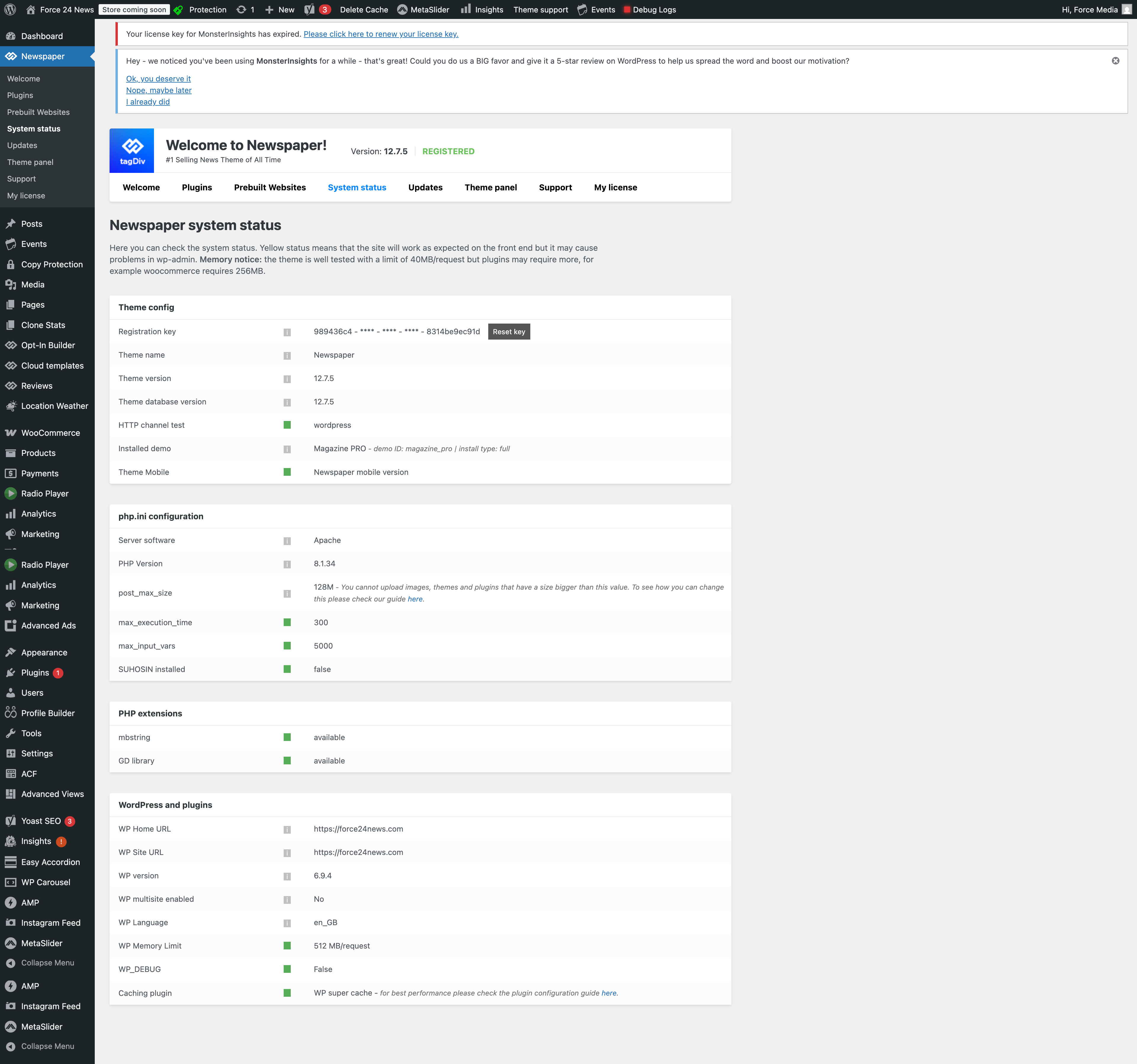
Yesterday I have upgraded newspaper from 12.7.4 to 12.7.5.
After that site got slow.
Also I am not getting you last message background image point.
Can you clarify it?
is there any php version issue?
Do I need to upgrade php version because I am using shared hosting.
Please check below link
https://force24news.com/System-status.png
It is system status of site and server.
Should I update anything in that?
Please check.
Regards
Scott
Calin Hi Scott,
I understand. The issue is that the update from Nesaper 12.7.4 to 12.7.5 does not include any changes that should affect the website’s speed.
What I recommend is addressing the problem with the image that has been set as a background on the site but cannot be found: https://i.imgur.com/xWXB1KQ.png
It appears this image may be used as a background for the header menu—likely on the main header, sticky header, and possibly the mobile header as well.
Hi,
Unfortunately, I haven’t received any message from our developers, but I see this is on the list for the next theme update.
Thank you for your understaing!
 opinandosinanestesia
 The problem was that the URL wasn’t linking, as usual.
I don’t quite remember what I did to get it working now, but it’s great that it’s working.
On that note, this is published weekly, and I’m wondering: do I have to change the URL every week, or does the block update it automatically?
Thanks!
Calin Hi,
The block filters will apply to all viewports, so if you want to have different content on mobile, you should consider using the mobile page option https://tagdiv.com/newspaper-10-3-7-update-brings-customizable-and-fast-mobile-pages/
What you need to know is that, on the mobile page, the cache plugin should support creating separate caches for desktop and mobile.
Calin Hi,
This situation usually occurs after a theme update when not all required theme plugins are installed, enabled, or updated. All plugins that were used before the update should also be updated and activated.
Please go to Newspaper > Plugins and make sure that tagDiv Composer, tagDiv Cloud Library, and tagDiv Opt-In Builder are installed, updated, and enabled.
Thank you!
Calin Hi,
This could be happening in more situations, but the most of common situations are when an extra plugin is interfering (it can be checked when you want to do a theme update, disable all plugins except the theme plugins), custom code added on the site or/and custom restrictions from the host.
Thank you!
 ygknews2020
 I did yes, maybe i should update PHP?
 hardbau
My site https://www.misioni-rijeka.hr/
I updated to Version: 12.7.5, then I opened the page and everything opened in a mess.
The top menu does not exist at all and the entire header logo has been removed.
I uninstalled some plugins and re-activated them, but the problem is the same.
My PHP Versions ist 8.3
 info@mediastudiogc.eu
I,
I have 3 site with newspaper theme, whwn update theme 2 site get automatic update plugin, but in one i have to do this manually and the page of update seems corrupt.
Can help me?
Calin Hi,
Since November 14th, there have been two updates, so it’s possible that the issues you’re experiencing are not related to theme updates.
If you’re referring to checking the code on that specific line, it appears to be related to HTML containing a link to an image.
If you’re able to set up a staging environment and provide us with wp-admin and staging access, we’d be happy to take a closer look. When those are set, you can contact us via email at contact@tagdiv.com
Thank you!
Calin Hi,
Whenever a potential vulnerability is reported, we forward it to our developers for review. They investigate each case, and if it is confirmed to be a theme-related issue, it is addressed and fixed in a future update.
I have also reported this to our developers, and they will review it.
Calin Hi nearview,
Thank you for the clarification. I understand your requirement. I hope our developers will understand it this time.
I’ve passed this information along to our developers and created a new task for the element update, including the details you provided. This should help ensure that the element only displays immediate children.
 BakuTv
 I experienced the same. It is connected to the last update of Rank Math. Deactivate the plugin, publish all posts, then activate the plugin again.
 Boostyourcity
I am experiencing a critical issue with the Newspaper theme on two of my websites (byc-news.de and notrufberichte.de). Both sites are running the latest version of WordPress and the Newspaper theme with the Classic Editor.
The Problem:
I am unable to publish new articles or update existing ones if I make any changes to the Post Title.
If I only edit the post content (body text), the update works fine.
As soon as I change a single character in the Title, the “Publish” or “Update” button just shows a loading spinner indefinitely, and the post remains a draft (or the changes are not saved).
Interestingly: If I use the WordPress “Quick Edit” feature from the post list, I can change the title and status without any issues.
What I have already tested:
Plugin Conflict: Deactivated all plugins (including MemberPress and Caching plugins) – the issue persists.
Editor: The problem occurs in the Classic Editor.
Server Environment: PHP Memory Limit is 512M, max_input_vars is set to 5000.
Hosting: Both sites are on different accounts but the same hoster (All-Inkl).
It seems like a specific JavaScript or REST-API call triggered by the Newspaper theme’s title field is being blocked or failing. Since the “Quick Edit” works, it must be related to how the Newspaper theme handles the title field within the post editor.
Could you please check if there is a known conflict with the current WordPress version or a specific theme setting that causes this behavior?
Best regards,
Meikel Dachs
great1212Hi, hope you are fine. There was a sidebar area appears on the text area of classic editor that was disappeared after the new update. Could you please figure out how to bring it back?
Sidebar in post description area. We want to get it back.
Calin Hi,
Please make a full backup and update the theme to the last version 12.7.5. Make sure all theme plugins you have before the update are updated and installed https://tagdiv.com/newspaper-changelog/?utm_source=forum&utm_medium=menu&utm_campaign=forum_loggedin&utm_content=52878. The latest theme versions contain the landmark elements you need.