Hello, my site http://www.vincimi.it has very bad Core Web Vitals scores.
Cumulative Layout Shift (CLS) in particular is really too high.
I suppose much is due to specific caracteristics of Newspaper template.
Do you hane any suggestion in order to get better scores?
Thanks
-
This topic was modified 1 year by
gmodonesi.

Hello,
I just tested your website, and I saw that you have a lot of scripts for ads https://pagespeed.web.dev/analysis/https-www-vincimi-it/2ej9cytgc3?form_factor=mobile You need to use a plugin to reduce and optimize requests, such as the WP Rocket plugin. Additionally, consider using the EWWW Image Optimizer for image optimization and the OMGF plugin for font.
There are many optimization guides provided by our users here in the forum, some made by us; you can check some of them
– https://www.infophilic.com/get-almost-100-pagespeed-newspaper-theme/
– https://forum.tagdiv.com/cache-plugin-install-and-configure/
– https://forum.tagdiv.com/how-to-make-the-site-faster/
– https://forum.tagdiv.com/topic/high-number-of-ajax-request/
– https://forum.tagdiv.com/topic/score-100100-pagespeed-with-newspaper-wordpress-theme/
– https://www.andraware.com/wp-rocket-for-newspaper-theme/
– https://forum.tagdiv.com/topic/page-speed-guide-for-2023-beginners-and-advanced/
– https://forum.tagdiv.com/topic/newspaper-theme-speedify-your-website/
– https://forum.tagdiv.com/topic/tutorial-chriss-custom-optimizations-for-functions-php-etc/
– https://forum.tagdiv.com/cloudflare-cdn/
– https://forum.tagdiv.com/topic/theme-causing-high-cpu-usage-2/
– https://forum.tagdiv.com/topic/sql-querys-high-cpu/
– https://forum.tagdiv.com/topic/newspaper-theme-slow-to-respond/
– https://premium.wpmudev.org/blog/optimizing-your-wordpress-database-a-complete-guide/
– https://underconstructionpage.com/optimize-wordpress-database/
– https://crunchify.com/better-optimize-wordpress-database-all-in-one-guide/
You can choose what version you want and what suits you.
Thank you!
HeHi,
Now the cls it is ok https://i.imgur.com/Hx7wczD.png -> https://i.imgur.com/Hx5mpmZ.png
You can use Litespeed cache, which also has a free version > https://www.inmotionhosting.com/support/edu/wordpress/plugins/how-to-use-litespeed-cache/
Thank you!
Sorry but I think that you posted the results of another site.
My is http://www.vincimi.it and it still has a very bad CLS score (for the mobile template).
Can you please check it?
Hi,
Yes, sorry.
I see that you have these ads, and I recommend using the WP Rocket or Lite Speed Cache plugin to optimize the images, fonts, and scripts because those can cause CLS. By optimizing the other parameters, it will influence all those metrics to have a better score.
Thank you!
Hello,
Did you have configured it -> https://i.imgur.com/PO6dgrY.png -> https://i.imgur.com/0DoEkKW.png -> https://i.imgur.com/GuRABP4.png -> https://i.imgur.com/W28mNLU.png ?
Thank you!

Hey,
I am sharing you my WP Rocket settings and I think they might be useful for you:
ON THE FILE OPTIMISATION TAB
1. Activate Minify CSS Files
2. Optimise CSS Delivery > Remove unused CSS with these exclusions:
(.*).tagdiv-type(.*)
(.*).bhcrow-(.*)
3. Minify Javascript Files
4. Load Javascript Defered with these exclusions:
\/jquery(-migrate)?-?([0-9.]+)?(.min|.slim|.slim.min)?.js
5. Delay Javascript Execution with these exclusions:
\/jquery(-migrate)?-?([0-9.]+)?(.min|.slim|.slim.min)?.js(\?(.*))?( |’|”|>)
tagdiv_theme.min.js
tdTrendingNow.js
tdPopupModal.js
tdBlocksArray
hammer.min.js
tdbMenu.js
tdLoadingBox.js
tdb_p_autoload_vars
blockClass
tdAjaxCount.js
tdTabbedContent.js
tdStickyRow.js
tdSmartSidebar.js
OneSignalSDK
Important – delaying Javascript will make your ads load after any movement on the page so if you just reload the page they will not be loaded as soon as you move anything on the page it will load them immediately. For me this isn’t a problem.
ON THE MEDIA TAB
1. Activate Enable for images
2. Activate Enable CSS for background images
3. Exclude your logo
4. Activate Add missing file dimensions
5. Activate self host fonts
ON THE PRELOAD TAB:
1. Activate preload
2. Enable link preloading
3. Prefetch these:
//fonts.googleapis.com
//www.googletagmanager.com
//www.googletagservices.com
//tpc.googlesyndication.com
//use.typekit.net
//netdna.bootstrapcdn.com
//www.google-analytics.com
//ajax.googleapis.com
4. Preload fonts – /wp-content/themes/Newspaper/images/icons/newspaper.woff
ON THE DATABASE TAB
Enable everything without scheduling auto cleanup
ON THE HEARTBEAT TAB
Enable it and make everything reduced
Important – if you are self hosting your site on nginx you can enable this https://github.com/SatelliteWP/rocket-nginx – this enables Nginx to serve directly previously cached files without calling WordPress or any PHP
Important – if you are self hosting your site on nginx you can enable FastCGI and Redis (use redis cache plugin and nginx helper). When it comes to FastCGI MAKE SURE TO ENABLE SEPARATE CACHE FOR MOBILE AND DESKTOP OTHERWISE IT WILL WORK BADLY!
Important – if you have a large installation and you notice that your queries become slow (e.g. search page takes a lot of time to load or non-cached pages load for more than 1-2 seconds) you can buy Scalability Pro and Super Speedy Search from here https://www.superspeedyplugins.com/shop/ for me this plugins changed the way the theme worked immensely. My non-cached pages loading time dropped form 10 seconds down to 1-2 seconds.
Important – WPRocket offers a plugin that converts all your images to webp format and this is also crucial for your page speed. Their plugin works well for my site.
I hope this is useful for you!
Extra – https://pastecode.io/s/ra3z4c8h – you can use these two scripts to update the time ago and current date elements to work when you page is cached. I don’t know if they are great, I made them for myself make sure to include their identifiers in the delay JS and update the translations correspondingly.
-
This reply was modified 1 year by
petar777.
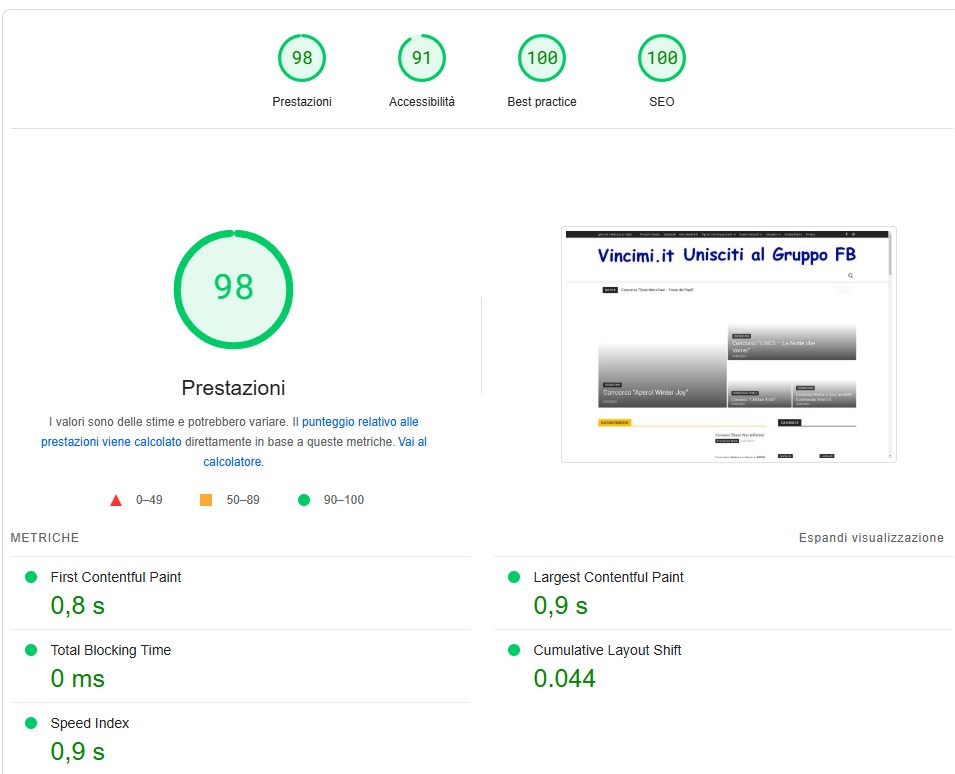
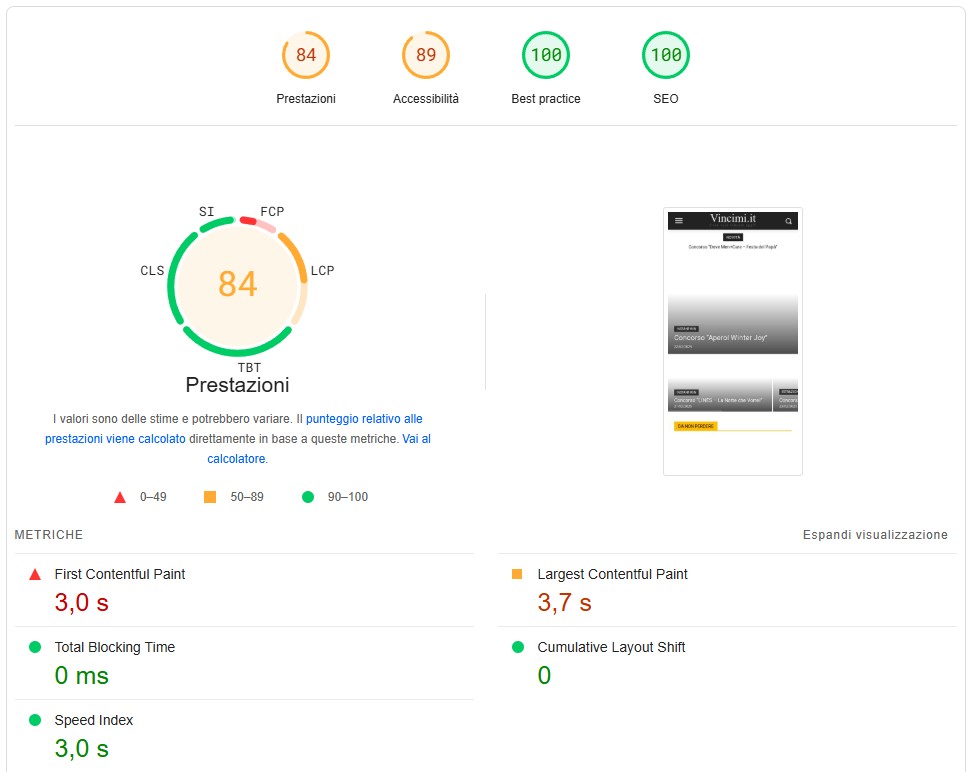
The site (www.vincimi.it) now has very good scores for desktop but still poor scores for mobile (First and Largest Contentful Paint).
Any idea to fix the mobile scores also?
Thanks
Desktop: https://www.vincimi.it/wp-content/uploads/2025/02/VI-desktop.jpg
Mobile: https://www.vincimi.it/wp-content/uploads/2025/02/VI-mobile.jpg