


Hello,
Please make sure that the update procedure is done correctly, that the plugins are updated too and active: https://forum.tagdiv.com/how-to-update-the-theme-2/ also, try to deactivate the tagDiv Composer plugin, delete and re-install it again from Newspaper plugins => https://www.screencast.com/t/WLy01lbc and see if is still a problem.
Also, please provide more details about the errors you have, screenshots, a link to your website.
Thank you!
Hi
Thanks but none of that helps.
I use AmberLight PRO Templates.
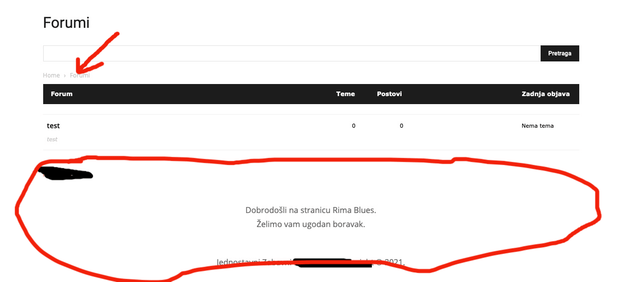
The problem is with the BBPress forum pages. There is an error with Header and Footer and only on the forum home page. While on forum topics everything is fine.
A little confusing !?
This is what it looks like on the home page of the forum: /forums
Header and Footer with error.

This is what the forum topic looks like and everything is fine here: /forums/forum /test
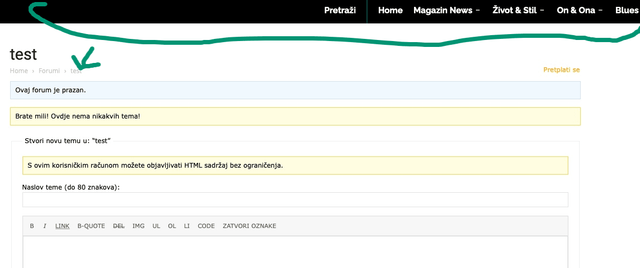
So the problem only appears on the forum home page.
It’s not urgent for me 🙂
Thanks for the good service.

I’ve got the weird problem with Catagory template after 10.4 update. I have the main navigation with Category menu items. Some of them work fine but some look very bad, it looks like page code is broken or CSS not fully uploaded. I didn’t find any difference between categories neither name nor content.
When I downgraded to 10.3.9.1 this problem gone.
But now I cannot edit my (main) page with TD Composer: It gives me the Error message in very beginning:
“Error at zones: 6(models) : 0(dom). The model does not match the content Current state has involved an issue. You could try an UNDO operation (CTRL+Z / CTRL+SHIFT+Z)”
It seems that pages were updated either and I can’t edit them with previous version.
Please, check your 10.4 code for stable work.

I have the same problem with a custom post template, the error says:
wp_booster error:
Internal error: The system tried to use an att that does not exists! class_name: td_res_context Att name: "f_auth_nme_font_family" as "f_auth_nme_font_family"
../wordpress/htdocs/wp-content/plugins/td-composer/legacy/common/wp_booster/td_css_res_compiler.php
And editing the template the error is:
Error at zones: 6(models) : 5(dom). The model does not match the content Current state has involved an issue.
-
This reply was modified 5 years by
owar77. Reason: error on character
Hello,
@Sodiac, Please do a test on a subdomain and use only tagDiv plugins, and if you have a child theme, please use the main theme, and see if the problem with the Catagory template persists.
Also, for this error, you can check our guide from here at point 5 -> https://forum.tagdiv.com/tagdiv-composer-not-working/ and you can try to deactivate, delete and reinstall tagDiv Cloud Library from Newspaper plugins => https://www.screencast.com/t/WLy01lbc
@owar77, Please deactivate, delete all the tagDiv plugins and reinstall them from Newspaper plugins => https://www.screencast.com/t/WLy01lbc
Thank you!
I deactivate all non tagDiv plugins. I removed and reinstalled the tagDiv Could Lib and all tagDiv plugins.
I made the new, empty page and try to build it with Tagdiv Composer. But I getting the same Error message.
I don’t care about Category problem anymore because I soved it with downgrade to 10.3.9.1.
But I cannot edit my pages now!
I love Newspaper theme. It’s great combination of simplicity and power. But now I’m stuck!.. Please, make something helpful for me now! My news portal lays down now!..
Just status update!
I upgrade Newspaper theme to 10.4 and Category Naviagtion problem gone. But…
I still cannot edit any page or Cloud template with the same Error message.
BTW I found that one template block is shown as shortcode instead of good looking module. Please, check its code! I could correct it in classic editor.
I do hope that we move ahead for tiny step. I will keep working myself and keep you informed.
Tiny update!
I found one more shortcode, which is looking as shortcode. And it’s block 3 again.
[td_block_3 ajax_pagination=”load_more” limit=”6″]
Sorry, I didn’t send you the shortcode from previous update:
[td_block_3 block_template_id=”td_block_template_8″ custom_title=”ЛЮБИТЕЛЯМ ПОЧИТАТЬ” border_color=”#003675″ header_text_color=”rgba(0,54,117,0.83)” category_id=”63″]
Hello,
Please check if you have the tagDiv Standard Pack plugin activate => https://www.screencast.com/t/UcJIBsPkztO This shortcode can be if you use block 3 from Standard Pack.
Thank you!
Great! I did it. Shortcode works fine now. What about Page and Could Template editing with TDComposer?
I still get the error message even on blank, brand new page.
“Error at zones: 6(models) : 0(dom). The model does not match the content Current state has involved an issue. You could try an UNDO operation (CTRL+Z / CTRL+SHIFT+Z)”
I cannot edit my pages and make new ones.
Hello,
First, make sure that all the settings are like in our requirements, please follow the guide carefully: https://forum.tagdiv.com/requirements-for-newspaper/ and please increase all requirements that are lower, and follow all steps => https://www.screencast.com/t/3eF7oKMSOr2J
Also, you can try to deactivate, delete and reinstall the tagDiv Cloud Library plugin, and do a test using only tagDiv plugins.
After all, if the problem persists, please make a full backup to all files and the database and contact us via email at contact@tagdiv.com . Provide
– admin URL and credentials
– cPanel URL and credentials
– A link to this topic in order to identify you
Thank you!

URGENT!!!
I have a same problem here! The conflict is detected on homepage only. I tried everything you wrote here (“make sure that all the settings are like in our requirements”, deactivate and delete plugins, delete htaccess, write to hosting provider…)
I made a new homepage and it seemed problem is solved, but it happened again. Please help me bcs obviosly the problem is about theme and code.
Hello,Sonjita,
If you have an error on the zones, you can check our guide from here at point 5 -> https://forum.tagdiv.com/tagdiv-composer-not-working/ so after trying the steps from our guide you do not get any good results, You can send us an email at contact@tagdiv.com and provide wp-admin login, as well as cPanel and credentials and let us know the issue. We will take a look.
Thank you!
